Section: A process owns resources; threads execute code.
The memory map says which pages existed when the tool asked. It cannot tell whether the game is changing an object at the same moment. To understand that time gap, we need to know who executes the game’s instructions and which state each execution path shares.
A process supplies the address space, handles, modules, and security boundary. A thread is a path of execution inside that process.
Every process begins with at least one thread. Games commonly add threads for rendering, audio, networking, asset loading, input, and background work. Those names describe roles chosen by the program; Windows fundamentally schedules thread IDs, priorities, and C P U, central processing unit, state.
Threads in the same process share code and most data, but each thread has its own:
thread ID, or TID;
instruction pointer and general C P U registers;
stack and stack pointer;
thread-local storage;
scheduling state and priority information;
TEB, introduced in the PEB/TEB lesson.
Two threads can access the same object at nearly the same time. That is why games use mutexes, events, atomics, queues, and other synchronization tools.
The process supplies shared resources, while each execution path keeps its own paused C P U state and call history:

This shared-versus-private split explains both communication between threads and the races that communication can create.
Step through one game from program file to process to two threads taking turns on a core, with the numbers worked out:

Section: Scheduling is not the same as parallel execution.
Windows schedules runnable threads by giving them turns on C P U cores. On one core, threads can interleave: one runs, pauses, and another runs. On several cores, some threads can also run truly in parallel. The program must be correct under both possibilities.
In brief: Thread correctness must survive both interleaved turns on one core and simultaneous work on several cores.
Suppose the update thread changes a player record in two steps while an overlay thread reads between them:

The overlay may observe a combination that was never a complete game state. This is an interleaving problem. “It worked ten times” does not prove it is safe, because the scheduler may choose a different order on the next run.
Section: A race that loses an update.
A bug whose result depends on which thread happens to run first is a race condition. The torn read above is one. The most common kind loses a write.
“Add 500 gold” is one line of source code, but the C P U does it in three steps: read the value into a register, add, and write the result back. Put two threads on the same gold field, one adding a 500-gold quest reward and one taking 300 for a purchase, and let the scheduler interleave them:
Narration: Two writers can each read the old gold before either stores its result. Neither write is torn, yet the final value can still lose one update.
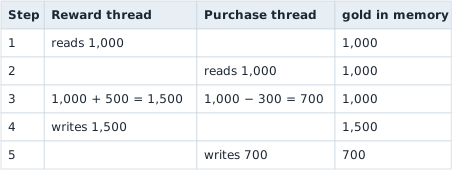

The player should have 1,000 + 500 minus 300 equals 1,200 and has 700. The reward vanished, because the purchase thread wrote a result computed from a value that was already out of date. Most runs interleave harmlessly, with one thread finishing before the other starts, which is why a race can pass every test and still fail for a player.

A mutex fixes it by making read, add, and write one unit: the purchase thread waits at step 2 until the reward thread has written 1,500, then reads 1,500 and writes 1,200. For a single number, an atomic add does the same job more cheaply; on x86, lock xadd performs the whole read, add, and write as one indivisible instruction.
The lock has its own failure, deadlock. Moving gold from player A to player B means locking both. If one thread locks A and then waits for B, while another thread locks B and then waits for A, each holds what the other needs and neither ever continues. Taking locks in one agreed order, say always the lower player ID first, makes that cycle impossible, as Lesson 12.2 shows for the Windows loader lock.
The same lost update appears whenever two writers share one value: a tool that writes a value the game is also updating every frame is racing the game, and one of the two writes will be lost.
Synchronization creates an agreement about ordering or exclusive access. A mutex can protect a group of fields as one critical section. An atomic operation can make one small value indivisible. A queue can transfer ownership of work from one thread to another. These tools solve different problems; adding an atomic flag does not automatically make the object around it coherent.
Two common non-deadlock failures deserve names:
An atomicity violation happens when several operations must behave as one unit, but another thread can observe or change state in the middle. “Check pointer, then use pointer” is unsafe if another thread can free it between those steps.
An order violation happens when one action assumes another action already occurred, but no synchronization enforces that order. A render worker reading a snapshot before initialization finishes is one example.
Here is the pointer version of the first problem. A true check does not reserve the object for the next line:

The fix must enforce the required relationship, not merely make the timing less likely. A lock can protect one compound state change. An event, condition variable, or channel can establish that initialization completed before consumption begins.
Section: Ask both safety and progress questions.
Concurrent code needs two kinds of reasoning:
Safety: can something bad happen, such as a torn state, double update, or use-after-free?
Progress: can the intended work eventually happen, or can threads wait forever?
A mutex may improve safety but create a deadlock if two threads acquire locks in opposite orders. A thread may be safe yet suffer starvation if other work continually wins access. A spin loop may make progress in a test and waste an entire core in the real game.
For an observer tool, prefer immutable snapshots and message passing when possible. One component reads a bounded snapshot, validates it, and hands owned data to rendering or logging. That reduces the amount of shared mutable state whose interleavings you must reason about.
Section: Ready, running, and waiting explain thread activity.
A thread that is not executing is not necessarily broken. In a simplified state model, a thread can be:
running: currently executing on a core;
ready: able to run, waiting for the scheduler to choose it;
waiting: blocked until I/O, a timer, lock, event, or another condition changes.
Windows transitions threads between these states. A network thread may spend most of its life waiting and still be perfectly healthy. A C P U profiler mainly samples running work; wait analysis explains why a thread is not running. Use the tool that matches the question.
Section: A thread context stores paused register values.
A thread context is a structure containing register state for a particular architecture. On 32-bit x86, useful fields include:
e i p: the next instruction address;
e s p: the top of the current stack;
e b p: a frame pointer when the compiler uses one;
e a x, e b x, e c x, e d x, e s i, and e d i: general-purpose registers;
e f l a g s: condition and control bits, including the trap flag used for single-stepping.
On x86-64, those names become r i p, r s p, r b p, r a x, and so on, with additional registers.
The context is meaningful only at a controlled instant. Reading or writing a running thread’s registers while it continues executing would race with the C P U. A debugger receives an event while Windows has stopped the relevant threads, or a tool explicitly suspends a thread and must later resume it.
This course’s debugger uses the debugger event model. It does not randomly freeze a game thread and hope cleanup succeeds.
Section: A stack records nested work.
When function A calls function B, the program must remember where B should return. Arguments, saved registers, local variables, and return information may be stored in a stack frame.
Alternative: A call stack is a chain of unfinished jobs: each frame keeps enough information to resume the job that called it.
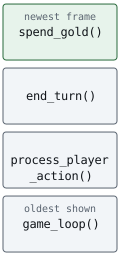
A stack trace walks from the current frame toward older callers. Optimized code can inline functions, omit frame pointers, move values into registers, or reuse stack slots, so the neat classroom picture is a guide rather than a promise.
That complexity is why Microsoft recommends StackWalk64 instead of inventing a stack walker from raw pointers. Matching symbols and unwind information make the result much more reliable.
Section: Worker threads and tasks: keeping slow work off the frame.
Lesson 4.1 showed that a frame has about 16.67 milliseconds, and that loading a file or planning a path can take longer. Games solve this with worker threads. The main thread runs the frame loop, and the other threads do jobs for it.
Starting a new thread for every job would be costly. Each thread reserves a stack, which is 1 MiB of address space by default for a Windows program, so 1,000 threads reserve about 1,000 MiB, and the scheduler has to juggle all of them. Engines instead start a fixed thread pool: a handful of workers that wait for jobs in a queue. A common size is one fewer than the number of cores, leaving a core for the main thread, so 7 workers on an 8-core processor. A job is a small function called a task. Whenever a worker is idle it takes the next task from the queue. A hundred tasks of 4 milliseconds each take 100 divided by 7 equals 14.3, so 15, rounds of 4 milliseconds equals 60 milliseconds on the 7 workers, against 100 times 4 equals 400 milliseconds on one thread.
A task finishes on a worker thread, but the main thread must not find its objects changing in the middle of a frame. So the worker does not touch game objects. It sends its result through a channel, a queue that one thread writes and another reads, and the main thread picks results up at one known point, such as the start of a frame, when nothing else is using the data. Lesson 6.11 builds such a channel for a recorder.
A result can arrive late. Suppose a task planned a path for entity 42 and, by the time the result is ready, that entity was despawned and its slot reused for a new entity. The task remembered the entity’s generation number (Lesson 3.10), so the main thread compares it with the slot’s current one and drops the result if they differ. Some engines write tasks as async functions that pause at a wait point and resume on the pool later, which is the same idea in different syntax.
For an observer, a pool shows up as several threads that start at the same address and spend most of their time waiting. A tool that pauses threads, as the next lab does, may catch workers that are doing nothing.
Section: Start with a read-only thread inventory.
Before opening a thread or asking for its context, identify which threads belong to the target process. TH32CS_SNAPTHREAD creates a system-wide snapshot, even when a P I D, process identifier, is supplied. The program must filter th32OwnerProcessID itself:

Additional detail: Complete lab source: thread_inventory.rs.
Code example. The code’s comments explain: 🔍 The thread snapshot is system-wide; filter by owner P I D below. 🧹 SAFETY: OwnedHandle owns the returned snapshot. 📏 SAFETY: entry has the required size and is writable. 🔁 SAFETY: entry remains a valid output structure.
dwSize tells Windows how large a THREADENTRY32 the caller prepared. The final ERROR_NO_MORE_FILES is not a failure; it is the documented end of enumeration.
Section: Run and compare stable facts.
Run the inventory once for each game process. Each row gives a thread ID and base priority from that moment’s snapshot. Look for threads that appear and disappear between runs before trying to assign any one ID a permanent role.
Terminal window
Code example. The surrounding prose explains this example; the full lesson contains the exact code.
The count may change between runs because games create and retire worker threads. A TID is temporary and can eventually be reused. Do not store it as a version-specific constant.
Base priority is scheduling input, not “importance.” The currently busy rendering thread might have the same base priority as an idle worker. E T W, Event Tracing for Windows, C P U samples and debugger stacks show which threads are actually doing work.
Likewise, a TID does not identify a permanent role. A thread’s role shows up in several places: its start address or module, its stack sampled over time, its C P U and wait activity, its thread description when the game sets one, and which game events line up with that activity. One paused stack shows only what the thread was doing at that instant. In an engine with a job system, the same worker thread can be mixing audio in one sample and decompressing a texture in the next.
Section: How the Wesnoth debugger uses a context safely.
When Windows reports the course breakpoint, the event thread is stopped. The debugger:
opens that exact event thread with context rights;
reads its x86 CONTEXT;
moves e i p back over the one-byte int3;
sets the trap flag in e f l a g s;
continues the event so one original instruction runs;
receives the single-step event;
clears the trap flag and rearms the breakpoint.
Code example. The surrounding prose explains this example; the full lesson contains the exact code.
The state machine prevents one thread’s single-step event from being mistaken for another thread’s event.
Section: Why this lesson does not hijack threads.
Changing another thread’s instruction pointer, queuing executable work to it, or suspending service threads is not required to understand game execution. Those operations can deadlock a process, strand locks, corrupt state, or stop the diagnostics that would explain the failure.
The course inventories threads read-only and changes a context only inside the explicit breakpoint lifecycle of the version-matched Wesnoth debugger, where every event is continued exactly once.
The inventory is thread_inventory.rs. The controlled context example is wesnoth_debugger.rs.
References: ToolHelp thread functions, GetThreadContext, and StackWalk64.