Suppose that helper script encounters a missing unit halfway through a turn. The game still needs to draw the next frame and let the player regain control. The script host therefore needs a clear error report, a bound on work, and a safe way to disable the failing script.
Section: A script can fail without being malicious.
Common mistakes include:
an infinite loop;
a table that grows every update;
calling a missing function;
assuming an entity always exists;
dividing by zero and producing a non-finite value;
repeatedly requesting an action the host rejects.
An embedded interpreter must treat failure as a normal result. One script error should not crash the game, leak resources, or leave input stuck.
Before setting limits, locate where the failure occurred. A syntax error means the source never became a runnable function. A runtime type error means execution reached unsuitable values. A host-A P I, application programming interface, error means the script called the engine but violated that function’s contract. A gameplay error may raise no exception at all: every layer ran, but the requested action was wrong.
Alternative: Locate the failed layer first: unreadable syntax, unsuitable runtime values, rejected host requests, and wrong gameplay decisions need different repairs.

The first three can produce diagnostic errors; the fourth needs an assertion about expected behavior. Keep that distinction when choosing what to log and what to test.
Section: Budgets describe several resources.
“The script is small” does not imply that it is cheap to run. Bound the dimensions separately:
source and bytecode size;
Lua-managed memory;
V M, virtual machine, instructions per update;
call-frame depth;
host-callback calls and returned data;
wall-clock deadline for work outside instruction counting;
queued actions and log output.
Choose whether a budget resets per callback, per frame, or per whole script session. A limit with no time window is ambiguous. Record which budget stopped execution so a learner can distinguish an infinite loop from memory growth or excessive host calls.
In brief: A budget needs both a resource and a reset window, so the same limit has one clear meaning across callbacks and frames.
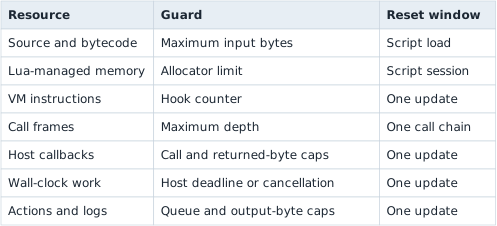
When a limit is crossed, stop that update, discard its uncommitted actions, and report the exact budget. Do not quietly continue with half-produced output.
Section: Limit memory.
The lab host applies a four-mebibyte Lua allocation limit. The multiplication converts four mebibytes to bytes before the host sets the limit:
Code example. The surrounding prose explains this example; the full lesson contains the exact code.
Choose a limit after measuring realistic scripts. Too low prevents normal work; unlimited growth lets one bug consume the process.
The limit covers Lua-managed allocations, not every resource a host callback might allocate. Host functions need their own bounds.
Section: Limit instructions.
mlua can call a host hook after a chosen number of V M instructions. The hook may run while Lua is executing, so its counter has to be shared safely with the Rust closure: Arc shares ownership of the counter, and Mutex protects one update to it at a time. The clone shares the same counter; it does not reset the budget.
Code example. The surrounding prose explains this example; the full lesson contains the exact code.

Since the hook fires every 1,000 instructions and allows at most 100 calls, a script gets roughly 100,000 V M instructions per update before this particular budget stops it.
The hook is not a stopwatch. Different instructions cost different amounts of real time, and host callbacks can do work between hooks. It is one defense against runaway Lua bytecode.
Predict first
The hook above fires every 1,000 instructions and raises an error when its count passes 100. Suppose the host never sets the count back to 0, and a well-behaved script runs 30,000 instructions in every update.
In which update does the instruction budget stop the script?
Answer: In update 4. 30,000 divided by 1,000 equals 30 hook calls per update. After three updates the count is 30 + 30 + 30 equals 90; in update 4 the 11th call makes it 101, more than 100, so the error fires after 11,000 of that update’s instructions.

Reset the instruction allowance at a controlled host boundary, not from inside the script. If the hook counter is shared across updates, document that as a session budget; if each update gets a fresh allowance, also cap how often updates can be requested.
Section: See the budget fail on purpose.
scripts/budget_failure.lua contains:
Code example. The surrounding prose explains this example; the full lesson contains the exact code.
Run it:
Terminal window
Code example. The surrounding prose explains this example; the full lesson contains the exact code.
Expected result: the host returns a contextual error naming the script and the exceeded budget. If the terminal hangs forever, the limit is not working.
Section: Protect every host callback.
A function exposed to Lua should validate:
argument types and string lengths;
sequence lengths;
numeric finiteness and range;
referenced IDs;
permissions for the current script;
rate and action budgets.
Never hold a poisoned mutex or important engine lock while running arbitrary script code. Copy inputs first, execute, then validate collected outputs.
Section: Make errors useful but not secret-leaking.
Development builds should report:
script path or stable identifier;
line and traceback when available;
host A P I function involved;
which type, range, permission, or action check failed;
whether the script was disabled or may retry.
Do not dump process memory, account tokens, full private chat logs, or arbitrary host paths into a public error report.
Section: Use a failure policy.
One practical policy is:

Do not catch an error and continue from half-mutated host state. Lua requests should be queued and committed only after the script returns successfully.
Narration: A script may fail after preparing several requests. Committing only after successful completion keeps half a plan from altering the host.
Section: Test more than the happy path.
Create scripts that:
request an unknown action;
omit a required field;
pass a string where an ID is expected;
allocate an ever-growing table;
loop forever;
throw an error inside a helper function;
return normally with zero actions;
submit the maximum allowed valid action list.
For each test, assert the result, action count, error category, and whether the script remains enabled.
Section: Sandboxing is a design, not one switch.
No single setting makes arbitrary scripts safe. The useful layers are:
a limited standard library;
no arbitrary native module loading;
a narrow host A P I;
copied snapshots;
structured action requests;
memory, instruction, time, and rate limits;
least-privilege Windows handles behind the host boundary;
clear cancellation and recovery.
Lua is most valuable when it makes small policies easy to change while the host keeps powerful capabilities narrow and testable. 🔒