A value that looks random in a scan may be a familiar number after a few reversible operations. Here we follow hexadecimal values through XOR, bit rotation, and wrapping arithmetic, using breakpoints and an instruction trace to check each step instead of guessing from one memory snapshot.
Section: Why a stored value can look like noise.
An encoded field often looks like noise in a memory viewer, because the bits being stored are not the number the game displays. That on its own tells you almost nothing about what is being done to it.
Five words get used as though they were interchangeable here, and they are not:
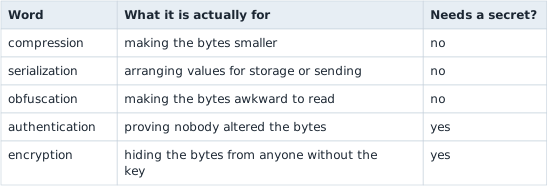
Only the last two involve a secret. Mistaking obfuscation for encryption sends you hunting for a key that was never there; mistaking encryption for obfuscation wastes days trying to spot a pattern in output designed to have none.
The rule your decoder has to satisfy:
Decoding an encoded value returns exactly the original value, and any integrity check travelling with it is verified before the decoded value is used for anything.
The second half is the part people skip. A value that decodes cleanly is not the same as a value nobody tampered with — decoding will happily produce a plausible-looking number from bytes somebody edited.
Trace both directions:

The write path often reveals the forward transform. The read path reveals its inverse and the order of operations.
Section: Obfuscation and encryption answer different questions.
Alternative: Use authenticated encryption when secrecy and tamper detection are required. A reversible representation alone supplies neither guarantee.
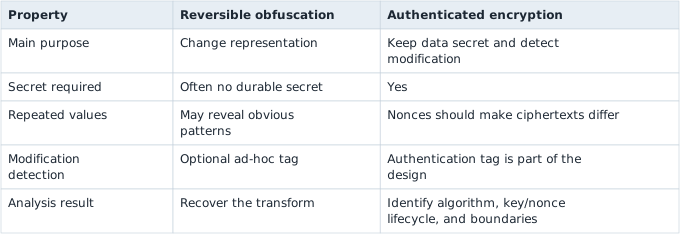
A reversible XOR-and-rotate transform is useful for learning data flow, but it is not a security boundary.
Section: Follow one complete toy transform.
A minimal reversible transform is:
Code example. The surrounding prose explains this example; the full lesson contains the exact code.
Read encode left to right. XOR combines the value and key; rotation moves the bit positions. To invert it, reverse both the order and each operation:
rotate right by the same count;
XOR with the same key because x ^ k ^ k equals x.
This “reverse order, invert each step” rule also helps when disassembly shows a longer composition.

Section: One value through the transform, bit by bit.
In brief: The order matters. Undo the rotation first, then XOR with the same key. That restores the original bits.
Take value equals 100 and key equals this value. The whole round trip, before each arrow is worked out below:

In hexadecimal, 100 is hexadecimal 6 4, because 6 times 16 + 4 equals 96 + 4 equals 100; as a 32-bit number it is this value. Each hexadecimal digit stands for exactly four bits: 6 is 4 + 2 equals 0110, 4 is 0100, A (10) is 8 + 2 equals 1010, and E (14) is 8 + 4 + 2 equals 1110. That lets both numbers be written out bit by bit.
Step 1, XOR with the key. XOR outputs 1 in each bit position where its two inputs differ and 0 where they match:
Code example. The surrounding prose explains this example; the full lesson contains the exact code.
The top six hexadecimal digits of value are zero, and XOR with 0 changes nothing, so the key’s own digits 5A3C96 pass straight through. Only the last byte mixes: 0110 0100 against 1110 0001 differ in the positions that give 1000 0101, which is hexadecimal 8 5.
Step 2, rotate left by 7. Every bit moves seven places toward the high end, and the seven bits pushed off the top re-enter at the bottom. Here are the same 32 bits split after the seventh, before and after the move:
Code example. The surrounding prose explains this example; the full lesson contains the exact code.
x86 stores a 32-bit number lowest byte first, which is called little-endian, so memory holds the four bytes in the reverse of the order they are written in hexadecimal:
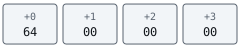
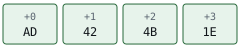
Decoding runs the same steps backward. Rotating this value right by 7 carries its bottom seven bits, the numeric value shown, back to the top and restores this value. XOR with the key then cancels it: the top six digits are identical in both numbers, and anything XORed with itself is 0, while the last byte gives 1000 0101 against 1110 0001 equals 0110 0100 equals hexadecimal 6 4 equals 100.

Section: Compare encodings of values that differ in one known way.
Encoding a few chosen values with the same key exposes the transform’s parts one at a time. With the key from the example:
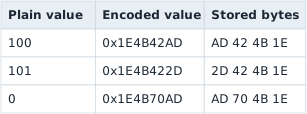
The comparisons work because the key cancels. Rotation only moves bits, and XOR works on each bit position separately, so rotating two numbers and then XORing them gives the same result as XORing them first and rotating afterward. For any two plain values a and b, the key drops out of encode(a) ^ encode(b):
Code example. The surrounding prose explains this example; the full lesson contains the exact code.
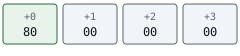
100 against 101 exposes the rotation. 100 is 0110 0100 and 101 is 0110 0101: adding 1 to an even number flips only bit 0, so 100 ^ 101 equals 1. The two encodings must then differ by rotl(1, 7) equals 2 to the power of 7 equals 128 equals hexadecimal 8 0, a single bit at position 7. They do. hexadecimal A D is 1010 1101 and hexadecimal 2 D is 0010 1101, which differ only in their top bit, bit 7 of the lowest byte. A bit that went in at position 0 came out at position 7, and that gives the rotation count without knowing the key.
0 exposes the key. encode(0) is rotl(0 ^ key, 7) equals rotl(key, 7), so rotating that stored value right by 7 returns the key itself. The third row also follows from the first without the key. encode(100) ^ encode(0) is rotl(100, 7), and 100 is only seven bits wide, so no bit reaches the top and the rotation is a plain multiplication: 100 times 128 equals 12,800 equals hexadecimal 3 2 0 0 (check: 3 times 4,096 + 2 times 256 equals 12,288 + 512 equals 12,800). XORing this value with this value changes only the byte 42: 0100 0010 against 0011 0010 gives 0111 0000 equals hexadecimal 7 0, so the result is this value.
One pair on its own cannot pin a transform down, because many formulas turn 100 into this value. The pairs above narrow it because each one isolates a single part. If the same plain value encodes differently after a restart, the key is not a constant: it is generated per session or per object, and has to be recovered for each one.
Useful clues in a read path include:
XOR, rotate, byte-swap, add, subtract, and multiply by odd constants;
a nearby key or generation field;
duplicate calculations before a comparison;
a branch that rejects the value;
conversion to float or clamping immediately after decoding.
Section: Preserve operation width and wrapping behavior.
Machine arithmetic is performed at a width. u32::wrapping_add is not the same as arbitrary-precision arithmetic, and an 8-bit rotate is not a 32-bit rotate. A decoder has to reproduce operand widths, truncations, sign extensions, and byte order exactly. The worked example above comes out right only because the rotation is a 32-bit rotation and the four bytes are read lowest first.
For multiplication modulo 2^32, only an odd multiplier has a multiplicative inverse. That mathematical fact lets a reversible transform undo the multiply; an even multiplier loses information.
Section: A tag verifies a defined relation, not every field.
A small record can store a toy tag beside the encoded value and verify it before decoding. That can detect accidental changes in the example, but the relation is still reproducible by anyone who knows the algorithm and key. Name the claim accurately: it is a toy integrity relation, not cryptographic authentication.
Section: Verify the recovered model.
The verification should prove:
Code example. The surrounding prose explains this example; the full lesson contains the exact code.
over edge values such as 0, 1, u32::MAX, values around a carry boundary, and multiple keys. Mutation tests should flip each encoded bit and confirm that the toy tag check refuses changed samples.
Section: Glossary terms introduced here.
Obfuscation: a reversible representation intended to make a value less obvious, not to provide strong secrecy.
Plain value: the value before a transform.
Encoded value: the stored result of a transform.
Round trip: encode followed by decode, ending at the original value.
Differential comparison: encoding two inputs that differ in one known way and comparing the outputs; for an XOR-based transform the key cancels.
Wrapping arithmetic: fixed-width arithmetic reduced modulo 2^N.
An encoded value is understood only when its read and write paths agree. The inverse must undo operations in reverse order at the same machine widths, and a changed plain input must produce the encoded bytes the model predicts. A value that merely looks plausible is weaker evidence than that round trip.