Chapter 2 found game state and the code that changes it. Now we need to carry that knowledge into a tool without mistaking a remote address for our own memory. This chapter begins with safe type and ownership boundaries, then derives how bytes represent numbers and pointers. An external reader turns those representations into local values; objects, collections, encoded fields, and text show what those values can mean inside a game. D L L, dynamic link library, call contracts return later when our code enters the process itself.
The Rust primer extension explains ownership, typed handles and cleanup with a small local example before those ideas are applied here. Its cleanup companion shows why ordinary early returns still drop an owner.
Section: Keep raw-pointer work at a checked boundary.
Game tooling needs low-level control: exact integer sizes, raw bytes, operating-system APIs, and sometimes pointers. Most of the program can still use compile-time checked ownership and types.
Keep the two responsibilities separate:
Write safe code for the algorithm. Put unavoidable raw-pointer work in one small wrapper, document its assumptions, and return an ordinary owned type.
🧠 Boundary idea: safe code should occupy most of the program. Small unsafe sections act like clearly marked doors where you check every assumption before crossing.
Section: Local memory and game memory are different trust zones.
The compiler can prove many facts about memory owned by the current program. A borrowed slice has a known length and owner. A Vec<u8> keeps its allocation alive. A reference cannot normally outlive the value it borrows.
It cannot prove equivalent facts about an address copied from another process. The target can free an object, change page permissions, exit, or race with our read. That is why cross-process code should not manufacture a normal reference such as &Player from a remote address.
Instead, use a clear boundary:

After the copy succeeds, ordinary ownership rules protect the local buffer. Before the copy, the address is untrusted input that needs checked arithmetic, region validation, and a useful error.
In brief: Never treat another process’s address as your own pointer. Copy the bytes into a buffer you own, then work on the copy.
Section: Values and types.
Memory work depends on sizes, so we use explicit integer types:
Code example. The surrounding prose explains this example; the full lesson contains the exact code.
Use usize for address calculations, not for game values just because it is convenient.
The target process does not store the words u32 or f32 beside each value. For example, 00 00 20 41 reads as the large number shown with u32 and 10.0 with f32; the type tells the reader which interpretation to use. We need the widths now to read memory safely. Lesson 3.6 derives the bit patterns behind those interpretations before we build the external reader.
usize is large enough to index memory in the current build. It is 32 bits in an i686-pc-windows-msvc tool and 64 bits in an x86-64 tool. A game’s u32 health value stays four bytes on both. Address width and value width answer different questions.
Section: Give equal-sized values different meanings.
A player ID and a health amount might both fit in a u32, yet swapping them should be an error. Rust can wrap the same stored bits in distinct types:
Code example. The code’s comments explain: damage(Health(50), PlayerId(3)); // rejected: the arguments are swapped
These are newtypes. The wrapper tells the compiler that equal byte representations do not mean interchangeable values, so a remote address, a byte offset, and a game value cannot be swapped just because all three are integers. Lesson 3.4 gives offsets and addresses their own newtypes and derives the traits they need.
Alternative: Think of labelled jars: sugar and salt look alike, but the label stops you pouring one where the other belongs. A newtype is that label for numbers.
Section: Ownership and borrowing.
An owned Rust value can be lent for reading with &T or for editing with &mut T. The Rust Primer introduced those forms and Option for a value that may be absent. Here a search returns Option<usize>: a found byte offset (Some(offset)) or no match (None).
Code example. The surrounding prose explains this example; the full lesson contains the exact code.
&[u8] is a borrowed slice: a view into bytes owned somewhere else. The function can read them but cannot keep or change them.
A slice is two pieces of information used together: where the first element is and how many elements are available. Indexing and windows use the length to avoid walking beyond the allocation. A raw pointer by itself carries no such length.
Assigning an owned String to a new owner makes the old name unusable; the Primer’s interactive view shows that transfer. The remote reader here borrows a slice instead of moving its whole byte buffer into every search function.
Borrowing is different from moving. A borrow gives code temporary permission to use a value without taking responsibility for freeing it. Shared borrows (&T) allow reading. A mutable borrow (&mut T) allows changing, but it must be the only usable borrow of that value for its lifetime.
This is the borrow checker doing memory-safety bookkeeping before the program runs. Vec::push may need to move the vector’s heap allocation to a larger space. Keeping view alive across that operation could leave a dangling reference, so Rust rejects the overlap.
The shared borrow can end before mutation when its final use comes first:
Code example. The surrounding prose explains this example; the full lesson contains the exact code.
Section: Convert bytes deliberately.
A debugger displays bytes; a game interprets them as types. The conversion should state that meaning explicitly:
Code example. The surrounding prose explains this example; the full lesson contains the exact code.
The ? means “if this step fails, return None now.” No out-of-bounds read and no panic are needed.
from_le_bytes names the byte order explicitly. transmute or an unchecked pointer cast would silently depend on layout, alignment, size, and host byte order. Low-level code is easier to review when every conversion states its assumption.
A three-byte buffer stops at the first ? and gives None, which is different from a decoded Some(0). Lesson 3.3 follows each step of this checked decode. The next boundary needs an actual error reason, so it uses Result.
Section: Errors are part of the function.
Use Result<T, E> when callers need to know why an operation failed:
Code example. The surrounding prose explains this example; the full lesson contains the exact code.
For a one-purpose tool such as memory_scanner.exe, the anyhow crate is useful because each failed Windows call can say which process, address, or operation failed. Code reused by several lessons—such as a packet, P E (Portable Executable, the header-and-sections layout Windows uses for .exe and .dll files), or byte-pattern parser—benefits from a typed error enum. The caller can then handle truncated bytes differently from an unsupported size or invalid text. Those errors should also explain themselves when printed. Debug shows the exact failure variant while you debug a parser. Display gives the learner a useful sentence such as “the input ended too soon.” Lesson 3.5 implements both traits by hand for a parser error, the code that thiserror would otherwise derive.
Section: Separate the cause from the decision.
An error value should report what failed; the outermost tool should decide what to do about it. A memory reader should not silently retry forever, and a parser should not terminate the whole application.
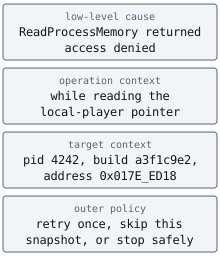
Add context at each boundary without erasing the original Windows or parsing error. Then classify the final decision:
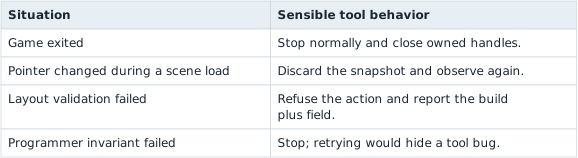
This makes failure part of the design. “Keep going” is safe only when the next iteration starts from fresh, validated state.
Narration: A reader that keeps going after a stale pointer can report numbers from an object that no longer exists. Discarding the snapshot and reading again avoids that.
Section: Put uncertain reads behind one boundary.
The scanner and the game-specific logic should not each repeat Windows handle checks, byte counts, and error conversion. An abstraction gives that work one named interface. This sketch describes the operation the rest of a tool needs, without claiming that the method alone makes an address safe:
Code example. The surrounding prose explains this example; the full lesson contains the exact code.
trait states a behavior another type can implement. &self lets the method use an existing reader, address is the location to request, and Result carries either the decoded u32 or an error. The implementation still must verify the target process, readable region, requested length, and actual bytes returned. The scanner can then ask for a value through read_u32 while one implementation owns the operating-system boundary. Programming Fundamentals called this an abstraction: a smaller interface hides the details of a larger operation. The reader trait now gives that idea a concrete shape.
Predict first
Windows maps memory in 4096-byte pages, so offsets inside a page run from 0 to 4095. A read_u32 call has a handle with the read right, and its address is offset 4094 of a readable page. The next page is not committed: nothing backs it yet.
What should read_u32 return?
Answer: An error: only 2 of the 4 bytes can be copied. The page ends after offset 4095, so 4096 minus 4094 equals 2 bytes lie inside it. The other 2 would come from the uncommitted page, so the copy is short and there is no complete u32 to decode.

Section: Give each game helper one obvious import path.
Avoid pub use windows_impl::* in the shared lab crate. A wildcard could expose an unfinished hook or internal address helper merely because somebody marked it pub inside that module. It can also make the same type appear under several paths. Export only the tools the lessons are meant to use:
Code example. The code’s comments explain: ✅ Course tools get a short, reviewable list of supported imports.
The Windows lab keeps its implementation module private, so a memory scanner imports gha_windows_labs::Process and a reversible hook imports gha_windows_labs::PatchPlan. #[doc(inline)] puts the ownership and error notes at those exact paths. A learner should not have to search several modules to discover which process wrapper is the supported one.
Section: Raw pointers and unsafe.
A raw pointer is written *const T for reading or *mut T for writing. Rust does not automatically know whether it is:
non-null;
aligned;
inside readable memory;
pointing to a real T;
still valid.
Dereferencing one therefore requires unsafe:
Code example. The code’s comments explain: / # Safety / `pointer` must be non-null, aligned, readable, and point to an initialized `u32`. 🛡️ SAFETY: the caller promises all requirements listed above.
This function reads a pointer in the tool’s own address space only when its caller can uphold every safety condition in the comment. A numeric address from the game process is different: the external tool must ask Windows to copy those bytes rather than casting the remote address to *const u32 and dereferencing it locally.
Section: What .offset() actually does.
Raw pointers have an offset method, but its number is an element count, not a byte count. If pointer has type *const u32, one element is four bytes:
Alternative: Picture a row of four-byte lockers: offset 2 skips two lockers, which is eight bytes. To count in bytes, use a byte pointer instead.
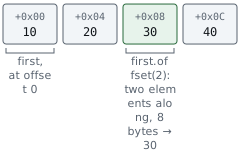
Code example. The code’s comments explain: 🧭 `offset(2)` means "move by two u32 values," so this advances 8 bytes. 🛡️ SAFETY: `third` is aligned, initialized, and still inside `values`.
The signed isize argument is what makes .offset() different from .add(). first.add(2) can move forward by two elements; third.offset(-1) can move backward by one element. When the number you recovered is a byte offset, use a byte pointer or .byte_offset() so the unit is obvious:
Code example. The code’s comments explain: 📏 This count is explicitly bytes because `bytes` points to u8 values.
Calling .offset() is already unsafe, even before dereferencing the result. Rust requires the start pointer, the result, and the range between them to stay inside the same allocation (or exactly one element past its end). The byte calculation must also fit in an isize. An address that merely looks plausible does not satisfy those promises.
This distinction matters in a game-memory tool:
This original example tries to load health by casting a remote address to a local Rust pointer. Do not execute it: the address belongs to another process, so the required local allocation and pointer-validity guarantees cannot be established.
Before: dereference an address from another process
Code example. The code’s comments explain: SAFETY: cannot be established for a remote address; this is the bug.
Keep remote addresses as integers, use checked addition for the field offset, then let the process-reading wrapper copy the bytes into a local buffer. It returns a normal error if the remote read fails.
Improved code
Code example. The surrounding prose explains this example; the full lesson contains the exact code.
Show the diff
Code example. The code’s comments explain: SAFETY: cannot be established for a remote address; this is the bug.
Takeaway: remote memory requires a process-aware copy; a cast does not move bytes across address spaces.
❌ The first version pretends memory owned by another process is part of this tool process’s allocation. It is not. ✅ The second version treats the remote location as a checked integer address and asks Windows to copy the bytes into a local buffer. Use pointer .offset() only when you can prove the allocation and bounds; use checked address arithmetic for remote memory.
Notice that Rust 2024 still requires an inner unsafe block inside an unsafe fn. The dangerous operation remains easy to find in review.
Never use unsafe to “make the borrow checker stop complaining.” First understand the ownership problem. In this course, unsafe is reserved for operating-system, graphics, foreign-function-interface (F F I, foreign function interface,) — that is, calls into code compiled from another language — and verified raw-memory boundaries.
Section: Set up a Windows project.
Those pointer checks and ownership guarantees become easier to inspect in a small executable. Create a separate Cargo project for the external-memory examples; cargo new makes its source file and manifest, and cd selects that project for later builds.
Terminal window
Code example. The surrounding prose explains this example; the full lesson contains the exact code.
Add the libraries:
Code example. The surrounding prose explains this example; the full lesson contains the exact code.
The windows crate generates typed bindings from Microsoft’s Windows metadata. We enable only the A P I, application programming interface, groups we use.
Section: Make the tools teach you.
Customize the editor enough that reading and navigating feel comfortable, then practice the few actions that shorten almost every debugging session:
go to a definition;
find every use of a name;
rename a symbol safely;
format the current file;
run the nearest test;
open the integrated terminal and debugger.
Gamers already learn key bindings and tune an environment for feedback. Apply the same skill here. A readable font, visible errors, and a reliable test key matter more than endlessly changing decorations. ⌨️
Run this small quality loop from PowerShell:
Terminal window
Code example. The code’s comments explain: ✅ Format first so later output focuses on behavior, not spacing. 🧭 Ask the compiler for type, ownership, and name errors quickly. 🧪 Run behavior checks after the program type-checks. 💡 Ask Clippy for common mistakes and clearer alternatives. 📚 Build documentation for this project and its dependencies.
cargo test runs the project’s test targets. Clippy’s official usage guide explains its lint levels. A lint is guidance, not an oracle: understand a suggestion before accepting it, especially around raw pointers and Windows F F I.
Fix a warning when you can. If a Windows boundary genuinely needs an exception, keep it as narrow as possible and record the reason with #[expect(..., reason equals "...")]. Prefer expect to a broad allow: the compiler can then tell you when the expected warning no longer occurs and the exception has become stale. Never disable a lint for an entire crate just to hide one unexplained cast.
Learn syntax by typing tiny examples, but focus on the tools that matter most here: ownership, Result, enums, exact integer sizes, and small documented unsafe boundaries. If you forget a spelling, look it up. Useful programming is not a closed-book memory contest.
Section: Reuse code without turning off judgment.
Crates can save months of work. Before adding one, check:
Does its A P I match the actual problem?
Does it support the toolchain and Windows versions you use?
Is the license compatible with the project?
Are its unsafe boundaries and maintenance history understandable?
Can you cover your use of it with a small test?
Autocomplete and A I, artificial intelligence, can also save typing. For every non-trivial suggestion you accept, be able to explain the types, ownership, side effects, failure path, and test. “It compiled” proves syntax and types; it does not prove the call targets the right process, preserves the right bytes, or cleans up a handle.
Section: The shape of our programs.
Keep the project in layers:
Code example. The surrounding prose explains this example; the full lesson contains the exact code.
The Windows calls may be unsafe. Finding a value in a byte slice, filtering candidates, parsing numbers, and printing results do not need to be.
Section: The boundary carried into the tool.
u32 is always four bytes; usize follows the tool’s pointer width. A borrowed slice lends access to bytes without transferring ownership. Option represents an absent value, while Result carries success or a failure reason. Raw pointers cannot prove their own validity, so every dereference needs a safety contract. Before building the external reader, How Bytes Become Numbers and Pointers works through the representations we will read. The reader then keeps the necessary unsafe Windows calls at one boundary and hands ordinary owned, typed values to the rest of the program.