Coordinates give a position meaning, and subtracting two positions gives the direction and distance between them. Now we can use those ideas to choose an action in a moving game. The earlier Wyrmsun macro reacted to a discrete result: a unit was recruited or it was not. In Flare, an enemy keeps moving. A fixed instruction such as “hold right for one second” can be correct at the start and wrong a moment later. Position becomes an observation the bot must refresh before choosing its next action.
Section: Begin with coordinates you can control.
Use Flare 1.12 in an offline test area. Stand at an easy location, move only left and right, and scan for a changing floating-point value.

Then hold the first coordinate steady and move only up and down. Two independent experiments help distinguish x from y.
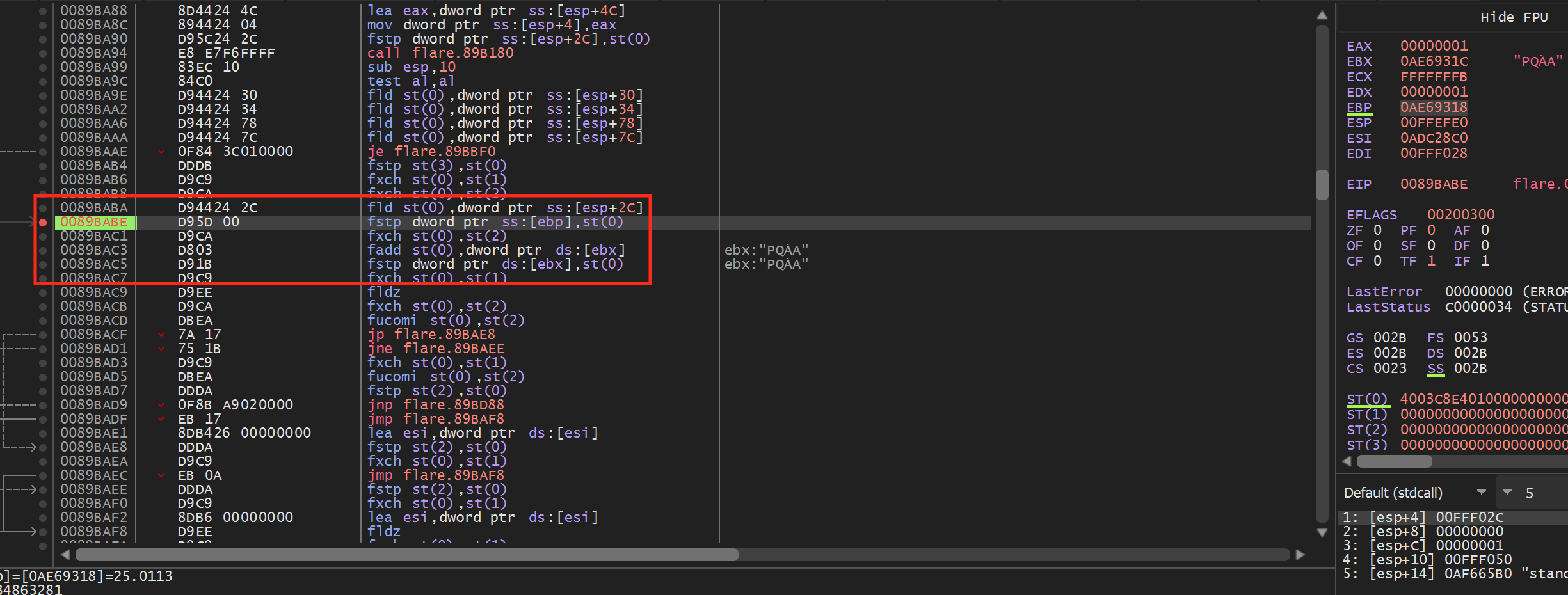
Validate each candidate at several positions. Teleporting a candidate a tiny distance in a disposable lab can confirm it, but restore the original value immediately.
Section: Find related objects.
Once the player position is known, inspect nearby fields and the code that reads them. Repeat the same process for:
one enemy position;
the current cursor or destination position;
an “is alive” or active flag.

Do not assume every object shares the same layout. Confirm offsets separately.
Section: Copy memory into snapshots.
Copy each confirmed position into a small Vec2 value, then group the player, enemies, and cursor in one WorldSnapshot. This is the input to decision logic: the bot works from local values captured together and does not keep a remote pointer alive while it chooses what to do.
Code example. The surrounding prose explains this example; the full lesson contains the exact code.
The bot should make decisions from owned snapshots. It should not hold long-lived raw pointers into game memory.
Section: Automation is a feedback loop.
A useful bot repeats four jobs:
Code example. The surrounding prose explains this example; the full lesson contains the exact code.
The action does not prove success. Movement may be blocked, the target may disappear, or the snapshot may already be stale. After every request, wait for a specific observation that confirms or rejects it before choosing the next action.
Keep time in the model. Store when the snapshot was captured, when the action was requested, and how long confirmation remains valid. A perfect position from half a second ago can be worse than a slightly noisy current position.
In brief: Treat a position as an observation you refresh, not a fact you keep. Choose a target from fresh, validated numbers every time.
Reject impossible floats:
Code example. The surrounding prose explains this example; the full lesson contains the exact code.
NaN and infinity can poison comparisons, so is_finite matters.
Range checks prove only that a coordinate is plausible, not that it belongs to the intended object. Combine them with identity, active/alive flags, expected movement continuity, and repeated reads.
Narration: A stale pointer can still give a number that looks fine. Range checks are cheap, but identity checks and repeated reads catch the wrong-object case.
Section: Choose a target.
Given a player at (0, 0) and enemies at (3, 4) and (1, 0), the nearest valid target is (1, 0). The function below first discards implausible coordinates, then compares distance for the survivors. An empty or entirely invalid enemy list returns None rather than inventing a target.
Code example. The surrounding prose explains this example; the full lesson contains the exact code.
This decision code has no raw memory access and can be unit-tested with made-up coordinates.
Alternative: Picture drawing a circle around the player and growing it until it first touches an enemy. That enemy is the nearest one.
Section: Separate decision from action.
decide turns a snapshot into an intent, never an input event. An invalid player position means Stop; no valid enemy means Wait; otherwise the nearest enemy becomes MoveTo(position). The platform-specific action layer can later decide how to carry out that intent.
Code example. The surrounding prose explains this example; the full lesson contains the exact code.
The action layer may simulate a click in the local test or call a verified in-game function. The decision layer should not know how that happens.
Section: Add guardrails.
Stop when:
the match or level is no longer active;
any base pointer becomes null;
coordinates are non-finite or out of bounds;
the player has not moved after several attempts;
the user requests stop;
the target version check fails.
Section: Test without the game.
Create snapshots in unit tests:
Code example. The surrounding prose explains this example; the full lesson contains the exact code.
The most valuable bot code—geometry, state, timing, and failure handling—does not need unsafe and does not need the target running.
Section: Wire it to Flare 1.12 after the D L L, dynamic link library, lessons.
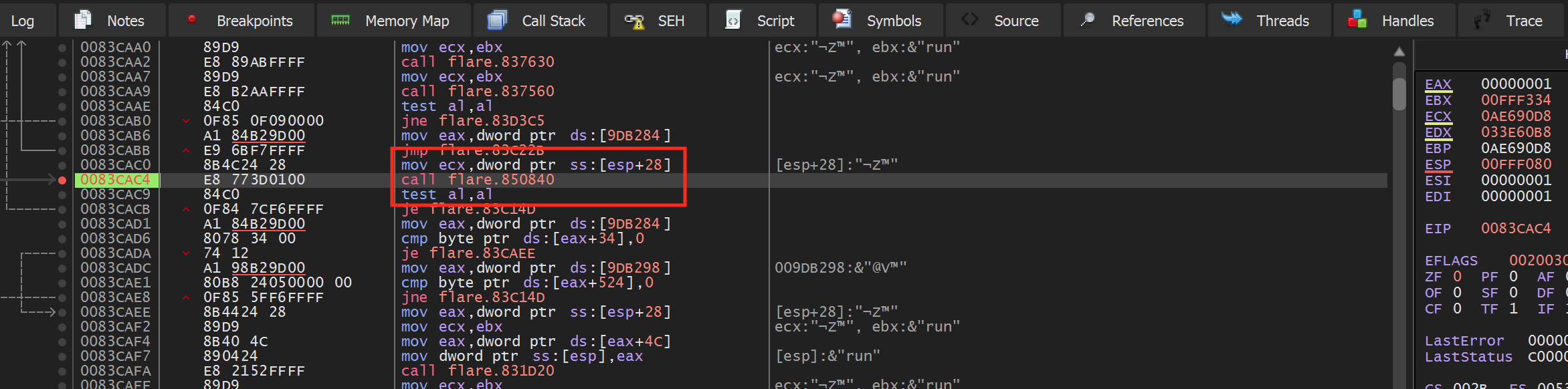
The snapshot, target selection, and tests above require no injected library. The following pinned Flare implementation uses the verified detour and D L L lifecycle developed in Lesson 8.3. Read it now as a worked mapping from three observed positions to an action, then run it after that boundary has been taught.
This is the original course’s farming bot: it walks toward a nearby enemy and attacks while a key is held.
The original 32-bit lab identified three calls. Their absolute addresses came from a run where flare.exe loaded at this value; use module-relative offsets in the injected D L L because the base can move.
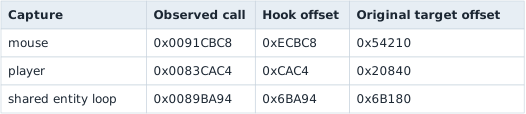
At those sites, the useful fields are:
mouse X/Y: [e b p + hexadecimal 6 6 4] and [e b p + hexadecimal 6 6 8];
player X/Y: [e c x + hexadecimal 2 4 0] and [e c x + hexadecimal 2 4 4];
current entity X/Y: [e b x - 4] and [e b x].
Store the captured addresses as atomics or copy the values into an owned snapshot. Do not let the worker hold a pointer while a hook is changing it. The historical action loop used screen positions 490/560 for left/right and 270/330 for up/down, then sent a left-button input while the M key was held:
Code example. The surrounding prose explains this example; the full lesson contains the exact code.
These cursor numbers depend on the window size and UI scale. Confirm them by hovering the four attack directions and watching the captured mouse fields. In an enemy area, hold M: the player should run toward the moving enemy and attack when close. Releasing M must stop the bot immediately. On unload, stop the worker first and restore all three original five-byte calls.
Section: The three capture caves and input worker.
The complete port is strategy_hooks.rs. Each site verifies its real E8 rel32 call before installing a detour. For example, the player cave captures e c x and then replays the original call:
Code example. The surrounding prose explains this example; the full lesson contains the exact code.
The worker rejects non-finite coordinates, writes the captured cursor fields, sends mouse input only when the active state changes, and always sends the final mouse-up before restoring all three calls. Inject into flare.exe, hold M near an enemy, and press End to stop.
Silent video demonstration: Following a target in Flare. The original farming-bot recording shows the player moving toward an enemy and attacking. The motion is the visible result of repeatedly observing positions, choosing a direction, and sending a bounded input.