A tool can know a target’s position and still draw its marker in the wrong place. The target’s coordinates describe the world; the screen describes the picture seen by one camera. We need to account for where that camera sits, which way it faces, and how perspective changes the apparent size of distant objects.
Coordinates, Vectors, and Directions established the spatial operations used here: subtract positions to form a displacement, normalize a vector to keep its direction, and use a dot product to compare alignment. This lesson follows that geometry through camera frames and projection.
For the worked coordinate differences and normalized alignment calculations, see the vector lesson.
The Rust examples on this page use this small three-coordinate record:
Code example. The surrounding prose explains this example; the full lesson contains the exact code.
Each field holds one f32 coordinate. subtract computes the component differences: calling target.subtract(camera) gives the displacement from the camera to the target. The method and record are defined here so the camera examples can be read without copying a program from another lesson.
Section: Construct perpendicular directions.
The cross product produces a direction perpendicular to two input directions:
Code example. The surrounding prose explains this example; the full lesson contains the exact code.
Its length is the area of the parallelogram between the vectors. Camera code uses it to construct perpendicular right, up, and forward directions. The order matters: a times b equals -(b times a).
For example, (1, 0, 0) times (0, 1, 0) equals (0, 0, 1). Reverse the inputs and the result is (0, 0, -1). Both outputs are perpendicular to the inputs, but only one points along the intended forward axis. That is why swapping arguments in a camera-basis calculation can make a view look mirrored rather than merely changing its notation.
Section: A coordinate frame is an origin plus directions.
Coordinates are not properties a point owns by itself. The numbers make sense only inside a coordinate frame: an origin and three axis directions. The point (10, 0, 0) means “ten units along this frame’s x-axis from this frame’s origin.” Change the frame and the same place receives different numbers.
Alternative: Coordinates are ruler readings: move or turn the rulers and the numbers change, even when the object stays in the same physical place.
A practical frame description answers four questions:
Where is the origin?
Which axis points right or forward?
Which axis points up?
Do positive rotations follow a left-handed or right-handed convention?
These are not cosmetic choices. If an overlay reads an engine that uses z as up but performs math as though y were up, the result may look almost correct near the origin and drift badly elsewhere.
Section: Handedness tells you which way positive rotation goes.
Point your right thumb along the positive axis. In a right-handed coordinate system, the curl of your fingers shows positive rotation around that axis. A left-handed system reverses that convention. Handedness also fixes the direction of a cross product: in a right-handed frame, right times up equals forward for one common choice of basis directions.
Do not infer handedness from axis labels alone. An engine may call an axis forward while using a different sign than a math library. Confirm it with three known movements or by reading the matrix construction code.
Section: Four engines, four conventions.
Engines made different choices, so a coordinate copied from one game means something else in another. Four common ones:
Axis conventions of four engines
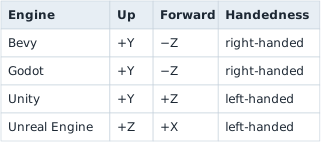
A tree 5 metres in front of a camera at the origin is at (0, 0, minus 5) in Bevy and at (0, 0, 5) in Unity. It is the same place, with the opposite sign of z. The two engines differ in handedness, so converting between them means flipping exactly one axis. Unity and Unreal share a handedness, so no flip is needed, but their axes are named differently and their units differ: Unreal counts in centimetres, and Unity treats one unit as a metre by convention. A point 500 cm ahead, 100 cm to the right, and 200 cm up is (500, 100, 200) in Unreal, listed as forward, right, up. Unity lists right, up, forward, in metres: (100 divided by 100, 200 divided by 100, 500 divided by 100) equals (1, 2, 5).
An overlay that reads positions from one engine and draws with another’s mathematics has to make this conversion before any of the camera work below. A picture that is mirrored left to right, or an object that sits 100 times too far away, is what a missing conversion looks like.
Section: A basis defines the local axes.
A basis is the set of directions you measure coordinates against — the rulers you are holding up. A camera basis usually holds right, up, and forward.
They have to be independent, meaning no one of them can be built by combining the others. If up were just forward tilted slightly, the two would partly measure the same thing and some positions would have no unique description at all.
When those directions are additionally all exactly length one and all at right angles to each other, the basis is called orthonormal. That is worth insisting on, because it makes measuring cheap: to find how far along a direction a point lies, you take a dot product and stop. No division, no correction for skew.

This is the view transform in plain English. First express the point relative to the camera, then ask how much of that displacement lies along each camera ruler:
Code example. The surrounding prose explains this example; the full lesson contains the exact code.
The sign of view_z depends on the convention. OpenGL camera space traditionally looks down negative z; many other descriptions use positive forward. A correct formula with the wrong convention is still a wrong result.
Section: Yaw and pitch.
Many first-person games describe view direction with:
yaw —turn left or right;
pitch —look up or down;
roll —tilt sideways.
To point toward a target, first find the difference:
Code example. The surrounding prose explains this example; the full lesson contains the exact code.
Then derive angles. The exact axis names and signs depend on the game:
Code example. The surrounding prose explains this example; the full lesson contains the exact code.
atan2 handles all four directions around a circle. Ordinary atan(y / x) loses information and breaks when x is zero.
Run real numbers through it. Put the camera at the origin and a target at (3.0, 4.0, 0.0) — three units along x, four along y, no height difference. delta.y.atan2(delta.x) is atan2(4, 3) approximately 53.13 degrees, so the target sits about 53 degrees around from the positive x axis. flat_distance is hypot(3, 4) equals 5: the straight-line distance across the ground, ignoring height entirely. With delta.z equals 0, pitch is atan2(0, 5) equals 0 degrees — level, as expected. Raise the target to (3.0, 4.0, 5.0) instead and pitch becomes atan2(5, 5) equals 45 degrees: the target is now as far up as it is away, a 45-degree climb.

Section: Turning without gimbal lock: quaternions.
Yaw, pitch, and roll are easy to read, and they have two limits. Pitch to 90 degrees, so the view looks straight up, and yaw and roll then turn around the same line: one of the three controls is lost, which is called gimbal lock. And blending two sets of angles number by number can turn the long way round, since 350 degrees blended with 10 degrees passes through 180 degrees.
Engines often store a turn as a quaternion instead, four numbers that avoid both limits. In memory, four adjacent floats whose squares add up to 1 are very likely a quaternion. Three angles, by contrast, are usually plain numbers in degrees or radians that wrap around.
Additional detail: Optional reference: the four numbers of a quaternion and slerp.
A quaternion stores (x, y, z, w) for a turn of angle θ around a unit-length axis (a x, ay, az):
Code example. The surrounding prose explains this example; the full lesson contains the exact code.
No turn at all is θ equals 0, so sin 0 equals 0 and cos 0 equals 1, giving (0, 0, 0, 1). A 90 degrees turn about z, the axis (0, 0, 1), has θ/2 equals 45 degrees, and sin 45 degrees equals cos 45 degrees approximately 0.7071, giving (0, 0, 0.7071, 0.7071). Every quaternion that stands for a turn has length 1: here 0.7071 to the power of 2 + 0.7071 to the power of 2 equals 0.5 + 0.5 equals 1. Applying that quaternion to (1, 0, 0) gives (0, 1, 0), the same result as the 90 degrees rotation in the transform section; the math library does the multiplication.
Two turns combine by multiplying their quaternions, with no gimbal lock. To blend them, engines use slerp, spherical interpolation, which turns at a steady speed along the shortest way round. Halfway between no turn and the 90 degrees turn is a 45 degrees turn: θ/2 equals 22.5 degrees, so the quaternion is (0, 0, 0.3827, 0.9239), and 0.3827 to the power of 2 + 0.9239 to the power of 2 equals 0.1465 + 0.8535 equals 1.
Section: World space to screen space.
A 3D point cannot be drawn directly on a 2D monitor. The renderer transforms it through several spaces:

A coordinate space is one specific choice of where the origin sits and which way each axis points. The same physical spot in the level gets different numbers in each space, so a coordinate is meaningless until you say which space it belongs to.
Model space describes a vertex relative to its own model. A character’s hand can be “half a meter from the character’s center.”
World space describes everything relative to the level’s origin.
View space moves the world so the camera behaves like the origin looking forward.
Clip space prepares points for perspective and clipping.
Screen space uses the pixel dimensions of the window.
The point is not physically moving through five worlds. We keep expressing the same point relative to a different reference frame.
The spaces can be summarized as contracts:
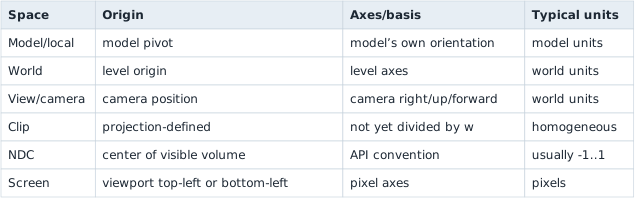
Never add values from different spaces. world_position + model_offset is valid only after the model offset has been rotated/scaled into world space.
Section: What a matrix actually does.
A matrix is a rectangular table of numbers. By itself that is just storage. Matrix-vector multiplication turns it into a transform: multiply each row by the point components and add the products to make one output component.
Code example. The surrounding prose explains this example; the full lesson contains the exact code.
To produce one number of the output, walk one row of the matrix alongside the point, multiply each pair, and add the results:
Code example. The surrounding prose explains this example; the full lesson contains the exact code.
As boxes, one row multiplied term by term against the point and added:
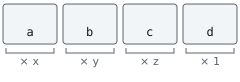
Do that once per row and you have the whole output point. For a 4 times 4 matrix that is four multiply-and-add passes. Nothing more mysterious is happening.
Every transform a renderer uses is just a choice of numbers in those rows. Ones down the diagonal and zeros elsewhere copy the point unchanged. Twos in the first three diagonal entries, with the final diagonal entry still 1, double the spatial coordinates while keeping w equals 1; that scales the model. The d entry is added no matter what the input was, which is exactly what moving something requires — and it is why a 3D point is carried as four numbers rather than three. That trailing 1 exists to give d something to multiply.
So a matrix is a compact way of writing “here is how to work out the new coordinates from the old ones.” Multiplying two matrices together produces a single matrix that performs both operations, one after the other.
You do not need to memorize sixteen formulas to use one carefully. Start with the promise:
Code example. The surrounding prose explains this example; the full lesson contains the exact code.
Matrix layout matters. Some engines store rows next to each other; others store columns next to each other. Some math libraries multiply vectors on the left and others on the right. A transposed or wrongly ordered matrix can produce believable-looking nonsense, which is why we verify it by moving the camera along one axis at a time.
Transform order matters too. Rotation followed by translation usually differs from translation followed by rotation. In plain English, “turn the model around its own origin, then place it in the world” is not the same operation as “place it, then turn the whole world-space position around the origin.” Matrix multiplication records that order, so swapping two matrices is not a harmless style change.
For one common column-vector convention, the complete transform is written:
Code example. The surrounding prose explains this example; the full lesson contains the exact code.
The rightmost operation happens first. A row-vector engine may write the reverse order. “Row-major versus column-major” describes storage, while “row vectors versus column vectors” describes the multiplication convention; people often mix up these two separate choices.
Section: Transforms: placing an object in the world.
A model stores its points relative to its own centre. To draw the object, the engine carries those points into the world in three steps, in this order:
Scale: multiply every coordinate by the scale factor.
Rotate: turn the points around the object’s centre.
Translate: add the object’s world position.
Rotating by an angle θ around the vertical z axis changes only x and y:
Code example. The surrounding prose explains this example; the full lesson contains the exact code.
Take a crate whose model has a corner at (1, 0, 0). Scale it by 2, turn it 90 degrees about z, and place it at (10, 5, 0). For 90 degrees, cos is 0 and sin is 1:
Code example. The surrounding prose explains this example; the full lesson contains the exact code.
The crate’s centre, (0, 0, 0) in the model, lands at (10, 5, 0), and the corner ends up 2 units from it along +y, which is where a 90 degrees turn sends the corner that started along +x.
Objects can be built from parts. A tank has a turret, and the turret has a gun barrel. Each part stores a local transform, its position and turn relative to its parent, and the engine finds its world position by applying its parent’s transform to those local numbers. Put the tank at (10, 5, 0), turned 90 degrees, with the turret 2 units along the tank’s own front and 1 unit up, so the turret’s local position is (0, 2, 1):
Code example. The surrounding prose explains this example; the full lesson contains the exact code.
The turret’s stored numbers, (0, 2, 1), are the same in both lines. Only its world position changed, because its parent turned. Give the barrel a local position of (0, 1, 0) inside the turret. Inside the tank that is (0, 2, 1) + (0, 1, 0) equals (0, 3, 1), and with the tank turned 90 degrees the world position is ( minus 3, 0, 1) + (10, 5, 0) equals (7, 5, 1).
This matters when you read a game’s memory. A child object often stores only its local numbers, so an overlay that wants a world position has to apply the parent’s transform, then the grandparent’s, up to the root. Reading the local numbers alone gives the right answer only for an object with no parent.
Each of these three steps is one matrix, and multiplying them gives one matrix per object, its world matrix (some libraries call it the model matrix). A child’s world matrix combines its parent’s world matrix with its own local matrix, in the order that the library’s convention requires, as noted above.
Section: Two copies of a transform.
Many engines, Bevy among them, keep two copies of every object’s transform. The local transform is the one game code edits. The world transform is derived from it: once per frame, in a step the engine runs late in the frame (Lesson 6.8), it multiplies each object’s local transform by its parents’. The local copy is the source, and the world copy is a cached answer.

Take the turret of the tank above, at (10, 7, 1) in the world while the tank sits at (10, 5, 0), not turned. In frame 20 a movement system adds 1 to the tank’s x. The turret’s local (0, 2, 1) does not change at all, and its world copy is not rebuilt until the engine’s late step:
Narration: Reading a child’s cached world transform before the parent update propagates can place a marker one update behind the moving object.

A system that reads the turret’s world position between the second and third rows gets the previous frame’s answer. A tank that moves 60 units a second advances 60 times (1 divided by 60) equals 1 unit in a frame, so a marker drawn from the stale copy trails the turret by exactly 1 unit. A system that needs the new value in the same frame has to run after the rebuild, or work out the world position itself from the local numbers, as above.
Two facts follow for memory work. While the tank drives, the turret’s local numbers stay the same and its world numbers change, so a scan for “the turret’s position” whose value changes with every move has found the world copy. And writing to the world copy changes nothing that lasts, because the next rebuild overwrites it from the local transforms. To move the object, write the source.
Section: Why 3D graphics uses four numbers for a 3D point.
A 3D translation cannot be represented by an ordinary 3 times 3 linear matrix because linear transforms must keep the origin fixed. That restriction is easy to confirm for yourself: multiplying any 3 times 3 matrix by the point (0, 0, 0) multiplies every entry in the matrix by zero, so the answer is always (0, 0, 0) again. No arrangement of nine numbers can shift the origin somewhere else — and shifting everything by a fixed amount is precisely what translation means. Homogeneous coordinates add a fourth component so translation fits into the same matrix pipeline as rotation and scale:
Code example. The surrounding prose explains this example; the full lesson contains the exact code.


A translation matrix affects the position because its w is 1, but it does not move a direction because its w is 0. This distinction is mathematical, not just extra padding.
After projection, (x, y, z, w) also represents the same Euclidean point as (kx, ky, kz, kw) for any nonzero k. Dividing by w chooses the familiar form where the last component is one.
A 4 times 4 view-projection matrix commonly combines the camera and projection steps. The transformed w value helps determine whether a point is in front of the camera.
A perspective projection fills w with the point’s depth, so dividing by w makes distant things small: an object twice as far away covers half as much screen. A point behind the camera gets a negative w, and dividing by it still gives ordinary-looking coordinates with both signs flipped, so world-to-screen code rejects a w at or below a small positive threshold before it produces pixels. The region such a camera can see is a frustum, a pyramid with its tip at the camera that widens with distance. Its vertical field of view fov_y and the aspect ratio width / height set how much of the view space fits on screen, through two scale factors:
Code example. The surrounding prose explains this example; the full lesson contains the exact code.
The angle must be in radians. A smaller field of view gives a larger scale, so the view zooms in: at 90 degrees, tan(45 degrees) equals 1 and y_scale equals 1; at 60 degrees, tan(30 degrees) approximately 0.577 and y_scale approximately 1.732. The division by aspect exists because a screen’s half-width is aspect times its half-height; without it a widescreen picture is squashed sideways instead of showing more of the scene. Lesson 7.9 derives both formulas and the projection matrix that uses them, starting from the view-space points this lesson produces.
Section: Orthographic projection: no shrinking with distance.
An orthographic camera does not divide by depth. It looks at a box-shaped volume, and an object has the same size at any depth. Two-dimensional games use it, strategy games use it so every tile keeps its size, and editors and shadow maps use it. Its settings are the size of the box, not a field of view.
Say an orthographic camera shows a region 20 world units wide and 15 tall, centred on (0, 0), on an 800 times 600 screen. Across, that is 800 divided by 20 equals 40 pixels per unit, and down it is 600 divided by 15 equals 40, the same, so nothing is stretched. A point at (5, 3) lands at:
Code example. The surrounding prose explains this example; the full lesson contains the exact code.
Move the point nearer or farther and (600, 180) does not change. Zooming changes the box instead: showing 10 units across, not 20, gives 800 divided by 10 equals 80 pixels per unit, and the same point lands at (400 + 5 times 80, 300 minus 3 times 80) equals (800, 60), at the right edge of the screen.
The reverse also works, because nothing was divided. A click at pixel (600, 180) is the world point ((600 minus 400) divided by 40, (300 minus 180) divided by 40) equals (5, 3). Turning a cursor position into a world position is the first step of picking, which Lesson 7.5 builds on.
The last step turns normalized coordinates, which run from minus 1 to 1, into pixels, flipping y because screen rows count downward:
Code example. The surrounding prose explains this example; the full lesson contains the exact code.
A game with several cameras, such as a split screen with a minimap, does that once per camera inside the camera’s own viewport, with that viewport’s aspect: a 960 times 1080 half of a 1920 times 1080 window has aspect 960 divided by 1080 equals 0.889, and giving it the window’s 1920 divided by 1080 equals 1.778 squeezes its picture to 0.889 divided by 1.778 equals 0.5 of its width; Lesson 7.9 works through both.
Section: Texture coordinates: the same top-or-bottom choice.
A texture is read with UV coordinates. u runs across the picture and v runs down it or up it, both from 0 to 1, whatever the picture’s size in pixels. APIs disagree about where v equals 0 is. Direct3D, Vulkan, Metal, WebGPU, and the glTF model format put it at the top row. Classic OpenGL puts it at the bottom row.
ExampleOne pixel, two conventions
Take a 256 times 256 texture and the pixel in column 64 and row 32, counting rows from the top.

A model made for one convention shows its texture upside down in an engine that expects the other. The repair is the same flip, v becomes 1 minus v, applied when the model is exported or loaded, and it is the first thing to try when a texture, or a replaced texture from Lesson 10.4, appears upside down.
Section: Coordinate sanity checks.
Before using values:
Code example. The surrounding prose explains this example; the full lesson contains the exact code.
Also verify:
standing still gives stable coordinates;
moving along one axis changes the expected field;
distance grows and shrinks sensibly;
yaw wraps where expected;
points behind the camera are rejected.
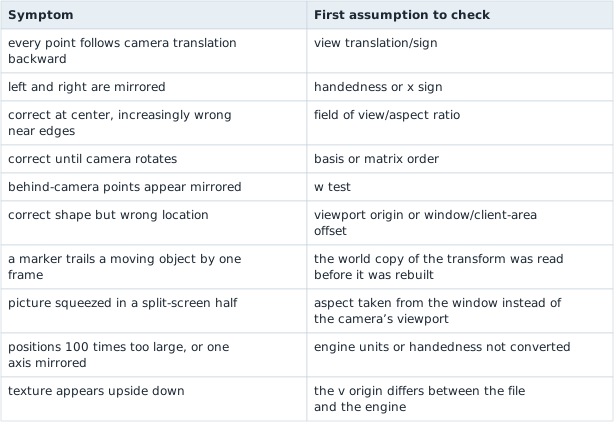
When a transform fails, identify the earliest wrong space:
Section: How the coordinate spaces connect.
Do not memorize every engine’s coordinate system. Remember the pipeline:

Later lessons reuse this math in offline observer tools.