Section: A wrapper records and forwards draw calls.
Lesson 7.2 showed that a draw submission combines geometry with the graphics state already in effect. To learn which submissions correlate with an entity, we need to observe calls without changing the frame they produce. OpenGL applications call functions such as glDrawElements. First consider a whole-call wrapper: it sits between the caller and the real function:
Code example. The surrounding prose explains this example; the full lesson contains the exact code.
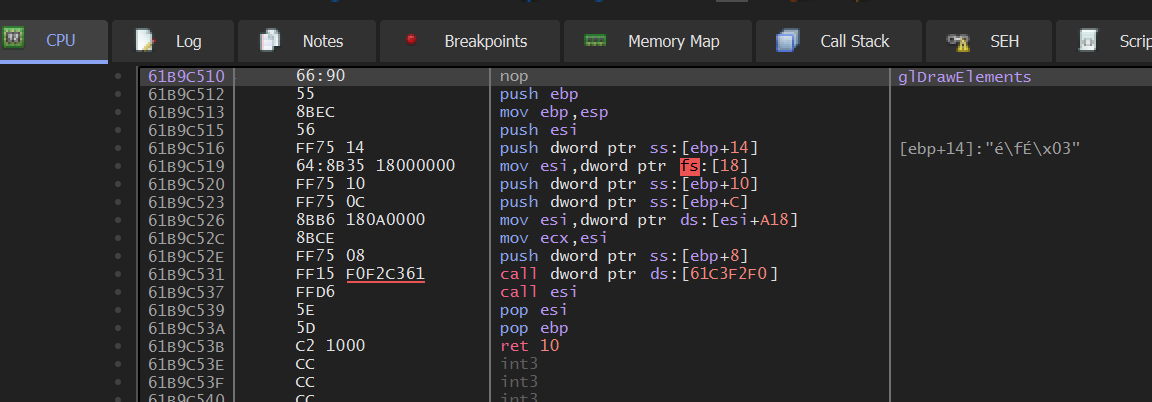
If the game makes a draw with count equals 9, the wrapper records that value and then passes the same arguments to OpenGL. The picture should remain identical; only the separate observation log changes. The wrapper must preserve the exact A B I, application binary interface, and forward every normal call. The pinned Urban Terror implementation in Lesson 8.8 instead detours an instruction inside glDrawElements, so it has a narrower restoration opportunity. Keep that difference visible when comparing the two designs.
Section: What an indexed draw actually requests.
glDrawElements(mode, count, element_type, indices) asks OpenGL to consume an ordered sequence of vertex indices:
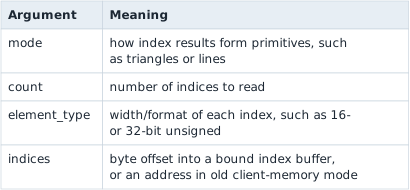
The call does not directly identify a model. OpenGL combines those indices with the currently bound vertex attributes, textures, transforms, and other state. One character may require several draws—body, head, weapon, shadow—and one draw may contain many instances or a batch of unrelated objects.
In brief: A draw request identifies submitted geometry and bound state, not one complete game object.
With GL_TRIANGLES, every complete group of three indices describes one submitted triangle. The indices may repeat vertices, and some triangles may be degenerate, clipped, back-face culled, or hidden by depth. Therefore:
Code example. The surrounding prose explains this example; the full lesson contains the exact code.
For example, this index buffer holds nine indices, so a call with count equals 9 submits 9 divided by 3 equals 3 triangles:
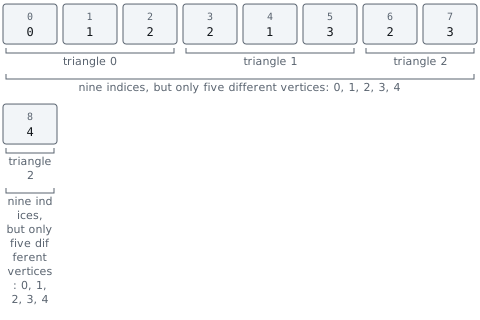
The indices parameter is especially easy to misread. If an element-array buffer is bound, a small value such as hexadecimal 1 2 0 is an offset into G P U, graphics processing unit,-managed buffer state, not a process pointer that should be dereferenced.
Section: C P U, central processing unit, submission and G P U execution overlap.
The C P U usually records commands faster than the G P U completes them. A draw call returning does not mean its pixels are finished. Reads that force the G P U to catch up can stall both processors. The hook sees submitted work: it runs when the C P U queues a draw, not when the G P U finishes its pixels.
Code example. The surrounding prose explains this example; the full lesson contains the exact code.
This overlap explains why a debugger pause or synchronous query can create a much larger performance change than its own instruction count suggests.
Section: A hook sits on the program’s critical path.
The render thread has a deadline: finish enough work for the next frame. A hook adds work to a path that may execute thousands of times per second. Even memory-safe code can cause stutter if it allocates, waits for a lock, formats strings, or writes files there.
Narration: A tiny delay repeated for thousands of draws can consume the frame budget. Move formatting and disk writes away from the render thread.
Split the design into two rates:
the capture path copies a tiny fixed-size sample and returns immediately;
the analysis path runs later on a worker and may aggregate, label, or save bounded results.

The render thread’s work ends at try_send; everything slow happens on the worker’s schedule. Measure both dropped samples and time spent in the hook. A dropped sample leaves a gap in the log, while blocking slows the very frames you are trying to measure.
Section: Write the function type.
For a 32-bit Windows OpenGL 1.x target, the calling convention is significant:
Code example. The surrounding prose explains this example; the full lesson contains the exact code.
The exact signature comes from the OpenGL A P I, application programming interface,, not from guessing registers.
In an older fixed-function renderer, transforms and arrays may be ordinary OpenGL state. In a modern renderer, shader programs and buffer objects carry the same roles. Hooking the draw call still works, but the state needed to explain a draw changes with the A P I version and engine.
Section: Keep the original function.
The wrapper needs a way to reach the real OpenGL function after it has intercepted a call. Store the resolved function pointer once during setup; every draw can then forward through that saved pointer without another lookup on the render thread:
Alternative: A forwarding wrapper is a receptionist with the original extension saved: recording the request must not route it back through the receptionist indefinitely.
Code example. The surrounding prose explains this example; the full lesson contains the exact code.
Initialization must resolve and store the real function before the wrapper can forward calls. Avoid resolving it recursively through your own wrapper.
The failure is recursion: a function calls itself. Recursion is useful when each call handles a smaller case and a base case eventually returns. Here there is no smaller case. If ORIGINAL_DRAW_ELEMENTS accidentally points to draw_elements_hook, the call path is:
Code example. The surrounding prose explains this example; the full lesson contains the exact code.
No call reaches OpenGL, so no call can return. Each nested call keeps a stack frame for its return address and local values, as Lesson 3.8 explained. The thread’s finite stack (often 1 MiB by default for a Windows executable, but configurable) eventually fills and Windows raises a stack-overflow exception, usually on the first draw. Resolving the real function before installing the wrapper breaks this cycle. The failure table at the end of the lesson calls this “Infinite recursion.”
Section: Forward first.
Begin with a transparent wrapper:
Code example. The code’s comments explain: 🔁 SAFETY: the wrapper preserves the A P I signature and forwards the exact arguments supplied by the original caller.
Run the game and verify that rendering is unchanged. Only then add the code that copies samples.
Section: Do not log every call to disk.
Draw calls can occur thousands of times per frame. Synchronous file output inside the hook will destroy performance and can cause re-entry problems.
Use a bounded channel and allow drops:
Code example. The code’s comments explain: 🎯 In the hook, observe the state immediately before forwarding the call:
A worker thread can aggregate samples later. If the channel is full, losing a sample is better than blocking the render thread.
Section: Classify with experiments.
The count argument may correlate with a model in one exact build:
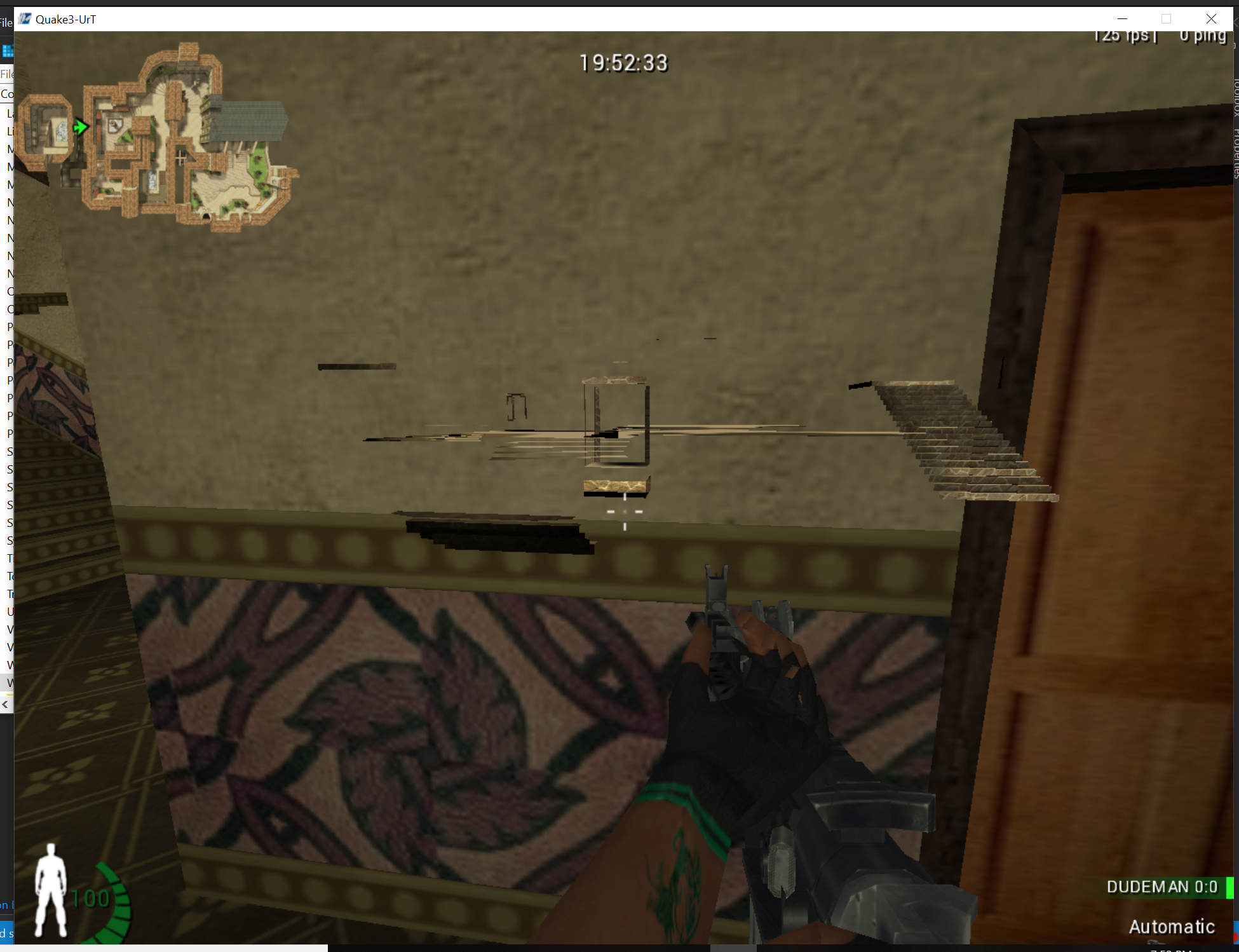
But count alone is fragile. Different objects can share a vertex count, and model updates can change it.
Collect features such as:
draw mode;
element count;
bound texture;
shader or fixed-function state;
model/view transform;
call site.
Then change one visible object and compare the samples.
Capture the smallest feature vector that can answer the current question:
Code example. The surrounding prose explains this example; the full lesson contains the exact code.
call_site distinguishes engine submission paths, but compiler inlining and updates can change it. texture can identify a material in one scene, but skins, quality settings, and atlases can change it. A feature can be trusted to identify a category only after changing one thing at a time — the model, the map, a graphics setting — leaves it pointing at the same objects.
This is a classification problem. A threshold such as count greater than 500 separates the examples you observed, not necessarily the concept “player.” Test it against weapons, detailed scenery, menus, different models, and different graphics settings. Report false positives (something your classifier caught that is not a player) and false negatives (a player your classifier missed) instead of quietly turning a correlation into a definition.
Section: Shaders turn vertex records into pixels.
A shader is a small G P U program invoked many times in parallel. The vertex shader and fragment shader of Lesson 7.2’s pipeline are the two central here: the first turns one vertex into a clip-space position plus values to interpolate, and the second turns one covered sample into a color, depth, or other output.
Values such as texture coordinates and normals are interpolated across a triangle. The fragment shader usually does not receive the original vertex value. This is why a draw’s texture, program, uniforms, and vertex layout are part of its identity.
Older fixed-function OpenGL calls hide these programs behind predefined state, but the pipeline still performs equivalent transformations and color calculations.
Section: What a shader reads.
A shader works only with what the draw has bound for it:
Interpolated inputs, the per-vertex values blended across the triangle.
Uniforms, values that are the same for every invocation of one draw, such as the matrices, a light’s colour, or the time since the game started.
Textures and buffers, images it can sample at a (u, v) position and arrays of data it can read, bound before the draw as part of the state from Lesson 7.2.
A small fragment shader that turns a texture grey shows how little a shader can be. It weights the red, green, and blue of the pixel by how bright the eye finds each:
Code example. The code’s comments explain: Fragment shader, in GLSL: turn the texture's colour into grey.
For a pixel of (200, 100, 50), the grey is 0.299 times 200 + 0.587 times 100 + 0.114 times 50 equals 59.8 + 58.7 + 5.7 equals 124.2, so the pixel becomes about (124, 124, 124). A shader that reads the time as a uniform can animate: a brightness of 0.5 + 0.5 times sin(time) is 0.5 at time 0 and 1.0 at time 1.5708 (a quarter of a turn in radians), and it repeats.
Shaders are written in a shading language: GLSL for OpenGL, HLSL for Direct3D, WGSL for WebGPU. A driver, or the engine ahead of time, compiles them to the G P U’s own instructions. Engines that support several graphics APIs often write a shader once and translate it for each.
Each on/off switch in a shader’s source doubles the programs that can be compiled, so three switches give 2 times 2 times 2 equals 8 variants. Instancing draws many copies of one mesh in one call, with a 4 times 4 matrix of 16 four-byte floats, 64 bytes, per copy. A compute shader does not draw at all: it reads and writes buffers for work such as particles. And every draw costs C P U time even when the G P U’s share is tiny: at 5 microseconds each, 10,000 draws take 50 milliseconds, three 16.67 milliseconds frames. If halving the window’s pixel count leaves the frame time unchanged, the C P U is the limit. Lesson 7.11 works through these beside the bound state that each Direct3D draw carries.
Section: Restore graphics state.
OpenGL is a state machine: a call changes settings that remain active until another call changes them. Two depth settings show how much a later draw inherits:
glDepthRange(near, far) controls where a fragment’s depth lands in the depth buffer after projection, by remapping the normalized -1..1 range onto whatever window-space interval you pass in. The default call is glDepthRange(0.0, 1.0): keep every fragment’s real depth. Calling glDepthRange(0.0, 0.0) instead collapses that mapping to a single point — every fragment’s stored depth becomes 0.0, the value reserved for the nearest possible surface, no matter how far away the vertex actually was. GL_LEQUAL passes a fragment whose depth is less than or equal to the stored depth, and no stored depth is below 0.0, so a collapsed fragment passes that test. A strict test such as GL_LESS would reject it wherever 0.0 is already stored, for example from an earlier collapsed draw. Switching glDepthFunc to GL_ALWAYS removes the comparison altogether: the test passes unconditionally, whatever is already in the buffer. The wrapper makes both calls, flattening the depth and then skipping the test, so highlighted geometry is drawn through walls however the game left its depth function.
The exact-build Urban Terror 4.3.4 wallhack applies that combination to player-sized draws from a cave inside glDrawElements. The cave saves the flags and every general-purpose register before calling its helper, because the interrupted OpenGL function expects them unchanged; it fills the sixth replaced byte with a nop so no fragment of the old instruction remains; it restores normal depth state on the next non-highlighted draw; and it is switched off before its code patch is removed, so GL_ALWAYS is never left active. It is in Lesson 8.8, after the D L L, dynamic link library, loading and detour lessons that its installation depends on.
State restoration must match what was changed. A robust typed wrapper queries or tracks the previous depth function, depth range, enabled client arrays, color, and bindings. Restoring guessed “defaults” works only until another legitimate render pass enters with different state. A middle-of-function cave, like that one, has fewer safe options, which is a real limitation of that interception point rather than an implementation detail to ignore.
Section: Diagnose common failures.
Common draw-call failures
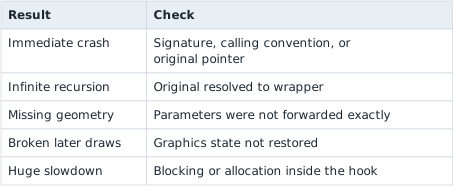
The first success is not a visual effect. It is a transparent wrapper that produces a bounded stream of samples while the game draws normally.