Section: An archive contains names, not trusted paths.
The texture and unit mods in Lessons 10.4 and 10.5 are easy to inspect when they remain small. To share or install many such files, we may put them in an archive. An installer must decide where each archived name will land before copying any bytes into the game folder.
A .zip can claim that an entry is named:
Code example. The surrounding prose explains this example; the full lesson contains the exact code.
It can also claim:
Code example. The surrounding prose explains this example; the full lesson contains the exact code.
If an installer joins those names directly onto the chosen mod directory.. or an absolute path can escape the folder. Joining is not a containment operation — it is string concatenation with a separator, and it will happily build a path that leads somewhere else entirely:
Code example. The surrounding prose explains this example; the full lesson contains the exact code.
Look closely at what makes this dangerous. The joined path does begin with the mod folder, so a check like “does this start with my destination?” passes. The escape happens later, when the operating system resolves each .. while opening the file. Absolute entry names are worse still: joining an absolute path onto a base discards the base completely, so the result is simply whatever path the archive asked for.
Predict first
An installer joins each entry name onto C:\Games\Wesnoth\mods and accepts the result only if the joined text starts with that folder.
Does that check stop the entry name textures/../../save.dat?
Answer: No: the text starts with the mod folder, yet the file lands in C:\Games\Wesnoth. textures goes one folder down, the first .. comes back to mods, and the second .. climbs to C:\Games\Wesnoth. The prefix check only read the text, which still begins with the mod folder.

Each .. climbs one level, so three of them undo the three folders below the drive root, and every part after that walks down a path the mod folder never contained. Counting the depth part by part catches it at the first .. that would go above the mod folder.
The safe rule is therefore simple: every extracted file must remain beneath one destination root after validation.
Containment is stronger than removing suspicious text. Paths can use repeated separators, mixed slash styles, drive prefixes, device names, case differences, links, or components that normalize away. Parse the path into components and accept only an explicitly safe relative form.
Also distinguish the planned path from the filesystem object reached at write time. A directory inside the destination can be replaced by a link or reparse point after validation. For a local mod installer, extract into a newly created private staging directory, reject links, avoid following reparse points, and perform final moves only after the whole staged tree passes inspection.
A safe installer treats extraction as a pipeline with a decision point before anything reaches the live game folder:

Failure at any earlier stage discards the staged copy instead of leaving a half-installed mod behind.
Section: Reject dangerous path components.
The zip crate exposes enclosed_name, which rejects names that would escape the extraction root. The following stage function demonstrates the order of checks on a newly created directory beneath a private parent controlled by the installer. It never writes into the working game directory. A caller must discard this staging directory on any error and perform the later manifest, format, and replacement checks before installation:
Code example. The code’s comments explain: The caller supplies a fresh name under its private staging parent. ZIP names use `/`. Reject `\` so the same name cannot later be interpreted as a Windows separator during installation. `create_new` rejects a duplicate output name or an existing link. Read one byte past the limit so an oversized entry is detected, not silently truncated into an apparently valid staged file.
The per-entry limit, 64 times 1,024 times 1,024 equals the large number shown bytes (64 MiB), bounds one decompressed file; Urban Terror’s .pk3 asset archives are ZIP files under another extension. take(MAX_ENTRY + 1) allows one extra byte solely to detect an oversized entry. A simple take(MAX_ENTRY) would silently write a truncated file and could make the archive appear to have been extracted. The declared size is checked before copying and compared with the actual byte count afterward. The total cap and entry-count cap address different problems: many individually small entries can still exhaust disk space or time.
Narration: A reader capped at the exact limit can hide excess bytes. Reading one extra byte lets the installer reject oversize output instead of accepting truncation.
This stage function demonstrates bounded extraction, not the whole mod installer. Before moving its files into the game, resolve case-insensitive collisions on the target filesystem, validate asset formats and the manifest, show the replacement plan, and retain originals for uninstall.
Section: Validate more than the path.
Before extraction, set policy for:
maximum number of entries;
maximum size per file;
maximum total uncompressed size;
allowed extensions;
duplicate output names;
symbolic links or reparse points;
case-insensitive name collisions on Windows;
existing files that may be replaced.
An archive with 50,000 tiny files can cause trouble even if every path is enclosed. Limits are part of parsing.
Apply limits before and during extraction. Declared compressed and uncompressed sizes are claims from the archive; count the bytes actually written and maintain a checked running total. Stop with an error if either the declaration or the real output crosses policy.
In brief: Check actual output sizes as well as declared sizes, and bound the archive’s total work before installation.

The declared size is checked first because it costs nothing, but only the counted bytes are trusted: an entry that declares 10 bytes and then produces more is caught by the count, not by the declaration.
Section: Stage, inspect, then install.
Do not unpack directly over a working game directory. Use this transaction:
Alternative: Staging is an inspection table: unpack and validate there before carrying approved files into the working game directory.
create a new staging directory;
extract under strict limits;
parse the mod manifest;
hash every staged file;
verify allowed locations and formats;
show the user the planned replacements;
back up affected original files;
move the validated files into place;
record an uninstall manifest.
If validation fails, delete only the known staging directory. The game remains unchanged.
Section: Treat file extensions as hints.
Renaming an executable to grass.png does not make it an image. For formats you understand, inspect the magic bytes — fixed bytes at the start of a file that identify its format — and parse headers:
Code example. The surrounding prose explains this example; the full lesson contains the exact code.
The escaped string in that code is eight bytes, and each one is there to catch a particular kind of damage:
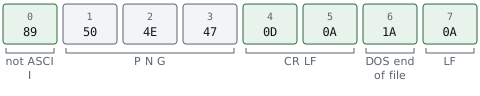
hexadecimal 8 9 is 8 times 16 + 9 equals 137. A S C I I, the standard table of character codes, stops at 127, so no plain text file starts with this byte, and a transfer that strips the top bit (worth 128) from every byte turns it into 137 minus 128 equals 9, hexadecimal 0 9, which no longer matches. Bytes 1 to 3 are the A S C I I codes for P, N, and G, so the format’s name is readable in a hex editor. 0D 0A is a Windows line ending (carriage return, line feed) and the final 0A is a Unix one: a transfer that converts line endings in either direction inserts or deletes a byte, so the damage is caught before any pixels are decoded. hexadecimal 1 A is the character old DOS tools treated as the end of a text file, which stopped them printing the binary data after it.
Magic bytes are still not a complete security check, but they catch obvious mismatches. A real image decoder should validate dimensions and allocation limits before loading pixels.
Section: Test the installer with hostile fixtures.
Create tiny archives in your own test suite containing:
../escape.txt;
an absolute path;
two names differing only by letter case;
a zero-byte file;
a declared huge file;
a valid nested texture;
an interrupted temporary output.
Success means valid files land in staging and every invalid archive fails without changing the game. This is defensive engineering for a file format the program does not control. 🛡️