Section: Why one edited byte breaks the save.
The book’s invented GSAV format makes the byte-integrity question concrete. Its offline character Nia has level 3, 250 gold, and this complete 19-byte save:
Code example. The surrounding prose explains this example; the full lesson contains the exact code.
The last four bytes are a checksum: a number computed from the other bytes and stored beside them, so the loader can detect damage. This format uses the simplest checksum there is. It adds up every byte from offset 0 to the byte just before the checksum and stores the total as a little-endian u32. For Nia’s save, bytes 0 to 14 add up like this:
Code example. The surrounding prose explains this example; the full lesson contains the exact code.
The stored checksum is the same number:
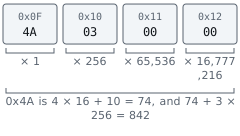
The loader repeats that sum every time it opens the file:


Now type gold over as 9,999 and change nothing else. 9,999 is 39 times 256 + 15, and 39 equals 2 times 16 + 7 equals hexadecimal 2 7 while 15 equals hexadecimal 0 F, so 9,999 is hexadecimal 2 7 0 F and its little-endian bytes are 0F 27 00 00.
Predict first
The last four bytes still say 4A 03 00 00, which is 842. What does the loader do with the edited file?
Answer: It refuses the save as corrupt. The old gold bytes FA 00 00 00 added 250 to the total; the new 0F 27 00 00 add 15 + 39 equals 54. The total becomes 842 minus 250 + 54 equals 646 while the stored checksum still says 842, so the loader refuses the file.

The fix is to do what the game does when it saves: recompute the checksum. For 1,250 gold, the gold bytes E2 04 00 00 add 226 + 4 equals 230 instead of 250, so the total is 842 minus 250 + 230 equals 822. That is 3 times 256 + 54, and 54 equals 3 times 16 + 6 equals hexadecimal 3 6, so the checksum is hexadecimal 3 3 6, stored as 36 03 00 00: exactly what save B contained. The complete edited file is:
Code example. The surrounding prose explains this example; the full lesson contains the exact code.
A plain sum has a blind spot: adding numbers in a different order gives the same total, so swapping two bytes goes unnoticed. The 64,000 example above is that swap: 00 FA 00 00 still adds up to 250, so the file loads. That is why real formats more often use a CRC-32, a 32-bit checksum designed to change when bytes are reordered, or a hash. The editing procedure stays the same: work out which bytes are covered, which algorithm runs, where the result is stored, and in which byte order, as listed in Lesson 10.2. If the check uses a secret key, as a MAC does, or a digital signature, it cannot be recomputed without that key; Lesson 10.10 explains why.
Section: A hash and a signature answer different questions.
The manifest in Lesson 10.7 records the bytes before and after a mod installation. Its hash detects an unexpected later change. To decide whether a downloaded game or mod came from the publisher you expected, we need a different question: who approved these bytes?
A SHA-256 hash is a fingerprint of exact bytes. Change one byte and the fingerprint should change dramatically. A saved baseline can answer:
“Are these bytes identical to the bytes I recorded earlier?”
It cannot answer who created the original file. A hash does not create trust; it only moves trust from wherever you obtained the hash onto the bytes now on your disk.
That distinction has practical teeth. If you download mod.zip and mod.zip.sha256 from the same page, and someone is able to change that page, they can change both — and the two will agree perfectly:

Verification reports success and has proven nothing. A hash is only worth checking when it reached you by a route the attacker does not control: a signed release, a genuinely separate channel, or a value you recorded yourself from a copy you already had reason to trust.
An Authenticode signature connects the file’s digest to a signing certificate and asks Windows to apply a trust policy. It can help answer:
“Does this file still match a signature made by a publisher whose certificate chain Windows trusts under this policy?”
Neither answer proves that software has no bugs or that you personally intended to install this version.
Section: How a signature is made and checked.
A digital signature is a number computed from a file’s hash with a secret key, which anyone can check with a matching key that is not secret. It fixes the compromised-page problem above: an attacker who controls the page can replace the file and the hash, but cannot produce a signature that checks out, because they do not have the secret.
That needs public-key cryptography, where keys are made in pairs. The private key never leaves the publisher. The public key is given to everyone; for Authenticode it travels inside the publisher’s certificate. The pair has one property that makes everything work: a signature made with the private key is accepted by the matching public key and by no other, and knowing the public key does not let anyone work out the private one.
Alternative: The signing key makes the approval mark; the matching public key checks it. Checking does not require handing everyone the signing secret.

Walk the two ways it can fail. Change one byte of the file and your machine computes a different hash, so the signature no longer matches it. Replace the signature with one the attacker made using their own key pair, and it only checks out against the attacker’s public key, whose certificate Windows does not trust.
A comparison often used for public keys is an open padlock: you hand out as many as you like and keep the only key, so anyone can lock a box for you and only you can open it. That picture describes encrypting a message to someone. A signature runs the other way: only the private-key holder can make one, and anyone can check it. Nothing is hidden, either; a signed file stays perfectly readable. The signature only proves which key approved these exact bytes.
Why can nobody forge one? Real keys are numbers hundreds of digits long, chosen so that checking a signature takes a fraction of a millisecond while making one without the private key would take longer than the age of the universe. The same kind of gap shows up with small numbers. Multiplying 7 times 17 equals 119 is quick. Given only 119, finding the two numbers means trying divisors: 2 fails, 3 fails, 5 fails, and 7 gives 119 divided by 7 equals 17. Checking a proposed answer is one division. RSA, a common signature scheme, builds its keys on this gap between multiplying and factoring, with numbers so large that the trying never finishes.
The same machinery sits behind the padlock icon in a web browser, driver signing in Lesson 12.7, and a console’s secure boot in Lesson 13.6. Its limits are the ones this lesson keeps returning to: a signature says who approved the bytes, not that the bytes are safe, and if a publisher’s private key is stolen, the thief can sign anything until the certificate is revoked.
Section: Unsigned does not mean malicious.
Many open-source game builds are unsigned, self-built, or distributed in archives without Authenticode. Wesnoth, AssaultCube, or Urban Terror files can legitimately report “no embedded signature,” depending on the exact build and distributor.
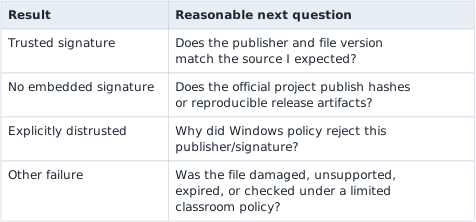
Treat the result as one fact:
Section: WinVerifyTrust returns a status code, not a Result.
The Win32 function returns a LONG. Microsoft’s return-value contract says only exact zero means the requested trust action succeeded. Do not use HRESULT-style “success if nonnegative” logic.
In brief: Interpret each A P I, application programming interface,’s documented return contract; for this trust check, success is exactly zero.
The original helper treats every nonnegative status as trusted, confusing this result with status types whose nonnegative values indicate success. WinVerifyTrust has a different contract: only exactly zero reports success.
Before: accept every nonnegative trust status
Code example. The surrounding prose explains this example; the full lesson contains the exact code.
Use the function’s own success contract, and keep every unknown nonzero status visible as a failure. A successful offline check still has the policy limits described below.
Improved code
Code example. The surrounding prose explains this example; the full lesson contains the exact code.
Show the diff
Code example. The surrounding prose explains this example; the full lesson contains the exact code.
Takeaway: do not reuse another A P I’s success test just because both results are integers.
Known nonzero values help us print plain-English explanations. Unknown statuses remain failures and are printed in hexadecimal for investigation.
Section: Trust verification has state and policy choices.
WINTRUST_FILE_INFO points to the file path. WINTRUST_DATA describes how the trust provider should work:
WTD_UI_NONE prevents pop-up dialogs;
WTD_CHOICE_FILE selects the file-info union member;
WTD_STATEACTION_VERIFY begins verification and may create provider state;
WTD_STATEACTION_CLOSE releases that state afterward;
WTD_DISABLE_MD2_MD4 refuses two obsolete digest algorithms;
WTD_REVOKE_NONE skips revocation checking in this offline classroom run;
WTD_CACHE_ONLY_URL_RETRIEVAL avoids network retrieval in this reproducible lab.
Those last two choices have a tradeoff: the result does not include a fresh revocation check. A release pipeline with network access should define and test a stricter revocation policy instead of treating this offline classroom result as the final word.
Narration: An offline trust result cannot include a fresh revocation check. Record that limitation alongside the result rather than silently treating it as current approval.
Section: Build the combined inspector.
run calls these in order; WinVerifyTrust itself is called twice, once to verify and once to release the state the first call created:

Additional detail: Complete lab source: signature_check.rs.
Code example. The code’s comments explain: SAFETY: both structures contain valid sizes and pointers that remain alive through the call. UI is disabled and the file path is terminated. SAFETY: closes provider state created by the verification call. The same live structures and action identifier are supplied once more.
Section: Why keep the wide path alive?.
PCWSTR is only a pointer. It does not own the UTF-16 vector. wide_path, file_info, and trust_data all remain local variables until both WinVerifyTrust calls finish, so every pointer stays valid.
This is why the unsafe comment names lifetimes instead of saying only “Windows A P I call.” A useful safety comment explains the exact facts the compiler cannot verify.
Section: Check your installations.
In the Windows V M, virtual machine,, build the checker from windows-labs and give it one EXE path at a time. Record each reported hash beside the exact file and build; the signature result applies only to the file you supplied.
Terminal window
Code example. The surrounding prose explains this example; the full lesson contains the exact code.
A SHA-256 value belongs to one exact file, so it means something only next to the game version and download source it came from. Re-run the tool after installing a mod or update: every file that changed gets a new hash, which is expected for the files the mod or update replaced and unexplained for any other.
Some Windows components are signed through catalogs rather than an embedded signature. This lab checks the embedded signature on the selected game EXE. If you expand it to inventory every D L L, dynamic link library, loaded beside the game, add explicit catalog-signature handling instead of reporting those files as simply unsigned.
Combine this lesson with module_inventory: inventory tells you what actually loaded, the hash identifies exact bytes, and Authenticode adds one publisher-trust signal.
The buildable source is signature_check.rs.
References: WinVerifyTrust, WINTRUST_DATA, WINTRUST_FILE_INFO, and Authenticode time stamping.