You do not need to prove that you already know something before you study it. The next lesson starts with the parts of a computer and builds each idea from there. You do not need to look up its missing foundations before you begin.
The lessons in this opening chapter connect four views of one game action: the computer runs instructions, the game checks whether a purchase is affordable, Rust expresses that check and subtraction, and memory holds the changing state. A Windows lab and a gold scan then make those ideas visible. The chapter ends with that first scan; the next chapter follows the value into the code that changes it. Read the sequence as a tutorial; later, the concept lessons are also places to return when an unfamiliar term appears.
Here is one study loop that works well for unfamiliar technical ideas. It is a suggestion, not a requirement: the later lessons explain their subjects directly and do not depend on it, so use it when an idea will not stick and skip it when it does.
Look up the exact part you need.
Close or hide the answer.
Explain the idea in your own words.
Check and correct what you said.

That loop gives you fast feedback. It also prevents a common mistake: reading the same paragraph several times and confusing recognition with understanding.
In brief: Look up, hide, explain, check. Explaining from memory is the real test; rereading only tests recognition.
Section: Choose a goal you can recognize.
Give a study session a specific goal. “Understand game hacking” does not say what you should be able to do afterward. “Explain what I observed after one jump, and distinguish that observation from my guess about its cause” does. You can finish that goal with a short explanation and a repeatable observation; you do not need to understand the entire game first.
Choose a goal that matters to the next task. If you want to follow a gold purchase, learning how to distinguish the stored amount from its display is useful. Collecting unrelated facts about every game engine can wait. As the book introduces code and tools, a goal can become more concrete: run one example, explain its inputs and result, or reproduce one error.
Section: Ask a question small enough to answer.
Broad questions make it hard to tell whether an answer is complete.
❌ Too broad: “How do games work?”
✅ Better: “When I press the jump button, what changes on the screen?”
✅ Better: “If I press jump while the character is standing still, does the character rise before landing again?”
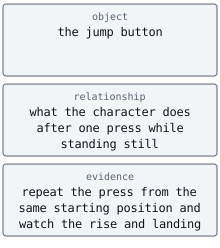
A useful technical question usually names:
the object you are studying;
the relationship you want to understand;
the evidence or example you can check.
The jump question names the action you control, the change you want to observe, and a way to check it: try the same button press while standing still and watch the character. If nothing happens, you have a more useful next question: was the button received, or does this situation prevent jumping? You can investigate one possibility at a time.
Alternative: Treat a question like a bug report. It points at one thing to try, so a small test can answer it.
Write down what you know, what you do not know, and what you are assuming. For the jump question, you know which button you pressed and whether the character visibly rose. You do not yet know whether the game received the input or which grounded-state or cooldown check allowed the jump. “The character was standing on the ground” may be an assumption until you check the starting position. These distinctions keep an attractive explanation from silently becoming a fact.
Section: Check whether the evidence answers your question.
A source can be accurate and still answer a different question. Instructions for another game version or another processor architecture may explain the general mechanism while giving the wrong steps for your experiment. Check the target, version, conditions, and actual claim before using the source.
Prefer evidence you can inspect: the relevant code, the tool’s documentation, or a controlled observation you can repeat. Each has limits. Documentation describes an intended contract; an experiment shows what happened under the conditions you recorded. One successful jump does not establish that jumping works from every position. Several sites repeating the same original claim also do not provide several independent checks.

Consider another explanation before settling on the first one. If a jump fails, perhaps the input was missed, or perhaps the character was already airborne. Reset to a known position and repeat the press, then vary one condition. A useful test produces different predictions for the competing explanations.
Occam’s razor is a useful preference for an explanation that needs fewer unsupported assumptions while still accounting for the evidence. It helps you choose what to investigate first. Simplicity does not prove an explanation true; a more complicated cause may fit a later observation better.
Narration: Checking the cheap explanation first saves time. A missed button press takes seconds to rule out; a theory about a hidden jump condition can take an afternoon.
Section: Use a worked example before making a prediction.
First follow an example whose starting point, action, and result are explained. Suppose a game shows 100 gold. Buying an item for 25 gold leaves 75: subtracting 25 from 100 gives 75. After seeing that worked through, you can predict what a second 25-gold purchase would do, then check in the game. Later lessons use this same visible change to ask where the value is kept and how code updates it.
When you reach a code example, read its explanation before predicting a result. If you use an A I, artificial intelligence, completion or copy a line, explain every accepted line. “It compiles” is useful feedback, but it is not the same as understanding.
Section: Make progress when you get stuck.
An error is information about this attempt. It does not establish that you cannot learn the subject. Keep the exact message or unexpected result, return to the last step you can explain, and reduce the task to one small example. For the jump problem, check one press from one known position before studying the whole movement system.
Change one thing and record what happened. If you keep making the same guess, take a short break, explain the problem aloud, or ask another reader to walk through the example with you.
Section: Ask for debugging help someone can reproduce.
“It does not work” gives another person almost nothing to inspect. A useful help request includes:
what you expected;
what actually happened;
the smallest relevant code;
the exact error message;
the target version and architecture;
what you already tested.
That information turns a complaint into a question someone can reproduce. Here is that list as a request you can fill in and send to a person or an assistant:
PromptAsk for help someone can reproduce
I expected [what you expected]. Instead [what actually happened]. The smallest code that shows it is [the code]. The exact error message is “[the message]”. I am using [the tool or game, its version, and 32-bit or 64-bit]. I already tried [what you tested]. What should I check next? Please say which part of my report your answer depends on.
Ask for the missing observation or explanation directly: “I expected the character to rise from this position; the input was recorded but the position did not change. What should I check next?” When helping someone else, recognize what they already tested and ask a useful question about the remaining gap. Avoid treating a mistake as a judgment about the person.
Section: Use A I as a helper, not as the source of truth.
A I can create practice questions, compare your explanation with supplied source material, simplify a difficult paragraph, or suggest a small test. Give it the actual source, version, and code when those details matter.
Always check important claims against the program, documentation, or source code. If the answer cannot show where a fact came from, treat it as a lead to verify—not as evidence.
Section: Optional study reference.
The study loop at the start of this lesson is optional, and nothing later in the book depends on it. If you want more detail on its steps, this reference expands them: what to do before answering, how to mark a correction, and a routine for one study session.
Additional detail: Optional study reference: answering, correcting, and a short session.
Section: Read the source before answering an unfamiliar question.
If you encounter an unfamiliar idea, read the explanation and its example before trying to answer a question about it. For a detail that depends on a particular tool or version, consult that tool’s documentation too.
Then hide the source and answer without looking at it. This matters because copying a sentence tests your eyes, while rebuilding its meaning tests your understanding.
Suppose a lesson says:
A game’s state is the information that describes what is happening now.
A good answer in your own words could be:
State is what the game currently remembers, such as a character’s health or position.
The wording changed, but the meaning stayed accurate. Do not add a claim the lesson did not support, such as “state is only what I can see on the screen.”
Section: Correct mistakes immediately.
After answering, compare your answer with the source or ask for a correction that uses the source. Mark each important part as:
correct — the meaning matches;
missing — an important part was left out;
incorrect — the answer says something the source does not support;
unclear — the idea may be right, but the wording hides it.
Rewrite only the parts that need work. A correction should tell you why the old answer failed, not merely show a replacement sentence.
If you miss the same question in the same study session, look it up again and retry with different wording. This tests whether you can express the idea in more than one way. If you retry on another day, answer as accurately as you can after reviewing it again. Save repeated weak spots for spaced review.
Practice should include checking and correcting the result; repeatedly rehearsing an incorrect explanation preserves the mistake. Over time, keep a few worked examples and corrected errors that you can return to when the same difficulty appears.
The four marks work as a request to a helper too:
PromptCheck my explanation against the lesson
Here is a paragraph from a lesson: “[paste the paragraph]”. Here is my explanation in my own words: “[paste your answer]”. Using only the paragraph, mark each important part of my answer as correct, missing, incorrect, or unclear, and say why each part that is not correct fell short. Do not add facts the paragraph does not contain.
Section: Accuracy and flexible wording are different skills.
Answering in your own words means preserving the original meaning without copying the sentence.
Explaining it a different way means keeping that meaning while changing the example, order, or comparison. For instance:
accurate answer: “Game state describes what is happening now.”
different explanation: “If a character loses health, the game’s remembered health changes; the health bar may then show that change.”
The first checks precision. The second checks whether you can use the idea.
Section: A short study session.
If you want a routine, this one fits in 20–40 minutes:
skim the lesson headings for a few minutes;
choose one question you can test;
read one explanation and one small example;
hide them and explain the idea;
run or inspect the example;
check your explanation against the source and retry the parts you missed.
Section: Checkpoint.
Before moving on, you should be able to:
turn a broad topic into a checkable question;
choose a useful goal and separate known facts from assumptions;
look up an unfamiliar idea before answering;
check that evidence fits the target and consider another explanation;
explain it without copying the source;
compare, correct, and retry your answer;
give a helper enough detail to reproduce your problem.