Suppose a game shows 100 gold. You collect one coin, and the display changes to 101. What had to happen inside the computer for that small change to appear? We can answer without knowing a programming language yet.
Section: The parts work together.
The game’s files stay on a storage drive when the game is closed. When you start it, the computer puts the code and the information needed soon into R A M, random access memory, (random-access memory). R A M is fast working storage; its contents are temporary. The C P U (central processing unit) runs the code and changes values such as your gold. A keyboard, mouse, or controller supplies input. The G P U (graphics processing unit) helps turn the game’s drawing work into the picture you see.
These parts have different jobs in our coin example. The stored game file contains the instructions for collecting a coin. While the game runs, R A M holds the current gold value. The C P U updates that value from 100 to 101, and the game draws the new number on the screen. The parts communicate through the computer’s hardware; none of them is the whole game by itself.


Section: The C P U follows small instructions.
The C P U is sometimes called the computer’s brain. That is a useful first picture of its central job, but the C P U does not understand a game as a person does. It executes instructions: small, specified operations such as copying a number, adding two numbers, comparing them, or going to another instruction.
The C P U has tiny working places called registers. Imagine one register currently holds 100. An add-one instruction changes that register’s value to 101. It did one small job; it did not decide what a coin means or draw the number. Later, the program can store the result in R A M for continued use.
This is a description of the change, not executable C P U code:
Code example. The surrounding prose explains this example; the full lesson contains the exact code.
The exact C P U instructions and register names depend on the machine. For now, follow the value: 100 went in, one was added, and 101 came out.
In brief: The C P U only does tiny steps such as copy, add and compare. Everything a game does is built from those.
Section: Working values live at different distances from the C P U.
A register holds a value named by an instruction. A cache holds memory lines the processor may reuse; it is not another set of variables the game names. Common CPUs have L1, L2, and L3 cache levels. A cache hit can serve a memory request nearby; a miss may require a farther cache level or R A M. Intel’s cache explanation describes why those extra fetches can make the C P U wait.
R A M holds the running program’s resident code and data. An SSD or HDD keeps persistent files; the operating system performs file I/O to bring their contents into working memory. Their capacities and access times depend on the machine, so this hierarchy gives roles rather than fixed speed numbers.

In brief: Changing gold in a working register or memory does not save the game. Persistent output needs a separate save operation.
Section: A program combines instructions.
A program is a collection of instructions arranged to do a larger job. Our example becomes a tiny program if we let a number come in and send the new number out:
Code example. The surrounding prose explains this example; the full lesson contains the exact code.
The input is the value supplied to this calculation. The output is its result. A running program can also remember values, cause effects, and keep working rather than stop after one output. In a game, the gold count is part of the game’s changing state: information describing what is happening now. The input might be the event “collect a coin,” and the new state has 101 gold.
Section: A function names work we want to reuse.
A larger program may need to add one in many places. We can give that small behavior a name: add_one. A named piece of program behavior is a function. Instead of describing its steps every time, another part of the program can ask add_one to work on a number.
Code example. The surrounding prose explains this example; the full lesson contains the exact code.
This is explanatory pseudocode, not code you can run as written. The name number stands for the input supplied on each use; result is the value after adding one. A function can also do work without taking an input or returning a useful value. Naming behavior lets the program reuse and organize it.
Section: A branch chooses which work to do.
What if a game can award a coin or charge one? We can name the second operation subtract_one. Both operations change the same starting number by one. Now the program needs another input: which action occurred?
Code example. The surrounding prose explains this example; the full lesson contains the exact code.
For “collect,” the program follows the add path and ends at 101. For “spend,” it follows the subtract path and ends at 99. It must compare the action with the choices and then follow one path. This choice is a branch. A branch lets the same program respond differently to different input. It does not run both outcomes for one action.

In a real game, spending may also need a rule such as “do not spend when gold is zero.” That is another comparison and branch. Lesson 1.4 will turn this small calculation into a program written in Rust.
Alternative: Picture a branch as a fork in a road: the program reads a sign, then walks down exactly one path.
Section: How the numbers are represented.
We have treated 100 and 101 as ordinary numbers. To find them in a running game, we also need to know how computers represent numbers.
In familiar decimal notation, each place is worth ten times the place to its right. The number 101 means one hundred, zero tens, and one unit: 1 times 100 + 0 times 10 + 1. Binary uses only 0 and 1. Each place is worth twice the place to its right. One binary digit, either 0 or 1, is a bit.
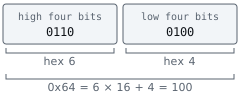
Eight bits make one byte. The eight places in a byte are worth 128, 64, 32, 16, 8, 4, 2, and 1. For example:
Code example. The surrounding prose explains this example; the full lesson contains the exact code.
Writing eight bits for every byte gets tiring. Hexadecimal, or hex, uses sixteen digits: 0–9 followed by A–F for values ten through fifteen. One hex digit represents four bits, so two hex digits represent one byte. The byte above splits into 0110 (six) and 0100 (four), written hexadecimal 6 4. The prefix 0x tells you it is hex. Its value is still decimal 100: 6 times 16 + 4. Decimal, binary, and hex are different ways to write the same number, not three different kinds of gold.
Narration: Memory tools often show bytes in hex because two digits fit one byte exactly. That is why you may meet hexadecimal 6 4 where the game says 100.
One byte can represent 0 through 255. Larger values use several bytes. The memory lesson just before the first scan will show where those bytes sit and how a program reads them together.
Section: Languages help people write programs.
The C P U executes instructions represented by patterns of bits. Writing a whole game as bit patterns would be difficult. Assembly language gives human-readable names to operations such as moving and adding values. A higher-level language lets us express larger ideas, such as functions and branches, without spelling out every C P U operation.
Our add-one function and collect-or-spend branch can be written in a language like Rust. A compiler translates source code into machine code for a chosen target. The translation is not necessarily one source line to one C P U instruction. Here is our same small function in Rust:
Code example. The surrounding prose explains this example; the full lesson contains the exact code.
fn names a function. number is its input; u32 means a non-negative whole number stored in 32 bits. The arrow says the function gives back a u32, and return sends back the sum. Calling add_one(100) therefore gives back 101, just as the earlier pseudocode did. This is a function fragment, not a whole program; Lesson 1.4 builds and runs the complete Rust example. Lesson 2.2 follows the later steps that turn source into a program file.
Section: The operating system helps programs use the computer.
Even our tiny add-one program needs more than arithmetic if a person must type a number and see an answer. It needs a way to receive input and display output. A game also needs files, sound, windows, and access to devices.
An operating system (O S) provides common services for those jobs and coordinates programs that use the computer. This book uses Windows for its practical examples. A program written for Windows can ask Windows to read a file or show a window instead of controlling each device from scratch.
An application is a program made for a user to do something. A game is an application: it uses the O S’s services, runs its own instructions, and keeps its own changing state.
Section: From a file to a running game.
The Rust source a developer writes has already been translated into machine instructions and linked with other code before the native game file exists. Other games may load scripts that an interpreter runs while the game is open. Either way, the C P U eventually carries out instructions. Lesson 2.2 follows those routes in detail; here we start with the native game file.
The game file on storage contains code and other saved information. Starting it creates a process: one running instance of that program, with its own memory and resources. Windows loads the code and needed data into memory and starts a thread, a path that executes instructions in the process. A process may have more than one thread, but one is enough to picture this first example.
Many games repeat a broad game loop while you play:
receive input, such as the event “collect a coin”;
update state, changing gold from 100 to 101;
draw the current state, so the display shows 101;
repeat for the next action.

Actual games split this work among many systems and sometimes several threads. This loop is a first model for asking a useful question: did the input arrive, did the stored value change, and did the display show the changed value?
Section: The pieces together.
The C P U carries out individual instructions. A program arranges many of them into useful behavior: receive a value, apply the add-one operation, and produce a changed value. A function names that reusable behavior; a branch chooses whether to collect or spend. Storage keeps the game file, R A M holds the running program’s state, and the operating system loads the file as a process the C P U can execute.
The gold value changed while the game was running. The next question is what the game’s rules do with it and how several players can each have their own value. Game Fundamentals starts there. We will return to bytes and addresses just before the first memory scan in Lesson 1.8.