Imagine an offline game whose display shows 100 gold. Buying an item for 25 changes the display to 75. The screen shows the result, but it does not identify the affordability check, subtraction, or stored value that caused it. Game hacking in this book means investigating that behavior and making a deliberate, testable change to the game or its data.
Section: Start with evidence, not a scan result.
An observation is what you can actually see: after a 25-gold purchase, the display changes from 100 to 75. An explanation is a hypothesis: perhaps a four-byte value in the game’s memory stores the gold used by the purchase handler. Other explanations are possible. The game may keep a display copy, recalculate gold from other data, or let a server decide the result. A matching number is therefore a candidate, not a conclusion.

The fastest way to get completely lost is to open a memory scanner and start searching before deciding what you are asking. You can end up with hundreds of addresses—numbered locations in the game’s running memory—with no way to tell which matters and no record of which ones you have ruled out. A scanner finds values that match a question; a debugger can later show the instruction that reads or writes a candidate. Neither tool supplies the meaning by itself.
In brief: A match is only a candidate. Decide your question first, because scanners and debuggers find things but do not explain them.
Section: Four steps for a controlled experiment.
One way to keep the work in order is to split it into four steps. Treat them as a useful order to adapt when new evidence changes the question:
Identify the exact behavior.
Understand how that behavior should work.
Locate the data and code involved.
Change one thing and measure the result.
The steps can repeat. A failed change often sends you back to improve what you understand or locate a different copy:

Section: 1. Identify the behavior.
Choose something you can observe and reproduce.
❌ “Find player stuff.”
✅ “Find the value that decreases by exactly 25 when the local player buys one known item.”
The behavior is only repeatable if it starts from the same conditions each time:
exact game build;
map, save, or level;
starting value;
action you will perform;
result you expect to observe.
Good starting behaviors include spending gold, taking damage, moving along one axis, or toggling one graphics setting. Avoid changing several things at once.

Section: 2. Understand how the behavior should work.
Before searching memory, predict the checks and calculation the game appears to use. For this lesson’s 25-gold purchase, our first guess is:
Code example. The surrounding prose explains this example; the full lesson contains the exact code.
Try the same idea on another behavior. For health, a first guess might be:
Code example. The surrounding prose explains this example; the full lesson contains the exact code.
A prediction can also be a condition valid state keeps, such as 0 less than or equal to health less than or equal to max_health. Lesson 14.5 tests conditions like this against a running game’s state.
The health calculation, stored result, and visible bar are connected, but they need not be one stored value:

These predictions help distinguish the health used for later damage and defeat decisions from text, animation state, or a cached display value.
This self-contained Rust fragment makes the distinction visible:
Code example. The surrounding prose explains this example; the full lesson contains the exact code.
Now displayed_gold is still 100, but gold is 75. Changing the copy would not make a later purchase use 100 gold; the next affordability check reads gold. A real game may refresh its display differently, so the experiment must establish which value the purchase handler actually reads.
At this stage these checks and formulas are hypotheses. The game may apply armor, difficulty scaling, or delayed damage, or a server may own the result, and any of these would break the simple formula.
Section: Define what your tool is allowed to do.
Before code touches another process, decide its limits in a small contract. This is a preview of the external tools built later in the book; you do not need to implement it for the first memory experiment:
Code example. The surrounding prose explains this example; the full lesson contains the exact code.
This contract prevents a small experiment from quietly turning into an unbounded tool.
The steps also have dependencies: a successful write needs a successful read of the intended field in the intended build. A failed read does not mean the player has zero gold. Stop at that failed step and preserve its error, rather than letting later code act on an invented value. The purchase itself depends on the current gold and price; the display depends on an update of its copy. Following those relationships tells you which earlier assumption to check when a later result is wrong.
A later tool may replace the temporary address with a module-relative pointer path: a sequence of lookups anchored to one exact game build. Lesson 1.8 first explains a pointer, Lesson 2.7 explains why the absolute address moves, and Lesson 2.8 builds the path. For this experiment, the useful limit is simpler: verify the game build and current value before changing anything.
Section: 3. Locate the data and code.
Use the least complicated technique that can answer the question. A breakpoint is a configured debugger stop that pauses execution at a chosen instruction or memory access; we will use one only after learning the debugger.
scan for the visible value;
make one controlled game change;
filter the candidate addresses;
repeat until the list is small;
later, set a breakpoint on the strongest candidate;
observe which instruction reads or writes it;
follow the stored address leading to the object and inspect nearby fields.
The first lab stops after scanning, filtering, and testing a candidate. The breakpoint and object steps become practical after Chapters 2 and 3 teach the required tools and pointer model.
Inside one scan, the scanner follows an algorithm over readable regions: ranges of numbered locations the operating system currently permits it to read. It copies one limited chunk at a time:

An algorithm is a repeatable set of steps. The scanner does not know what gold means; it compares bytes according to the value and type you supplied. Even a small choice such as checking only every fourth byte can miss a value starting at one of the positions between those checks.
Each controlled change throws away the candidates that did not change the same way. The numbers below are only an example, but the shape is typical:

An address found once is only a candidate for that run; its object can even disappear before the run ends. Restarting the game shows whether it is repeatable; the module-relative path described above is what can carry over to a new run of the same build.
Each kind of check rules out a different mistake. A second scan with a different amount rules out an unrelated value that happened to match once. A write breakpoint pauses the game when an instruction writes to a chosen address. Chapter 2 teaches how to use one. It shows which instruction changed the candidate; a restart shows whether the path survives a new process.
Section: Find the step that actually takes time.
If a scanner is slow, ask where its time goes. A bottleneck is the step that limits the overall work. It might be reading another process, comparing many values locally, sorting the remaining candidates, or writing a large log. Finding a number and accessing its bytes are different operations, and neither requires sorting the results unless the tool needs that order.
Measure a repeatable scan before changing its design. Record how many reads it made, how many bytes it compared, how many matches it kept, and the time spent in the expensive stages. Improving comparisons will do little if most time is spent waiting for reads. Keep the first working experiment small enough to understand; Sampling Game State Under Load later handles repeated observations and slow log writes. Larger collections and more workers are choices to evaluate against a measured need.
Section: 4. Change one thing and measure the result.
Make a prediction before the change:
Code example. The surrounding prose explains this example; the full lesson contains the exact code.
Then:
save the original bytes or value so you can restore them;
confirm the value still matches what you expect;
apply one bounded change;
observe the immediate and next-update results;
restore the original state;
repeat from a known starting condition.
If only the text changes, you probably found a display copy. If the value snaps back, another system owns or recomputes it. If unrelated fields break, your type, width, or address may be wrong.
Section: Choose diagnostics that fit the failure.
Compare the expected and observed result at the first step where they diverge. Suppose you expected to read 75 before a write but actually read 74. Investigate that mismatch before explaining the later failed purchase.
A log records events and values without requiring you to inspect them immediately. A useful entry could include the operation, expected amount, actual amount, and stage:
Code example. The surrounding prose explains this example; the full lesson contains the exact code.
That entry explains why the tool should reject the write. For a failed process read, record the reported error and how many bytes were read too. Keep the target build and tool version with the run so the entry retains its meaning.
A debugger lets you pause at the suspicious step and inspect its values and instructions. Pausing changes timing: other work may wait, or an input or timeout may behave differently. Logging also adds work, especially when it writes to disk. If a failure disappears when you add diagnostics, that is evidence to investigate the timing change; it does not establish that the underlying problem is fixed. What a Debugger Can Reveal explains the pause, while the later sampling lesson shows how to limit recording delays.
Section: Use tests and types for quick feedback.
Separate code that decides what should happen from code that performs a Windows A P I, application programming interface, call. In this toy decision function, a write is allowed only when the current value still matches the value we expected and the replacement is at most 10,000. That limit is an example policy for this exercise, not a universal gold limit. Pure logic like this can be tested without launching the game:
Code example. The code’s comments explain: Both the expected-value check and the replacement limit must pass. A changed field must not pass the expected-value check. The limit is allowed; the next value is not.
The first test passes because 74 is different from the expected 75, so should_write returns false. ! reverses that boolean, making the assertion true. The #[test] marker tells Rust’s test runner to call the function, and assert! fails when its expression is false. The other tests exercise a permitted write and both sides of the 10,000 limit. The Rust test guide explains these test features. The compiler checks types, tests check examples, and the debugger checks the running game. Each one catches mistakes the other two cannot. This function checks the supplied sample; the game may change again after that sample was read. Lesson 4.3 rechecks the value immediately before a write and reads it back afterward.
Keep the smallest implementation to the contract above, with the decision separate from process access so you can test it with ordinary values. Reuse an existing tool or library when it supports your target and you can check its behavior, version, error handling, and maintenance. Writing every dependency yourself does not make the experiment more reliable.
As repeated code or new use cases appear, give each responsibility a small interface. Refactoring changes the organization while preserving the intended behavior; keep the existing examples and tests working as you do it. Tool Architecture, Commands, and Cleanup develops this separation when several features share observations and must coordinate changes.
Review small changes as you work. A diff compares edited source with its previous version, making an accidentally changed field width or missing check easier to see. A walkthrough follows one example through the complete read, decision, write, and restoration path, often with another reader. Automated checks and these reviews answer different questions: passing a logic test does not prove that the live address is the game’s gold field.
Section: Leave a record another reader can repeat.
Start documentation with the question, the tool’s purpose, and its limits. Then show the route through the experiment before detailing each step. A reader needs to know which file or command to begin with, what result to expect, and what a failure means. Define names consistently: if gold means the amount used by the purchase check, call the screen copy displayed_gold throughout.
Keep a compact experiment record:
Reference environment: game version and build identity, architecture, operating system, tool versions, and the save or map used.
Reproduction: starting state, exact actions or commands, expected result, observed result, and how to restore the original state.
Evidence: candidate values, relevant instructions or logs, failed checks, and which explanations remain possible.
Decisions: why you chose this candidate, data type, limit, or dependency; include the observation that would make you reconsider it.
For a tool you build, document one complete supported path from a fresh source checkout to a runnable artifact, including the compiler, target, dependency versions, required options, and tests. Keep that path consistent with the instructions you actually verify. Reproducible steps let another person repeat the experiment; they do not automatically guarantee an identical executable byte for byte. How Source Becomes a Running Process explains the build stages, and the next lab fixes the environment for this book’s first scan.
Read the record from a newcomer’s position. If an instruction says “use the usual settings,” supply the settings. If a screenshot is the only record of a result, write down the important value and condition too. Update the record when the tool or target changes so an old address or command is not mistaken for a current promise.
Section: Say how you know each claim.
The record above holds statements you trust for different reasons, and the reason decides what can be built on each one. Four kinds cover most of them:
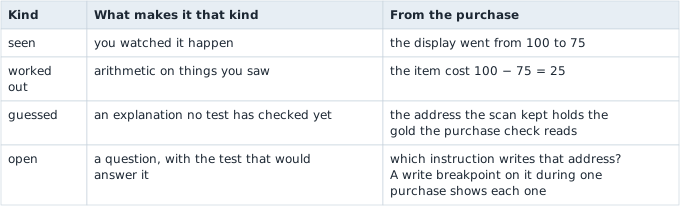
A guess becomes seen only when a test you ran shows it; an explanation that merely sounds right leaves it a guess. A search that finds nothing is the claim most often given the wrong kind, because its result covers only what it searched.
Predict first
After the purchase you scan every readable region for the four-byte whole number 75 and get no matches.
Which line belongs in the record?
Answer: No readable region held 75 as a four-byte whole number when the scan ran. That is exactly what the scan checked, and nothing more. Every other way the game could store gold stays open until a search that looks for it runs.
The scan compared memory with the bytes 4B 00 00 00: 75 is hexadecimal 4 B (4 times 16 + 11), stored lowest byte first. Gold kept as a 32-bit floating-point number (Rust’s f32) would be the bytes 00 00 96 42 instead, which How Bytes Become Numbers and Pointers works out, so a whole-number scan can never match it. A scan that checks only every fourth position also misses a value that starts between them. Each of those possibilities stays open until its own search runs: a scan for the f32 value 75.0, or one that checks every position.
Section: What a candidate address tells you.
A matching address is a lead. A repeatable action and a predicted check or calculation give it meaning; controlled changes and a breakpoint narrow the lead. A reversible edit tests whether that address changes the amount a purchase reads or only a displayed copy. The compiler and tests check the tool’s logic, while the debugger observes what the running game actually does.
Lesson 1.7 prepares a repeatable Windows lab. Lesson 1.8 shows what its scanner will read, and Lesson 1.9 walks through the first gold scan with screenshots. Its 15-gold recruit is a separate game action with its own starting value and observed result.