Before using a scanner or debugger on the course game, set up a place where the game, tools, and starting conditions can be repeated. This lets you tell a real game change from a difference in the environment.
Use a separate Windows virtual machine for the book. A virtual machine (V M) is a computer simulated inside your main computer. It can run its own copy of Windows and can be reset without reinstalling your everyday system.
Section: Why the V M is useful.
A V M gives the experiments a controlled environment:
old game builds and debugging tools stay separate from personal files;
a snapshot can restore a known state after a crash or bad configuration;
the Windows and tool versions stay fixed, so results repeat;
optional connections to the host can stay disabled until needed.
A snapshot is not a security guarantee and does not make every action harmless. It is a recovery point. Test that you can restore it before depending on it.
In brief: A V M with snapshots is an undo button for experiments. It is a recovery point, not a force field, so test the restore.
The same caution covers what you bring into the V M. A program can do exactly what it advertises and something else at the same time: a “free trainer” that really does give you gold while it quietly copies the passwords saved in your browser. That is called a trojan, after the wooden horse, and it is one of the most common ways players lose accounts, because the cheat working is exactly what makes people trust it. Every tool in this book comes from its official project page or is one you build yourself.
Section: Create the Windows V M.
VirtualBox, VMware, or Hyper-V can work. A practical starting configuration is:
2 or more virtual C P U, central processing unit, cores;
4–8 GB of R A M, random access memory;
about 50 GB of storage;
graphics acceleration if a target game requires it.
Install Windows, apply updates, and create a normal user account. Run an individual tool with additional rights only when its operation requires them.
Keep shared folders, clipboard sharing, drag-and-drop, and U S B passthrough off at first. Enable a connection only when you need it and know what crosses it.
Section: Install the required tools.
Inside the V M, install:
rustup for the compiler and Cargo;
Visual Studio Build Tools with “Desktop development with C++” so the MSVC linker and Windows libraries are available;
x64dbg for debugging 32-bit and 64-bit programs;
Cheat Engine for the first value-scanning lessons;
Wireshark for later local network captures;
Git, so you can use the exact course source revision.
Open PowerShell and check the compiler tools:
Terminal window
Code example. The surrounding prose explains this example; the full lesson contains the exact code.
Then verify that a tiny program builds:
Terminal window
Code example. The surrounding prose explains this example; the full lesson contains the exact code.
You should see Hello, world!. If this step fails, fix the toolchain before adding debuggers, games, or course code to the problem.
Section: Install the 32-bit Windows target.
The specific Wesnoth, AssaultCube, Urban Terror, Wyrmsun, and Flare builds used in the historical lessons are 32-bit Windows programs.
Terminal window
Code example. The surrounding prose explains this example; the full lesson contains the exact code.
Read the target name in parts:
i686 — 32-bit x86 instructions and plain pointers, which store 32-bit addresses;
pc-windows — Windows is the target operating system;
msvc — use Microsoft’s Windows A B I, application binary interface, and linker toolchain.
Code loaded inside a process must match that process’s architecture. A 64-bit D L L, dynamic link library, cannot be loaded into a 32-bit game. Later code changes, register choices, stored-address widths, and calling conventions also depend on the architecture.
Alternative: Think of plugs and sockets: a 64-bit D L L is a plug that will not fit a 32-bit game’s socket, however well it is made.
An external tool can sometimes have a different bitness because Windows copies bytes across the process boundary. The course keeps its Windows labs 32-bit so addresses and machine-code examples stay consistent. For another game build, inspect its executable and choose the matching target instead of copying this choice blindly.
Section: Get and check the course code.
The complete Windows workspace is in windows-labs. It is one folder of the repository, beside the other lab projects:
Directorywindows-labs/ the Windows workspace this chapter builds Cargo.tomlREADME.mdDirectorysrc/ Directorybin/ one program per lab, such as access_probe.rs and injector.rs…Directorywindows_impl/ shared Windows code: process.rs, dll.rs, and more…lib.rswesnoth_protocol.rs
Additional detail: Directorywindows-labs/ the Windows workspace this chapter builds.
Cargo.toml
README.md
Directorysrc/ Directorybin/ one program per lab, such as access_probe.rs and injector.rs…Directorywindows_impl/ shared Windows code: process.rs, dll.rs, and more…lib.rswesnoth_protocol.rs
Additional detail: Directorysrc/.
Directorybin/ one program per lab, such as access_probe.rs and injector.rs…
Additional detail: Directorybin/ one program per lab, such as access_probe.rs and injector.rs.
…
Directorywindows_impl/ shared Windows code: process.rs, dll.rs, and more…
Additional detail: Directorywindows_impl/ shared Windows code: process.rs, dll.rs, and more.
…
lib.rs
wesnoth_protocol.rs
Directoryrust-labs/ portable labs that run on any computer…
Additional detail: Directoryrust-labs/ portable labs that run on any computer.
…
Directorylua-labs/ the Lua host from Chapter 10…
Additional detail: Directorylua-labs/ the Lua host from Chapter 10.
…
Directoryadvanced-memory-labs/…
Additional detail: Directoryadvanced-memory-labs/.
…
Directoryfirmware-labs/ the bare-metal project from Chapter 14…
Additional detail: Directoryfirmware-labs/ the bare-metal project from Chapter 14.
…
Directorysite/ this book…
Additional detail: Directorysite/ this book.
…
From the repository root, run:
Terminal window
Code example. The surrounding prose explains this example; the full lesson contains the exact code.
cargo check parses and type-checks the programs without producing a final optimized build. It is the fastest first check for a compiler or dependency problem.
The workspace uses the windows crate for typed Windows A P I, application programming interface, declarations and anyhow to attach useful context to errors. Cargo reads those dependencies from Cargo.toml; you do not need to copy a long feature list from the lesson.
When a lesson needs an executable or D L L, build the release version:
Terminal window
Code example. The surrounding prose explains this example; the full lesson contains the exact code.
That command produces a 32-bit Windows build even if the development V M is 64-bit. If it fails, the first error tells you whether the target toolchain, project code, or a Windows library needs attention; a successful build alone does not prove the tool can attach to the course game.
Section: Four Cargo commands you will use often.
Terminal window
Code example. The surrounding prose explains this example; the full lesson contains the exact code.
Read the first compiler error before later errors. One missing type or bracket can cause many follow-up messages.
Section: Create recovery snapshots.
Take at least two snapshots:
Clean Windows — after Windows updates, before the lab tools;
Ready for lessons — after tools, the 32-bit target, and course code work.
Name snapshots by what they contain. A date alone does not explain which state is safe to restore.
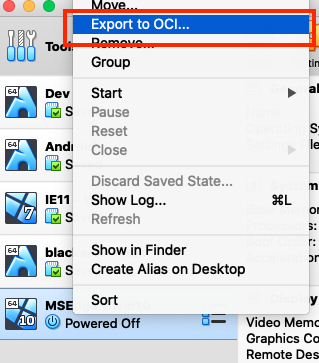
You may also export the V M as a slower, portable backup:
Terminal window
Code example. The surrounding prose explains this example; the full lesson contains the exact code.

Terminal window
Code example. The surrounding prose explains this example; the full lesson contains the exact code.
Section: A snapshot rewinds one V M; a clone creates a second V M.
Use a snapshot to return one V M to recorded files and settings. Use a clone when you want a separate experiment copy beside the baseline. VirtualBox offers two disk arrangements: a full clone copies the dependent virtual disks; a linked clone writes into its own differencing disks while relying on source base disks. Keep that base available. The VirtualBox cloning guide describes these choices and its network-adapter address policy.
Disk separation is one boundary. Before starting both copies, review their network adapter MAC addresses, guest host names and fixed i p settings, and host sharing. A MAC address identifies an adapter on its local network; cloning disk content alone does not make all copied network settings unique. Changes in a shared host folder are outside the guest disk snapshot.
The model below changes an invented save in an experiment copy, then resets it. Choose how the copy was prepared and inspect the disk dependency.
Keep the baseline stopped while preparing a named experiment copy. Start from the recorded course build and your own resettable test program or save. A separate V M supports comparison and recovery; it does not prove that network peers or host files are isolated.
In brief: Snapshots recover one V M. Full and linked clones make second VMs; a linked clone still needs its source base disks. Check networking and host sharing separately.
Recovery cheatsheet: a snapshot rewinds one V M; a full clone copies its virtual disks; a linked clone keeps a dependency on its base disks. Host sharing and networking need separate checks.
Section: What a result depends on.
When you later record an address (a location in the running game), an offset (a distance from a chosen start), or a byte pattern (a sequence to search for), record the exact environment too. The next lesson develops these ideas; their usefulness depends on:
the game name, exact build, and architecture, because a different build can move every function and field;
the executable’s file hash, a short fingerprint computed from its bytes: matching hashes are strong evidence that two copies use the same build even when their version labels are ambiguous;
the Windows version, because system DLLs change between updates;
the repository commit and the tool and debugger versions;
the starting save, map, or settings;
the V M snapshot the machine started from.
The snapshot restores files and installed tools, and source control restores the exact code. The build and file hash tell you whether an address found last week still applies to the game in front of you.
Narration: A note saying gold lives at some address is nearly useless a week later unless it also records which exact build it came from.
Section: Checkpoint.
Before the first memory experiment, confirm that you can:
restore the “Ready for lessons” snapshot;
run cargo check in windows-labs;
launch the target game in the V M;
identify whether its executable is 32-bit or 64-bit;
name the exact build and starting state an experiment depends on.
The V M is ready. Lesson 1.8 now shows what a scanner means by an address, a value type, and a pointer before you search the game.