Before scanning a running game, we need to know what the scanner reads. Suppose a health bar says 100. The player takes a hit, and the bar says 75. Somewhere inside the running game, a stored value changed.
This lesson gives you the first map of where that number lives and what it is made of. You will use the same map when you find a value, follow a pointer, or read another program’s memory later in the book.
We will distinguish locations, contents, types, and pointers here. Lesson 3.6 later takes the bits apart one at a time, including exactly how a fractional number like 10.0 is stored.
Section: “Memory” means more than one thing.
People use the word for several kinds of storage, and mixing them up causes a lot of early confusion.
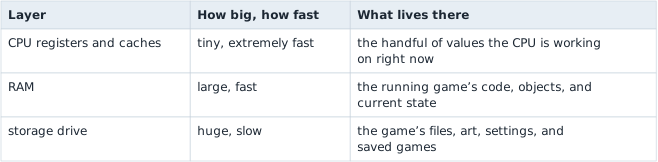
There are layers because no single technology is fast, large, cheap, and permanent all at once. Fast memory costs a lot, so you get a little of it. Cheap storage is slow, so it holds the things you are not using this instant.
From here on, when this book says “memory” it means R A M, random access memory. That is where your health value lives while you are playing. Turn the computer off and it is gone — which is exactly why saving a game has to write a file to the drive.
Section: Memory is a very long row of numbered boxes.
Picture a process’s memory as an enormous row of boxes. Each box holds one byte, and each box has a number called its address. The number tells the process where to look during that run; it need not identify the same data after the game restarts.
That really is most of the idea. Memory is boxes, one byte each, each with an address. Here are four of them:
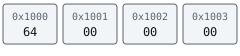
Lesson 1.2 introduced hexadecimal as another way to write numbers. The 0x prefix on an address announces it. Inside the boxes, each byte is shown as two hex digits with the prefix left off, which is also how debuggers and hex dumps display bytes. The next two sections show why the first byte, 64, represents decimal 100.
Section: Inside a byte: eight bits and their place values.
A bit is a single switch that is either 0 or 1. A byte is eight bits in a row. The question is how eight 0s and 1s can mean a number like 100.
The answer is the same trick ordinary numbers use: position. In the decimal number 100, the 1 is worth a hundred only because of where it sits. Each position in decimal is worth ten times the position to its right — ones, tens, hundreds, thousands.
Binary works the same way, except each position is worth two times the position to its right. Starting from the right, the eight positions in a byte are worth:
Code example. The surrounding prose explains this example; the full lesson contains the exact code.
To read a byte, add up what the positions holding a 1 are worth. The positions holding a 0 add nothing. As a formula, where b at position i is the bit that sits i places from the right:

With every bit set, a byte holds 128 + 64 + 32 + 16 + 8 + 4 + 2 + 1 equals 255. With none set, it holds 0. So a byte has exactly 256 possible values, 0 to 255.
Lesson 1.10 uses those positions to inspect flags, build masks, and compare shifts with rotations.
Section: Why everything is in hex.
Eight 0s and 1s are tiring to read, so people write bytes in hexadecimal, which is base 16. It counts with sixteen digits: 0 to 9, then A to F standing for 10 to 15.
Hex fits bits perfectly. Four bits have the place values 8, 4, 2, and 1, so they can hold anything from 0 (all off) to 15 (all on) — exactly the range of one hex digit. Split a byte into two halves of four bits and each half becomes one hex digit:

That is the whole reason debuggers use hex: two hex digits are always exactly one byte, so you can see where each byte starts and ends. The same number written in decimal, 100, hides that. It gets more obvious with bigger numbers: decimal 4096 looks arbitrary, while hexadecimal 1 0 0 0 is clearly a round figure in memory terms.
You do not need to convert hex in your head. Recognise the 0x, and use a calculator until it becomes familiar. Converting by hand works like decimal with sixteens instead of tens: hexadecimal 6 4 is six sixteens plus four, 6 times 16 + 4 equals 100.
There are several ways to check a conversion, whichever tool is open. Each one turns hexadecimal 6 4 into 100 and back:
Windows Calculator
Open the menu and choose Programmer. Select HEX, type 64, and the DEC line shows 100. Select DEC, type 100, and HEX shows 64.
PowerShell
Terminal window
Code example. The surrounding prose explains this example; the full lesson contains the exact code.
Rust
Code example. The surrounding prose explains this example; the full lesson contains the exact code.
Section: Bigger values use neighbouring boxes.
One box holds one byte, and one byte only goes up to 255. Anything bigger has to spill into the boxes next door. A u32 — the type name for an unsigned 32-bit whole number, explained properly below — uses four boxes in a row.
Section: Byte order, and why hex dumps look backwards.
Once a value spans several boxes, the value needs a byte order: which box holds the low byte, then the next byte, and so on.
Think about the decimal number 1,234. The leading 1 is worth the most — it means a thousand. The trailing 4 is worth the least. The bytes inside a multi-byte value work the same way, and the byte worth the least is called the least-significant byte.
Windows games on x86 and x86-64 put the least-significant byte in the lowest-numbered box. That arrangement is called little endian.
Example1,000 in four boxes
Each box counts in units 256 times bigger than the box before it, because one byte holds 256 different values — the same reason each decimal column counts in units ten times bigger than the one to its right. So the four boxes of a u32 count ones, 256s, 256 times 256 equals 65,536s, and 256 times 256 times 256 equals 16,777,216s. Here is the number 1,000, which is hexadecimal 3 E 8 in hex:
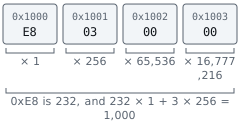

The practical effect is that reading a hex dump left to right shows the bytes in the opposite order from how you would write the number: E8 03 00 00, not 00 00 03 E8.
This trips up nearly everyone at least once. Expect the reversal every time you compare a number you worked out against bytes you actually saw.
Alternative: Imagine writing 1,000 with the ones digit first: 0001. Little endian does this with bytes, so the bytes E8 03 00 00 read as 1,000.
Now the four boxes from the start of the lesson make sense. 64 00 00 00 is hexadecimal 6 4 ones plus nothing else, which is 100.
Section: Three facts that are easy to blur together.
Look again at those four boxes. There are three separate things going on:
hexadecimal 1 0 0 0 is a location — which box;
64 00 00 00 is a pattern of bytes starting in that box;
100 is one interpretation of that pattern.
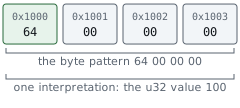
The third one does not follow automatically from the first two, and this is the single most important idea in the lesson. Those bytes only become the number 100 once something decides to read four boxes, treat them as one whole number, and use little-endian byte order. Read the same boxes with a different type or byte order and the very same bytes mean something else, as the next section shows.
So never treat “address” and “value” as the same word. An address tells you where to look. A value is what you get after you look and decide how to read what is there.
In brief: An address is where to look, the bytes are what sits there, and the value appears only after you choose a type to read them.
Section: A type is the instruction for reading bytes.
A type answers two questions: how many bytes to read, and what the bits inside them mean.
Code example. The surrounding prose explains this example; the full lesson contains the exact code.
The names are for you. The types are for the compiler. These are the ones you will meet most often:
Number types at a glance
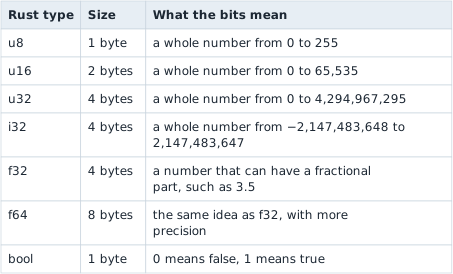
The names follow a pattern. The number is the size in bits. u means unsigned: the value can never be negative. i means a signed integer, which can be. f means floating point, a number with a fractional part.
The ranges come from counting patterns. One bit has 2 patterns, and every extra bit doubles the count: two bits have 4, three have 8, and eight have 256, which is why a u8 stops at 255. An i32 has exactly as many patterns as a u32, but it spends half of them on negative numbers, which is why its range is split around zero. Lesson 3.6 counts the 16- and 32-bit patterns and shows which patterns the negative numbers use.
Section: One pattern, two readings.
u32 and f32 are both four bytes, but they use those 32 bits in completely different ways. A u32 reads all 32 bits as one whole number. An f32 splits them into three parts — a sign, a power of two, and the digits of the number — much as scientific notation writes 1,500 as 1.5 times 10 to the power of 3.
So one four-byte pattern holds two totally different numbers, depending on which type you ask for:
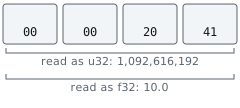
The u32 reading uses only what this lesson has covered: written most significant first, the bytes are this value, and a calculator turns that into the large number shown. The f32 reading decodes a sign, an exponent, and a fraction; those calculations are not covered here, so Lesson 3.6 works through them bit by bit, all the way to 10.0. What matters now is that nothing in memory changed between the two readings. Only the type did.
Floats have one habit worth knowing from the start: most fractions cannot be stored exactly. Ask an f32 to hold 10.1 and it actually holds 10.the numeric value shown…, the nearest value its 32 bits can express; Lesson 3.6 derives that value. That is why float values in games are rarely round, and why memory scanners let you search for a float within a small range instead of only an exact value: a scan for exactly 10.1 would miss the stored value.
Section: Values side by side.
An array puts equal-sized values back to back. A 3D position is often three f32 values in a row, one each for x, y, and z:
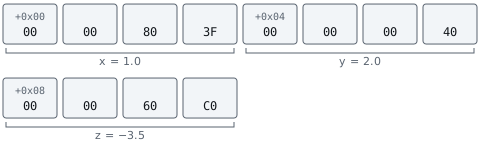
Each value is four bytes, which is why the labels go up by 4 and not by 1.
Text and lists need additional layout information: where the data starts and how its end is found. A C string just runs until it hits a zero byte. Other kinds of string store a pointer and a length. A growable list usually stores a pointer to its contents plus a length and a capacity. The code that reads a string or list is what tells you which layout a game uses.
Section: Working out types in a running game.
When you inspect a compiled game without useful debug information, many source names and type declarations are unavailable. The compiler used them to choose instructions, and those instructions provide clues about how the game uses the bytes:
how many bytes an instruction reads or writes at once: 1, 2, 4, or 8;
which kind of instruction does it — x86 has separate instructions for floating-point values, so a float load means an f32 or f64;
what the code does with the result — compares it with a signed or unsigned test, adds it to an address, passes it to a drawing function;
how the bytes change when you make the game change;
whether nearby bytes behave like parts of the same object.
This is also why a memory scanner asks what kind of value you are hunting before it searches. The whole number 10 is stored as 0A 00 00 00. The float 10.0 is stored as 00 00 20 41. The two patterns do not share a single byte, so a search for one can never find the other.
Section: A pointer is a number that happens to be an address.
Every value so far has been data about the game: 100 gold, 10.0 metres per second. A pointer is a value too — an ordinary number, stored in ordinary bytes, in an ordinary box. What makes it a pointer is only what that number means: it is the address of something else.
Nothing in the bytes marks them as a pointer. 00 50 00 00 could be the number 20,480 — hexadecimal 5 0 is 80, and 80 times 256 equals 20,480 — or it could be a pointer to address hexadecimal 5 0 0 0, which is the same number written in hex. As always, the code that reads them decides which.
Here is the whole idea. Four ordinary bytes at hexadecimal 2 0 0 0:
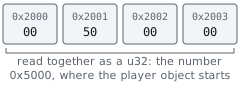

Three different numbers are involved, and running them together is the most common early mistake by a wide margin:
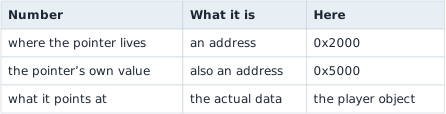
Read address hexadecimal 2 0 0 0 and you get hexadecimal 5 0 0 0. That is not the player. To reach the player you read a second time, now from hexadecimal 5 0 0 0. That second read is called dereferencing the pointer.
Think of a library catalogue card. The card is not the book. It sits in a drawer at its own location, and all it carries is a shelf number. Finding the book is two separate steps: read the card, then walk to the shelf.
That comparison is worth keeping because it survives being pushed on. The drawer slot is hexadecimal 2 0 0 0. The shelf number written on the card is hexadecimal 5 0 0 0. The book is the player object. And here is the part that matters most: if a librarian removes that book and shelves a different one in the gap, your card still reads hexadecimal 5 0 0 0 and still sends you confidently to a real shelf holding a real book — the wrong one. Nothing about the card looks damaged.
That is not a flaw in the comparison. It is precisely what can go wrong with a stale pointer. Lesson 3.10 shows the address-reuse example in memory.
Section: Why bother with the extra hop?.
Because the object can move. It can be destroyed and rebuilt somewhere else. When the game updates the pointer at hexadecimal 2 0 0 0, code that reads it again can follow the new address instead of holding on to the old one.
Following the pointer works only while the box at hexadecimal 2 0 0 0 itself still holds the game’s current pointer. Lesson 2.8 finds such a starting box that survives a restart and follows a chain of pointers from it.
A pointer is not guaranteed to stay good, either. The object can be removed, the memory reused, a module unloaded. An address that is not zero can still be completely wrong.
Section: What a pointer’s type tells you.
In source code a pointer usually has a type attached. Rust writes a raw pointer to a u32 as *const u32, read aloud as “a pointer to a u32”. That type describes the data at the other end, not the pointer itself, and it is called the pointee type. It tells the program how many bytes to read at the destination and how to interpret them.
Follow one pointer value, hexadecimal 5 0 0 0, with three different pointee types. The bytes waiting at hexadecimal 5 0 0 0 are the 00 00 20 41 pattern from the type section:
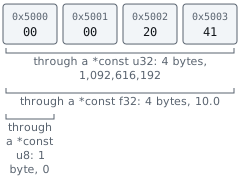
The pointer’s own size has nothing to do with its pointee type. For the plain raw pointers to sized values used in this book’s x86 labs, it is set by the process architecture: 4 bytes in a 32-bit game and 8 in a 64-bit game, whether it leads to a single byte or a 2,000-byte player object. Lesson 3.6 shows why, and how the pointee type also decides how far a pointer moves when it steps to the next item in a list.
Section: An offset is a distance, not a place.
Say a player object starts at hexadecimal 5 0 0 0, and its health sits 48 bytes into it.
Code example. The surrounding prose explains this example; the full lesson contains the exact code.
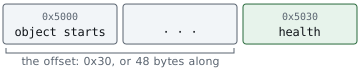
Three different numbers, doing three different jobs. The base says where the object starts. The offset says how far in the field is. The sum says where to read.
An offset is not an address and it is not the health value. On its own it means nothing at all — hexadecimal 3 0 is just “48 bytes along from something.”
Offsets matter because they may outlast one address. The object’s base address may land somewhere new every time the game starts, while the health field can remain 48 bytes into the same object layout for that build. Verify the offset again when the game or layout changes.
Alternative: Picture a flat in a building: the building’s street address can change, but the flat stays the same number of floors up. The offset is the floors.
Watch the pointer read and the field calculation together. Notice when a number is being read from memory and when it is being used as an address:

Section: Why an address can stop working.
The pointer and offset example gives you a way to find a field now. It does not promise that the object will occupy the same address later. Two common ways of handing out memory help explain why.
A function can use its thread’s stack for temporary values. Its stack frame lasts through that call; later calls can reuse the same bytes. An allocator can give a longer-lived game object space on the heap. That object may survive many calls, but the game can eventually remove it and reuse its address for a different object. A growing collection can also move its contents. Lesson 3.8 draws a call frame in memory, and Lesson 3.10 follows a heap address from one object to another. Lesson 2.7 then builds pointer paths that can survive a moving object base.
Section: The process is part of the address.
A debugger shows virtual addresses in a particular process. The game’s hexadecimal 5 0 0 0 and your tool’s hexadecimal 5 0 0 0 need not name the same bytes. An external tool therefore opens a process handle and asks Windows to read an address in that game’s address space. Windows also divides the space into protected pages; a number that looks like an address may not be readable at the moment you try it. Lesson 3.7 works through a remote read, and Lesson 6.5 examines the page map in detail.
Section: A running game is not a frozen picture.
A scanner copies bytes while the game continues to update them. Its result is a snapshot gathered over a short stretch of time, not a promise that every field describes one instant. This is a copy of selected memory, unlike the whole virtual-machine recovery snapshot from Lesson 1.7. For example, if the game removes one enemy after you read its pointer and reuses that address before you read its health, both reads can succeed while your combined answer describes neither enemy correctly. Re-check a promising candidate and its object identity before trusting it. Lesson 3.7 shows that sequence and the checks an external reader needs.
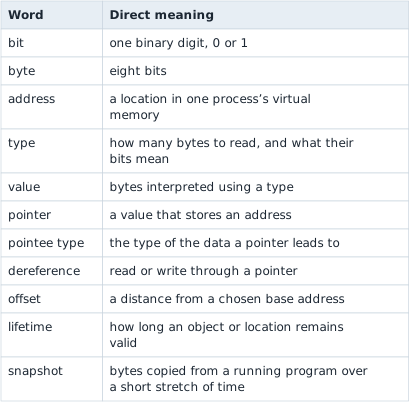
Section: Keep these words separate.
The words of this lesson
Section: What the scanner sees.
A byte is the sum of the place values of its set bits. On x86, a hex dump shows a multi-byte u32 least-significant byte first. An address, the bytes at that address, and the value produced by interpreting those bytes are different things; four identical bytes can mean a whole number or a float when read with different types.
A pointer has a size set by the process, while its pointee type controls the value read after following it. base + offset computes the address of a field. Stack and heap allocations have different lifetime patterns, and another process has its own virtual address space. A memory scan reads state while the game can continue changing it; it is not an instantaneous frozen copy.
Lesson 1.9 uses these distinctions to scan a real gold value, narrow the candidates, and test one of them in the game.