Lesson 1.8 explained how bytes hold a health number. Sometimes a program uses the positions inside one byte separately. One position can record “door open,” another “lamp on,” and another “alarm active.” To inspect or change just one of them, we need bitwise operations: operations on corresponding bit positions rather than on whole decimal values.
Section: A bit’s position gives it a weight.
A bit is either 0 or 1. An unsigned byte has eight positions, numbered from 0 on the right to 7 on the left. Position i contributes 2^i when its bit is 1. The byte the bit pattern shown has positions 2 and 0 set, so it represents 4 + 1 equals 5. Binary literals in Rust begin with 0b.
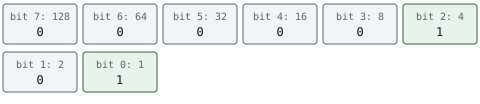
The number 5 alone does not tell us whether it means five coins or two enabled flags. That meaning comes from the code and format using the byte. For our invented status format, bit 0 means door open, bit 1 means lamp on, and bit 2 means alarm active. The other five positions are reserved and start at zero. Status 5 therefore means door open and alarm active.
In brief: Bit positions run from 0 at the right. A byte’s numeric value is the sum of its set-bit weights; flag meanings come from a declared format.
Section: A mask chooses positions.
A mask is a bit pattern used to select positions. A mask of the bit pattern shown selects bit 2, whose weight is 4. AND, written & in Rust, keeps a bit at 1 only when both corresponding input bits are 1:
Code example. The surrounding prose explains this example; the full lesson contains the exact code.
For this format, status & 0b00000100 isolates the alarm bit. Testing whether that result is nonzero tells us whether the alarm is active:
Code example. The surrounding prose explains this example; the full lesson contains the exact code.
For a mask containing several 1 bits, “nonzero” means any selected bit is set. To require all selected bits, compare the result with the mask. With mask the bit pattern shown, status 5 has only the door bit, so status & mask is 1: nonzero, but not equal to 3. A zero mask selects nothing.
The bitwise & above produces a number. Boolean && combines true/false conditions, such as “enough gold and item in stock.” They answer different questions and accept different operand types.
Section: Set, clear, and flip a flag.
Four operations explain the common edits. A 0 in a mask preserves the input position for OR and XOR. AND preserves positions where its mask is 1.
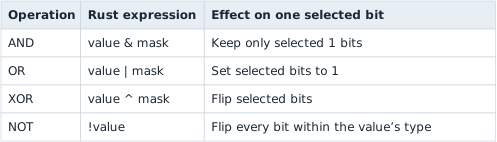
For our status byte, setting the lamp uses OR with bit 1. Clearing the alarm uses AND with a mask that has zero at bit 2 and ones everywhere else. NOT constructs that clearing mask. XOR toggles the door bit:
Code example. The surrounding prose explains this example; the full lesson contains the exact code.
These are three separate calculations from the same starting status. They do not successively update one variable. OR sets an already-set bit to 1 again; XOR would switch it off.
Predict first
A game hides gold 125 (the bit pattern shown) by storing 125 XOR 90, where 90 is the bit pattern shown. The stored byte is 39 (the bit pattern shown).
Which calculation gets 125 back from the stored 39?
Answer: 39 XOR 90. XOR flips the positions where the key has a 1: bits 6, 4, 3 and 1 of 90. The first pass flipped those four bits of 125; flipping the same four again restores them. the bit pattern shown XOR the bit pattern shown equals the bit pattern shown equals 125.

Width matters for NOT. Flipping the bit pattern shown as a u8 gives the bit pattern shown, decimal 250. A 32-bit value has 32 positions to flip. A bit pattern must be interpreted with its type and width, just as a memory scan must choose its field width.
In brief: Set with OR, clear with AND and an inverted mask, toggle with XOR. NOT flips the positions in the operand’s type, so record the width.
Section: Explore an operation before stepping through it.
The starting example isolates the alarm bit: 5 AND 4 gives 4. Change the byte, mask, or operation below. Use “Show me the result” whenever you want the endpoint, then step back to inspect the selected positions. Mask and count controls remain visible for comparison; each explanation states which inputs the operation uses.
Section: Shifts move positions and discard bits.
A logical shift moves bits left or right, fills the newly opened positions with zeros, and discards bits that leave the chosen width. In Rust, << shifts left; >> on an unsigned integer shifts right. For an eight-bit value:
Code example. The surrounding prose explains this example; the full lesson contains the exact code.
A left shift by one doubles the unsigned numeric value when the result fits. A right shift by one divides it by two and drops the fractional part. But the bit pattern shown shifted left by one becomes the bit pattern shown: the original high bit was discarded. It does not become the wider number 258.
Code example. The surrounding prose explains this example; the full lesson contains the exact code.
Our controls restrict the count to 0–7 for an eight-bit shift. A zero count leaves the byte unchanged. Do not assume that a count of eight is a portable way to produce zero: count validity and machine count handling depend on the operation and language. Rust’s checked_shl and checked_shr return None for a count at least the type’s width. They check the count; they do not report every bit discarded by a valid shift.
Section: Rotations wrap bits instead of discarding them.
A rotation moves bits in one direction but carries the outgoing bits to the opposite end of the same width. Rotate the bit pattern shown left once and its leading 1 reappears at the right:
Code example. The surrounding prose explains this example; the full lesson contains the exact code.
Rust provides stable integer methods for this:
Code example. The surrounding prose explains this example; the full lesson contains the exact code.
A rotation preserves the number of set bits, though their positions and the numeric value can change. Rotating a byte by eight positions returns the original byte. These methods and their distinction from shifts are documented in the Rust u8 reference.
In brief: A shift discards outgoing bits and introduces zeros. A rotation wraps outgoing bits around within the same width.
Section: Packed fields use masks and shifts together.
Suppose an invented byte stores an item kind in its upper four bits and a quantity in its lower four. the bit pattern shown means kind 10 and quantity 3. A field is packed when it occupies selected bit positions rather than a whole byte of its own.
Code example. The surrounding prose explains this example; the full lesson contains the exact code.
The mask selects; the shift moves selected positions to weights starting at one. These operations explain a packed value only after evidence establishes its field boundaries. “A byte equals 163” alone does not prove this format. Bit order within the number and byte order across several memory addresses are separate questions; Lesson 1.8 develops byte order.
When Lesson 2.3 introduces assembly, recognize the same ideas in and, or, xor, shl, and shr. Track the operand width and the result, then investigate any flags or branches that use it.
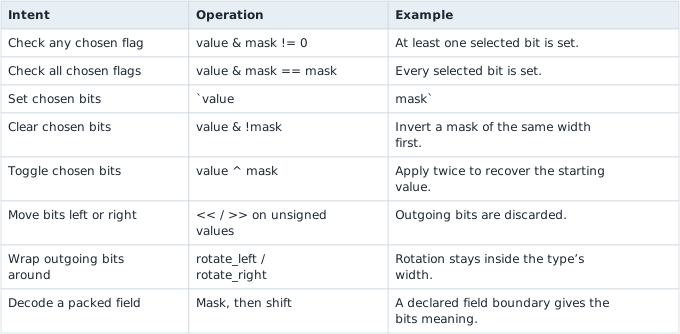
Section: Cheatsheet.