The first scan showed where gold might be stored. This chapter follows that lead into instructions. A debugger first makes the running program visible; the build process explains why that view differs from source code; assembly then gives us the vocabulary to trace a purchase check and its subtraction. From there we recover a path to state after addresses move and examine what a temporary control-flow detour must preserve. The debugger lessons can also be revisited by tool action: read assembly, set a breakpoint, follow a caller, or check an address path.
Section: A debugger can pause and inspect a running program.
A memory scanner answers, “Where might this value live?” A debugger answers, “Which instruction just touched it?” In the Lesson 1.9 experiment, a purchase narrowed many candidate addresses to one changing gold value. Suppose it fell from 100 to 75 when you recruited a unit. Which instruction made that subtraction?
The address gives us a route into the running program. A write breakpoint asks the debugger to pause when an instruction stores to those four bytes. At the pause, we can compare the address and the amount being subtracted with the gold address and unit price we already know. One match is a lead; another purchase can test it. Lesson 2.5 performs the experiment in x64dbg.

When a debugger pauses a process, you can inspect:
the next instruction the C P U, central processing unit, will run;
register values;
the call stack;
nearby memory;
the condition flags used by branches.
This is not a special “hacking mode.” Developers use the same ideas to find bugs in their own programs.
In brief: A scanner says where a value lives. A debugger pauses the program and shows which instruction touched it.
Section: Start from a value you can see.
Scrolling through thousands of instructions hoping one looks important rarely works. The visible gold value gives you a way in:
Which instruction changes my gold when I recruit a unit?
Then:
Find the gold address with a memory scanner.
Set a breakpoint on writes to that address.
Perform exactly one gold-changing action, so the pause can be tied to that action.
Inspect the instruction that triggered the pause.
You used a visible value as a trail back to the code. The pause is evidence of one execution, not a guarantee that the same instruction serves only recruitment. A later test can distinguish those possibilities.
Different practice targets may use 32-bit or 64-bit code, different calling conventions, and different build settings. The technique carries over from a worked example; its addresses and register choices do not.
Section: Registers hold values the C P U is using now.
Lesson 1.2 introduced registers as the C P U’s small working places. The 32-bit Wesnoth build uses x86 registers named e a x, e b x, e c x, and e d x. In a 64-bit x86 program, their wider relatives are r a x, r b x, r c x, and r d x. The diagram shows how one 64-bit register overlaps its smaller views: e a x names the low 32 bits of r a x, a x its low 16, and a l its low 8. In the Wesnoth lab, you will inspect e a x; the wider view helps when you meet a 64-bit target later.
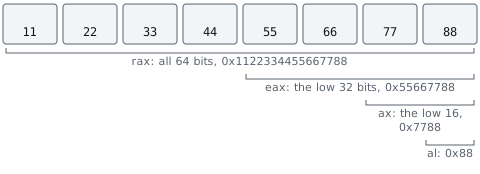
Each name selects a width of the same working value. When tracing Wesnoth, use the 32-bit name and ask what instruction last wrote it.
Section: Memory, registers, and the stack answer different questions.
Registers are the values this thread needs immediately. Memory holds far more data but is slower to access. The stack is one memory area used to organize function calls.
Suppose the debugger stops here:
Code example. The surrounding prose explains this example; the full lesson contains the exact code.
e a x contains one immediate input, perhaps a price;
e b x contains a base address, perhaps the start of a player-side record;
30h is an offset, a distance from that base;
[e b x+30h] means “access memory at the calculated address”;
dword ptr says the memory operation is four bytes wide.
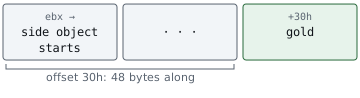
The register names alone do not prove those meanings. If e b x held hexadecimal 5 0 0 0, for example, e b x+30h would name hexadecimal 5 0 3 0 because 30h is 48 in decimal. Compare the calculated address with the gold address, compare e a x with the known unit price, and repeat the action. If the address equals the gold address and e a x equals the price every time, this instruction is the one that spends gold.
The call stack answers another question: “Which chain of function calls brought this thread here?” A low-level update function may be called by a recruit action, an A I, artificial intelligence, simulation, and a save loader. The caller tells you which of those uses triggered this pause.
Section: What actually happens when a debugger attaches.
The first trace needs only a verified pause and the values visible there. To understand how those values reach the debugger, follow the exchange between the game, Windows, and the debugger.
A debugger is a separate process. It requests the required process and thread access rights from Windows, and Windows begins sending it debug events. An event can mean:
a process or thread started;
a D L L, dynamic link library, was loaded;
an exception happened;
a breakpoint was reached;
the process exited.
When an event stops a thread, the debugger can ask Windows for that thread’s context. A context is a snapshot of its registers, including the instruction pointer that says where the C P U will continue. The debugger can also copy memory from the process and show the copied bytes in friendlier forms.
The target and debugger do not merge into one program. Windows remains the gatekeeper between them:

Many debuggers pause the rest of the process while you inspect one event. That prevents other game threads from changing registers and memory while you read them, but it also means audio, rendering, and network work temporarily stop.
Narration: While you study a pause, the picture holds and the sound stops. That freeze is the price of reading memory that is not changing under you.
Section: Disassembly versus debugging.
Disassembly translates machine-code bytes into assembly instructions. It is a snapshot of what the bytes could mean.
Debugging watches those instructions run. It lets you see what the registers and memory contain at that exact moment.
Reading code without running it is called static analysis. Watching it run is dynamic analysis. They answer different questions:
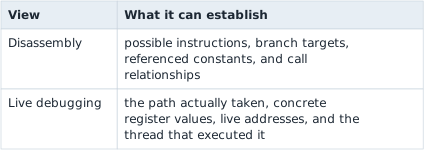
Neither view replaces the other. The disassembly shows paths that one test run did not take. The live debugger shows which path a real game event actually took, and with which values.
Alternative: Disassembly is like reading a recipe, and live debugging is like watching the cook. The recipe lists every path; the cook shows the one taken.
A decompiler goes one step further and guesses at higher-level expressions, loops, and function arguments. Those guesses can be useful, but the machine code is the final record of what the C P U executes. A friendly decompiler name such as player_health is only a guess until the program’s behavior matches it.
Section: What a decompiler can recover—and what it cannot.
Compilation keeps the effects a computer must perform, but it can discard many choices that only helped the original programmer. Local names, comments, source file boundaries, and the exact spelling of a loop may be gone. Optimizations can inline a function, reuse one register for unrelated values, remove a variable, or turn a branch into arithmetic.
A decompiler therefore works upward through several reconstructions:

Every upward step is useful, but it adds interpretation. Two different source programs can compile to the same machine behavior, so exact original source is often unknowable. What you can recover is a description that matches what the machine code does, not a perfect transcript of the original source.
Pseudocode is a draft, and most decompilers let you rename values and change types in it:
rename a value once its use is clear from the code and from live values;
change a type when instruction width, signedness, A P I, application programming interface, contracts, and live values agree;
check the control-flow graph — the map of which instruction can run after which, built by following every jump — when an if or loop looks strange;
return to assembly when one incorrect type makes later expressions look impossible.
This prevents a common failure chain: one guessed pointer becomes a guessed structure, which gives every field a confident-looking but incorrect name.
Section: Recover source-level meaning from machine state.
At source level, the compiler chooses registers for you. Recall the guarded purchase in Lesson 1.4: if the player has at least 25 gold, subtract 25; otherwise, leave gold unchanged. The compiler may express that decision as a comparison, branch, and subtraction. In a debugger, you see those pieces and the current register values instead of the original variable names. Check both an affordable and an unaffordable attempt: if the subtraction runs only in the first case, you have evidence that affordability guards the write. Before learning the assembly vocabulary, we need to explain how a named purchase function becomes this machine-level view.
Section: A safe first session.
Use the V M, virtual machine, snapshot and offline target from section one. Attach x64dbg, pause the game, look at the C P U view, then resume without changing anything.
Success for this lesson is simple: you can pause and resume the process, and you know which panels show instructions, registers, memory, and the stack. How Source Becomes a Running Process explains how those instructions and addresses were produced. The following assembly lesson teaches how to read them, and the later gold-write lab returns to the purchase question in x64dbg.