The debugger shows instructions and addresses, while the programmer wrote functions, fields, and variable names. Why are those two views different? And why can an address found by a memory scan move after a restart even though the game still checks affordability and subtracts the same cost?
These differences come from the stages that turn source into a running process. First, distinguish several ways a language implementation can run code. Then we can follow the native executable used in the Windows memory labs and see which facts survive a restart, which require the exact build, and which must be rediscovered after an update.
Section: Source code can take different routes to execution.
Source code is the text a programmer edits. A C P U, central processing unit, eventually executes machine instructions, but the source does not always become a standalone machine-code file first. Two routes used in this book are:
Rust application: source becomes native code before the program runs.

Lua script: source becomes instructions for the Lua virtual machine when a game loads the script.

Compilation translates code from one representation to another. The Rust route above compiles ahead of time to native instructions for a particular target. A virtual machine is a program that understands its own instruction set. Its bytecode is instructions for that virtual machine, not the x86 instructions a debugger shows for the C P U. Lua also compiles when it loads a source chunk; its virtual machine then interprets the resulting bytecode by carrying out those instructions. This is why “compiled” and “interpreted” are not mutually exclusive labels. The Lua reference manual describes this load-and-execute sequence. Lesson 11.2 shows what changes when a game embeds a Lua interpreter.
A R E P L, read eval print loop, is a way to interact with a language tool: read a line, evaluate it, print the answer, then loop for another line. For instance, an interactive Lua session can evaluate 2 + 3 and show 5 immediately. A file can contain the same calculation and be run later. R E P L describes the interaction, not whether the tool uses bytecode, native compilation, or dynamic typing. The Lua interpreter manual describes both interactive and file-based use.
Section: Type checking answers a different question.
The route to execution is separate from when a type mismatch is detected. The same job, giving one variable a number and then text, goes differently in each language:
Rust: statically typed
Rust is statically typed: every value has a type known to the compiler, often inferred without an explicit annotation. This fragment fails to compile, because one variable cannot hold both a u32 number and a string:
Code example. The surrounding prose explains this example; the full lesson contains the exact code.
Lua: dynamically typed
Lua is dynamically typed: values have types, and a variable can refer to a number at one moment and text at another. This code can make both assignments, but its final arithmetic operation fails when run:
Code example. The surrounding prose explains this example; the full lesson contains the exact code.
The difference is about where that particular mistake is caught. Rust can still have run-time errors, and Lua catches some mistakes, such as malformed syntax, while loading code. Neither typing style alone tells you whether code is compiled to native instructions, compiled to bytecode, or entered through a R E P L. The Rust data-types chapter and the Lua reference manual give the language-specific rules.
The rest of this lesson follows the native executable route used for Rust tools and the Windows game builds in the early memory labs. Lua’s virtual-machine route returns when we study scripting.
Section: Four stages, each deciding something different.
A Windows EXE is an executable file for a program. A D L L, dynamic link library, (dynamic-link library) is compiled code that a running program can load and call. Once loaded, either one is a module with a starting address and a range of code and data in the process.

Each stage keeps what the next stage needs. A release build may omit information that helped the programmer but is unnecessary for execution. Debug information can preserve some names separately; we will distinguish that case below.
Section: The compiler decides layout, and stops needing your names.
The compiler translates source into object code, often stored in .obj files by the Microsoft toolchain used for these Windows C++ examples. Two of its decisions matter throughout this book.
First, it chooses field order, padding, and alignment under the language’s layout requirements. For an example player structure, it may leave unused bytes between fields so each field starts at an address suited to its type. Those gaps are padding, explored in the later object-layout lesson.
Second, the machine instruction no longer needs the word health. The name helped the programmer refer to the field; the instruction uses its distance from the object base. If health begins 48 bytes into the object, a debugger may show the read as [e c x+hexadecimal 3 0]: the address held in the e c x register, plus hexadecimal hexadecimal 3 0, which is decimal 48. Lesson 2.3 explains registers and this notation. A normal release executable often omits local and field names, though debug information can preserve them. A missing name is not evidence that it was encrypted or hidden.
In brief: A compiled game keeps distances, not names. A missing name usually means the program never needed it to run.
Function names survive slightly longer, because the linker still has work to do with them.
Section: The linker resolves names, then it does not need them either.
Your game is many object files plus libraries, and one file’s call to a function defined in another may still be an unresolved reference. The linker matches references to definitions it has, lays the sections out into the final image, and records the references that a loader must finish later. A call to an internal game function can be resolved here; a call into a D L L still needs the D L L’s address at run time.
After that, many internal names have served their purpose. Debug information can be kept — the Microsoft toolchain often puts it in a separate .pdb file — but the EXE does not need it to run. Imports and exports can still carry names in the executable; the next section shows why an imported function name may remain.
This explains why a debugger may show an imported Windows function’s name but only a numeric address for an internal game function. A binary without debug symbols is not necessarily obfuscated; it may simply lack source names that execution does not require.
Section: Two things the linker deliberately leaves unfinished.
Not everything can be decided at build time, and the two exceptions are exactly the ones later chapters spend time on.
Where the module will be. The linker does not know which address Windows will choose, so it records a preferred base and includes a table of every location that would need adjusting if a different base is used. An offset measures a distance from the beginning of that module. The later address-movement lesson uses the distinction: for the same build, that distance can stay fixed while the loader chooses a different starting address.
Alternative: Picture a street and a house number: the street can be built at a different place each day, but the house stays the same number along it.
Where the D L L functions will be. The linker knows the game calls MessageBoxW in user32.dll, but not the address, which will not exist until the D L L is mapped. So it writes down the requirement — which D L L, which function — and leaves a table of slots for the loader to fill with real addresses. That table is the Import Address Table:
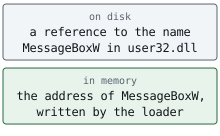
Lesson 8.4 hooks a program’s own copy of this table — a technique that works precisely because the linker left the address for someone else to fill in.
Section: The loader turns a file into a process.
The loader maps the sections into memory with the right permissions, applies those relocations if it picked a different base, fills in the import table, prepares thread-local storage (data kept separately for each thread), and runs the initialisation code. The later loader-boundary lessons follow these details. They explain why a D L L’s DllMain initialisation function cannot safely perform every task a normal function can.
The executable-file chapter will compare the two layouts: content arranged for storage on disk and content arranged for execution in memory. The loader is the connection between them; file positions do not automatically equal positions in the running process.
Section: Follow one location across two runs.
ExampleOne location across two runs
Suppose the linker placed an instruction hexadecimal 1 3 5 0 bytes from the beginning of the game’s module. In one run, Windows loads that module at this value; in another, it loads it at this value. The instruction did not move within the module, even though its absolute address changed:

The same distinction applies inside an object, but the starting point is different. If the compiler put health at +hexadecimal 3 0 within a player object, and that object begins at this value in the first run, its health field is at this value. A newly created player at this value puts the same field at this value. The module offset measures from the loaded module; the field offset measures from that particular object. Neither offset alone is a complete address. Later pointer work uses this distinction every time it adds an offset to a base address.
Predict first
The same build runs a third time, and Windows loads the game's module at this value.
Where is the instruction from the table now?
Answer: this value. The instruction is still hexadecimal 1 3 5 0 bytes into the module, so add that offset to this run’s base: this value + this value equals this value.

Section: How updates affect locations.
The practical payoff is knowing which kinds of location survive a new game version.
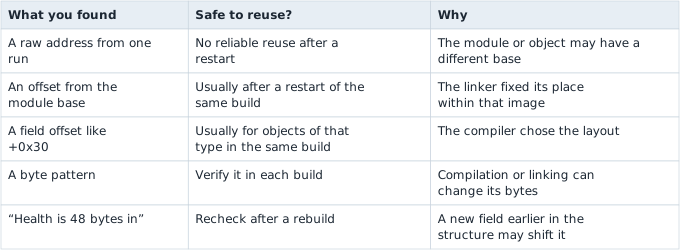
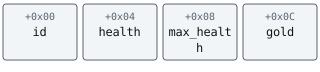
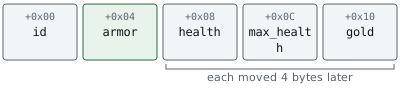
That last row is the one Lesson 14.1 turns into a migration procedure. In this fixed-order example, inserting a field moves the later fields and leaves the earlier ones in place. A different field-order or alignment requirement can change more, so measure the new build rather than assuming the same shift everywhere:
Narration: That is why an old offset note can break after a game patch: one added field is enough to shift every field that follows it.
Section: Optimization is why the code does not match the source.
One more consequence, and it explains a lot of confusing disassembly. An optimising build is allowed to produce anything that behaves the same. It can paste a small function into each of its callers so no call remains, keep a variable only in a register so it never touches memory, drop a variable whose result is never used, reorder work, and merge two identical functions.
So when a function you expected is missing, the usual explanation is not that it was hidden. It is that the compiler decided the fastest way to do that work did not involve a separate function. This is also why a debug build and a release build of the same source can be so different to read, and why an address or offset belongs to the exact build it came from.
Section: Why the stages matter in a debugger.
The compiler chooses field layouts and may remove or transform source functions. The linker fixes positions within a native image and records D L L imports; the loader chooses a run-time base and fills in external addresses. A module-relative offset can therefore survive a restart of the same build while a raw address changes. Rebuilding after a field insertion can shift later offsets, so old offsets need rechecking. Release binaries may omit source names even while import names or separate debug information remain.
We now know why a debugger can show addresses and transformed operations instead of the source’s original names. How Assembly Describes a Running Game gives those operations a readable vocabulary and follows a gold purchase through its comparison, branch, and subtraction.