For an unfamiliar operation, use the instruction reference: it explains operand forms, changed values and flags, with an adjustable worked trace for each instruction.
Section: What assembly actually is.
A C P U, central processing unit, does not run source code or even the words mov and sub. It runs machine code: bytes whose bit patterns mean operations for one C P U architecture. Continue the 100-to-75 gold purchase from Lesson 2.1: this first instruction loads its price, 25, into a register. Later instructions will compare and subtract it.
Assembly language is a human-readable spelling of those operations. For 32-bit x86, these five bytes:
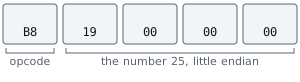
can be shown as:
Code example. The surrounding prose explains this example; the full lesson contains the exact code.
The byte B8 selects one form of mov. The next four bytes hold 25 as a little-endian 32-bit number. The readable instruction and the bytes describe the same C P U action at different levels.
🔍 Reading tip: each instruction changes only a few things, usually one register or one memory location, and sometimes the flags. Taken one instruction at a time, a function becomes ordinary bookkeeping.

An assembler travels from assembly text to machine code. A disassembler travels from machine code to assembly text. A debugger includes a disassembler and also shows the live register and memory values while the instructions execute.
Assembly preserves machine effects, not the author’s original explanation. A release build usually does not retain friendly variable names, comments, source loops, or the exact class boundaries that produced it. Optimization may inline two functions into one, remove a variable completely, or replace multiplication with a different but equivalent instruction sequence.
Therefore, disassembly shows what the machine does; it is not recovered source code. A decompiler can suggest source-like structure, but you still verify its types, signs, widths, branches, and calling convention against the actual instructions.
Section: Assembly depends on the C P U architecture.
This book’s historical game builds are 32-bit x86 programs. Their main registers are named e a x, e b x, e c x, e d x, e s i, e d i, e s p, e b p, and e i p.
A 64-bit x86 program uses wider names such as r a x and r i p. ARM uses a different instruction set and different register names. Assembly is not one universal language; it is the readable face of a particular processor architecture.
The examples use Intel syntax, where the destination normally appears before the source:
Code example. The surrounding prose explains this example; the full lesson contains the exact code.
Other tools may display AT&T syntax with a different order and punctuation. Pick one syntax while learning so the notation does not hide the idea.
Section: Read the whole disassembly row.
A debugger may show:
Code example. The surrounding prose explains this example; the full lesson contains the exact code.
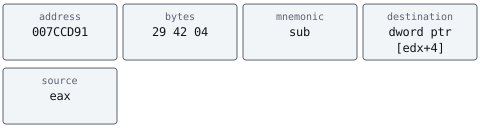
Read it from left to right:
The parts of a disassembly row
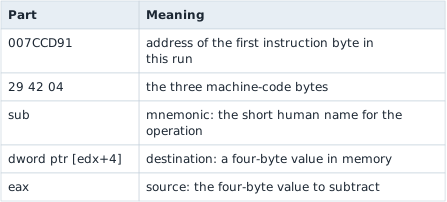
In plain English: “Take the 32-bit number stored four bytes after the address in e d x, subtract e a x, and store the answer back in that same memory location.”
This one sentence is far more useful than memorizing that opcode 29 means a form of subtraction.
In brief: Read each instruction as a plain sentence: what is read, what is written, and how many bytes. Skip memorizing opcodes.
Section: The C P U repeats a tiny cycle.
At a simplified level, one thread repeatedly:
uses e i p to find the next instruction;
fetches its bytes from executable memory;
decodes what the bytes mean;
reads the required registers or memory;
performs the operation;
writes the result;
advances e i p or jumps somewhere else.

e i p is the instruction pointer. It is not a normal game variable. It tells the C P U where this thread is executing. A jump, call, return, exception, or debugger action can change it.
On the ordinary path, e i p advances by the length the decoder just found. The five bytes 29 42 04 85 C0 decode from offset 0 as sub dword ptr [e d x+4], e a x (3 bytes) and then test e a x, e a x (2 bytes), so the next instruction starts at 0 + 3 + 2 equals 5.
Predict first
Suppose e i p points at offset 1 instead, one byte inside the sub. What does the C P U do?
Answer: It decodes different instructions from the same bytes. The C P U keeps no list of where instructions begin. At offset 1 the byte 42 is a complete instruction, inc e d x, and 04 85 is add a l, 85h: real instructions the program never meant.

Section: Registers hold the C P U’s current working values.
Registers are tiny, very fast storage locations built into the C P U. On 32-bit x86, each general-purpose register below holds 32 bits:
x86 registers at a glance
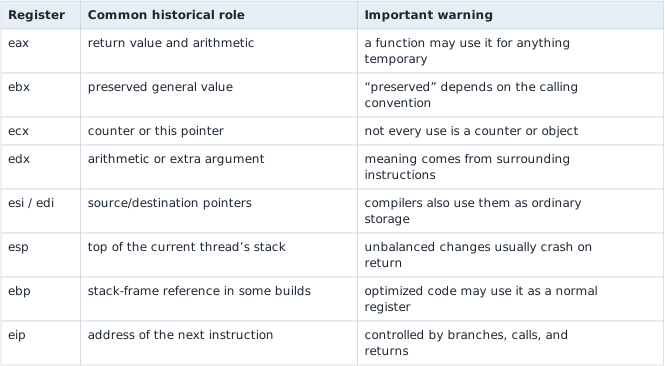
The role column is a clue, not a promise. Ask what the current function actually reads and writes.
Section: Bits do not carry their own meaning.
The register value shown here is only 32 one-bits. An instruction may interpret those bits as:
unsigned integer the large number shown;
signed integer -1;
four bytes;
part of a pointer;
a bit mask where every switch is on.
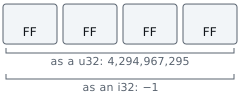
Source-level types give those bits a declared meaning. In disassembly, only the instruction that uses the bits, and the code around it, tells you which meaning applies.
You do not need to memorize the whole x86 instruction set. Start with a handful of verbs, but always connect each verb to the C P U, registers, memory, and control flow described above.
Section: The debugger changes the view, not the bytes.
The same four bytes can be displayed as hexadecimal, a signed integer, an unsigned integer, a float, four characters, or an instruction. Changing the debugger’s display format does not convert the target’s memory. It changes only the question you ask about those bits.
Use the program’s operations to choose the view:
a floating-point instruction supports a float interpretation;
sign extension or a signed conditional jump supports a signed integer;
a memory dereference supports an address interpretation;
repeated one-byte reads ending at zero support a C-string interpretation;
bytes that decode into valid-looking instructions are code only if control flow actually reaches them.
This last point matters because a code section can contain alignment bytes, constants, and jump tables. A disassembler can produce a plausible instruction from almost any byte sequence. What makes bytes code is that execution reaches them: a jump, call, or fall-through from other code leads there, or a debugger sees the C P U run them.
Section: Moving data.
mov destination, source copies data:
Code example. The surrounding prose explains this example; the full lesson contains the exact code.
Square brackets mean “use the memory at this address”:
Code example. The surrounding prose explains this example; the full lesson contains the exact code.
Without brackets, r c x is a number. With brackets, that number is treated as an address.
For the 32-bit course games, the same examples usually use e c x instead of r c x:
Code example. The surrounding prose explains this example; the full lesson contains the exact code.
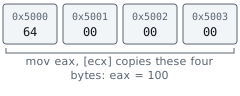
The instruction decides the size. byte ptr means one byte, word ptr means two, dword ptr means four, and qword ptr means eight.
Section: Little endian explains “backward” bytes.
x86 stores a multi-byte integer with its least-significant byte first. The value shown here appears in memory as:
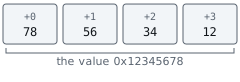
The number is not reversed when the C P U uses it. This is only the byte order in memory. The conversion helpers u32::from_le_bytes and to_le_bytes make the chosen byte order explicit.
Section: Doing math.
Code example. The surrounding prose explains this example; the full lesson contains the exact code.
The source-level equivalent is easier to read:
Code example. The surrounding prose explains this example; the full lesson contains the exact code.
Starting at 25, those four operations leave value at 32: add 10, subtract 3, add 1, subtract 1. The assembly operations would do the same arithmetic if e a x started at 25. The debugger lets us check the actual register value before and after each instruction instead of assuming that starting point.
Section: Comparing and branching.
cmp performs a comparison and updates flags. A jump reads those flags:
Code example. The surrounding prose explains this example; the full lesson contains the exact code.
je means “jump if equal.” Common jumps include:
Jumps after a compare
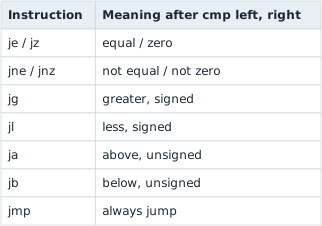
Signed and unsigned matter because the same bits can be read in different ways. this value is the large number shown as a u32, but -1 as an i32.
That choice decides which branch actually runs. Imagine a price of this value arriving at a gold check while the player holds 100 gold:
Code example. The surrounding prose explains this example; the full lesson contains the exact code.
Identical bits, identical cmp, opposite outcomes. When you are reading a check that guards something valuable, the signedness of the jump is not a footnote — it is very often the entire bug.
The type makes that choice visible:
Code example. The surrounding prose explains this example; the full lesson contains the exact code.
The assertion passes because -1_i32 and u32::MAX have the same four-byte pattern on this target. A signed jump treats that pattern as minus 1; an unsigned jump treats it as the large number shown. The branch instruction determines which meaning controls the next step.
Narration: The compiler picks the jump that matches the source type, so a signed or unsigned jump in a listing is a free clue about how the programmer declared the number.
Section: Flags are one-bit answers from the last operation.
e f l a g s is a register containing many one-bit results. Common ones include:
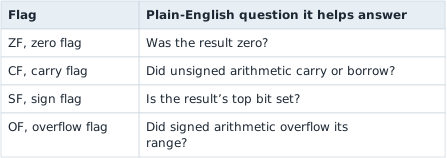
cmp e a x, e b x behaves like a subtraction that throws away the numeric answer but keeps the flags. je, jg, ja, and the other conditional jumps interpret those flags in different combinations.
This is why signed and unsigned jumps differ even though the register bits are identical.
Here are the flags after the two comparisons in the gold check at the end of this lesson:
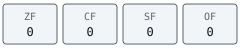
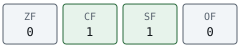
Lesson 1.10 develops bit masks, shifts, and rotations before we use their assembly forms. It is a useful optional detour when these operations are new to you.
Section: Calls, returns, and the stack.
call jumps into a function and remembers where to return. ret goes back.
Code example. The code’s comments explain: execution continues here after `ret`
The stack is a last-in, first-out area used for return addresses, saved registers, and some local values:
Code example. The surrounding prose explains this example; the full lesson contains the exact code.
On 32-bit x86, the stack grows toward lower addresses. push e a x subtracts four from e s p and stores e a x there. pop e a x loads four bytes and adds four back to e s p.
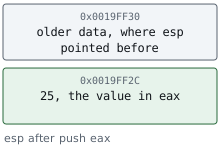
call target is roughly:
Code example. The surrounding prose explains this example; the full lesson contains the exact code.
ret roughly pops that saved address into e i p. If a hook adds an unmatched push, ret may treat some unrelated value as an address and jump into nonsense.
Follow the call calculate_damage above through its return. The saved address belongs to the caller’s next instruction; it is separate from the address of calculate_damage:

Section: A nested call returns to its immediate caller.
An ordinary near ret does not search for “the main program.” It takes the return address currently on top of the stack. If main calls add_bonus, and add_bonus calls add_one, the first return goes to add_bonus; its return goes to main. The last-in, first-out order keeps these two continuations separate.
The labels below stand for addresses in a simplified 32-bit x86 example. Each near call saves one four-byte return address; each plain ret removes one. There are no stack arguments or saved local registers in this model. Change the starting score and watch the two slots as well as e s p.
The returned-to instruction is the one after the matching call, not the instruction that made the call. Also, popping a slot moves the stack pointer; it does not clear the old bytes. Those bytes alone are no longer evidence that the return address is still part of the active stack.
In brief: Nested returns unwind one call at a time. ret uses the top return address; releasing a stack slot does not erase its bytes.
Call/return cheatsheet: call records where execution should resume; nested calls add newer return slots; ret uses the newest active slot. A calling convention separately specifies arguments, preserved registers, and stack requirements.
Section: Calling conventions are agreements between functions.
A calling convention answers questions such as:
Where are arguments placed: stack or registers?
Which registers must the called function preserve?
Who removes stack arguments?
Where is the return value placed?
The course’s 32-bit games commonly expose cdecl, stdcall, and thiscall boundaries. The three differ mainly in who removes the arguments from the stack after the call. cdecl leaves that job to the caller, which is also what lets a cdecl function such as printf accept a varying number of arguments—only the caller knows how many it pushed. stdcall makes the callee remove its own arguments before returning. In a typical 32-bit thiscall, e c x carries the object pointer—the value an object method treats as self or this—while other arguments use the stack, and the callee cleans up like stdcall.
Do not identify a calling convention from one register alone. Inspect how the caller prepares arguments and how the callee returns. A wrong convention can leave e s p incorrect even when the function address is right.
On 64-bit Windows, ordinary integer and pointer arguments start in r c x, r d x, r 8, and r 9; floating-point arguments use the matching X M M argument registers. The caller also reserves stack space for the register arguments and keeps the stack correctly aligned. There is one main Windows x64 convention, so do not carry the old 32-bit cdecl versus stdcall cleanup distinction into 64-bit code.
A calling convention is more than an argument list. It is the complete border contract between caller and callee:
Code example. The surrounding prose explains this example; the full lesson contains the exact code.
Read both sides of a call. Code before call explains what the caller offers; the callee’s first uses explain what it expects; code after the return shows what the caller believes survived.
Section: Address calculations.
This pattern appears constantly:
Code example. The surrounding prose explains this example; the full lesson contains the exact code.
Read it as: “Start at the address in r c x, move forward hexadecimal 3 0 bytes, then read a 32-bit value.” If r c x points to a player object, offset hexadecimal 3 0 might be a field such as health.
A typed struct expresses the idea by name:
Code example. The surrounding prose explains this example; the full lesson contains the exact code.
#[repr(C)] asks the compiler for a predictable C-compatible field layout. We only rely on a layout after confirming its offsets; guessing a struct from one screenshot is not enough.
lea (“load effective address”) is the one common instruction where brackets do not mean a memory access:
Code example. The surrounding prose explains this example; the full lesson contains the exact code.
lea r a x, [r c x+r d x*4] stores the address r c x + r d x*4 itself and reads nothing; mov e a x, [r c x+r d x*4] reads the four-byte value stored there into the four-byte e a x (the eight-byte r a x would take the next element too). A *4 scale usually steps through an array of four-byte elements, so with r d x equals 2 the address is r c x+8. Compilers also use lea for plain arithmetic, so not every result is a pointer. Lesson 5.4 traces lea beside mov with addresses you can change.
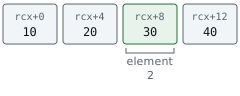
Alternative: Think of lea as asking a map for a house’s street address, while mov with brackets walks inside and reads what is there.
Section: A five-question reading method.
For each instruction, ask:
What is read?
What is written?
How many bytes are involved?
Is a number signed or unsigned?
Where can execution go next?
Answer those five questions one instruction at a time. A long function becomes a trail of small facts.
Section: Trace both data flow and control flow.
Reading only downward through the listing works for a tiny straight-line function. Larger functions need two connected maps.
Data flow asks where a value came from and where it goes next. If e a x is compared, trace backward to the instruction that last wrote e a x. If [e c x+hexadecimal 3 0] is changed, trace how e c x obtained the suspected player address and who later reads that field.
Control flow asks which instruction can run next. A straight sequence with one entry and one exit is often called a basic block. Conditional jumps connect blocks into a graph:

The graph explains the decision even when the compiler has rearranged the blocks. Source-level if, match, loops, early returns, and error paths all become control-flow edges of this kind.
Use both maps together. A branch tells you when a write occurs; data flow tells you what it changes. Guessing from only one of them is how a nearby animation counter gets mislabeled as health or a failure path gets mistaken for the normal path.
Alternative: Control flow is the road map and data flow is the cargo log: the map says where a truck may go, and the log says what it carries.
Section: Trace a complete tiny function.
Suppose e c x points to a player and gold is the four-byte field at offset 4:
Code example. The surrounding prose explains this example; the full lesson contains the exact code.
The same listing as a control-flow graph. Each box is a basic block, and the only decision is the jb:

Three details in that listing puzzle almost everyone the first time.
Why [e s p+4] and not [e s p]? The call that reached this function pushed a return address onto the stack, so that address is now sitting at [e s p]. The argument the caller pushed just before the call is one slot further in, at [e s p+4]. Whenever you see a function collecting its arguments from +4, +8, +12, the saved return address is what those offsets are stepping over.
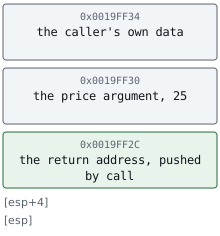
Why xor e a x, e a x instead of mov e a x, 0? Both leave zero in e a x. Any value exclusive-ORed with itself is zero, and the xor form assembles to fewer bytes, so compilers emit it constantly. Read xor register, register as “set this register to zero” and keep going.
Why does ret have a number after it? ret 4 returns and discards four bytes of arguments from the stack, so the function cleans up after itself. A plain ret leaves that job to the caller. Which form a function uses is fixed by its calling convention, and getting it wrong corrupts e s p: execution returns to the correct place, and from that point on the caller’s stack is off by four bytes.
Trace it with gold equals 100 and price equals 25:
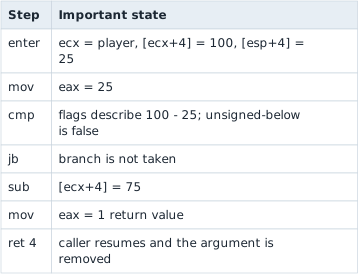
Now trace gold equals 20. The jb branch skips the subtraction and returns zero. That is assembly comprehension: follow state changes and rebuild the higher-level decision.
Section: What the debugger is showing.
Assembly text is a readable rendering of machine bytes for one C P U architecture; x86 and ARM bytes need different decoders. In the x86 trace, e i p locates the next instruction, e s p marks the stack top, and e f l a g s holds one-bit results that branches can use. Brackets such as [e d x+4] mean read or write memory at the calculated address; e d x+4 without brackets is only an address calculation. A call saves a return address on the stack, and ret uses it to resume the caller. The calling convention completes that contract by fixing where arguments and results go and who removes arguments from the stack. Breakpoints in the next lesson let you inspect those facts while a real instruction is paused.