Section: A program file is not a running process.
The previous chapters followed executable files, saved data, mods, and scripts. All of them meet in a running Windows process. The executable’s bytes help create that process, but the running game contains more than that file.
wesnoth.exe on disk is a program file. When Windows starts it, Windows creates a process: an isolated running instance with its own address space, handles, threads, security information, and loaded modules.
That distinction matters. The P E, portable executable, chapter reads the file on disk. A debugger or memory tool studies the running process after Windows has mapped that file and its DLLs into virtual memory.
The questions now come in a useful order: what runtime owns the game’s objects, which exact build is running, what access Windows grants, and how pages and threads change while the game runs. A dump at the end of the chapter will preserve a slice of that state for later inspection.
Code example. The surrounding prose explains this example; the full lesson contains the exact code.
The process is not simply a copy of the file. Windows may place sections at different virtual addresses, fill zero-initialized data, apply relocations, resolve imports, and create private memory that never existed in the EXE.

A process groups process-wide resources and a set of independently scheduled threads. Each thread adds its own execution state inside that shared container:

Threads share the process address space and handles, but each thread needs its own registers, stack, and thread bookkeeping so Windows can pause and resume it.
The P E entry point is also not automatically the game’s main function. Windows transfers control to startup code chosen by the executable and its runtime. That code can initialize security state, global constructors, thread-local storage, and library support before it calls the developer’s main function. Reverse the startup chain as a sequence of responsibilities rather than labeling the first code address “main.”
Section: What Windows creates for a running process.
A normal game process contains several kinds of state:
the virtual address space, which gives the process its own numbered memory locations;
one or more threads, which are the paths of C P U, central processing unit, execution;
modules, including the main EXE and loaded DLLs;
heaps and stacks, used for dynamic objects and function calls;
a handle table, containing Windows-managed references to files, events, sockets, and other objects;
an access token, describing the process security context;
user-mode bookkeeping structures, including the PEB and one TEB per thread.
Windows creates and manages these resources, checks access to protected objects, and schedules threads. A process can read much of its own user-mode state, but an internal Windows field can change between versions even when its address is readable. Prefer a documented A P I, application programming interface, when one provides the information you need.
Section: A process is machine state plus managed resources.
The useful description is an inventory of everything required to stop this running program and later continue it:
Code example. The surrounding prose explains this example; the full lesson contains the exact code.
The EXE supplies code and initial data, but the process is this larger live state. That explains why copying wesnoth.exe does not copy a running match and why a crash dump can reveal much more than the original file.
In brief: The executable supplies starting code and data; a running match also depends on live memory, threads, handles, and other process state.
Keep mechanism separate from policy. A context switch is a mechanism for stopping one thread and restoring another. Scheduling policy decides which ready thread receives a C P U next. A handle is a mechanism for naming a Windows object; access checks are policy decisions based on the requested rights and security context. Mixing the two makes an implementation detail sound like a guarantee.
Section: PEB means Process Environment Block.
The PEB is a user-mode structure Windows uses to keep process-wide information. It includes or leads to information such as:
the process image base;
loader bookkeeping for DLLs;
process parameters such as the command line and environment;
heap-related state;
flags used by parts of Windows and the loader.
Model the PEB as one root in a graph of process metadata. Its fields lead to other structures such as process parameters and loader records; those records contain more links and values. Walking the graph requires the correct architecture and structure layout at every step. It is internal implementation data, so a field offset copied from an old 32-bit article is not automatically valid for a current 64-bit process.
The loader lists connected to the PEB describe modules known to the Windows loader. They are why low-level debuggers can teach you a lot about how D L L, dynamic link library, loading works. They are also live linked lists: another thread may load or unload a module while you are walking them.
Section: TEB means Thread Environment Block.
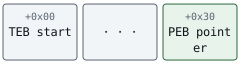
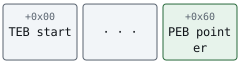
Each thread has its own TEB. It contains thread-specific user-mode state, including a route to the PEB, stack boundaries, thread-local storage information, and error-related fields.
Each thread’s TEB points to the one PEB shared by the whole process, which in turn fans out into the structures described above:
Alternative: Picture one process-wide information hub with a separate thread desk for every execution path: each TEB leads back to the shared PEB.

On 32-bit x86 Windows code, the fs segment register helps locate thread state. On x86-64 Windows code, gs fills that role. That is why you may see instructions such as these in low-level Windows disassembly:
Code example. The code’s comments explain: 32-bit Windows: obtain the current process's PEB pointer. 64-bit Windows: obtain the current process's PEB pointer.
This is not ordinary game data. fs: and gs: tell the C P U to use a segment-relative address associated with the current thread. hexadecimal 3 0 and hexadecimal 6 0 are offsets in different Windows layouts, not an instruction to double every structure offset when moving from 32 to 64 bits. Wider pointers and alignment help explain why layouts change; the actual offsets come from the layout being examined. Treat these internal structures as an observation in a particular architecture and Windows build, not as a public A P I contract.
Section: Why the course tool uses ToolHelp.
Walking internal loader pointers is useful when you are learning in a debugger. For a beginner-facing tool, Windows already provides a documented, read-only alternative: a ToolHelp snapshot.
CreateToolhelp32Snapshot asks Windows for a moment-in-time copy of a process, thread, or module list. Module32FirstW fills the first MODULEENTRY32W, and Module32NextW advances through the copy.
The shared wrapper keeps that unsafe boundary in one reviewed function. Here is the order of Windows calls it makes before it ever returns a module base and size:

Code example. The code’s comments explain: 🛡️ SAFETY: the P I D, process identifier, is a value and OwnedHandle closes the returned snapshot. 📏 SAFETY: entry has the size Windows requires and remains writable. 🔁 Module32NextW either replaces entry or reports the end of the list.
dwSize is important: it tells Windows which version and size of the output structure the caller prepared. Forgetting it is like handing someone a form without saying which form it is.
Section: Snapshot does not mean frozen process.
The list is stable, but the process is still running. A D L L could unload after the snapshot was created. A snapshot therefore has a time limit:
Narration: A module can disappear after its name entered a snapshot. Treat a later failed read as a normal lifetime change, not proof the snapshot was fabricated.
Enumeration tells you what existed during the snapshot. A later read must still be allowed to fail.
Result makes that race visible. The tool should report a normal error instead of assuming a previously seen address must remain valid.
Section: Lab: connect the file map to the live process.
Start one offline course game, then run both existing tools. 3CCD91 is the sample Wesnoth R V A, relative virtual address, examined in Lessons 5.1 and 5.2; it is a position relative to the module base, not a live address to reuse after a restart. Replace it with an R V A you verified for the exact local build if your file differs:
Terminal window
Code example. The surrounding prose explains this example; the full lesson contains the exact code.
pe_inspector prints the preferred base stored in the file, and module_inspector prints the live base where the loader placed the module in this run. If the two differ, A S L R, address space layout randomization, or relocation moved the whole module, and every byte inside it moved by the same amount. The R V A is measured from the module’s start, so it still names the same position, and module_inspector adds it to the live base to find where that position sits in this run.
Repeat with ac_client.exe and Quake3-UrT.exe. Do not copy one game’s module name, pointer width, or address into another game.
Section: What not to change.
Do not edit PEB flags, unlink modules from loader lists, or disguise process parameters. Those changes can break loader assumptions or conceal activity from diagnostic tools. This lesson uses the structures to explain Windows, then uses documented APIs for the actual program.
The buildable implementations are module_inspector.rs and the ToolHelp wrapper in process.rs.
References: Microsoft ToolHelp snapshots, Module32FirstW, and Microsoft P E format.