An executable has become a running process, but its address space does not yet tell us what runs the game’s logic. Before reading a memory map or applying a native-code method to an unfamiliar game, identify its engine and runtime. Wesnoth, AssaultCube, and Urban Terror let us practice with compiled native code. A game using a managed runtime or script host may give us names and types that those labs had to infer, and its objects may have different lifetimes and may move in memory.
For example, searching for a field at player base + hexadecimal 1 3 8 assumes that we have the right kind of player object, that the field has that layout in this build, and that the object is still alive when we read it. Discover the runtime first; then choose what evidence can answer the health question.
Section: The runtime decides what an address means.

The branches are not different difficulty levels. They are different questions. In any branch, an offset describes a layout in a particular build; it does not keep an object alive. The runtime changes what evidence is available for recovering that layout and whether the object can move during its lifetime.

In brief: An offset describes one layout; it cannot keep the object alive or prevent its storage from moving.
Section: Read the folder before you attach anything.
The quickest answer is on disk and costs nothing:
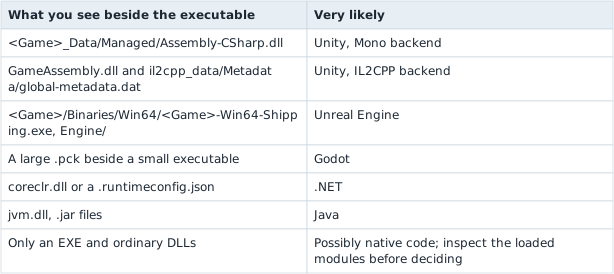
Confirm it against the process’s loaded-module list, because a folder can lie and a launcher can start something other than the executable you inspected. The folder shows what is installed; the module list shows what the running process actually mapped. Lesson 12.1 later shows a tool for collecting that list.
Alternative: The installation folder is a proposed inventory; the loaded-module list is the running process’s actual inventory. Compare both before classifying the runtime.
Section: Native: reuse the earlier method, with its checks.
For a native build, the debugger and P E, portable executable, techniques from Chapters 2, 3, and 5 remain useful. An object layout can have fixed field offsets within that build. The object base can still change after allocation, collection growth, destruction, or a restart, as Lessons 1.8 and 3.10 explained. Reconfirm the module, object identity, and lifetime before reusing an address.
Section: Unity with the Mono backend: the code is readable.
Assembly-CSharp.dll is not a native D L L, dynamic link library. It holds .NET intermediate language, which keeps class names, method names, and field names in its metadata. A decompiler shows something close to the original C#, including the field you are looking for and the method that changes it.
This changes the shape of the work completely. You are no longer inferring that offset hexadecimal 1 3 8 behaves like health across controlled tests. You are reading a field called health and the method called TakeDamage that writes it. The recovery skills from Chapter 3 still matter, but they become confirmation rather than discovery.
One useful nuance: Unity documents its managed garbage collector as non-compacting. It does not move surviving managed objects merely to close gaps in the heap. That removes one reason an address might change, but it does not make a pointer chain a permanent identity: the game can destroy and recreate an object, reuse storage, or change the layout in another build.
Section: Unity with IL2CPP: native code with some metadata.
IL2CPP converts the same C# ahead of time into C++ and compiles it, so the logic ships as native code inside GameAssembly.dll. There is no Assembly-CSharp.dll to decompile, and at first glance you are back to reading disassembly.
The runtime also needs metadata for the managed features that remain in the build. A typical Unity IL2CPP layout has global-metadata.dat; it can reveal useful names and type relationships. It is not a promise that every original class, method, or field name survived: build stripping and packaging affect what remains. Correlate the metadata you can actually inspect with the native code and with a controlled observation in that exact build.
Section: CoreCLR and the JVM: addresses that can move.
A .NET game running on CoreCLR is the case where the earlier assumption really does break. CoreCLR’s garbage collector is generational and compacting: it relocates surviving objects to remove gaps. An object’s address is therefore valid only until the next collection that moves it.
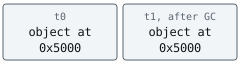
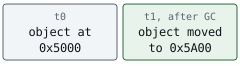
That differs from Unity’s non-compacting collector. Both are “managed” and “garbage collected”; those words alone do not tell you whether a particular object may move. Check the runtime and collector, as well as the object’s lifetime.
Where objects can move, a raw address is not a durable identity. Use a runtime-supported reference, a validated handle, or a fresh lookup when the runtime exposes one. Lesson 3.10 built slot-and-generation handles for a similar identity problem: storage can be reused even when nothing moves.
Many JVM collectors, including G1, also move surviving objects. The collector and configuration matter; do not infer a permanent address from the word “Java” alone.
Section: Unreal: native, with its own directory.
Unreal combines native C++ code with an engine object system. Its reflected UObject types carry class and property information, while ordinary native types and unreflected fields can still require the earlier layout method. That makes the engine’s object and name facilities useful orientation points, not a guarantee that every gameplay value is listed there. Inspect the exact game build before choosing a search target.
Section: Other engines: classify the build, not its logo.
A .pck file may suggest Godot, but a game can add native extensions or use a different scripting arrangement. A launcher can also start a different executable from the one beside the package you inspected. Treat the folder clues as a starting hypothesis and verify it with the loaded-module inventory and one observed behavior.
Section: The answer belongs to one build.
A runtime classification goes stale the same way an offset does. Unity lets a studio switch a project’s scripting backend between Mono and IL2CPP, so an early-access release and the finished game can land on different branches of the flowchart above. The classification holds for the exact build you inspected; a new build means reading the folder and the loaded modules again.
Narration: A later release can switch scripting backends while keeping the same game name. Recheck the build instead of carrying the old runtime assumption forward.
Apply the method to a second folder. Suppose you see GameAssembly.dll and il2cpp_data/Metadata/global-metadata.dat, but no Assembly-CSharp.dll. Unity IL2CPP is a useful first hypothesis, so inspect the loaded modules and available metadata. It would be a mistake to conclude that every old field name survived, or that a pointer found today will still identify the same object after a scene reload. If the next build instead loads coreclr.dll, revisit the collector and reference model before reusing any raw object address. Verify runtime, build, and object lifetime separately before reusing an address.
References: Unity scripting back ends, Unity garbage-collection modes.NET garbage collection, Oracle G1 garbage collection, and Unreal’s reflection system.