Section: A P I D, process identifier, identifies a process but grants no access.
A build hash can tell us which executable we intend to inspect, and a P I D can tell us which running instance to ask about. Neither lets a program read its memory. Windows makes access a separate decision when it issues a process handle.
A process ID identifies a running process. It does not grant access to that process. To ask Windows for a usable process handle, a program calls OpenProcess with an access mask: a group of bits describing the operations it wants.
Alternative: The P I D names the building, while the handle is a key issued for particular doors. Finding the address does not provide that key.
Windows checks whether the caller may obtain those rights to the target process. The call either returns a handle carrying the granted rights or fails with an error:

The handle is not the process itself. It is a Windows-managed reference plus a specific set of permissions.
Think of the P I D as the number on a catalogue entry and the handle as a claim ticket issued for a particular visit. Knowing the number lets you ask; Windows checks the caller and the target before issuing a ticket marked with the allowed operations. The analogy ends there: a handle is an opaque value meaningful to Windows in this process, and an A P I, application programming interface, checks its recorded rights, not a handwritten label. This is why finding the right P I D does not rescue a handle that lacks PROCESS_VM_READ.
The call that issues the handle takes three arguments:
OpenProcess, argument by argument
dwDesiredAccessaccess maskrequired
The rights to ask for, as bits ORed together. Ask for the smallest set the job needs; the table further down lists the rights this course uses.
bInheritHandlebooldefault false
Whether a process this one starts later inherits the handle. The course passes false, so nothing a tool launches quietly receives access.
dwProcessIdu32required
The P I D of the target. It names the process and grants nothing by itself.
return valuehandle, or an error
A handle carrying the granted rights, or an error such as “access denied” when Windows refuses the requested access. Close a handle you no longer need.
Optional: practise the three-argument call below. For a supplied P I D, this helper asks only for basic process-query access and disables inheritance. A successful call gives it an owned HANDLE, which it immediately closes; an error returns through ?. Real inspectors keep an ownership guard when more fallible work happens between opening and closing. These are the course’s windows 0.62 projected signatures, with the paired handle-release contract.
Code example. The code’s comments explain: SAFETY: numeric P I D, query-only rights, and inheritance disabled. SAFETY: this function owns this valid handle and never uses it again.
Section: Treat a handle as a capability.
A capability combines a reference to an object with authority to perform particular operations. A process handle opened for limited queries can identify the process and ask for its image path, but it cannot become a memory-writing handle because a later function wishes it could.
In brief: A process handle carries specific granted operations; knowing the P I D cannot expand those permissions.
That is useful architecture, not just security etiquette. Give read-only observation code a type that owns only a query/read handle. Give patching code a separately created write-capable handle after the user selects an explicit lab action. Then ordinary scanner functions cannot accidentally grow into writers without changing their inputs and call sites.
Rights belong to the handle, not permanently to the P I D. Opening the same P I D twice with different access masks can produce two handles with different capabilities, and closing one does not close the other.
Section: The caller has an access token.
When you sign in, Windows creates security information describing your account and groups. A process receives an access token representing its security context. That token includes identity information, privileges, restrictions, and an integrity level.
An integrity level is a boundary used by Windows to limit which processes may influence others. A normal desktop program commonly runs at medium integrity. A program started through an administrator approval may run at high integrity. A lower-integrity caller generally cannot gain powerful access to a higher-integrity target merely because both processes are visible in Task Manager.
An integrity level is not a score for whether software is good or bad. It is one input to an access decision.
Section: The target has a security descriptor.
A process object also has a security descriptor. Its DACL—Discretionary Access Control List—describes which trustees may receive which rights. When OpenProcess runs, Windows checks the requested rights against this information and the restrictions on protected processes.
This explains a common beginner mistake: “I found the P I D, so why did reading memory fail?” Finding and opening are separate steps with different permissions.
The access check happens when Windows creates or duplicates the handle. Afterward, APIs compare their required rights with the rights recorded on that handle. Asking for extra rights up front can make OpenProcess fail even when the smaller operation you actually needed would have been allowed.
Section: Name the right that matches the job.
These course tools use several process rights:
Process access rights at a glance
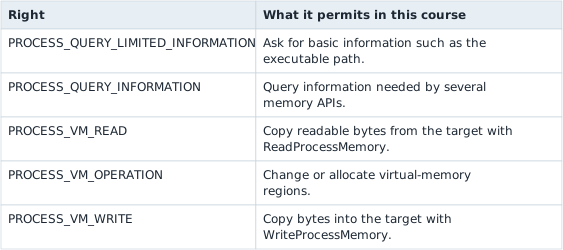
PROCESS_ALL_ACCESS is not a convenient “make it work” flag. It requests many unrelated powers and makes failures harder to diagnose.
The original helper asks Windows for every process right just to query an executable path. OwnedHandle owns the returned handle, and query_full_process_image_name is the path-query helper below.
Before: ask for every process right
Code example. The code’s comments explain: SAFETY: OpenProcess accepts a numeric P I D; errors are returned normally.
Least privilege means requesting only the capability the next call uses. Windows still checks whether the caller may receive that right.
Improved code
Code example. The code’s comments explain: SAFETY: OpenProcess accepts a numeric P I D; errors are returned normally.
Show the diff
Code example. The code’s comments explain: SAFETY: OpenProcess accepts a numeric P I D; errors are returned normally.
Takeaway: match the handle rights to the operation you actually need.
Section: Why this version?.
The small request documents the tool’s purpose. If Windows grants it, you know the program did not quietly obtain memory-write, thread-creation, handle-duplication, or termination rights.
Section: Build a limited query tool.
This program finds a named process through the shared ToolHelp code, opens it with only PROCESS_QUERY_LIMITED_INFORMATION, and asks Windows for the image path:

Additional detail: Complete lab source: access_probe.rs.
Code example. The code’s comments explain: SAFETY: path owns length writable UTF-16 units, and length remains valid while Windows replaces it with the number actually used.
Section: Read the unsafe block slowly.
QueryFullProcessImageNameW writes UTF-16 text into caller-owned memory. The compiler cannot prove what the operating system will do, so the call is unsafe.
The comment states the exact proof:
path owns the buffer;
length begins as the buffer capacity;
both remain alive during the call;
Windows reports the number of UTF-16 units it wrote;
The wrapper truncates the vector before converting the used portion to a string.
unsafe does not mean “skip safety.” It means the programmer must supply the proof the compiler cannot check.
Section: Run the experiment.
Start a local match, then use a normal, non-administrator terminal:
Terminal window
Code example. The surrounding prose explains this example; the full lesson contains the exact code.
Repeat with:
Terminal window
Code example. The surrounding prose explains this example; the full lesson contains the exact code.
The result should show the exact executable path. That helps prevent a tool from acting on a different file that happens to share a familiar process name.
Section: Why another process may still reject you.
Possible reasons include:
the target runs under another account or at a higher integrity level;
the DACL does not grant the requested rights;
Windows restricts access because the target is a protected process;
the process exited between enumeration and OpenProcess;
the P I D was reused after the old process ended;
the caller requested more rights than the job required.
The first troubleshooting step is to print the exact error and requested mask. Do not automatically enable debug privileges or elevate the whole tool. For the offline open-source course games, matching the user and integrity level is normally enough.
Narration: Requesting unrelated rights can make a simple query fail. The exact access mask and error explain more than immediately rerunning the entire tool with higher privileges.
Section: How the writable labs stay explicit.
The shared Process wrapper starts with query and read rights. It adds operation and write rights only when the caller passes allow_write: true:
Optional: practise the access-mask decision that adds write rights only when requested.
Code example. The surrounding prose explains this example; the full lesson contains the exact code.
That boolean is a visible decision at the call site. A scanner can open read-only; a verified patcher must deliberately opt into writing.
The “group of bits” from the top of this lesson is not a metaphor. Microsoft documents PROCESS_QUERY_INFORMATION as hexadecimal 0 4 0 0 and PROCESS_VM_READ as hexadecimal 0 0 1 0. ORing them sets bit 10 and bit 4 of one 32-bit value and leaves every other bit 0, producing hexadecimal 0 4 1 0. Allowing writes ORs in PROCESS_VM_OPERATION (hexadecimal 0 0 0 8) and PROCESS_VM_WRITE (hexadecimal 0 0 2 0), setting two more bits for a final mask of hexadecimal 0 4 3 8. OpenProcess compares that exact bit pattern against what the target’s DACL permits; there is no separate “and also let me read memory” step hiding behind the named constant.
Predict first
A scanner found the game's correct P I D and opened it with only PROCESS_QUERY_LIMITED_INFORMATION, mask hexadecimal 1 0 0 0.
It now calls ReadProcessMemory with that handle. What happens?
Answer: ReadProcessMemory fails with access denied. hexadecimal 1 0 0 0 has only bit 12 set. VM_READ is bit 4, hexadecimal 0 0 1 0, and hexadecimal 1 0 0 0 AND hexadecimal 0 0 1 0 is 0, so the handle lacks the one right a read needs.

The complete buildable tool is access_probe.rs.
References: Microsoft process security and access rights, OpenProcess, and QueryFullProcessImageNameW.
Transfer the idea to a file: CreateFileW can return a handle opened for reading only. Knowing the path does not turn that existing handle into a writing one. The file A P I may succeed at a read and refuse a write for the same reason this chapter’s query-only process handle cannot read game memory.