Section: A dump is a saved debugging snapshot.
The live tools in this chapter reported different parts of one process: modules, page regions, threads, and A P I, application programming interface, results. The kernel lessons explained why those observations pass through controlled services. A dump brings selected process data together at one capture moment, so a later investigation can ask which module and thread were involved even after the process is gone.
A live debugger reads a running process. A dump file saves selected process state so it can be inspected later. A minidump may include:
basic process and operating-system information;
loaded and recently unloaded modules;
thread records and selected thread context;
stack memory needed to reconstruct calls;
exception information when captured during a crash.
The word “mini” describes a selectable subset, not a harmless text log. Dumps can contain file paths, arguments, stack data, and other private values. Treat them like diagnostic data, not screenshots.

The dump type decides which optional streams are saved. That is why a missing heap object or exception record may mean “not captured,” not “never existed.”

Section: Why dumps help reverse engineering.
A reproducible crash often disappears when you attach a debugger and change timing. A dump saves the process state close to the failure without a debugger attached, and from that file alone you can answer:
Which thread failed?
Which module contained the instruction pointer?
What calls led to that point?
Which game and D L L, dynamic link library, versions were loaded?
Did the crash occur inside the course patch, the game, or a system D L L?
A dump does not record every earlier event. Combine it with logs or an E T W, Event Tracing for Windows, trace when the history matters.
In brief: A dump preserves selected state at capture time; it needs logs or tracing to explain the earlier sequence of events.
Section: Scope this lab to the current process.
MiniDumpWriteDump can accept a process handle and P I D, process identifier. This course program deliberately uses GetCurrentProcess and GetCurrentProcessId, so it can dump only itself through this code path. It does not search for a game P I D or request another process handle.
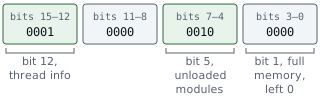
It also avoids MiniDumpWithFullMemory. A normal dump plus thread and unloaded-module information is enough to learn the workflow without copying every private page in the process.
In the source, that choice is the dump_type value. Each optional stream has its own bit, and | sets several bits at once:
Additional detail: Complete lab source: self_minidump.rs.
Code example. The code’s comments explain: SAFETY: these calls take no pointers and return identifiers for this process. SAFETY: both handles belong to this process, the file stays open during the call, and no optional exception/user/callback pointer is supplied.
Section: Translate the raw file handle carefully.
File owns a Windows file handle. AsRawHandle borrows the numeric handle so the Windows A P I can use it. The File must stay alive until MiniDumpWriteDump returns.
That is why drop(file) appears after the Windows call. Closing it first would leave file_handle as a stale number.
Narration: Borrowing a raw file handle does not keep the file alive. Its owner must remain present until the dump-writing call finishes.
Section: Build and capture.
The first command builds the small dumper in the Windows V M, virtual machine. The second gives it an output path; create_new(true) makes a repeat run fail safely rather than replace the first capture. Open the resulting file in the next step.
Terminal window
Code example. The surrounding prose explains this example; the full lesson contains the exact code.
The program should print the saved path. Its complete buildable source is self_minidump.rs.
Section: Open the dump in WinDbg.
Install WinDbg from Microsoft, then open the file from the UI or run:
Terminal window
Code example. The surrounding prose explains this example; the full lesson contains the exact code.
These first commands answer different questions:
Code example. The surrounding prose explains this example; the full lesson contains the exact code.
The self-dump is captured during a normal function call, so it does not contain a crash exception. That is useful: you can learn module, thread, register, and stack navigation without deliberately causing undefined behavior.
Section: Read a stack from bottom to top.
A stack trace is a chain of function frames. The top frame is where the selected thread was when captured. Frames below it are callers that led there.
Alternative: Read stack frames as nested unfinished requests: the current work is on top, with the callers that led there underneath.
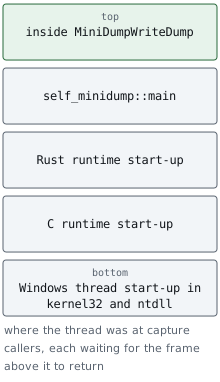
Names may be missing when matching symbols are unavailable. In that case, WinDbg may show a module plus an offset:
Code example. The surrounding prose explains this example; the full lesson contains the exact code.
The offset is still useful when paired with the exact build hash and module base: it names the byte hexadecimal 1 2 3 4 past the start of self_minidump.exe as loaded, and in one exact build that is one specific instruction.
Section: Create a controlled crash exercise safely.
Do not corrupt a running game’s memory just to obtain a dump. Instead, make a tiny separate test program that crashes on purpose, enable Windows Error Reporting local dumps for that one executable in a disposable V M, and inspect the result.
Not every Rust failure is a crash that Windows Error Reporting can see. Returning an error from main prints it and exits with code 1. A panic under Rust’s default unwinding strategy is caught by the runtime, which prints the message and exits with code 101. Both are ordinary exits, so there is nothing to dump. A panic in a program built with panic equals "abort" is different: it ends in a fail-fast exception, code this value, which Windows Error Reporting does capture, and !analyze then reports that exception rather than an access violation.
Section: Dump limitations.
A small dump may omit heap data needed to inspect a particular object.
A dump records one instant, not the earlier event timeline.
Unresolved symbols make stacks harder to name.
Optimized code may inline functions or keep values only in registers.
A module path and timestamp help, but a trusted hash is stronger build identity.
Start small. Capture more data only when a specific debugging question requires it, and keep diagnostic files with the exact build record and test logs they describe.
Chapter 12 uses that same build and module evidence to ask which D L L actually loaded, which A P I contract was resolved, and where a process-level view ends. It then follows requests into device drivers and distinguishes process virtual addresses from the physical-memory mappings underneath them.
References: MiniDumpWriteDump, Minidump files, and WinDbg overview.