Lesson 12.4 showed why ordinary user programs go through operating-system interfaces to reach devices. Something has to turn a request into device work, though. When you press a key, bytes arrive from a keyboard; when a game loads a level, a disk controller delivers the file. The code that operates the device is its device driver: code that knows which registers to read or write and how to exchange commands with the device. The kernel-mode drivers studied here are .sys files in the same P E, portable executable, format as programs and DLLs (Chapter 5), loaded into privileged memory. Windows also supports some user-mode driver arrangements; this toy path follows the kernel-mode kind.
This lesson follows one request from a program down to a device and back, looks at how a driver talks to hardware through registers and interrupts, traces a key press from a U S B keyboard to a game, and ends with why Windows is strict about which drivers it will load. Everything here stays conceptual. The next lesson decodes the same requests and registers bit by bit, and its lab runs a pretend device and driver as an ordinary user-mode program.
Section: Why the kernel owns every device.
Suppose two programs could drive the same disk controller directly. One writes the number of the sector it wants; a microsecond later the other overwrites it with a different sector; the first program receives the wrong data. Worse, a program could point the controller’s copying engine at another process’s memory. Devices hold state that everyone shares, and many can copy data to or from physical R A M, random access memory,, so the operating system coordinates who may operate them and which buffers they may reach. The later D M A, direct memory access, lesson examines those memory controls in detail.
Narration: Two uncoordinated callers can overwrite the device’s current command. The driver’s shared request path keeps one program’s transfer from becoming another program’s operation.
Instead, Windows coordinates access through a driver stack. The I/O manager checks the caller’s handle and sends the request onward; the receiving driver must still validate the operation, lengths, and buffers it uses. This division matters: an access check on a handle does not prove that the request’s contents are safe for a device.
In brief: Permission to open a device and validation of one request’s contents are separate checks.
Windows represents each device as a device object, and several drivers can stack on one device:
a bus driver talks to the bus the device is plugged into, such as U S B or PCI Express;
a function driver knows the device itself and does the real work;
optional filter drivers watch or adjust requests on their way past.
A request enters at the top of this driver stack, and each driver either handles it or passes it to the driver below.
Section: A request’s path from a program to a device.
A program cannot call a function inside a driver, because the driver lives in ring 0. Instead, the program opens the device much like a file, receives a handle, and makes requests through two general-purpose calls:
ReadFile and WriteFile move data from or to the device;
DeviceIoControl sends a numbered command, a control code, for anything that is not simply reading or writing, along with an input buffer and an output buffer.
Both travel the system-call path from Lesson 12.4, through kernelbase.dll, ntdll.dll, and syscall, and arrive at the kernel’s I/O manager, the part of the kernel that runs every device request. The I/O manager checks the handle and then describes the request in an I/O request packet, or IRP: a kernel data structure that serves as the request’s work order. It names the operation, carries the parameters and buffers, travels down the driver stack, and comes back up carrying the result.
Here is a read from this lesson’s toy keypad, a simple imaginary device that the lab in Lesson 12.8 simulates, made before any key has been pressed:

The driver’s dispatch routine is the function the I/O manager calls with a new IRP. If the dispatch routine can finish at once, it completes the IRP, handing it back with a status and a byte count. If it has to wait for the hardware, it keeps the IRP, returns STATUS_PENDING, and completes the IRP later, from the code that runs when the device interrupts. Meanwhile the program’s thread waits inside ReadFile.

A DeviceIoControl request is checked twice. Each control code declares the rights that the caller’s handle must hold, and the I/O manager refuses a request from a handle without them before the driver ever runs. The IRP also records that the request came from user mode, so the driver must treat every parameter as untrusted: it compares the whole control code with the ones it defines, and it never writes more bytes than the request says the caller’s buffer can hold. Lesson 12.8 unpacks a control code into its four fields.
Section: Registers: how a driver talks to hardware.
A device exposes a small set of registers: storage locations inside the device that software reads to learn the device’s state and writes to give it commands. On a modern PC most devices expose their registers through memory-mapped I/O: the registers answer to a range of physical addresses, as if they were memory. When the processor reads or writes one of those addresses, the access goes to the device instead of to R A M. The driver asks the kernel to map that physical range into kernel virtual addresses, and then reads and writes it with ordinary load and store instructions. x86 also has an older mechanism, port I/O, with its own in and out instructions; the classic PS/2 keyboard controller answers at ports hexadecimal 6 0 and hexadecimal 6 4.
Alternative: A device register can act like a doorbell or status window: the same-looking memory access may command hardware rather than store an ordinary byte.
The toy keypad, modeled loosely on that PS/2 controller, has four registers, each 4 bytes wide, one after another:
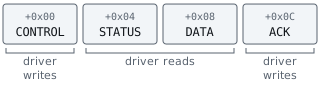
CONTROL is where the driver switches the device on and allows it to interrupt.
STATUS tells the driver whether key events are waiting, and how many.
DATA holds the event at the front of the device’s queue: a scan code, a number that names a physical key position, plus whether that key was pressed or released. The A key’s scan code is hexadecimal 1 E.
ACK is where the driver tells the device that its interrupt has been handled.
Unlike ordinary R A M, these registers can change because of device activity, and a read can consume data. Reading DATA removes the event it returns, so the next read returns the next event, and a tool that read DATA “just to look” would silently swallow a key press. STATUS can change between two reads with no instruction in between, because the device changes it. So register accesses are never cached, merged, or skipped: the kernel maps device memory as uncacheable, and drivers use dedicated read-register and write-register routines that the compiler must carry out exactly as written. Lesson 12.8 places the four registers at a physical address and decodes every bit in them.
Section: Interrupts: how a device gets the driver’s attention.
The driver could read STATUS over and over until an event appears. That is polling, and it wastes a processor core on a device that sits idle almost all the time. Instead, the keypad raises an interrupt, a hardware signal that makes the processor stop between two instructions and run the handler the kernel registered for that device’s vector (Lesson 12.4).
A driver’s interrupt handling comes in two halves:
The interrupt service routine, or ISR, runs immediately, while other work on that core waits, so it does the minimum. It reads STATUS to confirm the interrupt really came from its device, because several devices can share one interrupt line; writes ACK so the device lowers the line; and queues the second half.
The deferred procedure call, or DPC, runs moments later at a lower priority, with interrupts enabled again. It does the real work: it drains the events, fills the waiting IRP’s buffer, and completes the IRP.
For a press and release of A, the DPC collects two events, A pressed and A released, and completes the parked read with those 2 bytes. The I/O manager copies them into the program’s buffer and wakes its thread, and ReadFile returns. Lesson 12.8 follows both halves register by register.
Section: D M A: letting the device copy the data itself.
Registers suit a keypad, which delivers a byte now and then. A disk or a network card moves megabytes, and fetching them one register read at a time would keep a core busy doing nothing but copying. Such devices use direct memory access, or D M A: the driver tells the device where a buffer is and how big it is, the device copies the data straight into or out of R A M, and it interrupts once when the whole transfer is done.

The address the driver gives the device is not a virtual address, because a device has no access to any process’s page tables. It is a physical address or, on a machine with an IOMMU, a device address that the IOMMU translates and limits to the buffers the driver approved. Lesson 13.1 explains that translation and why Windows uses it to stop a malicious device from reading all of memory.
Section: A key press, from a U S B keyboard to a game.
A real keyboard is more complicated than the toy keypad, but every layer it passes through is a device, a driver, or a queue from this lesson. Lesson 1.2 introduced the keyboard as an input device the game uses through Windows. Here are the steps inside that path, for a U S B keyboard on a modern PC:

A U S B device never speaks first. The host controller asks each device for news on a fixed schedule, and a keyboard asked 125 times a second is asked every 1,000 divided by 125 equals 8 milliseconds; many gaming keyboards are asked every millisecond. The keyboard answers with a H I D report (H I D, human interface device, is the U S B standard for keyboards, mice, and controllers), which lists the keys held down at that moment by their H I D usage numbers. A is usage hexadecimal 0 4.
The host controller writes the report into R A M by D M A and interrupts, and the report climbs the driver stack. The keyboard mapper driver, KBDHID.SYS, converts usage hexadecimal 0 4 into scan code hexadecimal 1 E, the numbering that Windows keyboard drivers have used since PS/2 keyboards, and the keyboard class driver, KBDCLASS.SYS, queues a key-down event.
The raw input thread, inside win32k, the kernel part of the Windows window manager, reads those events. It translates the scan code into a virtual-key code using the active keyboard layout, updates the key-state table that GetAsyncKeyState reads (Lesson 6.9), and posts the event to the message queue of the thread that owns the foreground window. On a US layout, scan code hexadecimal 1 E becomes VK_A, hexadecimal 4 1, which is also the A S C I I code for the letter A: 4 times 16 + 1 equals 65. For security, Windows opens keyboards exclusively for this thread, so an ordinary program cannot read keystrokes straight from the keyboard’s driver.
The game’s message loop then takes the event out with GetMessage or PeekMessage, as a WM_KEYDOWN message, or as WM_INPUT if the game registered for Raw Input. Lesson 12.8 reads the report and the message bit by bit. Synthetic input from SendInput joins this path at the raw input thread, above every driver in the diagram, which is why programs watching input at that level can tell it apart from key presses that came through a keyboard.
Section: Why Windows insists on signed drivers.
Loading a driver puts new code into ring 0, where, as Lesson 12.4 showed, nothing sits beneath it to catch its mistakes and nothing can overrule it. So 64-bit Windows refuses kernel-mode code without a valid digital signature, the kind of signature Lesson 10.8 checked on game files.
A signature answers two questions: who published this driver, and has it changed since? It does not answer the question that matters most: is the code safe? A correctly signed driver can still offer a control code that reads or writes any memory for any caller. Attackers look for exactly those drivers, old and legitimately signed, and load one to borrow its bug. So Windows also keeps a vulnerable driver blocklist: a list of signed drivers known to be exploitable, which it refuses to load.
The same reasoning shows why a cheat that ships as a driver endangers its own user. It runs with the kernel’s full authority and comes from an anonymous author. It often comes with instructions to switch off Secure Boot, the firmware check that lets only signed boot components start, or memory integrity, the Windows feature that refuses to run kernel code it has not checked, or the blocklist. Each of those protects the machine against all kernel malware, not only against cheats. Lesson 12.9 gives the signing rules in full and lists a cheat driver’s risks one by one, then builds a read-only inventory of the drivers your own machine has loaded.
References: example I/O request, security issues for I/O control codes, keyboard and mouse H I D client drivers, driver signing policy, and Microsoft recommended driver block rules.