This lesson opens the numbers on the paths that Lesson 12.7 followed: the parameters of a DeviceIoControl request, the four fields packed into a control code, the toy keypad’s registers byte by byte, the values its interrupt handlers read, and the bytes of a real key press. It ends with a lab that runs the keypad and its driver as an ordinary program.
Section: What a driver reads from a control request.
A DeviceIoControl request carries more parameters than a read. These are the parts of its IRP that the keypad driver reads (Windows keeps some in the IRP itself and some in a per-driver stack location attached to it):
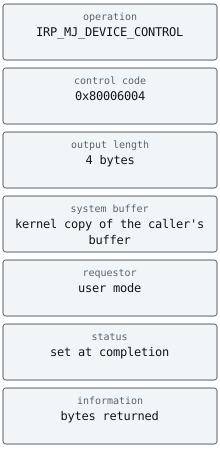
The toy control code uses buffered I/O. Its method bits tell the I/O manager to copy the caller’s input into a kernel system buffer before the driver runs, then copy the output back after completion. With this method, the driver works on that buffer rather than the program’s pointer. It still has to respect the lengths: the output length says how many bytes the caller’s buffer can hold, and writing even one byte more would overrun kernel memory.
In brief: Buffered I/O provides a kernel buffer, but the driver must still respect input and output lengths.
Section: A control code is four fields in one number.
A control code is a 32-bit number that packs four fields, built by a macro called CTL_CODE:
Alternative: A packed control code has labelled bit compartments: shifts place each field in its compartment, and masks recover those fields separately.
bits 16 to 31, the device type: values from hexadecimal 8 0 0 0 up belong to hardware vendors, lower ones to Microsoft;
bits 14 and 15, the access the caller’s handle must hold: 0 for any, 1 for read, 2 for write, 3 for both;
bits 2 to 13, the function number: vendors use hexadecimal 8 0 0 and up;
bits 0 and 1, the method, which says how buffers travel: 0 means buffered.
Packing the fields into one number uses the left shift from Lesson 1.10: a shift left by n bits multiplies a number by 2ⁿ when the result fits, so a shift by 4 bits moves it exactly one hex digit, because each hex digit stands for 4 bits.
The toy keypad defines one control code, get status, with device type hexadecimal 8 0 0 0, function hexadecimal 8 0 1, the buffered method, and read access. Packing it takes one shift per field:
hexadecimal 8 0 0 0 shifted left by 16 bits, which is 16 divided by 4 equals 4 hex digits, is this value;
the access value 1 shifted left by 14 bits is 2 to the power of 14 equals 16,384. That is 4 times 4,096, and 4,096 equals 16 to the power of 3 is the value of a 1 in the fourth hex digit, so 16,384 is hexadecimal 4 0 0 0;
hexadecimal 8 0 1 shifted left by 2 bits is hexadecimal 8 0 1 times 2 to the power of 2 equals hexadecimal 8 0 1 times 4 equals hexadecimal 2 0 0 4, because hexadecimal 8 0 0 times 4 equals hexadecimal 2 0 0 0 (8 times 4 equals 32, which is hexadecimal 2 0, and the two zero digits stay behind it) and 1 times 4 equals 4;
the method, 0, adds nothing.
this value + hexadecimal 4 0 0 0 + hexadecimal 2 0 0 4 equals this value. The top half, hexadecimal 8 0 0 0, is the device type, and the low half, hexadecimal 6 0 0 4, holds the other three fields. Here are its sixteen bits, one byte at a time:

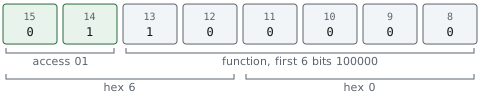
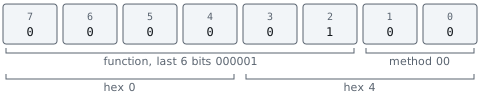
The access field is a security check that happens before the driver runs. The I/O manager compares it with the rights on the caller’s handle and refuses the request, without ever calling the driver, if the handle lacks them. A driver that declares a powerful command with access 0, any access, lets every program that can open the device send it, which is one of the classic driver mistakes. Drivers are also expected to compare the whole 32-bit code, not just the function number, so that a code with the right function but a different method or access is refused.
Section: The toy keypad’s registers, bit by bit.
The toy keypad’s four 32-bit registers take 4 times 4 equals 16 bytes in all. Suppose the firmware placed them at physical address shown here: CONTROL at offset +hexadecimal 0 0, STATUS at +hexadecimal 0 4, DATA at +hexadecimal 0 8, and ACK at +hexadecimal 0 C. STATUS therefore answers at this value + 4 equals this value. Here is the block after the driver has started the device and the A key has been pressed and released, 8 bytes at a time:


CONTROL, this value, is written by the driver. Bit 0, enable, makes the device scan its keys, and bit 1, interrupt enable, lets it interrupt. 3 equals 2 + 1, so both bits are set. The other 30 bits are reserved and must be written as 0.
STATUS, this value, is read-only and describes the device at this moment. Because the register is little-endian, byte +hexadecimal 0 4 holds bits 0 to 7 and byte +hexadecimal 0 5 holds bits 8 to 15. Byte +hexadecimal 0 4 is hexadecimal 0 1: bit 0, data ready, is set, so an event is waiting, and bit 1, overflow, is clear. Byte +hexadecimal 0 5 is hexadecimal 0 2: bits 8 to 15 form an 8-bit count of waiting events, here 2. As one number, hexadecimal 0 2 0 1 equals 2 times 256 + 1 equals 513. Dividing 513 by 256 gives 2 remainder 1: the count, and the low byte’s flags.
DATA, this value, holds the event at the front of the device’s queue. Bits 0 to 6 are the scan code, and bit 7 is set when the key was released rather than pressed. hexadecimal 1 E is 1 times 16 + 14 equals 30, binary 0001 1110. Its bit 7 is 0, so the front event is A pressed: 30 is the scan code of the A key in the numbering Windows uses, known as set 1. The event behind it is hexadecimal 9 E:

hexadecimal 9 E is 9 times 16 + 14 equals 158. Bit 7 is worth 2 to the power of 7 equals 128 equals hexadecimal 8 0, and 158 minus 128 equals 30, so the remaining bits name the A key again: A released.
ACK is write-only and reads as 0. Writing a 1 to bit 0 tells the device its interrupt has been handled, and the device lowers its interrupt signal; writing a 1 to bit 1 clears the overflow flag. Bits written as 0 change nothing. This write-1-to-clear convention is common because it lets a driver clear one flag without first reading the register to preserve the others.
Section: The ISR and the DPC, register by register.
Lesson 12.7 split a driver’s interrupt handling into a short interrupt service routine and a deferred procedure call that does the real work. Here is that sequence for the two events above, with the value each register returns:

The ISR writes hexadecimal 1 to ACK. Only bit 0 is set, so the device lowers its interrupt line and leaves the overflow flag, bit 1, as it was. The last read of STATUS returns 0: both events have been read, so the queue is empty, and the overflow flag was never set. The 2 bytes the DPC collected, hexadecimal 1 E and hexadecimal 9 E, are what the parked read receives when the DPC completes it.
Section: A key press in bytes.
Two stops on the path from a U S B keyboard to a game, the keyboard’s report and the message the game finally receives, pack their facts into bits.
Section: The keyboard’s report.
In the simple boot format that every PC understands, a keyboard’s H I D report is 8 bytes:
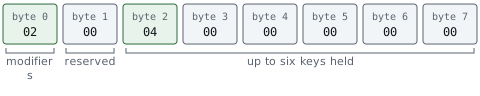
Byte 0 holds one bit per modifier key: bit 0 is left Ctrl, bit 1 left Shift, bit 2 left Alt, bit 3 the left Windows key, and bits 4 to 7 the same four keys on the right. hexadecimal 0 2 is binary 0000 0010, so only bit 1 is set: left Shift. Bytes 2 to 7 list up to six keys currently held, each as a H I D usage number. The letters A to Z are usages 4 to 4 + 25 equals 29, or hexadecimal 0 4 to hexadecimal 1 D (1 times 16 + 13 equals 29), so hexadecimal 0 4 is A. Six slots is also why a keyboard reporting in boot format cannot report a seventh key held at the same time.
Section: From scan code to message.
KBDHID.SYS turns usage hexadecimal 0 4 into scan code hexadecimal 1 E. The toy keypad marked a release by setting bit 7, hexadecimal 8 0, which is how PS/2 keyboards sent it over their wire. The events that KBDCLASS.SYS queues keep the scan code on its own and mark a release with a separate break flag instead.
When the game’s WM_KEYDOWN message arrives, its lParam packs the details of the key press into 32 bits:
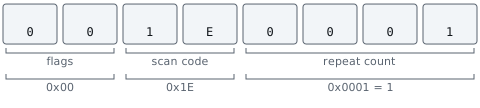
hexadecimal 1 E shifted left by 16 bits, which is 4 hex digits, is this value, and adding a repeat count of 1 gives this value. The top byte, bits 24 to 31, holds flags. For the matching WM_KEYUP, bit 30 (the key was down before) and bit 31 (the key is being released) are set. Bit 31 is bit 7 of the top byte, worth 2 to the power of 7 equals 128 equals hexadecimal 8 0, and bit 30 is its bit 6, worth 2 to the power of 6 equals 64 equals hexadecimal 4 0, so the top byte becomes hexadecimal 8 0 + hexadecimal 4 0 equals hexadecimal C 0 and the lParam is this value.
Section: Simulate a device and its driver.
The lab toy_driver_lab.rs builds the toy keypad and a driver for it as an ordinary user-mode program. Nothing in it touches hardware or the kernel: the register block is a Rust struct, the interrupt line is a bool, and an IRP is a small struct in a queue. What it keeps from the real thing are the request checks and register behavior described in Lesson 12.7 and here.
The device’s register read shows DATA’s side effect in one line:
Narration: Reading DATA consumes queued events, so repeatedly reading it for inspection can change which events the driver receives next.
Code example. The code’s comments explain: Reading DATA is not a pure read: it removes the front event.
register refuses an offset that is not a multiple of 4 or that lies past the 16-byte block, so a mistyped offset becomes an error instead of a read of the wrong register. The driver’s ISR is as short as Lesson 12.7 says it should be:
Optional: practise the named operations and their inputs with a few whole-token blanks.
Code example. The surrounding prose explains this example; the full lesson contains the exact code.
The dispatch routine compares the whole control code and checks the output length before it copies anything, and a separate submit function plays the I/O manager, refusing any request whose handle lacks the access bits its code demands.
Build it, then run it from the rust-labs folder:
Terminal window
Code example. The surrounding prose explains this example; the full lesson contains the exact code.
The program parks a read request, presses and releases A, prints the register block drawn above, runs the ISR and the DPC, and shows the read completing with hexadecimal 1 E and hexadecimal 9 E. It then sends four control requests: one from a handle without read access, one with the near-miss code this value, one with a 2-byte buffer, and a valid one. Finally it presses keys six times with no driver running in between, to show the four-slot queue setting its overflow flag. The tests beside it check the register bytes from this lesson, the write-1-to-clear rule, the overflow, every refused request, and that waiting reads complete in order.
Then set QUEUE_CAPACITY to 2 and work out which tests must now fail before running them.
The toy kept driver mechanics inside an ordinary program: control codes, buffers, register side effects, and interrupt work were all visible without installing privileged code. The next lesson asks what changes when those mechanics belong to a real loaded driver, and builds an inventory of the components already trusted by Windows.
References: defining I/O control codes, security issues for I/O control codes, keyboard and mouse H I D client drivers, and WM_KEYDOWN.
For the specific buffered method used in the toy code, see Microsoft’s IOCTL buffer descriptions.