Lesson 13.9 explained how an emulator works and ran one instruction of a made-up 8-bit console through the fetch–decode–execute loop. This lesson builds the whole console, follows a complete program through it cycle by cycle, and ends with a lab that runs it.
Section: A toy 8-bit C P U, central processing unit.
In brief: The opcode chooses the operation. The operand supplies a number or an address. An address operand needs another memory read.
The C P U is made up, but it is built like the 8-bit processors in 1980s consoles. It has four registers:
PC, 8 bits, the program counter, so the whole machine has the 256 addresses, hexadecimal 0 0 to hexadecimal F F, of Lesson 13.9 ’s memory map.
A, 8 bits, the accumulator, where arithmetic happens.
X, 8 bits, a second register, used here as a loop counter.
Z, 1 bit, the zero flag: 1 when the last result was zero, 0 otherwise.
It understands seven instructions. Each begins with its opcode, and some carry an operand byte:
The toy C P U’s instructions
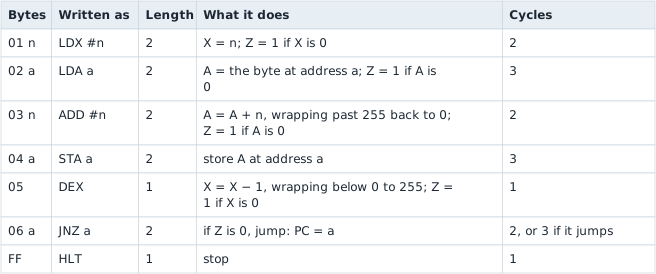
A # marks an immediate: #5 means the number 5 itself, while an operand without # is an address, and the instruction uses the byte stored there. STA and J N Z leave Z alone. Every other byte value is not an instruction, and the lab reports it as an error instead of guessing.
Every number in the last column comes from one rule: the C P U spends one cycle on each memory access, meaning each instruction byte it fetches and each data byte it reads or writes, plus one extra cycle when a jump is taken, to load the new address into PC. So L D X #n and ADD #n each fetch 2 bytes, 2 cycles; L D A a fetches 2 and reads 1, 3 cycles; STA a fetches 2 and writes 1, 3 cycles; D E X and H L T each fetch 1, 1 cycle; and J N Z a fetches 2, plus 1 if it jumps. Real 8-bit CPUs, such as the 6502 inside the NES, have similar costs for similar reasons.
Section: The program in memory.
The program adds 5 gold twice and then shows the total on the console’s display. Gold lives at address hexadecimal 8 0 and starts at 10:
Code example. The surrounding prose explains this example; the full lesson contains the exact code.
Each address is the one before it plus that instruction’s length: hexadecimal 0 0 + 2 equals hexadecimal 0 2, and so on down to hexadecimal 0 8 + 1 equals hexadecimal 0 9, hexadecimal 0 9 + 2 equals hexadecimal 0 B, and hexadecimal 0 B + 2 equals hexadecimal 0 D. The last byte sits at hexadecimal 0 D, which is 13, so the program fills addresses 0 to 13, which is 14 bytes:

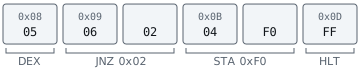
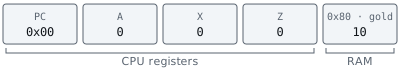
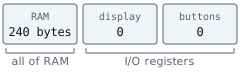
The program and its data share one memory, as they do in every stored-program computer. At power-on the machine looks like this:
Section: Trace the program.
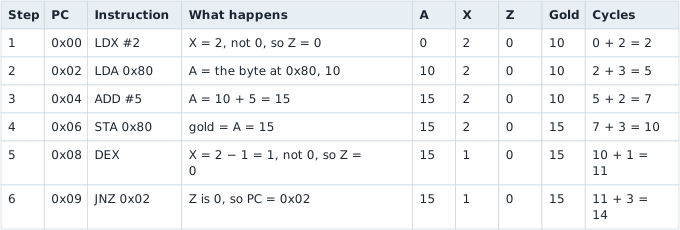
The first pass goes from power-on through the jump back:
The second pass repeats the loop body, and this time the counter runs out:
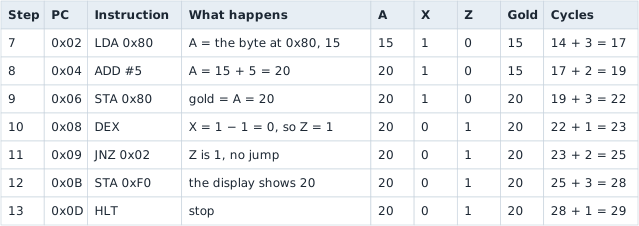
In hex, 15 is hexadecimal 0 F and 20 is 1 times 16 + 4 equals hexadecimal 1 4. At step 11, fetching J N Z and its operand has already moved PC from hexadecimal 0 9 to hexadecimal 0 9 + 2 equals hexadecimal 0 B, so not jumping needs no extra work: the next instruction is simply the next one.
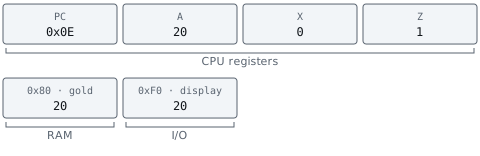
The whole run takes 29 cycles: 2 for L D X, then 3 + 2 + 3 + 1 + 3 equals 12 for the first pass, 3 + 2 + 3 + 1 + 2 equals 11 for the second, and 3 + 1 equals 4 for the ending. 2 + 12 + 11 + 4 equals 29. When the machine stops, it looks like this:

Section: The interpreter in Rust.
The lab’s step function is that trace, as code. It fetches the opcode, decodes it, and runs one arm of a match. Each arm’s last value is the instruction’s cost in cycles:
Code example. The code’s comments explain: The other five arms follow the same pattern.
fetch reads the byte at PC and adds 1 to PC, so each call consumes one byte of the instruction. Opcode::decode is a match on the byte that returns None for anything that is not an instruction, and the ? turns that into an IllegalOpcode error that names the address. A real C P U meeting an unknown opcode might raise an exception, as x86 does, or do something undocumented. An emulator that guessed would hide bugs in the guest program and in itself.

Narration: The number travels from R A M, random access memory, into A. R A M keeps its copy. Later arithmetic can change A before a store changes R A M.
The same instruction can load a different value. Change the memory byte below, then step through the fetches and the data read. Try zero: the loaded value also changes the zero flag. Each memory read costs one cycle in this toy C P U.
Because step decodes every instruction each time it runs, the loop body from hexadecimal 0 2 to hexadecimal 0 A is decoded afresh on both passes. That repetition is what the dynamic recompilers of Lesson 13.9 remove.
Section: The memory map as code.
The toy console maps R A M from hexadecimal 0 0 to hexadecimal E F, the display at hexadecimal F 0, the buttons at hexadecimal F 1, and nothing from hexadecimal F 2 to hexadecimal F F. In the lab, the map is two functions. Every read the C P U makes, including every fetch, goes through read, and every store goes through write:
Code example. The surrounding prose explains this example; the full lesson contains the exact code.
hexadecimal 0 0..=hexadecimal E F is Rust’s range from hexadecimal 0 0 to hexadecimal E F with both ends included. That is hexadecimal F 0 equals 15 times 16 equals 240 addresses, exactly the length of the ram array. DISPLAY and BUTTONS are constants holding hexadecimal F 0 and hexadecimal F 1. So step 12’s STA hexadecimal F 0 calls write with address hexadecimal F 0 and value 20, the second arm stores 20 in the display register, and nothing in step has to know that hexadecimal F 0 is not R A M.
Real consoles work the same way on a larger scale. The NES has 2 KiB of R A M at hexadecimal 0 0 0 0 to hexadecimal 0 7 F F; hexadecimal 0 8 0 0 is 8 times 256 equals 2,048 bytes. Its address decoder ignores the top address bits for R A M, so the same 2,048 bytes answer again at hexadecimal 0 8 0 0, hexadecimal 1 0 0 0, and hexadecimal 1 8 0 0: the range up to hexadecimal 2 0 0 0, which is 2 times 16 to the power of 3 equals 2 times 4,096 equals 8,192 bytes, holds 8,192 divided by 2,048 equals 4 copies. This is called mirroring. The picture chip’s registers start at hexadecimal 2 0 0 0, and the controllers answer at hexadecimal 4 0 1 6 and hexadecimal 4 0 1 7. An NES emulator’s read is a bigger version of the one above.
Section: Frame budgets and overshoot.
In brief: An instruction finishes as a whole. A frame budget can be exceeded by the final instruction’s cost.
A real frame’s budget, like the one in Lesson 13.9, runs to thousands of cycles, while the whole traced program takes only 29. So the lab uses a tiny budget of 18 cycles, which ends a frame partway through the program. Its run loop steps whole instructions until the budget is used or the C P U halts:
Code example. The surrounding prose explains this example; the full lesson contains the exact code.
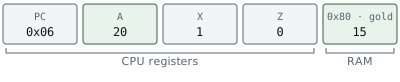
The check used less than budget happens before each instruction, never during one, because an instruction cannot stop halfway. After step 7 the run has used 17 cycles, which is less than 18, so it runs step 8, an ADD worth 2 cycles, and reaches 19. That is not less than 18, so the frame ends. It overshot by 19 minus 18 equals 1 cycle, and the emulator gives the next frame 18 minus 1 equals 17 cycles, which keeps the long-run average at exactly 18 per frame. The overshoot can never exceed 2: the frame’s last instruction starts with at most 17 cycles used and costs at most 3, and 17 + 3 equals 20 equals 18 + 2.
Here is the machine at that frame boundary:
Section: A save state, byte by byte.
Alternative: Saving R A M alone suits a data backup. Resuming this emulator also needs the registers, flags, counters, and device state.
At that frame boundary the new gold total exists only in A, so a snapshot of R A M alone would restore gold equals 15 and lose the 20. The lab’s SaveState copies every part of the machine and converts it to a row of bytes:
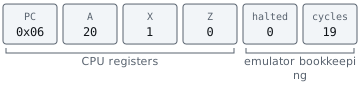
The halted flag records whether H L T has run, and the cycle count is the emulator’s position in time, so a loaded state resumes at the same point in the frame. Reading a state back is parsing input from outside the program, so it is checked the way Lesson 10.2 checks a save file: the lab refuses anything that is not exactly 255 bytes long, and refuses a Z or halted byte that holds anything other than 0 or 1, because no real run of the machine could have produced it. Real emulators also store a version number, because the layout changes as the emulator does, and a state saved by one version may not load in another.
Section: A cheat code racing a register.
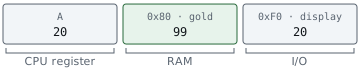
Narration: There are two copies to follow here. A frame-end R A M write can be replaced by the value still waiting in A.
The lab’s run_frame runs one frame and then applies every cheat, the way a cheat cartridge wrote its values once per frame:
Code example. The surrounding prose explains this example; the full lesson contains the exact code.
It returns the overshoot, which the caller takes off the next frame’s budget. saturating_sub subtracts but stops at 0 instead of wrapping around, so a frame that ends early because the C P U halted reports no overshoot.
Give it the 18-cycle frames and one cheat: write 99 to gold. Frame 1 runs steps 1 to 8, and then the cheat writes 99 to hexadecimal 8 0. But the game had already copied gold into A and added 5. Frame 2, with its budget of 17, starts with step 9, which stores A’s 20 over the 99, and steps 9 to 13 finish the program in 3 + 1 + 2 + 3 + 1 equals 10 cycles, well inside the budget. Step 12 shows 20 on the display, and at the end of frame 2 the cheat writes 99 again:
Section: Run the toy console.
The portable lab toy_emulator_lab.rs is the console from this lesson: the C P U, the 240 bytes of R A M, the display and buttons registers, the step interpreter, a run loop with a cycle budget, frames with constant-write cheats, and a SaveState that copies the registers and memory and converts them to and from 255 bytes.
Build it, then run it from the rust-labs folder:
Terminal window
Code example. The surrounding prose explains this example; the full lesson contains the exact code.
The lab first runs the traced program one instruction at a time and prints the same numbers as the tables above. Then it stops a run at the 18-cycle boundary, takes a save state, runs to the end, loads the state, and runs again, arriving at an identical machine. Finally, it runs two frames with the gold cheat and shows R A M at 99 while the display says 20. The tests check every one of the 13 trace steps, both costs of J N Z, wrapping at 255, the budget stop, the save state’s round trip through 255 bytes, the rejection of damaged save states and unknown opcodes, and the cheat’s race with register A.
Then give the console a watchpoint: a watch: Option<u8> field, and an if in write that records self.cpu.pc whenever the watched address is written. Before you run the traced program with gold watched, predict which PC values it records and why they are not hexadecimal 0 6, the address of the STA.