Lesson 11.8 promised that an emulator is a program whose data is the software of an entire other computer. This lesson keeps the promise. An emulator is a program that imitates another computer’s hardware closely enough that software written for that computer runs on it unchanged. The imitated machine and its software are the guest; the computer running the emulator is the host.
The console architecture from the preceding lessons gives the emulator a concrete target. Processor instructions, devices, timing, and saved state have to agree closely enough for the same game code to behave as expected.
Lesson 11.9 built a virtual machine for bytecode that was designed to be interpreted. An emulator interprets machine code that was designed for a real chip, and it has to reproduce whatever that chip does, including its quirks.
Section: The loop at the heart of every C P U, central processing unit.
Lesson 2.3 described the steps a C P U repeats: fetch the bytes at the instruction pointer, decode them, execute, and move on. In a real C P U, circuits do that. In an emulator, a loop does:
Code example. The surrounding prose explains this example; the full lesson contains the exact code.
The program counter, or PC, holds the address of the next byte to fetch; x86 calls the same register the instruction pointer. The last line counts cycles, ticks of the guest C P U’s clock, so the emulator knows how long the real chip would have taken. An emulator that runs this loop once per guest instruction is an interpreter. Everything else in this lesson is either a faster way to run the loop or a way to imitate the rest of the machine around it.
Section: One instruction through the loop.
To watch the loop work, take a made-up 8-bit console, the one Lesson 13.10 emulates in full. Like the processors in 1980s consoles, its C P U has a program counter and a few small registers, and it does its arithmetic in one called A, the accumulator. Each instruction is one or two bytes long. The first byte, the opcode, says which instruction it is; some instructions carry a second byte, the operand.
The bytes 03 05 mean ADD #5: add the number 5 to A. Suppose they sit at addresses hexadecimal 0 4 and hexadecimal 0 5, PC holds hexadecimal 0 4, and A holds 10:
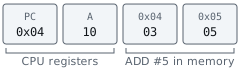
One pass of the loop does four things:
Fetch: read the byte at PC, 03, and add 1 to PC, making it hexadecimal 0 5.
Decode: 03 is ADD, which takes one operand byte.
Execute: fetch the operand, 05, which adds 1 to PC again and makes it hexadecimal 0 6. Then set A equals 10 + 5 equals 15.
Keep time: this C P U spends one cycle on every byte it reads or writes in memory. ADD #5 read two bytes, so it costs 2 cycles.
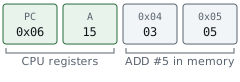
Nothing in memory marks where one instruction ends and the next begins. The C P U knows each instruction’s length from its opcode, and fetching the bytes moves PC past them, so PC lands on the next instruction without any extra work.

Lesson 13.10 lists all seven instructions of this C P U, loads a 14-byte program, and follows it instruction by instruction.
Section: Interpreters and dynamic recompilers.
An interpreter pays for fetching and decoding every time an instruction runs, typically many host instructions for each guest instruction. Suppose a loop of five guest instructions runs 1,000 times. The interpreter decodes 5 times 1,000 equals 5,000 instructions, although only five different ones exist.
A dynamic recompiler, also called a J I T, just in time compilation, (just-in-time compiler), removes most of that repetition. The first time guest code runs, it translates it into host machine code and stores the translation; every later time, it runs the stored host code directly. It translates a block, a run of instructions that ends at a jump, because after a jump the next instruction could be anywhere:
Alternative: A dynamic recompiler keeps a translated recipe for a guest-code block, instead of decoding the same recipe again on every loop iteration.

With a recompiler, the 1,000 passes of that loop cost 5 decodes and 1,000 runs of native code instead of 5,000 decodes. Consoles whose CPUs execute hundreds of millions of instructions per second, such as the GameCube and the PlayStation 2, are emulated with recompilers, as in the Dolphin and PCSX2 emulators, because an interpreter cannot keep up.
The speed has two costs:
Self-modifying code. Code is data, so a guest program may overwrite its own instructions. A stored translation then describes code that no longer exists. The recompiler must notice writes to addresses it has translated and throw those translations away.
Writable, then executable memory. A recompiler writes host machine code into memory and then runs it. Lesson 13.6 showed that consoles, and some phone platforms, refuse ordinary programs exactly that combination. Emulators on those platforms have to interpret.
Section: The memory map and memory-mapped I/O.
The toy console’s PC is 8 bits wide, and eight bits can name 2 to the power of 8 equals 256 addresses, hexadecimal 0 0 to hexadecimal F F. Not all of them are R A M, random access memory. The console’s memory map says what answers at each address:
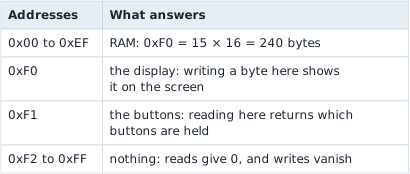
A device that answers at an address this way uses memory-mapped I/O. To the C P U, storing A at hexadecimal F 0 is an ordinary store instruction. The address alone decides that the byte goes to the display instead of R A M. In hardware, address-decoding circuits make that choice. In the emulator, a pair of functions does, one for reads and one for writes, and every memory access the C P U makes goes through them:

Real consoles have far bigger maps, with more R A M, a picture chip, a sound chip, and controller ports, but an emulator handles them the same way. Lesson 13.10 writes the toy console’s map as code and looks at part of the NES’s.
Section: Timing and cycle counting.
Inside a real console, the C P U, the picture chip, and the sound chip all run at the same time, each from its own clock. Older games depended on that timing exactly. A game might change a picture-chip register partway down the screen to split it into a scrolling playfield and a fixed status bar; if the emulated C P U reaches that write too early or too late, the split lands on the wrong line. So emulators count cycles and keep the parts in step: run the C P U for a slice of cycles, advance the other chips by the same amount of time, and repeat.
Narration: A device write at the wrong emulated cycle can move a screen split to the wrong line, even if the final register value is correct.
Suppose the toy console’s clock runs at 1.2 MHz, which is the large number shown cycles per second, and the screen redraws 60 times a second. Each frame then lasts the large number shown divided by 60 equals 20,000 cycles. The emulator’s frame loop runs instructions until 20,000 cycles are used, draws the frame, and waits until 1/60 of a second of real time has passed, so the game plays at its original speed on a host that could run it thousands of times faster.
An instruction cannot stop halfway, so a frame can end slightly past its budget. The emulator then takes the extra cycles off the next frame, which keeps the average exact. Lesson 13.10 ends a frame partway through a program and works out the numbers.
Section: Graphics and audio.
Consoles of the 8-bit and 16-bit eras had a dedicated picture chip that built each frame line by line from tiles, small blocks of pixels, and sprites, movable images, kept in video memory, in step with the television’s scanning beam. An emulator imitates that chip’s rules, writes the resulting pixels into an array called a framebuffer, and hands the array to the host’s G P U, graphics processing unit, as a texture, one of the objects Chapter 7 observes.
3D consoles are harder. Their GPUs run command lists and shaders written for that G P U’s own design, so the emulator translates the guest’s commands into a host graphics interface such as Vulkan or Direct3D, and the guest’s shaders into host shaders. That translation happens while the game runs, the first time each effect appears, which is why emulated games can stutter the first time they show something new, and why emulators keep a cache of translated shaders. The original console never had this problem, because its games shipped shaders already compiled for its one G P U (Lesson 13.6).
Sound works the same way in a different currency. The guest’s sound chip produces a stream of samples, numbers that describe the sound wave, and a typical host plays 48,000 of them per second. At 60 frames per second the emulator must therefore produce 48,000 divided by 60 equals 800 samples every frame. Audio is the least forgiving part of the machine. A late video frame just leaves the previous picture up a moment longer, but if the samples run out, the speakers click and crackle. Many emulators pace themselves by the audio device for that reason.
Section: Save states: the whole machine as bytes.
A save state is everything the machine is, written out: every register, all of R A M, the I/O registers, and the emulator’s own timing position. Loading one overwrites all of it, so the machine carries on as though nothing had happened. A game’s own save file, like the ones in Lesson 10.2, stores only what the game chooses, in the game’s format. A save state works for any game, at any instant, even in the middle of a frame.
The registers matter as much as R A M. Partway through a calculation, a new value may exist only in a register, not yet stored to memory, so a snapshot of R A M alone would lose it. Lesson 13.10 catches the toy console at exactly such a moment, writes its state out byte by byte, and checks the bytes again when they are loaded back.
In brief: A save state needs registers and timing state as well as R A M, because unfinished work may not have reached memory yet.
Section: Why emulated games are easy to inspect.
Chapters 1 and 2 needed scanners, debuggers, and pointer paths because Windows keeps each process’s memory private and moves things around. An emulator removes both obstacles.
The guest’s R A M is one array. The emulator can display it, search it, and change it directly. A R A M search in an emulator is the scan of Lesson 1.9, keeping the candidates whose value changed as expected, run over the guest’s R A M: on an NES, 2 KiB, which is 2 times 1,024 equals 2,048 bytes, instead of the gigabytes a PC game can occupy.
Addresses do not move. Old consoles have no virtual memory and no A S L R, address space layout randomization, ( Lesson 2.7 ), and their games keep variables at fixed addresses. Gold found at an address today is at the same address tomorrow, and on every other copy of the same game, with no pointer path ( Lesson 2.8 ) needed.
The emulator is already a debugger. Every guest memory access passes through the emulator’s read and write functions. A watchpoint on a variable is one if in the write function that checks the address and records PC. That is the answer the debug registers of Lesson 2.4 gave, with no debug registers involved.
Fixed addresses are also what made commercial cheat devices possible. The Game Genie sat between the cartridge and the console, and whenever the console read a particular cartridge address, it substituted a different byte, patching the game’s code or data as it was read. Action Replay and GameShark codes worked on R A M instead, writing a chosen value to a chosen address once every frame. A cheat code of that second kind is just an address and a value.
Such a code can lose a race with the game: a game that has already copied the value into a register, or that recomputes it from other data, later stores its own number over the cheat’s. Lesson 13.10 shows the race cycle by cycle.
All of this is for single-player games played alone. An emulator that plays online with other people, or that submits scores to a shared leaderboard, is part of a multiplayer service, and the same limits apply as everywhere else in this book.
Section: The legal line.
Writing and using an emulator is legal in many countries. In the United States, a 2000 appeals court decision in Sony v. Connectix held that copying the PlayStation’s BIOS during reverse engineering, in order to build a compatible emulator, was fair use. A 1992 decision had already found the Game Genie lawful, because it changed a game only while the owner played it.
What the emulator runs is a different matter. A console’s BIOS or system firmware and its games are copyrighted, and downloading them from the internet is generally copyright infringement. Emulator projects that shipped decryption keys or firmware, or that were promoted for piracy, have been sued, and some have shut down. Several emulators avoid needing the original firmware by replacing it with their own code.
That leaves plenty to run legitimately:
homebrew games that their authors release for anyone to play;
public-domain or freely licensed programs;
test programs that emulator developers write to check C P U and video behaviour;
dumps you make yourself of games you own, where your country’s law allows making them.
The toy console of Lesson 13.10 sidesteps the question entirely: it emulates a machine that does not exist, running a program written for this book.