A controller can recognise a button press before your game opens. An SSD can manage its stored blocks before a Windows driver asks for one. A console can check its boot software before its main operating system starts. In each case, some software belongs to the device itself. That software is firmware.
Writing your own firmware means taking responsibility for work that a desktop application normally delegates: starting the processor correctly, choosing a memory layout, configuring hardware, and deciding what happens when something fails. We will make those responsibilities concrete with a small button-and-lamp controller, build its Rust code into a firmware image, and run that image on an emulated microcontroller.
Section: Firmware is a role, not a file extension.
Firmware is software that operates a device, usually stored in nonvolatile memory: memory that keeps its contents without power. Flash is a common example and can be erased and programmed again. The word does not mean that the code is permanently unchangeable, nor that it must be written in assembly.
Consider a U S B controller plugged into a PC:
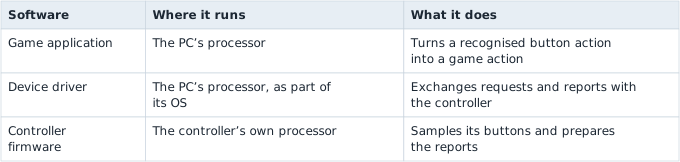
The driver and firmware cooperate across a device boundary. Updating the game does not necessarily update either one. A firmware update replaces code in the device; its format and programming procedure belong to that particular device.
Firmware can include a real-time operating system, or RTOS, which schedules tasks and provides services suited to embedded devices. It can also use no O S, operating system, at all. The latter arrangement is called bare-metal programming, and it is the arrangement used by this lesson. An embedded Linux application is another possibility; being physically inside a device does not make every program bare-metal firmware.
Section: One chip, several kinds of memory.
A microcontroller combines a processor core, memory, and peripheral devices on one chip. Peripherals include timers, serial interfaces, and GPIO (general-purpose input/output) pins. A GPIO pin can sense a button’s electrical level or drive an output, with the appropriate circuit and configuration.
Our target is QEMU’s model of the LM3S6965EVB evaluation board. QEMU is an emulator: a program that reproduces a machine’s behaviour so its software can run on another computer. This model has a Cortex-M3 core, 256 KiB of flash, and 64 KiB of SRAM. A KiB is 1,024 bytes; SRAM is the chip’s working R A M, random access memory,, whose contents are not retained without power. These capacities are listed in the QEMU board documentation. The address map is shown in the Cortex-M memory-layout walkthrough.
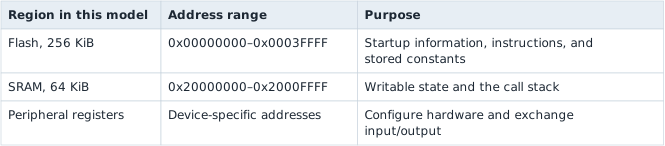
These are addresses in the emulated device, not addresses in the PC process running QEMU. The model can load an image into its flash region, but that does not reproduce the electrical procedure for programming a physical flash chip.
For the lamp controller, the instructions survive a power cycle in flash. The current lamp state is working state: the program starts it again at each boot. Retaining the last setting across power loss would require an explicit storage design. Writing flash every time the main loop runs would be a poor substitute: flash has erase/program constraints and finite endurance that R A M does not.
Section: Reset comes before the Rust entry point.
On this Cortex-M system, reset does not mean “call whichever function happens to be named main.” The core obtains startup values from a vector table. Its first entry contains the initial stack pointer; its second contains the reset-handler address. Later entries describe exception and interrupt handlers. The table contains values and addresses, rather than a sequence of application instructions. The Cortex-M memory-layout walkthrough shows how these entries fit into an image.
Alternative: The vector table is a startup directory of addresses: the processor reads where the stack and reset handler begin, rather than executing the entries as instructions.
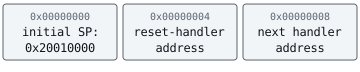
The reset handler runs startup code. Among its jobs is preparing writable static data so Rust can safely use it. The linker groups program contents into sections. Placement in the image happens before execution; reset-time initialization then prepares particular writable ranges:
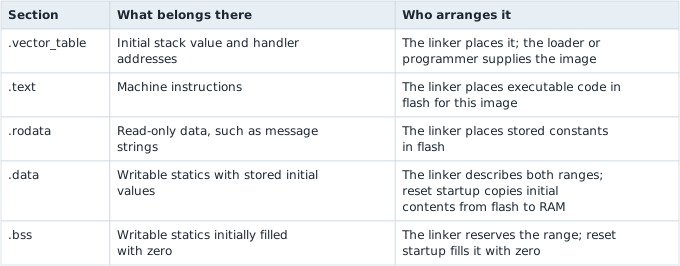
For example, a writable counter that must start at 7 needs both a working location in R A M and an initial value in the image. Startup copies the 7 before the application uses the counter. A counter starting at zero needs a reserved R A M range, but the image need not carry a long run of zero bytes: startup can write the zeros. The linker and runtime agree on where these ranges begin and end. Local variables are separate; a compiler can keep them in registers or on the stack as the program executes.

The cortex-m-rt runtime provides the Cortex-M startup and vector arrangement used here. Our application supplies its memory map and Rust entry function. The runtime prepares static data, then calls that function. These responsibilities are why a source file containing fn main() alone is not a complete firmware image.

Section: A bootloader is an additional stage.
A boot ROM is startup software stored in read-only memory on a chip. A bootloader is software whose job is to select, check, or load the application that will run next. It may support updates and recovery. A vendor boot ROM can start a bootloader; a bootloader can then start an application image.
Those stages are not mandatory in every design. Our simple image starts through its Cortex-M reset vectors and runtime without a separate bootloader. A console uses a more elaborate chain, including signature checks, as console architecture explains next. A bootloader’s work and the Rust runtime’s initialization work remain distinct, even if a particular system coordinates them closely.
Section: Write the control rule separately from the hardware.
Our rule is: a new button press toggles the lamp once. Keeping the button held must not toggle it on every sample. The input is a logical pressed value; the output is whether the lamp should now be on.
The logical change false to true is a rising edge. We detect it by remembering the previous sample:
Code example. The surrounding prose explains this example; the full lesson contains the exact code.
Here is that complete control rule in Rust. It requires neither an O S nor a hardware register address:
Code example. The code’s comments explain: Holding the button is not a new edge.
&mut self lets the method update this controller’s remembered state. ! negates a boolean: it switches false to true or true to false. The last expression returns the new lamp state. No heap allocation is needed; the controller stores just its two boolean fields.
The input deliberately means a recognised, stable press. A physical switch can bounce, briefly making and breaking contact several times. Rising-edge detection alone does not remove that bounce. Physical firmware would first use a suitable debounce policy, often based on several stable samples over time, then pass the resulting logical state to this controller.
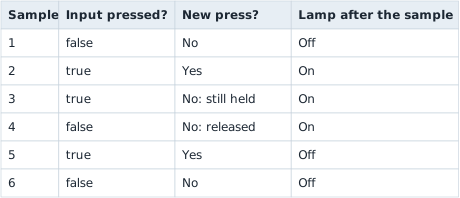
This separation lets us test the rule on the PC and then reuse it inside a firmware image. It also keeps a logic bug distinguishable from a pin-wiring or clock-configuration bug.
Section: Build a complete firmware project.
The firmware-labs project combines this rule with a target, memory map, runtime, and entry function. The full image follows; the build reference keeps its exact files and reproduction steps.
Section: The target and the layout answer different questions.
The thumbv7m-none-eabi target selects Armv7-M instructions, a bare-metal environment, and a calling convention for Cortex-M3. It does not select board pins or a memory map. memory.x declares the regions for the runtime’s link.x: ORIGIN gives the starting address; LENGTH gives the capacity.
Code example. The surrounding prose explains this example; the full lesson contains the exact code.
In brief: The compilation target specifies the processor environment; the board configuration supplies its particular memory layout and peripherals.
Section: no_std keeps Rust without assuming an O S.
#![no_std] uses Rust’s core without the O S-oriented standard library. Arithmetic, structs, borrowing, arrays, slices, Option, and Result still work; O S files, threads, and terminal printing do not appear automatically. Vec needs allocation support; this controller does not.
#![no_main] removes the normal application entry arrangement. The runtime’s #[entry] marks the function called after startup. to ! means it never returns: there is no desktop caller waiting.
Section: Report results through the emulator.
Semihosting asks a supporting debugger or emulator to perform host-side operations. Here cortex-m-semihosting sends text to QEMU’s terminal, without a guest O S or emulated UART. This is the full src/main.rs:
Code example. The code’s comments explain: These are logical input samples, not GPIO reads.
fmt::Write supplies output. run_trace uses Result and ? for failed opens/writes; entry reports the outcome. Formatting needs no growing string.
The panic_handler reports failure too. Both exits serve QEMU; a physical device needs safe outputs and its own halt or restart policy.
Section: Build and run the image.
The build reference contains the exact installation and run commands. Linking produces an ELF image with sections and addresses, at target/thumbv7m-none-eabi/debug/lamp-firmware. Debug metadata can enlarge that file without occupying flash. Its output is:
Code example. The surrounding prose explains this example; the full lesson contains the exact code.
The held press stays on. QEMU exits successfully; the computer’s O S runs the tools while the loaded firmware has no guest O S.
Section: Take the same rule to a physical board.
A HAL (hardware abstraction layer) supplies operations such as reading pins while peripheral-access code reaches hardware registers. Choose the exact board’s documented example; the physical-board reference keeps the complete configuration, polarity, and programming order.
Replace fixed inputs with debounced observations and QEMU exits with a board-appropriate failure policy. Polling repeatedly checks input; an interrupt runs a handler for a configured event. Shared controller state needs synchronization; this example has one owner. A watchdog can reset a stalled device unless firmware services it, requiring an explicit recovery policy.
Section: Debugging changes timing too.
The library checks the logical rule; QEMU exercises the compiled ARM image and startup. Neither proves physical wiring or electrical behavior.
Narration: An emulated run can verify startup and compiled control behavior while missing a reversed physical pin or noisy button. Keep board observations distinct from emulator results.
Breakpoints stop the processor while external devices can continue. Timers, messages, and watchdogs may behave differently; printing also slows loops. Semihosting output does not measure normal execution speed. Compare timing with logging disabled. The troubleshooting reference keeps the observation checklist and transport tradeoffs.
Section: Optional build references.
Use these references to reproduce the emulated run or adapt the rule to physical hardware. The complete working firmware remains above.
Additional detail: Optional build reference: project files, QEMU runner, and commands.
The complete firmware-labs project contains these files. Keep their names and directory arrangement, including the hidden .cargo directory:
Directoryfirmware-labs/ Cargo.tomlCargo.lockDirectory.cargo/ config.tomlmemory.xbuild.rsDirectorysrc/ lib.rsmain.rs
Additional detail: Directoryfirmware-labs/.
Cargo.toml
Cargo.lock
Directory.cargo/ config.toml
Additional detail: Directory.cargo/.
config.toml
memory.x
build.rs
Directorysrc/ lib.rsmain.rs
Additional detail: Directorysrc/.
lib.rs
main.rs
src/lib.rs contains the controller and its tests. Cargo.toml declares the project and its runtime dependencies; Cargo.lock pins the full dependency set. build.rs is a small helper that makes the memory map available to the linker. It runs on your computer during the build, so its use of std does not require an O S on the microcontroller.
You can obtain the source files from those links and the configuration link below, or use the authored project folder. The project uses Rust 2024 and requires Rust 1.85 or later.
The project’s .cargo/config.toml selects the target, passes -Tlink.x to the linker, and tells Cargo how to run the image:
Code example. The surrounding prose explains this example; the full lesson contains the exact code.
Cargo appends the built executable’s path after -kernel. QEMU creates the selected machine and loads that image. -nographic uses terminal output; the semihosting option enables the reporting mechanism described next. This configuration follows the Embedded Rust QEMU setup.
Install stable Rust with rustup and an ARM system build of QEMU. The QEMU downloads page provides platform-specific installation options. On Windows, make sure the folder containing qemu-system-arm.exe is on PATH.
Open a terminal inside firmware-labs/, so Cargo reads this project’s configuration, then run:
Terminal window
Code example. The code’s comments explain: Install Rust's libraries for the Cortex-M3 target. Compile and link the image using the supplied dependency versions. Start the same image using the QEMU runner in .cargo/config.toml.
Section: Target, runtime, and reporting details.
The Rust target is thumbv7m-none-eabi. It describes the Armv7-M architecture, bare-metal environment, and calling convention suitable for this Cortex-M3. It does not identify which pins the board wires to an LED or where a different chip keeps its flash. The Rust target documentation describes the C P U, central processing unit, requirements.
The memory.x mapping above supplies this board model’s regions.
ORIGIN is a region’s starting address; LENGTH is its capacity. The linker places the program into these regions using the runtime’s link.x script. A matching C P U instruction set with the wrong memory map still produces the wrong firmware for a board.
The binary begins with #![no_std] and #![no_main]. no_std uses Rust’s core library without automatically linking the O S-oriented standard library. Arithmetic, structs, borrowing, arrays, slices, Option, and Result still work. File access, O S threads, and ordinary terminal printing do not appear automatically. Dynamic collections such as Vec require additional allocation support; our controller does not need them.
no_main disables the normal application entry arrangement. The #[entry] attribute from cortex-m-rt marks the function that startup calls. Its to ! means it never returns: there is no desktop caller waiting for a return value.
Semihosting lets target code ask a supporting debugger or emulator to perform host-side operations. Here it sends text to QEMU’s terminal. That is neither an emulated UART nor Windows providing println! to a guest process. The cortex-m-semihosting interface provides the output stream used in the complete main file above.
The complete main file above supplies these reporting steps.
fmt::Write supplies the writing operation used by writeln!. Opening the stream or writing can fail, so run_trace returns a Result and ? propagates an error. The entry function converts that result into an emulator success or failure request. Formatting uses the fixed samples and controller state; it needs no growing string buffer.
A panic_handler defines what this no_std application does if it panics. This one makes the emulator run fail. Physical firmware needs its own failure policy, such as placing outputs into a safe state and halting or restarting. Both exit calls in this file are QEMU test instrumentation, not a physical-device shutdown procedure.
Section: The linked image and model output.
The image is an ELF executable at target/thumbv7m-none-eabi/debug/lamp-firmware. ELF carries sections, addresses, and other information a loader or debugger can use. The file’s total size is not the flash usage: debug metadata can occupy space in the file without being loaded into the microcontroller’s flash.
The worked trace above shows the expected result.
QEMU then exits successfully. The two consecutive true inputs leave the lamp on, which is the essential difference from toggling on every held sample. Some QEMU versions also print Timer with period zero, disabling; that model message is separate from the firmware trace.
The computer’s O S runs Cargo and QEMU. The emulated firmware has no guest O S. Its startup, control logic, and output requests all execute as part of the loaded image.
Additional detail: Optional build reference: adapt to an exact physical board.
The control rule is reusable; the board configuration is specific. Start with the exact development board’s documented Rust board-support or HAL (hardware abstraction layer) example. A HAL presents operations such as reading a pin or configuring a timer while handling many register details. Underneath it, peripheral-access code ultimately reads and writes hardware registers, the mechanism introduced in device registers.
Adapt the project in this order:
Identify the actual chip and board. Select their C P U target, memory map, pin assignments, and supported programming interface. Two Cortex-M boards can require different targets, flash addresses, clocks, and peripherals.
Initialize the hardware. Configure clocks, an input pin with the right pull resistor, and a suitable output. A pull-up or pull-down resistor gives an unpressed input a defined electrical level instead of leaving it floating. Convert high/low into logical pressed/released meaning: active-low means a low electrical level represents a press. Its logical false to true press can therefore correspond to an electrical high-to-low transition.
Replace the trace with real observations. Debounce the input, call sample, and apply its result to the output. A timer can set the sampling cadence. A real loop continues working rather than ending after six inputs.
Replace emulator-only behaviour. Remove the QEMU runner and both semihosting exit calls. Choose board output and a panic policy that work without QEMU. Logging through a debugger is an optional development aid.
Rebuild, program, verify, reset, and observe. Use the board’s supported bootloader or a compatible debug probe. A flashing tool erases/programs the required regions; verification checks the written image. Reset tests the startup path, and the real output tests pin configuration and behaviour.
probe-rs is one programming and debugging tool for supported chips and probes. A board can instead document a vendor tool, a U S B bootloader, or OpenOCD. Use its exact target configuration; the QEMU build above is not an image for arbitrary boards.
Polling checks an input repeatedly; an interrupt runs a handler when a configured event occurs. Either design can work. If an interrupt and the main loop both touch controller state, they need an explicit synchronization policy. The simple controller above has one owner and introduces no such shared access. A watchdog is a timer that can reset a stalled device unless firmware services it correctly; its configuration and recovery policy matter on real hardware, rather than being a cure for an unexplained bug.
Additional detail: Optional build reference: hardware observations and logging transports.
Firmware debugging has two places to inspect: the rule and its hardware integration. The library tests in the project check that holding a press does not toggle repeatedly and that a fresh controller starts with fresh state. They do not establish that a physical button is wired correctly. The QEMU run tests the compiled ARM image and its startup, but does not test a real board’s electrical behaviour.
When a real device behaves differently, record the chip, board revision, toolchain, image version, and input conditions. Compare the intended state transition with the observed one. Then check the boundary responsible for that input or output: pin polarity, debounce timing, timer rate, or register setup. Changing the control rule to compensate for a wiring mistake hides the cause.
Breakpoints stop the processor, while external devices can keep running; timers, incoming messages, and watchdogs may therefore behave differently. Printing can also slow a loop. Semihosting is convenient for this short trace but unsuitable as a measurement of normal execution speed. Other transports have different requirements:
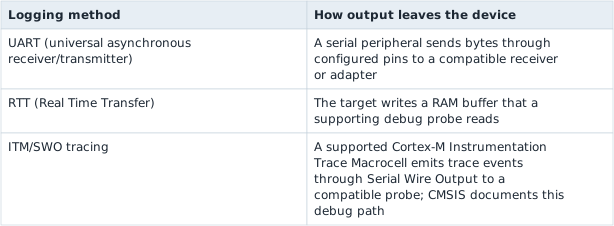
RTT’s buffer policy matters too: a full blocking buffer can pause the program, while a nonblocking mode can discard output. Buffering or deferring text formatting reduces work on a time-sensitive path but does not make it free. Record only the events needed to distinguish the competing explanations, and compare behaviour with logging disabled when investigating a timing problem.
The image joins reset, memory, and control logic. Console architecture extends those startup responsibilities into a larger boot chain.