Open a current game console and you find parts a PC builder would recognise: a processor, a graphics processor, memory, an SSD, and a network adapter. The PlayStation 5 and the Xbox Series X even run the same x86-64 instruction set as most PCs. Yet a PC runs whatever its owner installs, while a console runs only what its maker has approved. Both facts come from design choices, and this lesson follows them from the chip up.
Firmware and Bare-Metal Rust established how device code starts and uses its memory. A console adds a larger software stack and checks which images are allowed to run at each stage.
Section: A fixed computer on one chip.
Three well-known consoles:
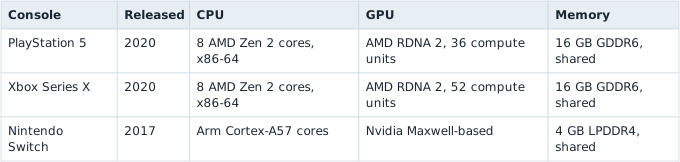
Two things in that table differ from a typical gaming PC.
First, the C P U, central processing unit, cores and the G P U, graphics processing unit, sit on the same piece of silicon. A chip that holds most of a computer’s parts is called a system on a chip, or SoC.
Second, the word “shared” in the memory column. A gaming PC gives the C P U system R A M, random access memory, on the motherboard and gives the graphics card its own video R A M, so anything the G P U needs, such as the textures and vertex buffers of Chapter 7, is copied across the PCI Express bus. In a console, the C P U and the G P U use one pool of memory: the C P U writes a buffer, and the G P U reads the very same bytes. This design is called unified memory.


The shared pool has to satisfy its hungriest reader, the G P U, so consoles build it from graphics memory. The PlayStation 5’s memory bus is 256 bits wide, one wire per bit, and each wire carries 14 billion bits per second. That is 256 times 14 equals 3,584 billion bits per second, and dividing by 8 bits per byte gives 448 GB every second, for the C P U and G P U alike.
The third difference is not in the table because it is the table: every PlayStation 5 has the same chip, the same memory, and the same clock speeds. A PC game has to run on thousands of combinations of parts; a console game is tuned for exactly one. At 60 frames per second, each frame gets 1,000 milliseconds divided by 60 approximately 16.7 milliseconds for all of its work, from game logic and physics to rendering (Lesson 4.1). A measurement on one console holds for every console, so developers can spend that budget almost to the last millisecond. They can even compile their shaders ahead of time for the one G P U and ship the results on the disc, a luxury that emulators lack, as Lesson 13.9 shows.
Sharing the PC’s instruction set does not make a console game a PC game, though. Its machine code calls the console’s own operating system and graphics interfaces, such as a console version of Direct3D 12 on Xbox and Sony’s own interfaces on PlayStation, which is why moving a console game to PC is still porting work.
Section: The software stack: a hypervisor and two partitions.
When Microsoft introduced the Xbox One in 2013, it described the console as running three operating systems at once: a hypervisor that owns the hardware, a game partition that runs the current game, and a Windows-based partition for the home screen and apps. Other consoles differ in the details, but the same shape keeps appearing:

A partition here is a virtual machine in the sense of Lesson 13.3: an operating system that sees only the cores, memory, and devices the hypervisor gives it. The split pays for itself three ways:
Predictable timing. The game partition has C P U cores and memory reserved for it, so a background download cannot steal time from a frame. With 16.7 milliseconds per frame, a background task that takes 2 milliseconds at the wrong moment is a visible stutter.
Containment. A bug in a game, such as a crash caused by a malformed save file, stays inside the game partition. The system partition’s memory, where account tokens and purchase records live, is not even mapped into the game’s address space.
Independent updates. The system software can change without touching the game partition that thousands of shipped games depend on.
Most console chips also contain a small, separate security processor. It starts before the main cores, holds the console’s keys, and performs the checks described next. The main cores never see those keys.
Section: Secure boot: a chain of trust.
When a console powers on, which code runs first, and why should anyone trust it? Secure boot answers with a chain of trust: each stage checks the digital signature (Lesson 10.8) of the next stage before running it, and refuses if the check fails.
Alternative: Think of boot as a relay of checked handoffs: each trusted stage verifies the next before letting that stage run.

The first link is the boot ROM, a small program written into the chip when it is manufactured, which no software, update, or owner can change. It is the root of trust: every later stage is trusted only because an earlier stage checked it, and the chain ends at the one piece of code that needs no check because nobody can alter it.
Each check is a digital signature, the same mechanism Windows uses on programs: the console maker signs every stage with a private key kept in its own buildings, and the console checks each signature with the matching public key, which can check signatures but cannot make them (Lesson 10.8 walks through how). The boot ROM needs that public key to check the first signature, and the key must be as unchangeable as the ROM. Chips can keep such values in eFuses: physical bits set once during manufacturing and then locked against ordinary software writes. Lesson 13.7 returns to how those bits can also lock a hardware debug port. A 2,048-bit RSA public key would need 2,048 of them. Chips store a SHA-256 hash of the key instead, which is 256 bits and so 256 fuses, and the key itself travels in flash storage alongside the bootloader:
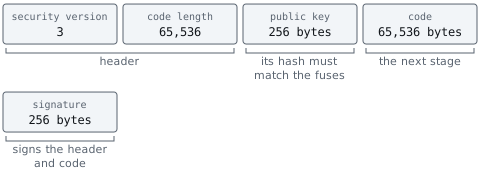
Before it runs a single instruction of the bootloader, the boot ROM:
hashes the public key that came with the image and compares the result with the fused hash, since a mismatch means someone supplied their own key;
hashes the header and the code;
checks the signature against that hash using the now-trusted key;
checks the security version, described in the next section;
only then jumps to the code.
Each later stage repeats the pattern for the stage after it, with keys that the earlier, already-checked stage vouches for. A bug in any later stage can therefore be fixed by an update, because the stage before it checks the replacement’s signature like any other. A bug in the boot ROM cannot be fixed on consoles already sold: nothing checks the ROM and nothing can rewrite it, so only a new revision of the chip fixes it. This has happened to at least one console family, whose early units remain modifiable for that reason alone.
Section: Anti-rollback: old versions stay dead.
A signature proves who made the code, not that it is the latest version. If version 4 of the bootloader fixes a security hole in version 3, version 3 is still genuinely signed, and without another check anyone could reinstall it and use its hole.
In brief: A genuine signature does not establish freshness; accepting an older approved image is a separate decision.
Consoles stop this with anti-rollback, a security version counter kept in fuses. Each boot image carries a security version, and the boot code refuses any image whose version is below the number of blown fuses:

When an update fixes a security hole, it raises the security version to 4 and blows fuse 3, and from then on a version-3 image is refused. A fuse cannot be unblown, so the minimum only ever rises. And because a bank of eight fuses can count only to 8, makers raise the security version only for updates that fix a security flaw, not for every update: each increase spends a fuse forever.
Section: Code signing and encrypted game packages.
The chain does not stop at boot. Everything a console runs, including system updates, apps, and every game, must carry the platform holder’s signature, which the system software checks before launching it. Unsigned code simply does not run. On Windows, by contrast, an Authenticode signature (Lesson 10.8) is optional for ordinary programs, and an unsigned program runs after a warning, because the owner decides.
Game packages are also encrypted, and the two protections do different jobs (Lesson 10.10). The signature proves that the package came, unchanged, from the platform holder. The encryption hides the contents, so the code cannot be read, or copied to run elsewhere, outside a console holding the right keys. Those keys stay inside the security processor, which decrypts content for the game without ever handing the keys to the game or to the system software. Digital purchases add a licence check before anything is decrypted.
Signing everything has a consequence for memory. Code that a program writes for itself at run time was never signed, so consoles generally do not let ordinary games mark memory as both writable and executable, the combination that Lesson 6.5 treats as a place where data can become code. That rule returns in Lesson 13.9, because an emulator’s fastest technique needs exactly that combination.
Section: Why a console is harder to modify than a PC.
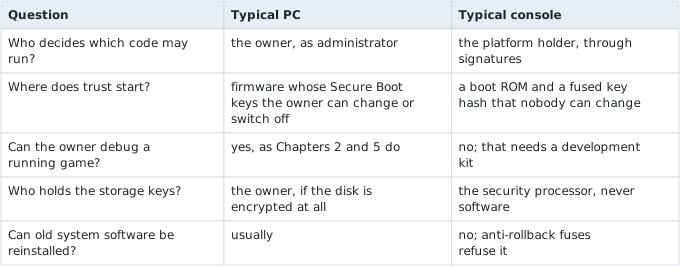
The deeper difference is whose interests the protections serve. A PC’s security defends its owner against other people: malware, other users, network attackers. The owner is the administrator and may switch any of it off. A console’s security also defends the platform holder and game publishers against the owner: against copying games, against cheating in online play, and against running unapproved software. So a console is built so that its owner cannot switch the protections off, down to debug ports locked with fuses (Lesson 13.7).
Game developers still need to debug. Licensed studios receive development kits: consoles with debugging enabled and different keys, which run unsigned test builds. A retail console lacks those permissions by design.
Narration: A development kit’s debug permissions explain why a studio can inspect its test build while the equivalent retail device refuses the same operation.
Section: Why online services ban modified consoles.
An online service decides whether to let a console into matchmaking, the store, and cloud saves. It cannot look inside the console, so it needs the console to prove what software it booted. That proof is called remote attestation:

As each boot stage runs, it records a hash of the next stage before starting it. Those hashes, called measurements, describe exactly what booted. The security processor signs the service’s nonce together with the measurements, using a key unique to that console, fused at the factory, that no software can read. The service checks the signature and compares the measurements with the values genuine software produces. Console makers do not publish their exact protocols, but PCs with a TPM security chip use the same idea, called measured boot.
A console running modified software cannot produce a valid report. The modified software cannot reach the key, and it cannot make the measurements match software it is not. Such a console can run cheats in matches with other people, run pirated games, and send messages that genuine software never would, so the service trusts nothing it says and may ban it. Attestation is still only one layer: no check on a client is perfect, so the server goes on checking every action. Lesson 15.5 follows the ban as one enforcement decision among the other layers.
Section: Homebrew and the law.
Homebrew is software written by hobbyists for a platform without the platform holder’s licence: games, tools, media players, and emulators. Because a console runs only signed code, unofficial homebrew depends on a flaw somewhere in the chain of trust, and its legal position is contested. Running pirated games is copyright infringement however the console was modified. This book stays out of that territory: none of its labs modify a console. Lesson 13.9 studies console software from the other side, with an emulator running on your own PC and programs you are allowed to run.
Additional detail: Optional reference: official homebrew, circumvention law, and the arguments on each side.
Homebrew’s legal position is worth describing precisely rather than taking a side.
Platform holders have sometimes opened official doors. In the late 1990s Sony sold the Net Yaroze, a black PlayStation that hobbyists could program. The PlayStation 3’s “Other O S, operating system,” feature let owners install Linux until a 2010 system update removed it. Microsoft’s Developer Mode turns a retail Xbox into a limited development kit for apps, for anyone with a developer account.
Platform holders treat exploiting a flaw in the chain of trust as circumvention. They patch it, ban consoles detected online running modified software, and have sued, and in some cases seen prosecuted, people who sold modification devices commercially. Many countries have anti-circumvention laws, such as section 1201 of the US Digital Millennium Copyright Act and Article 6 of the EU’s 2001 Copyright Directive. These make it unlawful to break technical measures that protect copyrighted works, with exemptions that vary by country and by kind of device.
On the other side, homebrew developers and some researchers argue that owners should be able to run their own code on hardware they bought, and that preserving old software depends on it. Where the line falls depends on the country, the device, and exactly what is done, and this lesson is not legal advice.