Every debugger in this book so far has been a program asking other software for permission. The debugger of Lesson 6.10 asks Windows to pause a thread, and Windows agrees because the debugger holds the right access. Lesson 12.4 showed the processor enforcing a boundary between user mode and the kernel, and Lesson 13.3 put a hypervisor underneath the kernel. This lesson goes below all of them, to a debugger that asks no software at all, because it is wired into the chip.
A console’s boot and signing rules can restrict software tools. A physical debug port crosses a different boundary, which is why shipped devices usually lock it too. To see how the port gained such reach, start with its original job: finding bad solder joints.
Section: Why circuit boards needed a test port.
A circuit board is a sheet of fibreglass with copper wires, called traces, printed on it. Chips are soldered on top, and every pin of every chip must make a good electrical joint with its trace. A factory building thousands of boards a day always produces some bad joints: a blob of solder that bridges two pins, or a pin that never touches its pad. Every connection has to be checked before a board ships.
For decades the check was a bed of nails: a fixture of spring-loaded metal pins pressed onto test points all over the board, so a tester could drive a signal into one end of a trace and measure it at the other. That approach struggled in the 1980s as surface-mounted chips packed their pins closer together, and it became hopeless once packages hid their connections underneath. A ball grid array, for example, joins the board through a grid of solder balls on its underside, and once it is soldered down no probe can reach them.
In 1985 a group of electronics companies formed the Joint Test Action Group to solve the problem. Their design was standardised in 1990 as IEEE 1149.1, and everyone calls it J T A G after the group. The idea was to stop probing the board from outside and build the probes into the chips.
Section: Boundary scan: a probe on every pin.
A chip that supports J T A G places a small circuit called a boundary-scan cell between each pin and the chip’s internal logic. In normal operation the cell is transparent: signals pass straight through, and the chip behaves as though the cell were not there. In test mode the cell can do two other things:
capture: record the level currently on its pin, 1 or 0;
drive: put a chosen level onto the pin, overriding the chip’s own logic.
The cells are wired one after another into a shift register: a row of one-bit cells in which, on every clock tick, each cell takes its neighbour’s value, so a new bit enters at one end and the bit at the far end falls out. The captured levels can therefore leave one at a time through a single wire while a new pattern arrives through another. This row is the chip’s boundary-scan register, and Lesson 13.8 shifts a four-pin chip’s register one clock at a time.
Alternative: A shift register is a conveyor for captured bits: each clock moves them one place, allowing many pin readings to leave through one wire.
Chips on the same board are linked the same way, the output wire of one chip feeding the input wire of the next, so the whole board forms one long shift register called a scan chain.
Section: Four wires and a scan chain.
The J T A G connection on each chip is called the Test Access Port, or TAP. It uses four signals:
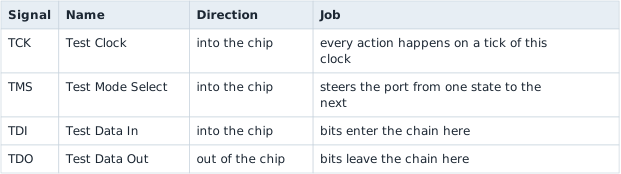
An optional fifth signal, TRST (Test Reset), resets the port directly.
Every chip receives the same TCK and TMS, while the data runs in series, from the debugger’s TDI through each chip in turn and back from the last chip’s TDO:


Testing the thick trace takes two passes. Load a 1 into the cell on chip A’s pin and switch A’s cells to drive; switch chip B’s cells to capture; then shift everything out and look at the cell on B’s pin. A good joint reads 1. Then repeat with a 0, because a pin accidentally joined to the power supply would read 1 whatever A drove. The two patterns together catch a trace stuck at 1 and a trace stuck at 0. Test software computes patterns that check every trace on a board at once.
Section: The TAP controller: steering with one wire.
The debugger has one wire, TMS, for giving orders, yet it needs to say “capture now”, “shift”, and “update”. The chip solves this with a small state machine called the TAP controller: a circuit that is always in exactly one of a fixed list of states. On every tick of TCK it moves to one of two next states, and the level of TMS, 0 or 1, picks which, so a sequence of levels on TMS walks the controller wherever the debugger needs it.
Reading or loading a register follows the same main path every time:

Capture loads the register from its inputs: for the boundary-scan register, the levels on the pins.
Shift moves the register one place toward TDO per clock, so a 32-bit register takes 32 clocks, its old contents leaving through TDO as new bits arrive from TDI.
Update copies the new pattern to the register’s outputs in one step, so the pins never see the in-between patterns the register passes through while bits ripple along.
The path above exists twice: once for a data register, such as the boundary-scan register, and once for the instruction register, described next. Lesson 13.8 draws all 16 states, including the ones that choose between the two copies and pause a scan, and follows them one clock at a time.
One more property makes the controller impossible to lose: from any state, five clocks with TMS at 1 reach Test-Logic-Reset, as Lesson 13.8 checks state by state. A debugger unsure where the controller is sends five 1s on TMS and starts again from a known place.
Section: Instructions choose which register sits in the chain.
Scanning through the instruction register’s copy of the path loads each chip’s instruction register, and the instruction decides which data register the data copy works on. The standard requires a few instructions and leaves the rest to each chip’s designer:
BYPASS selects a one-bit register. It shrinks a chip to a single bit in the chain, so the debugger can reach other chips without shifting through this one’s long registers.
EXTEST and SAMPLE/PRELOAD select the boundary-scan register for board tests like the one above.
IDCODE is optional but nearly universal. It selects a 32-bit register holding a number that identifies the chip: its manufacturer, its part number, and its version. A chip that has one selects it automatically on reset.
Those two small registers let a debugger explore a board it knows nothing about. Right after reset, one data scan reads the ID of every chip that has one. And with every chip in BYPASS, each chip adds exactly one bit to the chain, so timing a single 1 from TDI to TDO counts the chips. Lesson 13.8 does both on a two-chip board.
Narration: With every chip contributing one BYPASS bit, the delay of a test bit reveals the chain length without reading each chip’s full data register.
Section: From a test port to a debugger.
The standard left room for chip designers to add private instructions and data registers, and designers used that room to connect the TAP to on-chip debug logic. Through the same four wires, a debugger can then:
halt the processor core, stopping it between two instructions whatever it is running, the kernel included;
single-step, running exactly one instruction and halting again;
read and write the core’s registers, including the program counter;
read and write memory, through a debug unit that issues reads and writes on the chip’s internal bus exactly as the C P U, central processing unit, does;
set hardware breakpoints and watchpoints, comparators that halt the core when it fetches from, or accesses, a chosen address. They work like the x86 debug registers of Lesson 2.4, except that they are programmed from outside the chip.
The difference from Chapter 5 is where the request goes. A Windows debugger asks the operating system to pause one thread. A J T A G debugger stops the whole processor, and the operating system has no say, because it is no longer running.
In brief: A hardware debug request reaches chip-level control, rather than asking the operating system to pause one selected thread.

Arm’s Cortex-M processors, found in a great many microcontrollers, the single-chip computers inside things like keyboards and game controllers, show how ordinary the mechanism is: one memory write into a debug control register stops the core before its next instruction. Lesson 13.8 follows how the debugger makes that write and builds its value bit by bit.
Section: SWD: the same debugger on two wires.
Four signals, or five with TRST, are a lot for a small microcontroller with twenty pins. Arm designed Serial Wire Debug, SWD, which needs two: SWCLK, a clock, and SWDIO, a single data wire that the debugger and the chip take turns driving. Instead of walking a state machine, SWD sends packets.
Every transaction begins with an 8-bit request that names a register and says whether it will be read or written. The wire then turns around, and the chip answers with a 3-bit acknowledgement: OK, WAIT, or FAULT. A read then delivers 32 data bits and a parity bit, an extra bit chosen to make the number of 1s even, so that a single bit damaged on the wire shows up as an odd count:
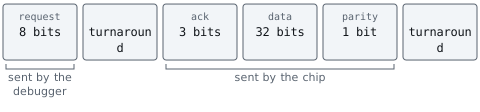
Many chips offer both protocols on shared pins, with SWDIO on the TMS pin and SWCLK on the TCK pin, and a special bit sequence switches the port from one to the other. Behind either protocol sits the same debug port, so halting, stepping, and memory access work the same way. Lesson 13.8 builds the first request a debugger usually sends, bit by bit.
Section: Why shipped devices lock the port.
Everything above needs one thing: an open debug port. The debug logic does not care what software the chip runs. A debugger that can halt the core and read memory can read whatever that memory holds, such as encryption keys, a game console’s decrypted code, or a phone owner’s data. It can also write memory, so it can change code that secure boot (Lesson 13.6) checked a moment earlier. The protections of Chapters 11 and 12 — privilege levels, memory protection, the kernel boundary — are all enforced by the processor that the debugger has just stopped.
So production devices close the port, in layers from weakest to strongest:
Leave out the connector. Makers often omit the header and leave unmarked pads. That only adds effort, because the traces are still there.
Turn debug off in early boot code. The first software to run disables the debug logic. It protects only from that moment on, and only if nothing can run earlier.
Blow a fuse. An eFuse is a one-time programmable bit: a tiny link on the chip that the factory can change once, from 0 to 1, and that nothing can change back. Hardware reads the fuses at power-on, before any software runs, and a fuse that says “debug disabled” keeps the debug logic off. Many microcontrollers offer levels: fully open, memory reads blocked while a debugger is attached, and debug permanently disabled.
Require authentication. The port stays present but locked until the debugger proves it is allowed in.
Secure debug authentication is a challenge and a signed answer:

Each part closes a specific gap. The nonce, a number used once (Lesson 10.10), makes old answers useless, because a recorded signature covers a different number. The chip ID makes each answer good for one unit, so a signature leaked from a repair bench unlocks nothing else. The private key never leaves the maker, so knowing exactly how the protocol works, as you now do, does not help anyone forge an answer.
The lock follows the chip through its life. Chips usually leave the chip factory open for manufacturing tests, are locked as the last step before a product ships, and may enter a return-for-analysis state, reachable only through authentication, if a unit comes back broken. Each step is a one-way fuse change. The hardware that reads those fuses is built to fail closed: designers assume someone will try to disturb the check itself, so any fuse reading other than a clean “open” leaves debug off.
A product shipped with its debug port open is a well-known and often repeated mistake. Fixing it costs almost nothing at the factory and is nearly impossible once the devices are in customers’ hands. Development boards sold for learning embedded programming are the opposite case: they leave SWD open on purpose and document it, because their owners are the developers.
The J T A G lab is in Lesson 13.8: a simulated two-chip scan chain that you drive one clock at a time.