Section: External means “a separate process”.
Our tool runs beside the game, not inside it. Windows must grant a process handle with specific rights before the tool can read or write memory.
An address makes sense only in a process’s address space. The number hexadecimal 5 0 0 0 can exist in both processes without naming the same bytes. The process matters as much as the numeric address:

Windows maps virtual addresses separately for each process. Reading a local pointer with the same number would inspect the tool’s own memory. A process handle names the target and carries the rights granted for this opening; the Windows read uses that handle with the target address and a byte count. Lesson 6.4 later examines handles in more depth.

That read is the Windows function ReadProcessMemory. Its arguments split cleanly into what belongs to the game and what belongs to the tool:
ReadProcessMemory, argument by argument
hProcesshandlerequired
The process handle, opened with the right to read (PROCESS_VM_READ). It says which process’s address map to use.
lpBaseAddressaddress in the gamerequired
Where to start reading. To the tool this is only a number, so it is never dereferenced locally.
lpBufferaddress in the toolrequired
Where Windows stores the copied bytes: memory the tool owns, with room for at least nSize bytes.
nSizebytesrequired
How many bytes to copy.
lpNumberOfBytesReadbytes, optional
Where Windows reports how many bytes were actually copied. A tool that ignores it can decode stale bytes left in its buffer.
return valuenonzero on success
Zero means the read failed. GetLastError then says why, such as ERROR_PARTIAL_COPY (299) when only part of the range could be read.
For this lab, the program discovers wesnoth.exe with the Windows ToolHelp A P I, application programming interface,, opens it, resolves the verified pointer chain, and performs the guarded write. There is no P I D, process identifier, or raw-address placeholder for the reader to fill in.
An external tool cannot dereference a target-process pointer directly. Windows mediates the boundary, and the handle represents the particular access the observer was granted:

The returned bytes belong to the observer, but their interpretation is valid only for the target build and moment that justified the layout. A write is a separate, stronger capability and needs its own expected-value check.
In brief: An external tool asks Windows to copy bytes out of the game, then reads its own copy. A write is a stronger power and needs its own check.
Even two successful reads can describe different moments. Suppose the tool follows a player pointer, the game removes that player and reuses the same allocation, and the tool then reads health. Both requests can succeed while the combined result describes no real player:

Watch that race. Each read can succeed while the pair of observations becomes inconsistent:

Check the returned byte count and revalidate the object path after a multi-step read. That reduces stale observations; it does not turn several Windows calls into one atomic snapshot. Lesson 4.3 builds a bounded double-capture check for that remaining uncertainty.
Section: Hands-on target: Wesnoth 1.14.9.
For the exact 32-bit Windows build used by this book, the verified gold path is:

This is the practical result from Lesson 2.8. Confirm it in Cheat Engine before running the tool: add a pointer manually, use this value as the base, then add offsets hexadecimal A 9 0 and hexadecimal 4. Start three fresh local matches and verify that it resolves to the gold shown in the game each time.
These constants belong to Wesnoth 1.14.9, 32-bit Windows. They are intentionally concrete so you can reproduce the hack. On any other build these addresses can point somewhere else, so stop before reading or writing.
Section: Own the handle with a type.
A Windows handle is an opaque ticket stored in one process’s handle table. It is not the process, file, event, or section itself, and it is not an address you should dereference. Windows uses the ticket to find the kernel-managed object and to remember which access rights this particular opening received. Two handles can therefore name the same object while granting different permissions.
That gives a handle four requirements:
Scope: a handle value is normally meaningful only in the process whose handle table contains it. DuplicateHandle can deliberately create another.
Rights: OpenProcess(PROCESS_VM_READ...) asks for a capability. The returned handle carries only the rights Windows granted for that opening.
Lifetime: the handle stays valid until its owner closes it. Closing the last handle to many kernel objects lets Windows destroy that object.
Correct closer: many kernel-object handles use CloseHandle, but not every Windows value does. SOCKET, HKEY, HMODULE, and HWND follow their own APIs and ownership rules. Never call CloseHandle merely because a type’s name begins with H.
The HANDLE type is intentionally opaque. The Drop trait gives an owned handle an automatic cleanup path:
Code example. The code’s comments explain: 👀 Borrow the ticket for one A P I call; ownership stays in `self`. 🧹 SAFETY: this instance owns the live handle and closes it exactly once.
The wrapper itself is not magic. Its constructor must accept only a valid, owned handle; it must not wrap pseudo-handles such as GetCurrentProcess() as though they need closing; and its raw value should be borrowed briefly instead of copied into long-lived state. In larger tools, std::os::windows::io types such as OwnedHandle and BorrowedHandle can express the same ownership split for compatible handle families.
The ownership improvement is small in code and large in behavior:
The original helper opens a raw process handle, reads four gold bytes, then closes the handle. If the read fails or copies fewer than four bytes? or ensure! returns before the closing line and leaks the handle. Both versions receive a discovered ProcessEntry, the requested rights, and the verified gold address; they use the linked lab library.
Before: close the handle only on success
Code example. The code’s comments explain: SAFETY: a numeric P I D is passed; Windows validates it and the requested rights. SAFETY: the handle is live and the local output buffer has four writable bytes. Windows validates the remote range; no local pointer to that range is dereferenced. SAFETY: this helper owns the live handle and has not closed it yet.
RAII moves handle ownership into Process. Its open_with_access method requests the same rights, and read_u32 requires a complete four-byte copy. Leaving the function drops the owner on success and on every early return, while the original error still reaches the caller.
Improved code
Code example. The surrounding prose explains this example; the full lesson contains the exact code.
Show the diff
Code example. The code’s comments explain: SAFETY: a numeric P I D is passed; Windows validates it and the requested rights. SAFETY: the handle is live and the local output buffer has four writable bytes. Windows validates the remote range; no local pointer to that range is dereferenced. SAFETY: this helper owns the live handle and has not closed it yet.
Takeaway: cleanup belongs to the resource owner, so a new error path cannot skip it.
Every use of ? can return early. Manual cleanup at the bottom is skipped by those early returns, while Drop runs when the owning value leaves scope. Keeping OwnedHandle private also prevents callers from copying the raw handle and closing it twice. The wrapper does not hide Windows errors; it only closes the owned handle automatically when its owner leaves scope.
The Process type stores this OwnedHandle. The rest of the program cannot forget to close it. Its complete ToolHelp implementation is in process.rs; the important discovery step is:
Alternative: Think of a self-closing door: however you leave the function, normally or through an early error, Drop closes the handle for you.
Code example. The surrounding prose explains this example; the full lesson contains the exact code.
Process::list creates a TH32CS_SNAPPROCESS snapshot, initializes PROCESSENTRY32W.dwSize, and repeatedly calls Process32FirstW and Process32NextW. That code is shown in full in the linked source rather than being replaced by “enumerate processes here.”
Section: Read into a byte buffer.
Put ReadProcessMemory behind a method:
Code example. The code’s comments explain: - `buffer` is valid for exactly `buffer.len()` writable bytes. - Windows validates the remote address against the target process. - `self.handle` remains open for this call. ✅ A successful A P I call may still report a short copy. Callers asked for an exact value, so returning partly old buffer data would be a bug. 🧭 These Windows/x86 course targets store integers least-significant byte first; the conversion documents that byte-order agreement.
The public method returns a normal u32. Raw pointers never escape the wrapper.
Section: Read the verified gold.
The wrapper now returns ordinary values, so the caller can follow the previously verified pointer path without touching raw pointers. In this example, wesnoth_gold_address resolves the current run’s gold field; read_u32 copies its four bytes into the tool. A successful run prints the address and the current gold value. A missing process, invalid path, or failed read returns an error through ? instead of printing a made-up result.
Code example. The surrounding prose explains this example; the full lesson contains the exact code.
Run the tool from an ordinary terminal in the V M, virtual machine. If Windows denies access, report the error; do not automatically demand more privileges.
Section: Add a guarded write.
Writing should be opt-in and should verify the expected old value first:

The method below turns the diagram into a checked write. Given an address, the value we expect there, and a replacement, it returns Ok(false) without writing if the value has changed. A matching value permits one four-byte write, and the result is true only when Windows reports all four bytes written. Another game thread can still race this check, so the caller must treat the result as evidence for this attempt, not a permanent guarantee.
Code example. The code’s comments explain: ⚠️ Re-read immediately before writing. A scan result is only an old observation, and the running game may have changed this value since. 🛡️ SAFETY: `bytes` is a live readable buffer; Windows validates the destination; the handle was opened with write and operation rights. ✅ Do not claim success when Windows copied only part of the value.
Open the handle with allow_write: true only when the user explicitly requests a lab change.
Section: Defeat the moving-address problem.
Wesnoth 1.14.9 is a 32-bit target, so a 64-bit tool must read its pointers as four-byte u32 values, not as the tool’s native usize:
Narration: Reading eight bytes where the game stored four pulls the next field into the pointer. The result looks like a random address, so a width mistake is easy to miss.
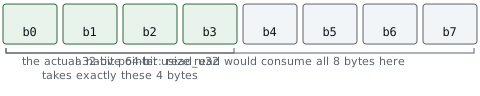
Code example. The code’s comments explain: 📏 Pointer width belongs to the target process, not to this tool. Reading a native usize here would consume eight bytes in a 64-bit build.
Now perform the actual hack:
Code example. The surrounding prose explains this example; the full lesson contains the exact code.
Return to Wesnoth and recruit a unit or end the turn to refresh the display. The gold should show 999 and behave as real spendable gold. Close and reopen the game to prove that the program resolves the dynamic address again.
You can build and run the finished program directly:
Terminal window
Code example. The surrounding prose explains this example; the full lesson contains the exact code.
The complete entry point is wesnoth_gold.rs.
Section: Make failure useful.
Test these cases:
wrong P I D;
target closed;
malformed hex address;
unreadable address;
expected value does not match;
pointer in the chain is zero.
A good low-level tool is not the one that never sees errors. It is the one that sees errors clearly and stops before making a bad write.