The safe boundary keeps an address separate from an owned byte buffer. We still need to know how the copied bytes become a number or another address. The introductory memory lesson made two claims without proving them. The four bytes 00 00 20 41 are the whole number the large number shown when a u32 reads them, and 10.0 when an f32 reads them. And a pointer’s type decides what is read at the far end, while the pointer’s own size stays fixed.
This lesson proves both, one bit at a time, until you can work out every number yourself. It also explains how a whole number stores a minus sign.
The Rust primer extension explains checked slices, explicit byte order and field layout with a small local example before those ideas are applied here.
Section: Every bit position is a power of two.
The memory introduction read a byte by adding up place values: 128, 64, 32, 16, 8, 4, 2, and
Each one is two times the one to its right, so each can be written as a number of twos multiplied together.
Number the positions from the right, starting at 0. Position n is then worth 2 multiplied by itself n times, which is written 2ⁿ:
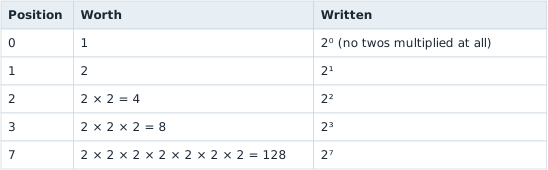
Counting from 0 is what makes that line up: the rightmost position is 2 to the power of 0, and 2 to the power of 0 is 1, because no twos have been multiplied in yet.
Wider values keep going. A 32-bit value has positions 0 to 31, and its leftmost position is worth 2 to the power of 31 equals the large number shown.
The same notation counts patterns. Every extra bit doubles the number of patterns, so n bits make 2ⁿ of them: 8 bits make 2 to the power of 8 equals 256, and 32 bits make 2 to the power of 32 equals the large number shown. Those are the ranges in the introductory type table.
Section: Negative whole numbers.
A u32 spends all 32 bits on size, so it has no way to say “minus”. An i32 needs one, and it gets it with a simple change: the leftmost position is worth a negative amount. Every other position keeps its ordinary value.
It is easiest to see in a single byte, the i8 type. There, the leftmost position is worth minus 128 instead of +128:
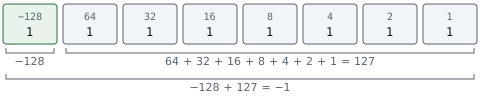
Read as a u8, the same hexadecimal F F is 255. Read as an i8, it is minus 1. Nothing about the byte changed; only the value given to its leftmost position did.
In brief: A signed number is the same bits with a negative weight on the leftmost position, so hexadecimal F F is 255 or minus 1 depending on the type.
An i32 works the same way across four bytes, with its leftmost position worth minus 2 to the power of 31 equals minus the large number shown. So the bytes FF FF FF FF are the large number shown as a u32 and minus 1 as an i32. This scheme is called two’s complement. Its big advantage is that the C P U, central processing unit, can use one adding circuit for both types: add 1 to hexadecimal F F and the result carries out of the byte and leaves hexadecimal 0 0. Read as an i8, that is the correct answer to minus 1 + 1. Read as a u8, it is 255 + 1 wrapping around to 0, because 256 does not fit in a byte.
The i32 range falls straight out of this. The most negative value has only the leftmost bit set: minus the large number shown. The most positive value has every bit set except the leftmost. Those 31 bits add up to one less than 2 to the power of 31, for the same reason 64 + 32 + 16 + 8 + 4 + 2 + 1 made 127, one less than 128. So the top of the range is the large number shown.
Section: Fractions: how an f32 splits its 32 bits.
A whole number cannot hold 3.5 or 0.25. For that, an f32 uses its 32 bits in a completely different way. It follows a standard called IEEE 754, which is the rulebook nearly every C P U uses for fractional numbers.
To see the idea, start with how scientists write very large or very small numbers:
Code example. The surrounding prose explains this example; the full lesson contains the exact code.
Slide the decimal point until exactly one non-zero digit sits in front of it, then count how far you slid it as a power of ten. A negative power means the point slid the other way: 10⁻³ means “divide by 10 three times”.
An f32 does the same thing in binary. Take 10. As a binary whole number it is 1010, because the positions holding a 1 are worth 8 and 2, and 8 + 2 equals 10. Slide the binary point three places to the left and count those three places as a power of two:
Code example. The surrounding prose explains this example; the full lesson contains the exact code.
That number now has three parts: a sign (positive), a power of two (3), and the digits after the point (010). The 1 in front of the point is missing from that list on purpose; step 5 below explains why it never needs storing. An f32 stores exactly those three things, in three fields that together use all 32 bits:
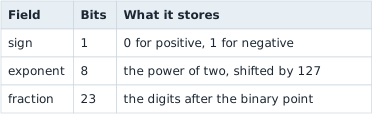
1 + 8 + 23 equals 32. The name floating point comes from that middle field: the exponent decides where the binary point floats to.
Alternative: Think of a number as a few digits plus a zoom setting: the fraction holds the digits, and the exponent slides the binary point to the right size.
Here is 10.0 as it sits in memory: the bytes 00 00 20 41. Little endian put the least-significant byte first, so written most-significant first, the way you write a number, they are 41 20 00 00. In binary, hexadecimal 4 1 is 0100 0001 and hexadecimal 2 0 is 0010 0000.
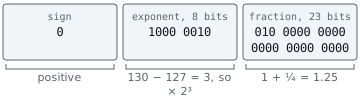
The fields do not follow the byte boundaries. Keep the same 32 bits in the same order and regroup them: the first bit is the sign, the next eight are the exponent, and the last 23 are the fraction.
Code example. The surrounding prose explains this example; the full lesson contains the exact code.
Here are the fields drawn as boxes:
Section: Step 1: the sign bit.
The first bit is 0, so the number is positive. A 1 there would make it minus 10.0 and change nothing else.
Section: Step 2: read the exponent field as a whole number.
The next eight bits, 1000 0010, are an ordinary unsigned whole number, read with the same place values as any byte:
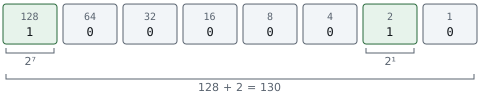
That is where the 128 and the 2 come from. The leftmost bit of an eight-bit field sits in position 7 and is worth 2 to the power of 7 equals 128. The second bit from the right sits in position 1 and is worth 2 to the power of 1 equals 2. No other bit is set, so the field holds 128 + 2 equals 130.
Section: Step 3: subtract the bias.
The real power of two is not 130. It is the stored number minus 127:
Code example. The surrounding prose explains this example; the full lesson contains the exact code.
That 127 is called the bias, and it exists to solve a real problem. An eight-bit field can only store 0 to 255, with no minus sign. But exponents need to be negative too, because numbers smaller than 1 are written with a negative power of two, the way 0.0025 needed 10⁻³:
Code example. The surrounding prose explains this example; the full lesson contains the exact code.
One fix would be to spend one of the eight bits on a minus sign. IEEE 754 does something neater: it shifts the whole range. Every stored exponent is the real exponent plus 127, so the reader subtracts 127 to get it back.
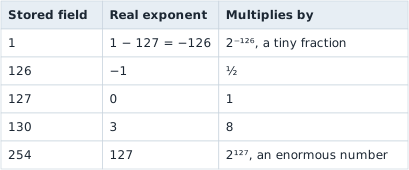
127 is used because it sits in the middle of 0 to 255, so there are about as many negative exponents as positive ones. The stored values 0 and 255 are kept aside for special cases, covered later in this lesson, which is why the table stops at 1 and 254.
The shift has a bonus. Because a bigger stored exponent always means a bigger number, two positive f32 values compare in the same order as their raw bit patterns do, which lets hardware compare floats cheaply.
Section: Step 4: read the fraction field.
The last 23 bits are the digits after the binary point. In decimal, the digits after the point are worth a tenth, a hundredth, a thousandth — each position a tenth of the one before. In binary each position is worth half the one before:
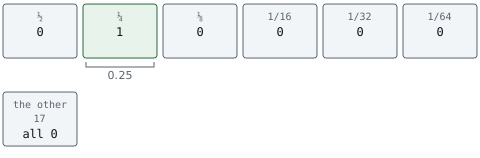
So the fraction 010 0000 … means 0 times ½ + 1 times ¼ + nothing else equals 0.25. That matches the .010 in 1.010 times 2 to the power of 3 from the start of this section.
Section: Step 5: put back the hidden 1.
Scientific notation always leaves one non-zero digit in front of the point. In decimal that digit can be anything from 1 to 9. In binary the only non-zero digit is 1, so in front of the point there is always a 1.
A bit that is always 1 tells you nothing, so an f32 does not store it. It is called the hidden bit, and the reader adds it back:
Code example. The surrounding prose explains this example; the full lesson contains the exact code.
The full number with its hidden 1 put back, 1.25 here, is called the significand. Many tools and older books call it the mantissa. Leaving the 1 out gives an f32 24 bits of precision from 23 stored bits.
Section: Step 6: put the pieces together.
In the formula below, ^ means “to the power of”, so 2^3 is the same as 2 to the power of 3. The sign counts as +1 for positive and minus 1 for negative.
Code example. The surrounding prose explains this example; the full lesson contains the exact code.
Predict first
Memory holds 00 00 20 41, which is 10.0. A tool changes only the third byte, from 20 to A0, so memory now holds 00 00 A0 41.
What value does the f32 hold now?
Answer: 20.0. Most significant first the bits are this value. The top bit of A0 (1010 0000) is the lowest bit of the exponent field, so the exponent goes from 130 to 131. The significand stays 1.25, and 1.25 times 2 to the power of 4 equals 1.25 times 16 equals 20.0.

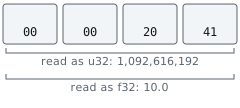
A u32 reads the same four bytes with none of these boundaries. It treats all 32 bits as one whole number, and gets something unrecognisable:
An f64 follows the same plan with more room: 1 sign bit, 11 exponent bits with a bias of 1,023, and 52 fraction bits.
10.0 is exactly 1.25 times 8, so its other 22 fraction bits are zeros it does not need. Most numbers are not that tidy. 10.1 is 1.2625 times 8, and 0.2625 has binary digits that repeat forever, so the 23 bits keep a rounded fraction and the f32 holds 10.the numeric value shown…, the closest value it can store. This is why float values found in games are rarely round, and why memory scanners let you search for a float within a small range instead of only an exact value. The optional rounding reference derives those bits and the spacing between neighbouring f32 values.
Narration: Because most fractions are rounded, two floats that print alike can differ in the last bit. Exact equality tests can fail, so programs often allow a tiny margin.
Section: Patterns kept aside for special values.
The stored exponents 0 and 255 do not follow the formula:
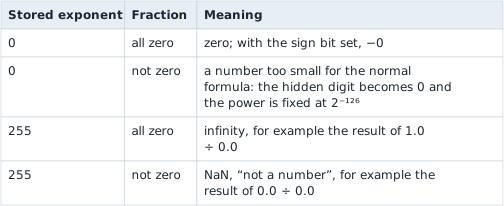
Zero needs its own pattern because it has no leading 1 to hide.
The special exponent-zero decoding also explains what the bytes for an integer 100 mean as a float. Read 64 00 00 00 as an f32 and, most significant first, it is this value: sign 0, exponent field 0, fraction 100 out of the large number shown. With the hidden digit off and the power fixed at 2⁻¹²⁶, the value is 100 divided by the large number shown times 2⁻¹²⁶, about 1.4 times 10⁻⁴³: a decimal point, then 42 zeros, then 14. A u32 read of the same bytes gives 100.
Section: Decode a whole position.
Now apply the same decoding to a 3D position stored as three f32 values in a row:
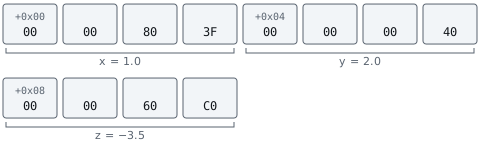
Each value decodes with the same six steps. Take z. Its bytes 00 00 60 C0, written most significant first, are this value. hexadecimal C 0 is 1100 0000 and hexadecimal 6 0 is 0110 0000, so regrouping the bits into fields gives:
Code example. The surrounding prose explains this example; the full lesson contains the exact code.
The sign bit is 1, so the number is negative.
The exponent field 1000 0000 has only position 7 set, so it holds 128, and 128 minus 127 equals 1. The number is multiplied by 2 to the power of 1 equals 2.
The fraction starts 11, so it holds ½ + ¼ equals 0.75. With the hidden 1 put back, the significand is 1.75.
So z equals minus 1 times 1.75 times 2 equals minus 3.5.
Additional detail: Decode x and y the same way.
x is 00 00 80 3F, which is this value. In bits that is 0011 1111 1000 0000 followed by sixteen zeros. The sign bit is 0. The next eight bits are 0111 1111, which is 64 + 32 + 16 + 8 + 4 + 2 + 1 equals 127, and 127 minus 127 equals 0, so the multiplier is 2 to the power of 0 equals 1. Every fraction bit is 0, so the significand is just the hidden 1. x equals +1 times 1 times 1 equals 1.0.
y is 00 00 00 40, which is this value: 0100 0000 followed by 24 zeros. The sign bit is 0. The exponent field is 1000 0000, which is 128, and 128 minus 127 equals 1, so the multiplier is 2 to the power of 1 equals 2. The fraction is all zeros, so the significand is 1. y equals +1 times 1 times 2 equals 2.0.
The interpreter below reads any four bytes as an unsigned, a signed, and a float value at once, so you can check a decode by hand. Try 00 00 60 C0 for minus 3.5, or 9A 99 21 41 to see how close 10.1 really gets.
Section: What a pointer’s type tells the program.
Suppose a pointer holds hexadecimal 5 0 0 0, where the bytes are 00 00 20 41:
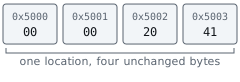
Following that address through a *const u32 reads all four bytes as the large number shown. Through a *const f32, the same four bytes mean 10.0. Through a *const u8, it reads only the first byte, 0. The pointee type decides how many bytes to read at the destination and how to interpret them. Two more facts complete the picture: why the pointer’s own size never changes, and how the pointee type controls a pointer that moves.
Section: The pointer’s size comes from the process.
A pointer has to be able to hold any address the process might use. A 32-bit process numbers its memory with 32-bit addresses. That gives it 2 to the power of 32 equals the large number shown possible addresses, from 0 to the large number shown, and a pointer needs all 32 bits — 4 bytes — to name any one of them. What it points to plays no part: a pointer to a single byte and a pointer to a 2,000-byte player object are both 4 bytes. A 64-bit process uses 64-bit addresses, so every pointer in it is 8 bytes.
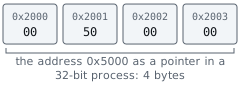

Rust’s usize, the pointer-sized whole number from Lesson 3.1, has the same width: 4 bytes in a 32-bit program, 8 in a 64-bit one. So a 64-bit tool reading a 32-bit game’s pointers must read 4 bytes for each one, even though its own usize is 8.
Section: The pointee type sets the step size.
The pointee type also decides how far a pointer moves. Adding 1 to a pointer means “the next value of this type”, not “the next byte”, as Lesson 3.1’s .offset() example showed. Rust writes this p.add(1) inside unsafe, because the compiler cannot check that the new address still lands inside the list:
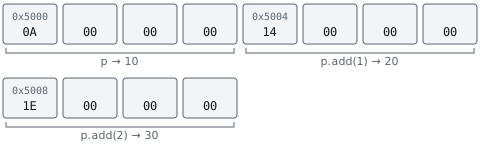
hexadecimal 0 A is 10, hexadecimal 1 4 is 16 + 4 equals 20, and hexadecimal 1 E is 16 + 14 equals 30. A pointer to a 64-byte structure would step 64 bytes at a time.
Alternative: Think of stepping along a row of equal boxes: add 1 and you reach the next box, however big. Bigger boxes mean longer steps in bytes.
Section: None of this is stored in memory.
The pointee type lives in the source code and in the compiler, which uses it to choose the right instructions: a four-byte whole-number read, a float load, or a one-byte read. The compiled game keeps only those instructions. When you study a game, you work out what a pointer points to the same way you work out any other type: from what the code does at the destination.
The same bytes can describe a whole number, a fraction, or an address, depending on the width and interpretation selected by the code. Knowing that representation still does not prove which object the bytes belong to or whether its address remains valid. How External Tools Read Game Memory combines these widths, byte orders, and encodings with the safe boundary: copy a checked byte range first, then interpret the local result.
Section: Optional reference: rounding and precision.
These derivations show where the rounded value of 10.1 comes from. The decoding steps above do not depend on them. Lesson 5.6 relies on the same binary32 rounding when floating-point instructions add, scale, or convert values.
Additional detail: Optional reference: what the rest of the fraction bits are for.
For 10.0, only one fraction bit is set and the other 22 are 0. They are not wasted. They hold finer and finer halves — ⅛, 1/16, 1/32, all the way down to 1/the large number shown — and 10.0 simply does not need any of them, because it is exactly 1.25 times 8. That is like writing 1.the numeric value shown in decimal: the extra zeros are real digits that happen to be zero.
Most numbers are not that tidy. Take 10.1. It is 1.2625 times 8, so the fraction has to be 0.2625. In binary, 0.2625 never ends: its digits settle into 0011 repeating forever, the same way 1 divided by 3 is 0.333… forever in decimal. The 23 bits store as much of it as fits, rounded at the last bit:
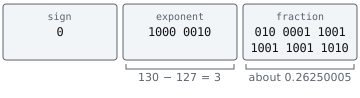
The stored fraction is 0.the numeric value shown…, so the value is 1.the numeric value shown… times 8 equals 10.the numeric value shown…, the closest an f32 can get. A debugger that prints enough digits shows 10.the numeric value shown.
The last fraction bit sets how fine that precision is. It is worth 1/the large number shown, and for numbers near 10 it is multiplied by 2 to the power of 3 equals 8, so neighbouring f32 values near 10 are about 0.the numeric value shown apart. That works out to roughly seven significant decimal digits.
Additional detail: Where the binary digits of 0.2625 come from.
To turn a fraction into binary digits, double it again and again. Each time the result reaches 1 or more, the next binary digit is 1 and you keep only the part after the point. Otherwise the digit is 0.
Code example. The surrounding prose explains this example; the full lesson contains the exact code.
After the eighth line the leftover is 0.2 again, just as it was after the fourth line. So lines five to eight repeat forever, producing 0011 over and over: 0.2625 is 0.0100 0011 0011 0011 … in binary. The fraction field holds the first 23 of those digits, rounded at the last one.
Doubling works because each doubling moves the binary point one place to the right, pulling the next digit in front of it.