Recording a guard’s movement tells us when it turned, chased, or stopped. It does not explain why. To reconstruct how the guard chooses its action, follow the information the game gave the guard, the decision it made from that information, and the action that followed.
Section: An N P C, non player character, is a small program that runs every tick.
A non-player character (N P C) is any character the game controls rather than a person: a guard, a shopkeeper, an enemy soldier. In games, “A I, artificial intelligence,” means the code that picks what an N P C does next. It is usually far simpler than the A I in the news: a small set of distance, visibility, health, and timing checks, evaluated many times per second.
The portable lab npc_brain_lab.rs builds one such character, a guard, and this lesson follows it piece by piece. Nothing in it touches a real game.
The game loop from Lesson 1.2 reads input, updates the world, and draws a frame. Many games update the world in fixed steps called ticks. Every tick advances the simulation by the same slice of time, however fast the computer draws. The lab runs its guard at 10 ticks per second (the constant TICKS_PER_SECOND), which makes each tick 1000 divided by 10 equals 100 milliseconds.
An N P C makes one decision per tick, for two reasons:
Behavior follows simulated time, not the frame rate. A guard that reacts after 3 ticks reacts after 3 times 100 equals 300 milliseconds on a fast computer and on a slow one. If it decided once per drawn frame, a machine drawing 144 frames per second would make it react faster than one drawing 30.
The cost is bounded and the behavior repeats. Fifty guards cost fifty decisions per tick, no matter what the renderer does. The same inputs, tick by tick, give the same decisions, which is what lets the lab test its guard without drawing anything.
Each tick, the guard’s tick method runs three stages in a fixed order: sense, decide, and act. Sensing also updates what the guard remembers:

The guard never reads the player’s true position directly. It gets the player’s position only through its senses, and remembers the last place it saw them in last_known. That separation is what makes hiding behind a wall work.
Section: Sense: three checks, cheapest first.
The guard sees a target only if it passes three checks, in this order:
Distance: the target is no more than VIEW_DISTANCE equals 10 units away.
View cone: the target is inside the guard’s view cone, the range of directions it can see: within 60 degrees of the way it faces, on either side, so 60 + 60 equals 120 degrees in all. Everything behind the guard is outside it.
Line of sight: the straight line from the guard to the target is free of solid geometry, so no wall hides the target.

The order matters for speed: the first two checks cost a handful of arithmetic operations each, while the last walks along the line and tests every wall, so it runs only after the cheap checks pass. Each check also gives the player a way to stay unseen: keep your distance, stay behind the guard, or put a wall between you.
In brief: A guard sees a target only if three checks pass: close enough, inside the view cone, and no wall in the way. Cheap checks run first.
The cone check never measures an angle. It uses a quick calculation called a dot product, and the lab’s constant VIEW_CONE_COS equals 0.5 is the value that stands for 60 degrees. Lesson 11.1 works through all three checks in the lab’s code and shows why.

Section: Decide: a finite-state machine.
The guard’s behavior is a finite-state machine, the same structure Lesson 4.6 uses for a macro: a fixed set of named states and a condition for each transition between them. The guard has five states:
Patrol: walk the route. The lab’s route is a single point, the guard’s post at (0, 0), so patrolling means standing there.
Chase: walk toward where the player was last seen.
Attack: the player is within ATTACK_RANGE equals 1.5.
Search: the player vanished, so go to the last known spot and wait there.
Flee: health is FLEE_HEALTH equals 25 or less, so run.
The whole decision is one function of the current state and this tick’s senses:
Code example. The code’s comments explain: The reaction delay: one glimpse is not enough to start a chase.
Drawn out, the transitions are:

When no arrow applies, the state stays the same. Three details of the code decide the shape of that diagram:
The health check runs before the match, so it overrides every state. Nothing leads out of Flee in this lab; a fleeing guard flees until the program ends.
The match arms are tried from top to bottom. A searching guard that sees the player for 3 ticks goes back to Chase before its counter is even looked at.
Search starts at count 0 on the tick the player is lost and adds 1 each tick. The guard gives up on the tick after the count has reached SEARCH_TICKS equals 4, so a lost player is searched for five ticks: counts 0, 1, 2, 3, and 4.
Section: Reaction time is counted in ticks.
seen_for counts the consecutive ticks in which the guard has seen the player, and drops back to 0 on any tick it does not. The guard only reacts when the count reaches REACTION_TICKS equals 3, so one glimpse through a gap never starts a chase.
At 10 ticks per second, the ticks are 100 milliseconds apart. The count reaches 3 two ticks after the first tick that saw the player, 2 times 100 equals 200 milliseconds later. The player may also have been visible for up to 100 milliseconds before that first tick sensed them, so the guard reacts 200 to 300 milliseconds after the player steps into view. That is close to a person’s own reaction time of about a quarter of a second, and that is the point: a guard that turns the instant one pixel of you appears feels unfair. It is also the filter that Lesson 4.9 calls debouncing.
The delay only runs one way. Once chasing, a single tick without sight sends the guard to Search. Losing the player is instant; noticing them is not.
Alternative: Think of waking at a noise: you need a few moments to be sure it is real, but you stop worrying the instant it clearly goes away.
Section: One run, tick by tick.
The lab’s first demo puts the guard at its post, (0, 0), facing east, (1, 0). A wall fills the box from (5.5, minus 1) to (6.5, 1): every point with x from 5.5 to 6.5 and y from minus 1 to 1. The player stands in the open at (5, 0) for ticks 1 to 7, then slips behind the wall to (8, 0) for ticks 8 to 16. “Distance” is measured before the guard moves:
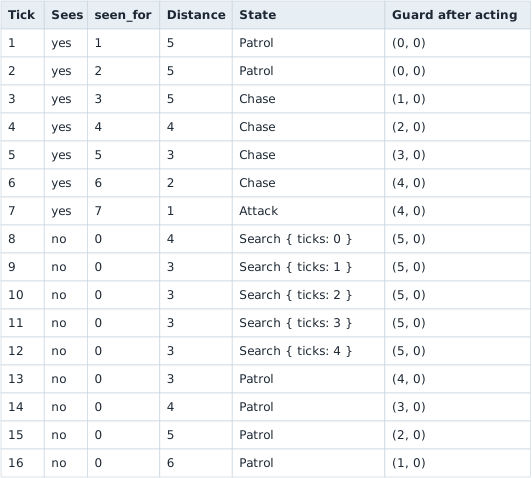
Every row follows from the perception checks and state transitions above:
Ticks 1 and 2: the player is 5 away, straight ahead, and in the open, so all three checks pass, but seen_for is only 1, then 2.
Tick 3: seen_for reaches 3, so the guard chases, stepping SPEED equals 1.0 toward the player.
Ticks 4 to 7: each step closes 1 unit. On tick 7 the distance is 5 minus 4 equals 1, within 1.5, so the guard attacks and stops moving.
Tick 8: the line from the guard at (4, 0) to the player’s new spot at (8, 0) runs along y equals 0 and passes through the wall where x is between 5.5 and 6.5, so line of sight fails. The guard switches to Search and walks the 1 unit to last_known, (5, 0).
Ticks 9 to 12: the guard waits there, facing the wall that hides the player, while the count climbs to 4.
Tick 13: the count has reached 4, so the guard returns to Patrol, turns west toward its post, and steps to (4, 0).
Ticks 14 to 16: the player is now straight behind the guard, 180 degrees from its facing and far outside the cone.
Games also use two other ways to decide, often mixed with small state machines: utility scoring runs whichever action scores highest right now, and a behavior tree checks an N P C’s priorities from the top every tick. Lesson 11.1 works through both.
Section: Moving is a separate system.
The lab’s guard moves with move_toward, which turns to face the target and steps straight at it, ignoring walls. It avoids the wall in the demo only because the spot it walks to, (5, 0), happens to be in front of it.
Games split movement off into a navigation system. The decision layer picks where to go. The navigation layer works out how: it plans a route over a grid or a navigation mesh, a set of polygons covering the floor an N P C can walk on, with a search such as A* from Lesson 4.8, then steers the N P C along that route one tick at a time.
Section: An N P C in memory.
A game written in C++ usually stores each N P C as a structure, a block of memory with each field at a fixed offset from its start, and keeps the state machine’s current state as a small number in one of those fields. In a toy layout of the guard, the state is a single byte:

Lesson 14.1 lays out the whole structure field by field, as an example of an object layout.
Section: What editing the state byte would do.
Take a toy program you wrote yourself, or an offline single-player game running in your lab V M, virtual machine,, whose guard uses the five-state implementation above. Changing the state byte between two ticks has very different effects depending on the value:
Write 4 (Flee) mid-chase: on the next tick decide sees Flee, and nothing leads out of Flee, so the guard turns and runs from the last place it saw the player until the program restarts. The edit lasts.
Write 0 (Patrol) mid-chase, with the player in view: a chase only starts after 3 ticks of sight, so seen_for is already 3 or more, and the next decision turns Patrol straight back into Chase before the act stage runs. The guard never takes a patrol step; the edit is undone within one tick, 100 milliseconds.
Write 0 (Patrol) while the guard is searching: now the senses agree with Patrol, because the player is not in view, so the guard gives up the search early and walks home. The edit lasts.
The pattern behind those results: the state is an output the game recomputes from its inputs every tick. An edit to the output survives only when the inputs agree with it, as seen_for did not in the second case. An edit to an input that the decision code reads, such as writing 20 into health, changes behavior for as long as the input holds, here by sending the guard into Flee on the next tick.
Narration: A value that snaps back after you change it is usually an output. The real control is an input the decision code reads, so look one step earlier.
Section: Why online NPCs are out of reach.
In an online game, the server runs the NPCs. Their state bytes, timers, and decision code exist in the server’s memory, on a machine you do not control. The server is the authoritative copy: its decisions are the ones that count. Your client receives only what it needs to draw, such as positions, animations, and perhaps a health bar, and Lesson 1.3 describes why changing a client-side copy does not change what the server decides. Editing an N P C’s position or state in client memory changes, at most, what your own screen draws until the next server update overwrites it. Tampering with a live multiplayer service is also outside this book’s scope; everything above belongs in your own toy programs and offline games.
Section: Run the lab.
From the rust-labs folder:
Terminal window
Code example. The surrounding prose explains this example; the full lesson contains the exact code.
The first command prints the sixteen-tick run from the table above, then five situations scored by the utility system from Lesson 11.1. The tests check each decision case separately, from the reaction delay and the search timeout to low health overriding every state, the three perception checks, and the utility choices.
Then change REACTION_TICKS to 1 and predict, before running the demo, which tick the chase starts on and where the guard stands when it attacks. Two of the tests will fail after that change, because they pin the delay at 3 ticks. Compare the new trace with the old one, then restore the constant to 3 so the tests describe the program again. Lesson 11.1 explains the sensing calculations and behavior-tree and utility-selection algorithms that this trace treats as black boxes.