Section: Why an EXE needs a map.
A Windows .exe is not one solid blob of C P U, central processing unit, instructions. It is a Portable Executable, usually shortened to P E, portable executable. Its headers tell Windows where the code, read-only data, writable data, imports, resources, and relocation information live.
First we will learn the file’s map and use it to translate positions on disk into live addresses. Then we will ask two different runtime questions: where are candidate bytes or values, and which instructions actually execute? Scanners, a disassembler, a debugger, and E T W, Event Tracing for Windows, each answer a different part. Knowing the map keeps their addresses anchored to a real build.
The same section occupies a place in the file and a place in memory, and those two places are numbered differently. A position in the file is a file offset. A position in the loaded image is an R V A, relative virtual address,, a relative virtual address, meaning a distance from wherever Windows put the module. Use two layouts connected by the section table:
Code example. The surrounding prose explains this example; the full lesson contains the exact code.
The layouts differ because sections have separate file and virtual alignments, zero-initialized data may occupy memory without taking equal file space, and Windows may apply relocations and resolve imports after mapping. A section row supplies the mapping information for converting a location in one layout to the corresponding location in the other; the numbers are related but not interchangeable.

Alternative: Think of printed page numbers versus e-book page numbers: one text, two numbers, and a contents table converts between them. The section table does that job.
A parser follows the file’s own chain of verified offsets. Each header tells it where the next structure begins or how large that structure is:

Never skip directly to a later box using a guessed offset. A damaged or wrong header should stop the parse before its numbers are trusted.
Section: The path through the headers.
The diagram above is a parser’s route, not six unrelated names. Each structure either confirms that this is a P E image or tells us where the next structure begins. Read this indentation as a chain of dependencies: we cannot trust a section row until the headers that locate its table have passed their checks.
Code example. The surrounding prose explains this example; the full lesson contains the exact code.
The “optional” header is not optional for an executable image. That old name survives because object files can omit it. The parser’s useful result is a bounded section table; the next lesson uses its rows to translate an R V A into the corresponding file bytes.
In brief: A P E file is a chain of headers. Each one tells the parser where the next begins, ending at the section table that maps file bytes to memory.
Section: Read numbers without pointer casts.
For an on-disk file, a byte slice is safer and easier than casting random offsets to Windows structs:
Code example. The code’s comments explain: 📏 Validate both the arithmetic and the slice. Either can fail for a damaged file, and neither failure should become a panic or pointer cast.
Three ideas are hiding in those few lines:
checked_add refuses an integer wraparound.
get refuses an out-of-file slice.
from_le_bytes states that P E numbers use little-endian byte order.
That is what “safe parsing” means: malformed input becomes an error instead of an invalid memory access. The three integer helpers differ only in how many bytes they take and which little-endian integer type they construct. In the excerpts that follow, bytes is the whole EXE file read into a Vec<u8>; these helpers check every field access against that file. The complete lab handles opening the path and reporting errors as well.
Narration: A parser that trusts a damaged file’s numbers can read outside its buffer. Programs that open untrusted files are a classic target for this mistake, so checks matter.
Section: Find the P E and COFF headers.
The COFF header, named for the older Common Object File Format it comes from, is the small fixed block right after the four-byte P E\0\0 signature. It gives the basics a parser needs before anything else: which C P U the machine code targets, how many section rows follow, and how large the next header is.
Code example. The code’s comments explain: 🧭 DOS field hexadecimal 3 c contains a file offset, not an R V A or live address. 📏 Skip the four-byte P E signature only after it has been verified above.
The cap of 96 is deliberately boring. Real course targets do not need thousands of sections, so a wild count means the offset is wrong or the file is damaged.
Section: Tell PE32 from PE32+.
The optional-header magic is hexadecimal 1 0 B for PE32 and hexadecimal 2 0 B for PE32+. Because their fields have different sizes, the image-base offset changes:
Code example. The code’s comments explain: 📦 PE32 stores a four-byte image base at +28. 📦 PE32+ stores an eight-byte image base at +24.
PE32+ also omits BaseOfData; its eight-byte ImageBase starts in the space where PE32 has that four-byte data landmark. Offsets here are relative to the optional header, as specified by Microsoft’s P E format:
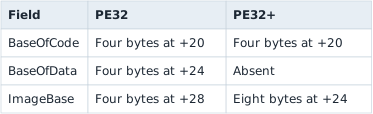
BaseOfData being absent does not mean the image has no data sections. The section rows still describe their RVAs and sizes.
The games used by the memory-patching chapters are the specified 32-bit course builds, so their magic should be hexadecimal 1 0 B. The parser supports both formats because a tool should explain what it found instead of guessing.
Section: Walk the 40-byte section rows.
The section table begins immediately after the optional header. Each row is 40 bytes:
Code example. The code’s comments explain: 📏 Multiply and add separately with checks so a hostile count cannot wrap around and point an apparently valid row back into an earlier header. 🔍 P E names are fixed eight-byte fields and are not required to end in NUL.
.text is normally readable and executable. .rdata is normally readable. .data is normally readable and writable. Names are only conventions; the characteristic flags are what the loader actually uses to set each section’s page protection.
Section: Linked code still needs a file-to-image map.
Static linking copies the needed library implementation into the output module. D L L, dynamic link library, linking keeps that implementation in another module and records how to find its exported functions. An import library can help link an EXE to a D L L without copying the D L L’s implementation into the EXE. Microsoft’s D L L overview describes load-time and run-time linking. Once loaded, the D L L uses the calling process’s virtual address space and the calling thread’s stack.
Whichever linking choice produced the module, its file bytes still need the section map. For an illustrative .text row with raw start hexadecimal 4 0 0 and R V A start hexadecimal 1 0 0 0, file byte hexadecimal 5 2 0 is hexadecimal 1 2 0 bytes into the section. Its R V A is hexadecimal 1 1 2 0; at live base this value, its virtual address is this value. This example assumes the byte lies inside that section’s file-backed data.
Try the example below, then change the offset to see where other bytes go: the two strips share one scale, and the section table is the converter.

The numbers a section row supplies are stored in the headers themselves. Here is the whole header chain with real file offsets, each one derived from the sizes before it:

Static and D L L linking package the library differently, but a file offset still becomes an address through the same section rows:

In brief: Static storage is a lifetime term; static linking is a packaging choice. Neither makes a file offset equal to a live virtual address.
Section: Run the real lab.
Build the tool, then inspect one exact course executable:
Terminal window
Code example. The surrounding prose explains this example; the full lesson contains the exact code.
For this build, the output shows:
PE32 or PE32+;
preferred image base;
entry-point R V A;
.text R V A and size;
whether .text is marked executable.
Then inspect ac_client.exe and Quake3-UrT.exe. The layout changes, but the map-reading process does not.
The complete buildable parser is pe_inspector.rs. It performs checked offset math for every field and never uses unsafe.
Section: What the P E map tells us.
For the same instruction, a P E section can give a location within the mapped image without saying where its bytes sit in the file:
“The instruction is at R V A this value inside .text, not at file offset this value, and Windows will add the live module base before the C P U can execute it.”
Reference: Microsoft’s P E/COFF format specification.