Section: Keep four address terms separate.
The P E, portable executable, map in Lesson 5.1 told us that an instruction can have one position in the EXE file and another in a running process. Suppose your debugger recorded an instruction at this value yesterday. To find it after restarting the game, you need to know which part of that number belonged to the module and which part Windows chose for that run.
We will use four names for the four different positions involved:
a preferred image base is where the file would like to be loaded;
a live module base is where Windows placed it in this process run;
an R V A, relative virtual address, is a distance from the beginning of the module;
a virtual address is the final live address used by the C P U, central processing unit.
An R V A is not a pointer stored in the game. It is arithmetic describing a location inside one loaded image. The P E file’s section table maps RVAs to sections such as code or data.
Do not confuse an R V A with a file offset. A file offset counts bytes in the EXE on disk. An R V A counts from the mapped image base after Windows has arranged sections according to virtual addresses and alignment. They can differ.
The complete vocabulary is worth making explicit:
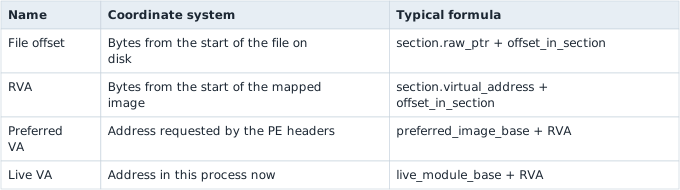
These are coordinates in different spaces. Adding a live module base to a file offset is the binary-analysis version of adding meters to seconds: the numbers fit in an integer, but the operation has no useful meaning.
In brief: File offset, R V A and live address are coordinates in different spaces. Convert between them with the section table and the module base.
Section: Map an R V A back to bytes on disk.
To translate an R V A to a file offset, first find the P E section whose virtual range contains it. For a section with virtual start V, raw file start R, virtual size VS, and raw size RS:
Code example. The surrounding prose explains this example; the full lesson contains the exact code.
The mapping is valid only when the R V A lies in the section’s mapped range and offset_in_section less than RS. A section can have more virtual bytes than raw bytes; the loader fills that tail with zeros, so no corresponding file byte exists. Conversely, alignment padding on disk is not necessarily meaningful mapped memory. Header RVAs below SizeOfHeaders are a special case that commonly map directly to the same file offset.
Example section:
Code example. The surrounding prose explains this example; the full lesson contains the exact code.
R V A hexadecimal 2 3 4 0 is hexadecimal 3 4 0 bytes into the section, so its file offset is hexadecimal 0 6 0 0 + hexadecimal 0 3 4 0 equals hexadecimal 0 9 4 0. R V A hexadecimal 2 8 8 0 is mapped inside the virtual tail but is beyond the hexadecimal 8 0 0 raw bytes; it represents zero-filled memory rather than a byte stored in the file.

Alternative: Think of a cookbook that says add a cup of water: the water is not printed, the cook supplies it. The loader supplies the zero bytes the same way.

Follow the hexadecimal 2 3 4 0 branch through the section mapping. Subtraction finds a distance inside the section; addition then expresses it in the file’s coordinate system:

A rigorous parser checks every subtraction and addition, validates section ranges against the actual file length, and rejects overlapping or impossible metadata. P E headers describe a file; they do not deserve blind trust merely because Windows-shaped field names were decoded.
Resolving an R V A is useful only when the build identity and the live module range are part of the calculation:

A S L R, address space layout randomization,, Address Space Layout Randomization, changes the live base, while a game update can change the R V A. Checking both facts keeps an old note from turning into a believable but wrong address.
Section: Why an address moves.
Old notes often show an address such as this value. That may be the address from one run, not a permanent location.
Windows can load an executable at a different base address each run; that is what A S L R randomizes. The useful part that usually stays the same for an exact build is the distance from the module’s beginning: the Relative Virtual Address.
A S L R makes fixed absolute addresses less predictable. Windows can relocate an image when its P E metadata supports relocation. The module’s internal layout for that exact file usually stays the same, so base-plus-R V A reaches the same instruction even when the base changes.
Code example. The surrounding prose explains this example; the full lesson contains the exact code.
The useful invariant is algebraic: for one exact module build, an internal location’s displacement from the module base can remain stable even when the base changes. A S L R changes the first term, not the meaning of the second:
Code example. The surrounding prose explains this example; the full lesson contains the exact code.
The R V A is stable only relative to that image layout. Recompiling or updating the game can move the instruction inside the module, so the build identity must travel with the R V A.
Small wrapper types can stop coordinate-space mistakes before runtime:
Optional: practise keeping the R V A inside its image before forming a live address.
Code example. The surrounding prose explains this example; the full lesson contains the exact code.
Both values are integers internally, but the type names preserve their units. The function also states two proof obligations: the R V A belongs to this image, and addition cannot overflow the address type.
Narration: Mixing up an R V A and a live address is an easy slip because both are plain numbers. A small wrapper type turns that slip into a compile error.
Section: Derive the Wesnoth example.
For the 32-bit Wesnoth 1.14.9 course build, the original disassembly records the instruction at this value. If the module was loaded at this value during that capture, subtracting the base gives the R V A; adding a different run’s base back to that same R V A gives that run’s own live address:

Never assume the example base. Measure the module in the run you are actually debugging.
Section: Ask Windows where the module lives.
The shared Process wrapper uses CreateToolhelp32Snapshot, Module32FirstW, and Module32NextW from the windows crate. The chapter tool becomes small because those unsafe Windows boundaries already live in one reviewed module:
Code example. The surrounding prose explains this example; the full lesson contains the exact code.
The two guards matter. An R V A outside the module is probably for the wrong version, and an overflowing addition is never a valid address.
ToolHelp returns information about modules in the chosen process. The snapshot is still a moment-in-time view: a D L L, dynamic link library, can unload after enumeration. For the course EXE this is stable during the short calculation, but reusable tooling should handle a later read failure normally.
Section: Run it against the course build.
Start a local Wesnoth match, then run:
Terminal window
Code example. The surrounding prose explains this example; the full lesson contains the exact code.
Open the printed live address in x64dbg. The bytes and disassembly must match the lesson before you use the address.
Repeat the process after restarting Wesnoth. If the base changes but base + R V A still reaches the expected instruction, you have separated stable location information from one-run information.
The buildable tool is module_inspector.rs, and its ToolHelp implementation is in process.rs.
Section: R V A is not a version check.
An R V A can move when the game is rebuilt. Keep all three checks:
exact supported game version;
live module base plus the version’s R V A;
exact original bytes or a unique pattern at the final address.
That is why the code-cave installers reject unknown bytes instead of hoping the address is close enough.
References: Microsoft P E format and GetModuleHandleW.