Section: An export table is a D L L’s public index.
An import says, “my program needs this name from another image.” An export says, “other images may ask me for this name or ordinal.”
Windows uses these tables while loading executables and DLLs. Reverse engineers inspect them to understand a game’s dependencies, plug-in interfaces, graphics libraries, and engine boundaries before reading assembly.
An export table connects three parallel ideas:
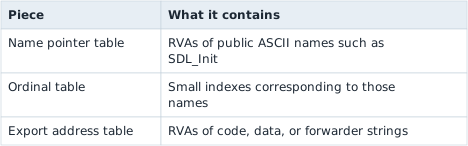
Not every export needs a name. A D L L can export by ordinal only. This beginner tool lists named exports and reports the total number of address entries so the difference stays visible.
An ordinal is not simply a row’s position in the address table. The export directory also stores an ordinal base, commonly 1, and an export’s real public ordinal is ordinal_base + its index in the address table. A caller asking for “ordinal 5” with a base of 1 wants functions[5 - 1], not functions[5]. The parser below reads that base once and adds it back in for every named export so the printed ordinals match what the D L L actually publishes.
In brief: An export table pairs names with ordinals and addresses. The public ordinal is the ordinal base plus the entry’s position, not the position alone.

Section: R V A, relative virtual address, is not a file offset.
An R V A, or relative virtual address, measures from the start of the mapped image, regardless of the live base Windows chose. A file offset measures from byte zero in the file on disk.
Sections connect the two coordinate systems:
Code example. The surrounding prose explains this example; the full lesson contains the exact code.
You cannot safely treat every R V A as a file offset. Sections can have different virtual and raw positions, and some virtual bytes have no stored file bytes at all.
The parser accepts an R V A only when it falls inside a section and its distance is smaller than SizeOfRawData. That last check prevents the parser from pretending zero-filled virtual padding exists in the file.
Treat every address-like number as belonging to a named coordinate system:
file offsets index the byte slice on disk;
RVAs index the mapped image relative to its base;
virtual addresses identify locations after the loader chooses a base;
table indexes select entries, not bytes.
Do not pass all four around as plain usize values. Small wrapper types such as FileOffset(u32) and Rva(u32) make accidental mixing visible and force conversions through one checked function.
The conversion is a partial function: some valid mapped RVAs have no file bytes, and malformed files may describe overlapping sections. Returning Option or Result is more accurate than inventing an offset.
Section: PE32 and PE32+ move the data directories.
The optional header is shaped differently for 32-bit PE32 and 64-bit PE32+. The magic value tells us which layout we have:
hexadecimal 1 0 b: PE32, data directories begin 96 bytes into the optional header;
hexadecimal 2 0 b: PE32+, data directories begin 112 bytes into the optional header.
Hard-coding one screenshot’s “export table is hexadecimal 7 8 after the P E, portable executable, signature” is brittle because that shortcut mixes header landmarks and assumes one layout.
The original helper assumes the export directory starts 96 bytes into every optional header. That matches PE32, but PE32+ puts it at 112. u32_at is the bounded four-byte reader used by the parser; magic identifies the header format.
Before: assume one optional-header layout
Code example. The surrounding prose explains this example; the full lesson contains the exact code.
Format-aware parsing chooses the documented landmark for the detected format, rejects unknown formats, and checks the offset calculation before reading. The complete parser also verifies that directory entry zero is declared present.
Improved code
Code example. The surrounding prose explains this example; the full lesson contains the exact code.
Show the diff
Code example. The surrounding prose explains this example; the full lesson contains the exact code.
Takeaway: select a format’s layout before calculating a field offset.
The program also checks NumberOfRvaAndSizes before reading directory entry zero. If the field is absent, reading entry zero would cross the file’s declared header.
Section: A forwarded export points to another name.
An export-address entry usually holds an R V A for code or data. If the R V A points back inside the export-directory range, it is a forwarder string instead, such as KERNELBASE.VirtualQueryEx or NTDLL.RtlSomething.
The loader follows that string to another D L L export. This is how Windows can keep a familiar public name while moving the implementation behind it.
Alternative: Think of a shop’s old phone number that now redirects to a new branch: callers still dial it and are passed along. A forwarder does that for a function name.
Looking a function up by name uses all three tables. The name’s row in the sorted name table selects the same row of the ordinal table, which holds an index into the address table; the entry there is either code or a forwarder:

Section: Every byte from a file is untrusted input.
Even a game D L L you intended to inspect might be truncated, damaged, from the wrong build, or simply not a P E file. A parser should fail with a useful message instead of panicking or allocating several gigabytes because a count field contained nonsense.
This implementation uses five guardrails:
bytes_at checks every slice boundary.
checked_add catches integer wraparound.
The optional-header magic chooses the correct layout.
Section and export counts have teaching-tool limits.
Strings must terminate within 4096 bytes.
Validate from the outside inward. Prove the DOS header range before reading its P E offset, prove the P E and optional-header ranges before reading directories, then prove section and export ranges. A later valid-looking signature cannot make an earlier out-of-bounds read safe.
Narration: A count field claiming billions of entries can make a careless parser allocate huge memory or loop forever. Damaged or hostile files do this, so limits matter.
Section: Build the complete parser.
Before the listing, here is the exact 40-byte structure parse_export_table reads once it has a validated pointer to it, and the order in which it validates its way there.


Additional detail: Complete lab source: export_inspector.rs.
Code example. The code’s comments explain: 📏 Every later P E reader funnels through this checked boundary, so a bad table entry becomes context-rich data error instead of an index panic. 🛡️ A corrupt file may omit NUL forever; cap the search before scanning. 🧭 Header RVAs map directly to the same file offset, but the final byte check still proves that the claimed header is present on disk. 📏 VirtualSize describes memory, RawSize describes bytes stored on disk. The larger span finds the section; RawSize gates actual reads. 🧭 PE32 and PE32+ place data-directory fields at different offsets. The magic chooses the layout; the host tool's pointer width is irrelevant. 🛡️ Counts come from an untrusted file and drive both allocation and loops.
The page wraps a few lines more tightly than cargo fmt so the whole parser remains readable on a narrow screen. The buildable source is the source of truth.
Section: Inspect real game files.
Build once:
Terminal window
Code example. The surrounding prose explains this example; the full lesson contains the exact code.
Then point it at files from your own installation:
Terminal window
Code example. The surrounding prose explains this example; the full lesson contains the exact code.
An EXE may have no export table, and that is a valid result. DLLs are usually more interesting. Try a Windows D L L such as C:\Windows\System32\kernel32.dll to find forwarded exports, then compare that result with lesson 11.1.
Section: Questions to answer from the output.
Does the file publish named exports, ordinal-only entries, or neither?
Which names look like a supported plug-in or library boundary?
Does an entry point to code/data or to a forwarder string?
Is the file PE32 or PE32+, and does that match the game build?
Can the same D L L name from two game installations have different exports?
Do not call an export merely because its name looks interesting. A name does not reveal the complete function signature, responsibility for allocation and cleanup, calling convention, or whether the A P I, application programming interface, is intended for outside use.
The complete parser is export_inspector.rs.
Reference: Microsoft’s P E and COFF format specification, especially optional-header data directories, section headers, the export directory, address table, name table, ordinal table, and forwarder RVAs.