Lesson 4.10 followed a toy guard through sixteen ticks of sensing, deciding, and acting. This lesson opens up what it described in words: the arithmetic behind the guard’s view cone and line of sight, and two other ways games choose what an N P C does. The earlier lesson is the first-pass behavior model; this is the worked explanation you can return to when a real guard’s choices need closer inspection. The geometry is the two-dimensional case of the vectors in Lesson 4.4.
Section: The three checks in code.
One method runs the guard’s three checks in their cheapest-first order. The first two use Vec2, the lab’s pair of x and y coordinates; the last uses the wall list:
Code example. The surrounding prose explains this example; the full lesson contains the exact code.
The return false lines reject a target as soon as a check fails. normalized() returns an optional direction because a zero-length arrow has no direction; the let Some(direction) ... else branch handles that case. The following sections work through each calculation with positions you can draw on a grid.

The first two checks read offset, the arrow from the guard to the target: the target’s position minus the guard’s, the same subtraction as in Lesson 4.4. For a guard at (0, 0) and a player at (4, 3), the offset is (4 minus 0, 3 minus 0) equals (4, 3): 4 units along x and 3 along y. The lab’s Vec2 type stores such a two-number vector, and the guard’s facing is one too.
Section: Distance.
The arrow’s length is the distance from Lesson 4.4 with two coordinates, square root of (x² + y²). For (4, 3), that is square root of (4 to the power of 2 + 3 to the power of 2) equals square root of (16 + 9) equals square root of 25 equals 5, within VIEW_DISTANCE equals 10, so the first check passes. A player at (15, 0) is square root of (15 to the power of 2 + 0 to the power of 2) equals 15 away and fails it.
Section: The view cone and the dot product.
A unit vector is a vector of length 1, the result of normalizing. It stores a direction and nothing else. The guard keeps facing as a unit vector: (1, 0) means it faces east, along the x axis. The offset (4, 3) has length 5, so its direction is (4 divided by 5, 3 divided by 5) equals (0.8, 0.6), whose length is square root of (0.64 + 0.36) equals square root of 1 equals 1. A target standing exactly on the guard has an offset of length 0 and no direction; the let Some(direction) ... else line counts it as seen.
In two dimensions, the dot product from Lesson 4.4 has two terms:
Code example. The surrounding prose explains this example; the full lesson contains the exact code.
For two unit vectors, the dot product equals the cosine of the angle between them. Picture a circle of radius 1 around the guard. A unit direction at some angle from east ends on that circle, and the cosine of that angle is, by definition, the x-coordinate of that end point. As the angle grows from 0 degrees to 180 degrees, the end point slides around the circle from right to left, so its x falls steadily: 1 at 0 degrees, 0 at 90 degrees, and minus 1 at 180 degrees. For a guard facing east, the dot product of (1, 0) with a unit direction (x, y) is x times 1 + y times 0 equals x, exactly that cosine.
For any other facing, take the two unit vectors a and b and look at the arrow from b’s tip to a’s tip, found the same way as offset: (a.x minus b.x, a.y minus b.y). Call its length the tip gap. Pythagoras gives the tip gap squared, and multiplying out the brackets regroups the terms:
Code example. The surrounding prose explains this example; the full lesson contains the exact code.
The first two groups are the vectors’ lengths squared, 1 each, and the last bracket is the dot product, so (tip gap)² equals 1 + 1 minus 2 times (a dot b), which rearranges to a dot b equals 1 minus (tip gap)² divided by 2. Turning the guard swings both arrows together like one rigid shape, which leaves the gap between their tips unchanged, so the dot product cannot change either: what holds facing east holds for every facing. As a check, the arrow between the tips of (1, 0) and (0.8, 0.6) is (1 minus 0.8, 0 minus 0.6) equals (0.2, minus 0.6), so the tip gap squared is 0.04 + 0.36 equals 0.4, and 1 minus 0.4 divided by 2 equals 0.8, the same as 1 times 0.8 + 0 times 0.6.
Why does 0.5 mean 60 degrees? A triangle whose three sides are all 1 long has three equal angles, and a triangle’s angles add up to 180 degrees, so each is 180 divided by 3 equals 60 degrees. Two of its sides, starting from the same corner, are unit vectors 60 degrees apart whose tips are 1 apart, so their dot product, the cosine of 60 degrees, is 1 minus 1 to the power of 2 divided by 2 equals 0.5.
The test direction.dot(self.facing) less than VIEW_CONE_COS therefore rejects every direction whose cosine is below 0.5. The cosine falls steadily as the angle grows, so that is every direction more than 60 degrees from the facing, on either side.
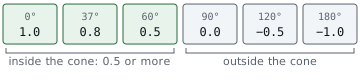
For the player at (4, 3), the dot product of (0.8, 0.6) with the facing (1, 0) is 0.8 times 1 + 0.6 times 0 equals 0.8, at least 0.5, so the player is inside the cone. (An inverse cosine, the calculator function that turns a cosine back into an angle, puts them about 37 degrees from the facing.) A player at (0, 5) has direction (0 divided by 5, 5 divided by 5) equals (0, 1) and a dot product of 0 times 1 + 1 times 0 equals 0, a full 90 degrees to the side, so the guard does not see them.
Comparing with a cosine worked out once, when the constant was written, costs two multiplications and one addition and never needs the slower inverse cosine, the same saving as the three-dimensional view test in Lesson 4.4.
In brief: The guard checks its view cone by comparing a dot product with a number worked out once. It never computes an angle.
Section: Line of sight.
The last check, line_of_sight, walks from the guard toward the target in steps of SIGHT_STEP equals 0.1 and tests each sample point against the walls. Each wall is an axis-aligned box, meaning its sides run along the x and y axes, stored as two corners, min and max. A point is inside when both of its coordinates lie between the corners.
On tick 8 of Lesson 4.10’s run, the guard stands at (4, 0), the player at (8, 0), and a wall fills the box from (5.5, minus 1) to (6.5, 1) between them. The samples are (4.0, 0), (4.1, 0), (4.2, 0), and so on. The 16th, (5.5, 0), is the first inside the wall, because 5.5 less than or equal to 5.5 less than or equal to 6.5 and minus 1 less than or equal to 0 less than or equal to 1 (a point on the edge counts as inside), so the function returns false long before it reaches the player.
Predict first
Same guard at (4, 0) and player at (8, 0), samples every 0.1: x equals 4.0, 4.1, 4.2 and so on. This time a thin wall covers only x from 5.62 to 5.68 (y from minus 1 to 1).
Does line_of_sight find the thin wall?
Answer: No: every sample misses it, so the guard sees the player. The wall is 5.68 minus 5.62 equals 0.06 wide, thinner than the 0.1 step. Samples 5.6 and 5.7 land on either side, all 40 samples test clear, and the function returns true. Try the thin-wall example below.

Additional detail: Optional reference: the lab's second line-of-sight test.
A line can also slip past a wall. From (0, 0) to (4, 3), the line rises 3 for every 4 across, so every point on it has y equals 3 divided by 4 times x equals 0.75 times x. A wall from (2, minus 1) to (3, 1) covers x from 2 to 3, where the line’s y runs from 0.75 times 2 equals 1.5 to 0.75 times 3 equals 2.25, higher than the wall’s top edge at y equals 1. No sample lands inside, and the guard sees the player. The lab’s tests check both cases.
Besides that blind spot for walls thinner than the step, stepping costs more with distance. A check across the full view distance takes 10 divided by 0.1 equals 100 samples, each tested against every wall. Engines instead compute exactly where a ray crosses each collision shape, a ray cast, but the question they answer is the same one.
Section: Choose among actions: utility scoring.
A state machine answers “which mode am I in?” Some decisions are better framed as “which of these options is best right now?” Utility A I, artificial intelligence, gives every option a score computed from the situation and runs the highest one. The second demo in the lab from Lesson 4.10 scores three options for a fighter:
Code example. The surrounding prose explains this example; the full lesson contains the exact code.
health here is a fraction: 30 health out of 100 is 30 divided by 100 equals 0.3. Each score is a straight line in health, chosen so its meaning is readable. Attack scores 1.0 at full health and falls to 0.4 as health runs out. Taking cover scores 0.3 at full health and rises to 0.9. Healing scores nothing at full health and 1.0 at zero. An option that makes no sense right now, such as healing with no potions, scores 0.
With an enemy in view, no cover, and one potion, the scores at several health levels are:
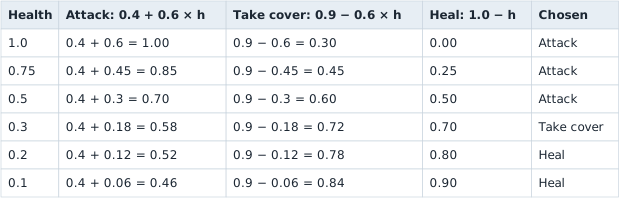
The switch points come straight from the formulas. Attack and cover score the same when 0.4 + 0.6h equals 0.9 minus 0.6h. Adding 0.6h to both sides and taking 0.4 from both gives 1.2h equals 0.5, so h equals 0.5 divided by 1.2 approximately 0.42. Cover and healing tie when 0.9 minus 0.6h equals 1.0 minus h, which rearranges to 0.4h equals 0.1, so h equals 0.25. Above about 42 percent health this fighter attacks, between 25 percent and 42 percent it takes cover, and below 25 percent it drinks a potion. Changing one number in a formula moves one of those switch points, and that is how designers tune utility A I.
Alternative: Think of a talent show: every option gets a score for the current situation and the judge picks the highest. Change a score weight or formula and the winner changes.
The lab’s choose function keeps only scores above 0 before it picks the highest. With nobody in view, every option scores 0, so it returns None: nothing on this list is worth doing, and another system, such as the patrol, keeps control.
Additional detail: Optional reference: the demo's five situations.
The demo also varies the situation, all at a health of 0.3 except where it says healthy:
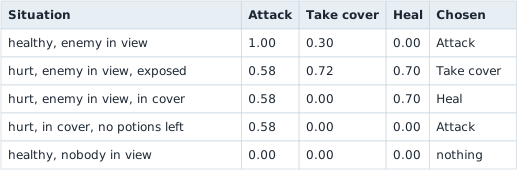
Once in cover, taking cover scores 0, so the next best option wins. With no potions, healing scores 0 too, and attacking is all that is left.
Utility scoring has its own weak spot. Near a switch point, a tiny change in health can flip the choice back and forth every tick. Games damp this by adding a small bonus to whatever the N P C is already doing, so a rival option has to beat it clearly before the N P C switches. The trade against a state machine is that a state machine lists every transition by hand, so each new state needs arrows to and from the old ones, while utility scoring adds one scoring function per option but hides its behavior in numbers that need tables like the one above to tune.
Section: Behavior trees, briefly.
Larger games often organize N P C logic as a behavior tree instead. The lab does not build one, but the idea is a priority checklist whose entries can contain smaller checklists. The leaves are conditions (“is health 25 or less?”) and actions (“flee”). A selector tries its children from left to right and stops at the first one that succeeds. A sequence runs its children in order and stops at the first one that fails. This simplified tree starts at the root each tick.
The guard’s priorities fit in one selector:

Walk through one tick. At 30 health, the first sequence fails its health check, so the selector tries the next one. If the player remains visible for three ticks and is within attack range, that sequence chooses attack; if they are farther away, it chooses chase. At 20 health, the first sequence reaches flee and the selector does not inspect the attack or patrol branches. The diagram shows priority, not the pathfinding or animation code inside an action. In a production tree, a long-running action can also return running so the engine knows it has not succeeded or failed yet; such a tree must define how that state is resumed or checked on the next tick.
Compare it with the guard’s state diagram. The four arrows into Flee, one from each other state, became one child, placed first, because a behavior tree re-checks its priorities from the top every tick. The tree keeps no memory between ticks by itself, though. Values such as seen_for and last_known live beside it, in a shared store that engines call a blackboard. Real games mix all three techniques: a behavior tree for priorities, small state machines inside some of its nodes, and utility scores to choose between similar actions.
Stored as a C++ structure, the guard’s fields add up to 33 bytes: four 4-byte floats, a 4-byte health, the 1-byte state at offset hexadecimal 1 4, and three more 4-byte values. Each 4-byte field must start at a multiple of 4, so three padding bytes follow the state and the structure takes 36 bytes. A state byte outside 0 to 4, such as 9, can make a compiled switch that indexes its jump table without a range check jump to an unrelated address and crash. These fields, offsets, and padding are worked through in Lesson 14.1, where recovering object layouts is the subject.
The guard can now be read in three ways. Its sensing code tells us which facts it can observe, a state trace tells us which choice it made on each tick, and seen_for and last_known hold what it carried from one tick into the next. None of those alone proves why a particular guard moved. Together they let us check a claim such as “the wall broke line of sight, so Chase became Search” against both behavior and state. The rest of this chapter moves decisions like these into Lua scripts that a game loads and limits.