Lesson 4.1 split a game into entities, components, and systems, and followed one frame from input to the screen. A real frame runs dozens or hundreds of systems. Four questions decide what you will see when you look at such a game from outside:
How do systems pass data to one another?
Which system runs first, and which can run at the same time?
Which systems run on a given frame at all?
How does the engine avoid redoing work for things that did not change?
The answers explain symptoms that look like bugs: a value that updates one frame late, a copy that does not follow your edit, a number that freezes in a menu. They hold in every engine of this kind. Where a detail belongs to one engine, the text names it; the examples use the Breakout game from Lesson 4.1, with 1 paddle, 1 ball, and 40 bricks.
Section: Three ways systems share data.
Systems never call one another. Each is a separate function the engine runs, and they cooperate only through data the engine owns. That data comes in three shapes:
Where shared data lives
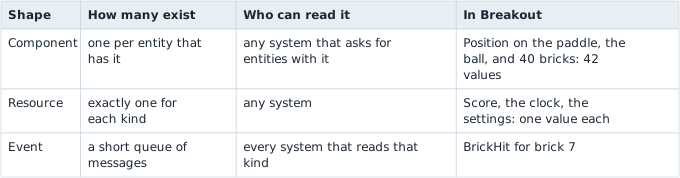

In memory the three look different. The 42 positions are one run of 42 records, which a scan finds together. A resource is one record at one address, so a scan for the score finds a single candidate instead of forty. An event is an entry in a queue that the engine empties again within a frame or two.
In brief: Systems share data in three ways: components belong to entities, a resource exists once for the world, and an event is a short-lived message.
Section: Resources: one value for the whole world.
A resource is a value that exists once for the whole world, whatever entities there are: the clock, the score, the settings read at startup, the state of the keyboard. Because there is exactly one of each kind, a system asks for it by kind and needs no entity.
The choice between a resource and an entity is about how the data is used. If every system should treat the value like any other character or object, an entity is the better home. A single-player game’s player can be either. Keeping the player as an entity lets the same health-and-damage system serve the player and the enemies, and a resource would not. A score, a clock, or the current level belongs to the game as a whole, so a resource fits.
Section: Events: messages with a short life.
An event says what changed rather than what is true now, the distinction Lesson 4.9 draws for an outside observer. Inside an engine it carries one fact from the systems that notice it to the systems that care. The collision system does not know that a score or a sound exists; it sends BrickHit and moves on. Any number of systems can read it, and a new system, such as a particle burst, can be added later without touching the collision code.
Mechanically an event queue is a list. A sender appends to it. Each reader keeps its own count of how many entries it has read, so two readers each see every event once. The engine empties old entries after a short time. Bevy keeps each event for at least two frames, and other engines choose differently, so a system that does not run during that window never sees the event. A paused game is the usual case: the systems that read events stop, the events expire, and the reaction is lost for good.
Alternative: Think of a noticeboard where each notice comes down after two days. A student who is away on both days never reads it.
Order matters as well, because a reader only sees what has already been sent when it runs:
ExampleOne brick hit, two orders
The game runs at 60 frames a second, so a frame is 1000 divided by 60 equals 16.67 milliseconds and frame 10 starts at 10 times 16.67 equals 166.7 milliseconds. During frame 10 the collision system sends BrickHit. The score system reads it, but when depends on which runs first:

One frame is short. A frame of delay between a bat swing and its sound or a key press and its effect is something a player can feel, which is why engines let you state the order.
Section: Queries: asking for entities by what they have.
A system does not loop over every entity and ask what it is. It describes the components it needs, and the engine hands it exactly the entities that have them. That description is a query. A query can say:
What a query can say
data wantedcomponents
Which components to read or write, such as Position and Velocity. An entity is included only if it has all of them.
with / withoutfilters
Components an entity must have, or must not have, without reading their values: every brick, or everything except the ball.
optionalcomponent
A component that may be missing. The system gets the value when it is there and None when it is not.
changed / addedfilters
Only entities whose component changed, or first appeared, since this system last ran. The next section covers these.
In Breakout, with 42 entities, the queries below match:
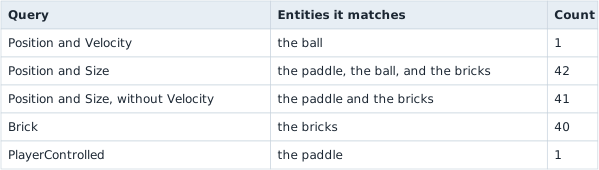
A query that should match exactly one entity, such as the player, can ask for exactly one and fail loudly when there are two or none. A query can also hand out every pair of entities, and the cost of that grows quickly. With n entities there are n times (n minus 1) divided by 2 pairs:
For the 42 Breakout entities that is 42 times 41 divided by 2 equals 861 pairs. For 1,000 entities it is 1,000 times 999 divided by 2 equals 499,500 pairs, and at 60 steps a second that is 499,500 times 60 equals the large number shown contact tests every second. This is why engines test only nearby pairs instead of all of them.
Section: Change detection: do work only for what changed.
Some work only needs doing when a value changed. A health bar must be redrawn when health changes, and not on every frame for every character. An outside tool finds such changes by comparing two snapshots; an engine’s change detection records them as they are written, so a system can ask for exactly those entities.
The engine keeps a counter that rises with every frame. When a system writes a component, the engine stamps that value with the current counter. Each system remembers the counter from the last time it ran, and a Changed query returns the entities whose stamp is newer than that. Suppose the health-bar system last ran at counter 41:
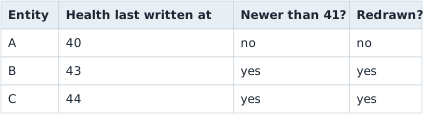
The saving can be large. With 10,000 characters and a redraw that costs 0.002 milliseconds each, redrawing all of them costs 10,000 times 0.002 equals 20 milliseconds, more than a whole 16.67 milliseconds frame. If only 12 changed this frame, the cost is 12 times 0.002 equals 0.024 milliseconds, about 833 times less.
Narration: A tool that rewrites a value every frame can make the engine think it changed every frame, so work that should be skipped runs again and again.
Three consequences follow, and the third one matters when you edit memory:
A system that was paused and runs again still sees every change since it last ran, because it compares against its own counter. Events behave differently, as above.
A removed component is a special case: the data is gone, so there is no stamp to read. Engines keep a short list of the entities whose component was removed this frame instead.
Writing a value counts as a change even when the new value equals the old one. A tool that rewrites a value every frame therefore makes the engine believe it changes every frame, and everything triggered by that change runs every frame too.
Section: A frame is a fixed list of schedules.
Every system belongs to a schedule, a named phase of the frame, and the engine runs the phases in a fixed sequence. The names below are Bevy’s; other engines use other names for the same idea.

Two things about this list explain a great deal of what you will measure.
First, the fixed steps from Lesson 4.1 are a loop inside the frame. A fixed step is a slice of game time, not of real time, so the number of steps a frame runs depends on how long the frame took. With a 60 Hz step, a step is 1000 divided by 60 equals 16.67 milliseconds. At 30 frames a second every frame runs 2 steps, at 60 exactly 1, and at 240 one frame in 4 runs a step.
Predict first
The game runs 60 fixed steps a second, so each step covers 16.67 milliseconds of game time. The screen draws 144 frames a second, so each frame lasts 1000 divided by 144 equals 6.94 milliseconds.
How many fixed steps does one frame run?
Answer: None on most frames, one on some: 5 of every 12. 12 frames last 12 times 6.94 equals 83.33 milliseconds, which holds 83.33 divided by 16.67 equals 5 whole steps. The leftover time carries over, so 5 of those 12 frames run one step and the other 7 run none.

The step rate is a setting of the game, so a value your tool watches can change once per step in one game and once per frame in another.
Second, the engine’s own work is made of ordinary systems that live in these same phases. Updating the world position of every object from its parents, and deciding which objects are visible, run in the bookkeeping phase near the end of the frame. Anything that reads those results earlier in the frame sees yesterday’s answer, which Lesson 7.1 shows for positions.

Section: Order and parallel work: when a system may run.
Within a phase the engine decides which system runs next from what each one declares it reads and writes. A system is ready to run when all three conditions hold:
no system that is running right now writes any data this one touches, and none reads data this one writes;
every system that was ordered before it has finished or been skipped;
its run conditions, covered next, are true.
The first condition is what prevents the lost update of Lesson 6.6: two systems never write, or read and write, the same data at the same time. A ready system starts on any free thread of the engine’s worker pool, so systems that touch different data run at the same time. When the order of two systems is not stated, the engine may run them either way round, and the order can even change from one frame to the next.
Alternative: Think of cooks in a kitchen: those at different counters work at once, but two who need the same pan must take turns.
Take five systems with these costs: read_input writes the player’s intent (1 milliseconds), enemy_ai (3 milliseconds), move_player writes Position and runs after read_input (1 milliseconds), collide reads Position and sends events (2 milliseconds), and play_sounds reads the events (1 milliseconds). One thread would take 1 + 3 + 1 + 2 + 1 equals 8 milliseconds. On two threads the result depends on what enemy_ai touches:
The A I, artificial intelligence, reads Position
enemy_ai reads Position, so move_player, which writes it, must wait for the A I to finish.
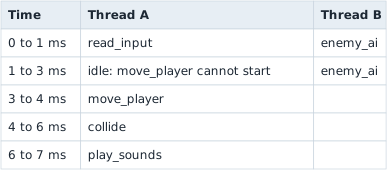
The frame’s systems take 7 milliseconds.
The A I reads its own copy
enemy_ai reads a copy of last frame’s positions, so nothing it touches conflicts.
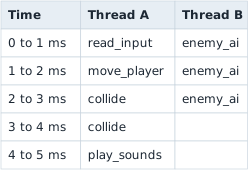
The longest chain, 1 + 1 + 2 + 1 equals 5 milliseconds, sets the frame’s systems at 5 milliseconds. The price is that the A I sees positions one frame old.
An unstated order costs correctness as well as time. If move_player happens to run before read_input, a key pressed during frame N is not applied until frame N + 1. At 60 frames a second that adds 16.67 milliseconds of delay, and at 30 frames a second it adds 33.33 milliseconds. The same mistake in the other direction, a reader running before the writer it depends on, is the one-frame lag of the events example.
Section: Run conditions and states.
A run condition is a yes-or-no check the engine makes before a system runs, on every frame: is the game in the playing state, has a timer finished, does an enemy exist? When the answer is no, the system is skipped and anything it would have changed stays as it was. A condition can be attached to one system or to a whole set of them.
States are the usual source of conditions. A game is in exactly one state of a kind, such as menu, loading, playing, paused, or game over, and most gameplay systems run only in the playing state. Changing state is queued rather than immediate, and the engine carries it out at one fixed point in the next frame:
A system asks for the new state. Nothing changes yet.
At the start of the next frame the engine runs the exit work of the old state, such as despawning the match.
It runs the work attached to the move itself.
It runs the enter work of the new state, such as spawning the game-over screen.
This is why a value stops changing the moment you open a menu: its system has a condition that is now false, and nothing is wrong with the value. It also ties back to events. A system skipped for 120 frames reads nothing from an event queue that expired in two.
Section: Commands wait for a safe moment.
Creating or removing an entity while systems are running would move data that other systems are reading. So a system does not do it directly. It records a deferred command, such as “spawn a bullet here” or “despawn brick 7”, and the engine applies the queue at a safe point, normally the end of the phase, or between two systems whose order was stated.
The consequence is a delay you can measure. A bullet spawned by a system in frame N appears in the queries of later phases, but systems that already ran earlier in frame N cannot see it, and it first reaches them in frame N + 1, 16.67 milliseconds later at 60 frames a second. A despawned entity is gone from the next query in the same way, and its memory is free to be reused, which is the reuse Lesson 3.10 warned about.
Section: How components are stored: tables and sparse sets.
Lesson 4.1 said that each kind of component sits in its own run of memory. There are two common ways to arrange that, and an engine can offer both: table storage, where entities with the same set of components share columns, and sparse-set storage, where one kind of component lives in its own pool. Tables make reading fast and adding a component slow; sparse sets make adding cheap and reading slower.
Additional detail: Optional reference: table and sparse-set storage compared.
Table storage
Entities with the same set of components share a table, and each component has a column of equal-sized records. Take Position (8 bytes), Velocity (8 bytes), and Health (4 bytes): one row is 8 + 8 + 4 equals 20 bytes, and 10,000 entities make 200,000 bytes.
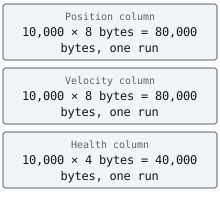
Reading is fast, because a system walks one column from start to end. Adding a component to one entity is the slow case: its row no longer fits this table, so all 20 bytes move to a table that has the new column, and 4 more are written for a 4-byte Burning component.
Sparse-set storage
A component of this kind lives in its own pool, with an index from entity to position in the pool. Adding Burning to one entity appends one 4-byte record to that pool and an entry to the index. Nothing else moves.
Adding and removing is cheap, but reading costs an extra step for every entity, because the engine looks in the index before it reaches the value, and the values are not in entity order. That suits a marker that comes and goes every frame, such as “this enemy has noticed the player”, and does not suit data that every system reads.
Tables have a limit of their own. Each distinct set of components needs its own table. If 10,000 bullets all carry Position, Velocity, and Damage, they share one table. If each bullet may also carry any of 8 optional markers, up to 2 to the power of 8 equals 256 different sets can appear, so the same 10,000 bullets are spread over as many as 256 tables, about 10,000 divided by 256 equals 39 to a table. Each table is a separate run in memory, and a scan for one component finds it in many pieces.
Section: The same ideas in a real engine.
Everything above holds in any engine of this kind. If you would like to see the names, Bevy writes the same ideas in a few lines of Rust: a component is a plain struct, a system is an ordinary function, and a query is the function’s parameter list.
Additional detail: Optional: Breakout's systems in Bevy.
A query for every entity that has both Position and Velocity, and the clock as a resource:
Code example. The code’s comments explain: Only the entities whose Position was written since this system last ran. update this entity's sprite from `position`
A command to remove the bricks that were hit, and the order and the run condition, which are written where the systems are added. Hit is a marker component that the collision system adds to a brick, and GameState is an enum the game defines. The other systems are written the same way:
Code example. The surrounding prose explains this example; the full lesson contains the exact code.
Each piece matches a section above: Res<Time> is a resource, the two Query parameters are queries, Changed<Position> is change detection, Commands holds deferred commands.chain() states the order, and .run_if(in_state(...)) is a run condition. These lines were compiled against Bevy 0.19. Bevy’s names change between versions, so check the one you use.
Section: Questions this raises.
Three questions that come up once the pieces are in place, each worth a minute and none needed for the next lesson:
Additional detail: Could more C P U, central processing unit, threads make the frame's systems finish faster than 5 milliseconds?.
No. The chain read_input, move_player, collide, play_sounds runs one system after another, because each needs the one before it: 1 + 1 + 2 + 1 equals 5 milliseconds. Extra threads can run enemy_ai beside the chain, but nothing can start a system before the one it waits for has finished. The longest chain of waiting systems sets a floor under the frame, whatever the number of threads. In the first tab above, enemy_ai joined that chain because it read Position, and the floor rose to 3 + 1 + 2 + 1 equals 7 milliseconds.
Additional detail: What happens when two systems write the same value and no order is stated?.
The result depends on which one runs last. Say one system sets a character’s speed to 100 and another sets it to 50. If the first runs first, the speed ends the frame at 50, and if the second runs first, it ends at 100. An unstated order can change from one frame to the next, so the value can flip between 50 and 100 with no input from you. A number that alternates like that is a sign of two systems writing it.
Additional detail: Why are events dropped after a short time instead of kept until someone reads them?.
A queue that was never emptied would grow for as long as the game ran. An event sent on every frame that nobody reads would add 60 times 60 equals 3,600 events a minute at 60 frames a second. Dropping each event after a short, fixed time keeps the queue small, at the cost of the missed-event problem described above.
Section: What this means when you look at a running game.
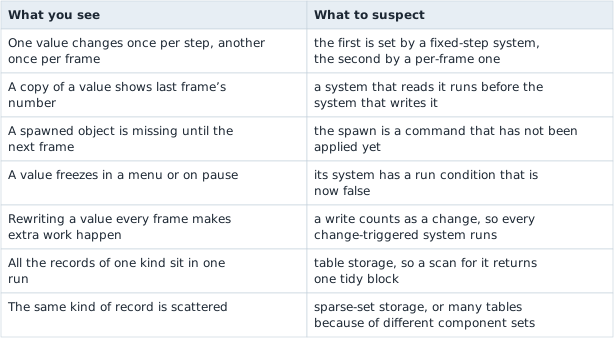
Each mechanism above leaves a mark you can see from outside. Use the table to turn a symptom into a question:
Symptoms and the engine mechanism behind them
Lesson 6.9 follows input from Windows into a frame like this one: polling, events, and window messages.