Section: Use an existing UI clue.
Use AssaultCube 1.2.0.2. Enable nametags, start a single-player deathmatch with eight bots, open the console with ~, and run idlebots 1. AssaultCube displays a name when the crosshair passes over a player, which means the game already computes a target-under-crosshair result.
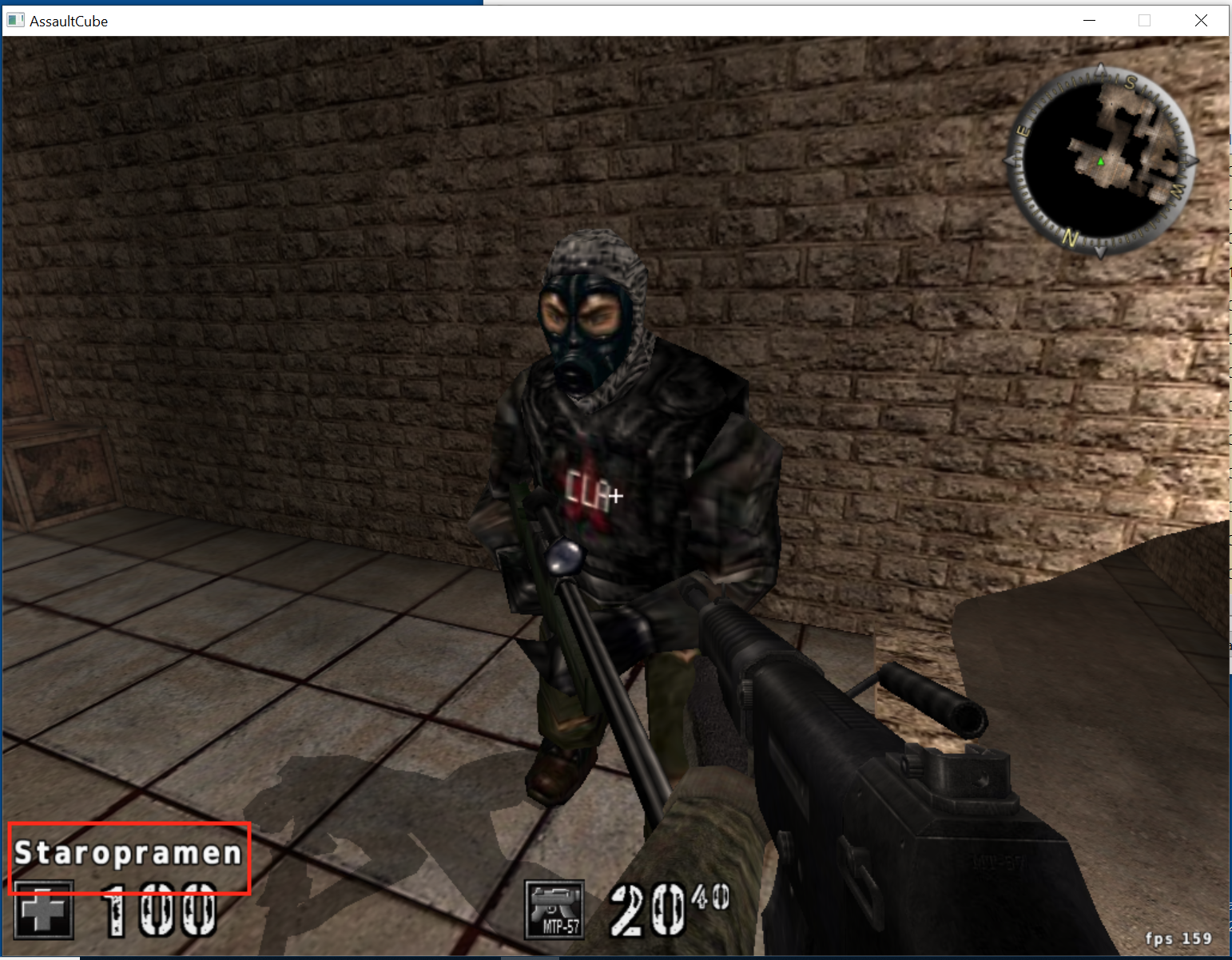
Searching for the visible name and breaking on reads can lead from text back to the target-selection logic.

Section: A crosshair is a ray through the camera.
For a centered crosshair with no weapon offset, the geometric query begins at the camera position and travels along the camera’s forward direction. A ray is:
Code example. The surrounding prose explains this example; the full lesson contains the exact code.
If direction has length one, t is distance in world units. If it is not normalized, t is merely a scale parameter. Keep that contract consistent when comparing hit distances.
Code example. The surrounding prose explains this example; the full lesson contains the exact code.
Crosshairs away from screen center require unprojection: transform a near and far screen point back through the inverse view-projection matrix, divide each by its homogeneous w, then normalize the direction between them. A rendered weapon muzzle may not be the ray origin; many games aim from the camera but spawn a projectile from the weapon, then reconcile the two paths.
Section: Ray casting is a nearest-valid-hit problem.
A collision system rarely tests every triangle directly. It commonly uses:

The broad phase quickly rejects distant regions. The narrow phase computes more exact intersections. The query then chooses the smallest nonnegative hit parameter and filters hits by collision masks and excluded entities.
A sphere intersection illustrates the math. For sphere center c, radius r, ray origin o, and normalized direction d, substitute o + td into the sphere equation:
Code example. The surrounding prose explains this example; the full lesson contains the exact code.
Each symbol has a plain-English meaning worth holding on to. m is the vector from the sphere’s centre to the ray’s origin. b is the negative of how far along the normalized ray the centre projects: the closest point is at t equals -b when that value is nonnegative. c_term compares the origin’s distance from the centre against the radius, so it is negative exactly when the ray starts inside the sphere.
The discriminant then answers one geometric question: how close does the ray pass to the centre, compared with the radius?
Code example. The surrounding prose explains this example; the full lesson contains the exact code.
That is why two roots appear when it is positive — one where the ray enters and one where it leaves. The nearer ray hit is t equals -b - sqrt(discriminant), provided t greater than or equal to 0. If the origin is inside the sphere, the nearer root may be negative and the farther root must be considered. Production engines use several shape types and acceleration structures, but this same “generate candidates, reject invalid roots, choose nearest” reasoning applies.
Section: Picking: the same ray, from the cursor.
A mouse cursor is a crosshair that can move. Picking is the question “which object is under the cursor?”, and games use it to select units, press buttons, drag items, and click on the world. It works like the centred crosshair, with one extra step to find the ray.
Alternative: A cursor is a movable crosshair: first turn its screen position into a camera ray, then apply the same nearest-valid-hit reasoning.
Step 1: pixel to normalized coordinates. This reverses the conversion at the end of Lesson 7.1. On an 800 times 600 window, a cursor at pixel (600, 150) has
Code example. The surrounding prose explains this example; the full lesson contains the exact code.
Step 2: build the ray. For a perspective camera at the origin looking along +z, with a 90 degrees vertical field of view (tan 45 degrees equals 1) and aspect 800 divided by 600 equals 1.3333, the ray leaves the camera in the direction
Code example. The surrounding prose explains this example; the full lesson contains the exact code.
A camera that is turned adds one more step, rotating that direction by the camera’s own axes (Lesson 7.1). An orthographic camera is simpler: every ray points straight forward, and the ray’s origin is the world point under the cursor, such as the (5, 3) that Lesson 7.1 found for the pixel (600, 180).
Step 3: test the candidates. The broad phase keeps the objects whose bounding shapes the ray might cross, and each is tested, nearest hit wins. For a box that lines up with the axes the test works one axis at a time. In a flat example, a ray starts at (0, 0) and heads in the direction (1, 0.5), and a box spans x from 4 to 6 and y from 1.5 to 3:
Code example. The surrounding prose explains this example; the full lesson contains the exact code.
Move the box up so that y spans 3.5 to 5 and the y range becomes t from 7 to 10, so the ray would have to enter at 7 but has already left at min(6, 10) equals 6. Entering after leaving means a miss.
Two other methods are common:
Colour picking. Each object is drawn into an off-screen texture in its own flat colour that encodes its number. Object 300 is 300 equals 0 times 65536 + 1 times 256 + 44, so its colour is (0, 1, 44). Reading the one pixel under the cursor and decoding the colour gives the object, already corrected for anything in front of it. It costs an extra pass and a read-back from the G P U, graphics processing unit.
Sprite picking. In 2D, convert the cursor to a world point as in Lesson 7.1 and test whether it falls inside each sprite’s rectangle, taking the topmost layer.
Dragging builds on the same query. When the button goes down, the game picks the object. While the mouse moves, it casts the ray again each frame and moves the object to where the ray meets a floor or a plane. When the button comes up, it drops the object. Many engines also have a debug view that draws the ray and the thing it hit, which is the quickest way to see why a click picked the wrong object.
Lesson 7.9 runs the opposite way, from a world point to a pixel. The “target under the crosshair” value this lesson hunts for is the result of this computation.
Section: Rendering visibility and collision visibility differ.
The renderer may omit a distant object, draw a transparent surface, or use a different level-of-detail mesh. A gameplay ray can still collide with its collision shape. The reverse can also occur: foliage may be visible but configured not to block shots.
Narration: Visible leaves can fail to block a shot, while invisible collision geometry can stop it. Rendering and collision answer different questions.
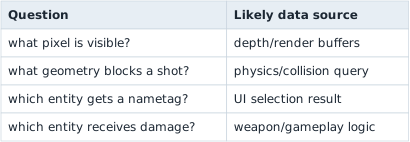
These results may agree most of the time without being the same variable.
Section: Collect positive and negative cases.
Compare the value the query returns while aiming at:
empty space;
a wall;
yourself, if possible;
a teammate;
an opponent;
a dead player.
One non-zero value does not automatically mean “valid opponent.”
Also vary distance, partial cover, transparent surfaces, camera mode, and weapon. The purpose is to learn the query’s contract: maximum range, ignored object types, collision mask, and whether it returns the nearest hit or the first accepted entity.
Section: Model the crosshair result.
The crosshair may point at empty space, a teammate, or an opponent. A single boolean such as enemy_under_cursor would hide which step failed. Record the selected entity, its relationship to the player, and the two properties that matter for a visible, living target:
Code example. The surrounding prose explains this example; the full lesson contains the exact code.
Use Option<EntityId> because “nothing selected” is a normal state, not an error.
In brief: No selected entity is an ordinary result. Keep it distinct from a failed read or an invalid observation.
Section: Decide without acting.
Once the observation has been named, the decision can be a small pure function. For an opponent that is both alive and visible, it returns a candidate entity ID; for every other combination it returns Hold. No input is sent to the game in this step:
Code example. The surrounding prose explains this example; the full lesson contains the exact code.
This function does not press a button. It turns a CrosshairObservation into a testable intent. Keeping action separate makes accidental behavior less likely.
The visible field needs an exact definition. It might mean “the game’s existing crosshair query selected this entity,” “a collision ray reached its hitbox,” or “its projected point is inside the viewport.” Name the field after the check that actually produced it; those definitions are not interchangeable.
Section: Reproduce the actual AssaultCube hook.
The ray, collision, and target-observation model above can be tested without injection. The pinned hook below applies the D L L, dynamic link library, lifecycle from Lesson 8.3 and the Windows input boundary from Lesson 6.9. Follow the target-specific evidence before writing to its memory.
Search Cheat Engine for one idle bot’s name. For each remaining text address, use Find out what accesses this address, look away, then look back at the bot. The useful address is accessed heavily only while the nametag is visible.
In x64dbg, the relevant 1.2.0.2 code is:
Code example. The surrounding prose explains this example; the full lesson contains the exact code.
When the crosshair is over a player, e a x/e d i is non-zero. Looking at empty space produces zero. Replace the five-byte call at this value with a verified detour, execute the original call inside the cave, then publish the result to a typed handler:
Code example. The surrounding prose explains this example; the full lesson contains the exact code.
The worker thread turns only state transitions into mouse events: send MOUSEEVENTF_LEFTDOWN when the atomic changes from false to true and MOUSEEVENTF_LEFTUP when it changes back. With the D L L loaded in the offline bot match, moving the crosshair onto a bot should fire; moving away should release the button.
Here is the complete windows-crate input boundary used by that worker:
Code example. The code’s comments explain: SAFETY: `input` is fully initialized and the size matches this INPUT type.
The actual worker remembers whether it previously pressed the button:
Code example. The surrounding prose explains this example; the full lesson contains the exact code.
This comparison is edge detection. Holding a target does not send thousands of repeated down events; only a false-to-true or true-to-false change produces input. The build-checked cave, original call bytes, detour installer, input function, and D L L worker are in game_hooks.rs and dll.rs.
Always send the final mouse-up event when disabling or unloading the feature. Otherwise Windows can keep the button logically held down.
Silent video demonstration: Crosshair-triggered firing in AssaultCube. The original trigger demonstration connects a target under the crosshair to firing. Watch when the target enters the crosshair; the implementation above turns changes in that result into mouse-down and mouse-up edges.
Section: Add debounce.
A target result may flicker for a frame. Require repeated agreement:
Code example. The surrounding prose explains this example; the full lesson contains the exact code.
Section: Verify the source.
The name-rendering path may use a cached or display-only target. Confirm it updates at the expected time and matches the game’s own hit logic.

Trace the value’s producer, not only its final display. Reusing an internal result is more reliable than recreating a ray test from incomplete data.
When tracing the producer, identify:
where the ray origin and direction come from;
the maximum query distance;
collision layers or masks;
ignored entities, especially the local player;
whether the result is a pointer, index, handle, or cached UI record;
when during the frame the result becomes valid;
whether a later gameplay check can reject the UI selection.
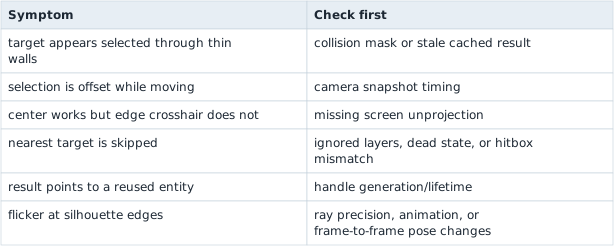
Section: Failure patterns reveal the wrong assumption.
Failure patterns and what they suggest
Section: Scope.
The implementation is tied to the offline bot-match state model. A multiplayer server may own hit and firing decisions, so a crosshair result read from the local client does not decide what the server accepts.
The lasting skill is finding an existing semantic result—“the object under the crosshair”—and representing its normal, missing, and invalid states cleanly.