Section: Break the problem into layers.
An aim-assistance experiment contains three different problems:
Snapshot — where are the camera and candidates right now?
Decision — which candidate is valid and closest to the crosshair?
Action — where and when should the verified view-angle update happen?
Keep these layers separate. Most of the interesting work belongs in safe, testable code.

Each arrow has to hold up its end of the deal, and the arrows before the maths are the ones that quietly break.
If the snapshot mixed two frames together, flawless trigonometry will aim confidently at where something used to be. If validation mistook a reused entity slot for a live one, the ranking step will happily pick a target that no longer exists. Neither failure looks like a maths error — the numbers are all beautifully computed — which is what makes them hard to find.
Maths cannot repair a bad snapshot. It can only give the wrong answer more decimal places.
Section: Confirm the view angles.
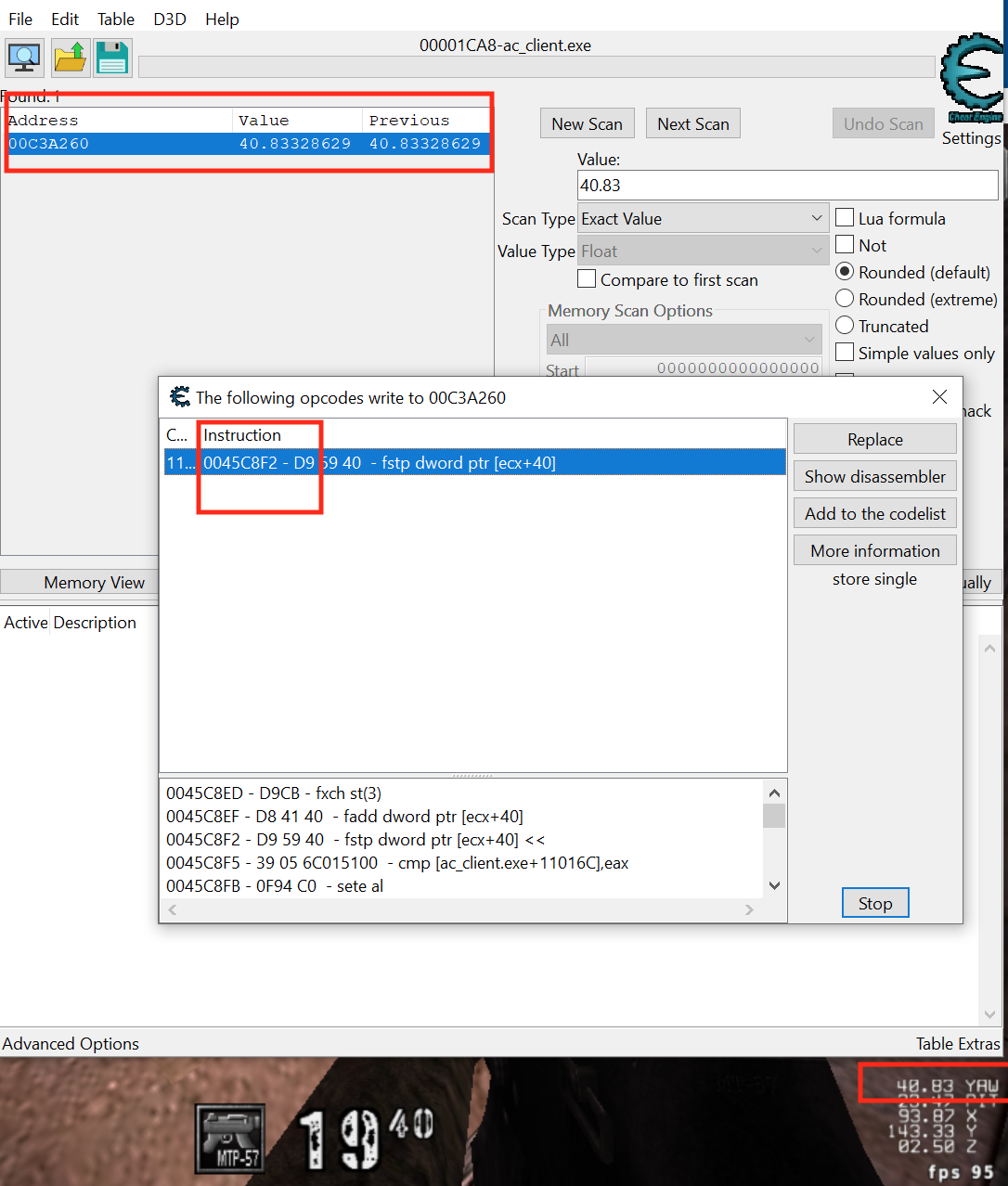
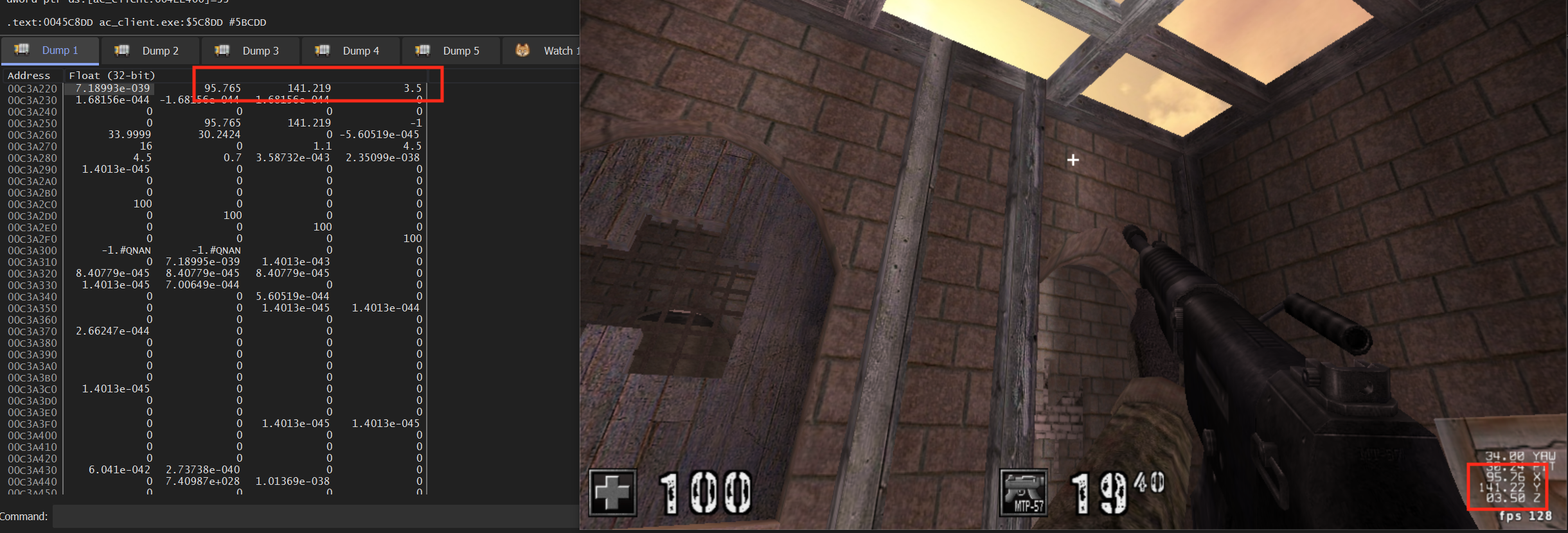
Use AssaultCube’s local debug commands and memory scanning to find yaw and pitch. Rotate only horizontally while searching for yaw, then only vertically for pitch.
Validate:
one full turn changes yaw by the expected range;
looking up and down changes pitch;
standing still keeps both stable;
values are finite;
the sign and zero direction match your formulas.
Write the convention beside the values, for example:
Code example. The surrounding prose explains this example; the full lesson contains the exact code.
This prevents “fixes” such as unexplained +90 or sign changes from leaking into generic math. Convert from the engine convention at one boundary, perform the calculation in one documented convention, then convert back.
Section: Read player snapshots.
Aim calculations need a stable set of facts about each player rather than a long-lived pointer into game memory. This record keeps identity, body and head positions, team, and health together. Its first filter rejects dead players, teammates, and invalid head coordinates before the angle math runs:
Code example. The surrounding prose explains this example; the full lesson contains the exact code.
Find a verified player count or bounded list. Reject impossible counts before allocating or looping.
Section: Exact AssaultCube 1.2.0.2 layout.
In AssaultCube 1.2.0.2, the HUD can display a bot’s name when the crosshair selects it. Tracing that UI path and the code that walks player objects gives a way to check the entity-list globals. For this pinned build, the verified starting facts are:
Code example. The surrounding prose explains this example; the full lesson contains the exact code.
Enable dbgpos 1 and showstats 1, search for the displayed yaw as a float, and follow its writer back to [hexadecimal 5 0 9 B 7 4]. Viewing the object as floats confirms these offsets:
Code example. The surrounding prose explains this example; the full lesson contains the exact code.
First prove the layout by adding 1.0 to (*local).yaw once per update. Your view should spin smoothly. If it does not, stop—the build or layout is wrong.
Section: Calculate desired angles.
Take a camera position and one target point from those snapshots. Their difference is the direction to aim; atan2 turns its horizontal components into yaw, while the vertical component against horizontal distance gives pitch. The function returns None when either point is invalid or both points coincide, because then no direction exists:
In brief: Subtract positions before calculating angles; coincident points have no aiming direction to calculate.
Code example. The surrounding prose explains this example; the full lesson contains the exact code.
The math helpers avoid two tempting shortcuts:
The original helper divides by the forward axis to estimate yaw and pitch, then subtracts the current yaw directly. It loses quadrant information and can ask for a nearly full turn when the short turn crosses the angle wrap point. For this comparison the caller supplies validated, distinct positions and finite current angles; angles_to above shows the position checks.
Before: derive angles by dividing one axis
Code example. The surrounding prose explains this example; the full lesson contains the exact code.
Use atan2 to retain both axis signs, hypot for horizontal distance, and angle normalization to keep yaw error within one half-turn of zero. Preserve current yaw when the target is directly above or below, because that direction has no unique horizontal heading.
Improved code
Code example. The surrounding prose explains this example; the full lesson contains the exact code.
Show the diff
Code example. The surrounding prose explains this example; the full lesson contains the exact code.
Takeaway: preserve the coordinate information first, then normalize equivalent directions before comparing them.
Division loses which quadrant the target occupies and behaves badly when the divisor is zero. atan2(y, x) uses both signs and handles axis-aligned directions. hypot measures horizontal distance without choosing one axis. rem_euclid then folds equivalent angles into the range -180 degrees..180 degrees, so crossing the wrap point chooses a two-degree turn instead of a 358-degree turn.
Your target may need a yaw offset, inverted pitch, or different axes. Derive those adjustments from known directions.
Section: Why the formulas have this shape.
Project delta onto the horizontal plane first:
Code example. The surrounding prose explains this example; the full lesson contains the exact code.
Yaw asks for the direction of the horizontal projection. Pitch asks how far the full vector rises above that projection. Using total 3D distance as the second pitch argument would measure a different angle.
When horizontal equals 0, the target is directly above or below. Pitch remains defined, but yaw is mathematically unconstrained because every horizontal heading points to the same vertical line. Preserve the current yaw in that case rather than letting an arbitrary atan2(0, 0) result cause a snap.
Section: Angle error can be measured without Euler angles.
For a normalized current forward vector f and target direction d, the dot product from Lesson 4.4 gives the true angle between them with no yaw wraparound:
Code example. The surrounding prose explains this example; the full lesson contains the exact code.
A field-of-view cone does not need the angle itself. Compare the dot product with the cosine of the cone’s half-angle:
Code example. The surrounding prose explains this example; the full lesson contains the exact code.
A smaller cone has a larger threshold, because the cosine falls as the angle grows, and no candidate needs an acos call.
Section: Measure angular difference.
Angles wrap around. The distance between 179 degrees and -179 degrees is 2 degrees, not 358 degrees.
Alternative: Angles sit on a circle: crossing its numbered seam can be a short turn, just as midnight is close to one minute before midnight.
Code example. The surrounding prose explains this example; the full lesson contains the exact code.
That one-line body looks like a trick until you read it as three separate moves. The goal is to take a raw difference, which can land anywhere in minus 360 to +360, and fold it into minus 180 to +180.
Code example. The surrounding prose explains this example; the full lesson contains the exact code.
Run the earlier example through it. Turning from 179 degrees to -179 degrees:
Code example. The surrounding prose explains this example; the full lesson contains the exact code.
Two degrees, and the sign says which way to turn.
rem_euclid rather than % is the part worth remembering. Rust’s % takes its sign from the left operand, so -178 % 360 is -178, and the formula would hand back -358 — the long way round, which is the exact bug the function exists to prevent. rem_euclid always returns a non-negative remainder, which is what makes the wrap correct for negative inputs.
Section: Select the smallest valid error.
The function receives copied player snapshots, the camera position and current angles, and a maximum yaw/pitch score. It rejects invalid targets, computes the desired view for each survivor, and returns the lowest-scoring player with those desired angles. If none passes the limit, it returns None:
Code example. The surrounding prose explains this example; the full lesson contains the exact code.
This is an iterator pipeline: filter invalid players, calculate candidates, enforce the chosen yaw/pitch limit, then select the smallest score. The angular_error helper here measures a practical two-axis camera turn with hypot(yaw_delta, pitch_delta); it is not the exact three-dimensional angle between two direction vectors. For a true circular field-of-view cone, use the normalized-vector dot product from the previous section.
Be precise about the score. Nearest world distance, smallest angular error, and smallest screen-pixel distance answer different questions:
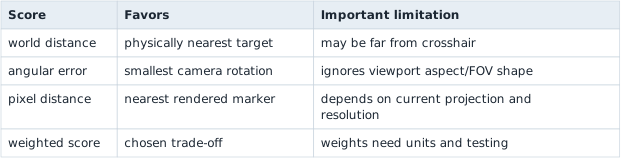
Do not compare mixed units directly. If a score is angle_degrees + distance_metres, its weights silently claim that one degree is worth one metre. Normalize each term or state the conversion intentionally.
Tie-breaking must also be stable. If two scores differ only by floating-point noise, prefer the current target or a stable entity ID. Otherwise the choice can oscillate every frame.
Section: How animation moves a character.
The next section aims at a character’s head, and a head is wherever the animation has put it this frame. An animation describes how some values change over time. The values can be a door’s angle, a button’s colour, the frame of a sprite, or the transforms of a whole skeleton.
Keyframes and interpolation. An animation does not store a value for every frame. It stores values at a few moments, called keyframes, and the engine fills in the rest by interpolating between them (Lesson 4.4). A door keyed at 0 degrees at time 0.0 s and 90 degrees at 1.0 s is at 90 times 0.25 equals 22.5 degrees a quarter of a second in. Add easing and the same moment gives 90 times 0.4375 equals 39.375 degrees with the ease-out curve from Lesson 4.4. Turns are blended as quaternions (Lesson 7.1). A sprite animation is the same idea with whole frames, picked from a sprite sheet by the clock (Lesson 7.2).
Skeletons and skinning. A 3D character is a mesh attached to a skeleton: a hierarchy of bones, each with a transform relative to its parent bone (Lesson 7.1), so turning the upper arm carries the forearm and hand. Every vertex lists up to four bones and a weight for each, and the weights add up to 1. Animation changes the bones’ transforms every frame, and the vertex shader moves each vertex by blending what its bones did. To see the blend, use only movement. A vertex starts at (0, 1, 0) with weight 0.75 on the upper arm and 0.25 on the forearm. In this pose the upper arm moves its points by (2, 0, 0) and the forearm by (6, 0, 0):
Code example. The surrounding prose explains this example; the full lesson contains the exact code.
The vertex goes mostly where the upper arm goes and is pulled a little toward the forearm, which is why a bent elbow bends smoothly instead of tearing. Real bones use full transforms, not just a move, but the weighted blend is the same. A skeleton of 60 bones, with one 64-byte matrix each (Lesson 7.1), is 60 times 64 equals 3,840 bytes of pose that is rebuilt every frame.
Choosing and blending clips. A character has many clips: idle, walk, run, jump. An animation graph or state machine (Lesson 1.3) decides which clip plays and when to switch. A switch is a cross-fade: for 0.2 s the pose is pose_A times (1 minus w) + pose_B times w, with the weight w rising from 0 to 1, so at 0.1 s it is an even half and half. A mask restricts a clip to some bones, such as a wave that plays on the arm while the legs keep walking. An animation event is a marker at one moment in a clip that runs code, such as the footstep sound 0.3 s into the walk.
Morph targets. A face cannot be posed with bones alone. A morph target, or blend shape, stores the changed positions of vertices for one expression as offsets from the base mesh. A vertex at (0, 0, 0) with a smile offset of (0, 0.2, 0) and a smile weight of 0.5 is drawn at (0, 0.1, 0). Many targets can be mixed at once.
For reading memory, this means a character’s pose is per-frame state, built from a clock value (seconds into the clip) and the bones’ matrices. It is not a fixed fact stored next to the character’s position.
Section: Choose an aim point, not merely an entity origin.
An entity’s position often refers to its feet, collision-cylinder center, or model pivot. A head position may come from a bone transform, tagged attachment point, or fixed offset. Animation changes bone positions each frame.
Narration: A marker tied to an entity’s feet can follow the character correctly while still missing its animated head. Choose the actual point you intend to track.
Code example. The surrounding prose explains this example; the full lesson contains the exact code.
A model is rigged once in a resting posture called the bind pose — arms down, standing straight — and every vertex is authored relative to its bone as that bone sits in that one fixed posture. bone_bind_inverse undoes the bone’s original resting transform, leaving the vertex expressed purely relative to the bone, with the authoring pose divided back out. skeleton_pose then reapplies the bone’s current, animated transform, and entity_world places the whole rig in the level. Skip the bind-inverse step and every point stays glued to the character’s resting pose no matter how the animation actually moves.
The exact matrix order depends on convention. The important distinction is that a bone’s local coordinates are not world coordinates until the hierarchy has been accumulated. A constant z offset may work for one stance and fail while crouching, jumping, or using a different model.
Section: Account for time only when the model requires it.
For an instantaneous hitscan query, aim at the current coherent target point. For a projectile with constant speed s, target position p, target velocity v, and shooter position o, solve for a positive time t:
Code example. The surrounding prose explains this example; the full lesson contains the exact code.
Get from one line to the other by squaring both sides — legal here because both sides are distances, so neither can be negative. Write q equals p - o for the target’s position relative to the shooter, so the constraint reads |q + vt| equals st. Squaring a vector’s length turns it into a dot product with itself (|x|² equals x dot x), which expands like ordinary multiplication:
Code example. The surrounding prose explains this example; the full lesson contains the exact code.
Move everything to one side and group by power of t and you have a standard quadratic at² + bt + c equals 0:
Code example. The surrounding prose explains this example; the full lesson contains the exact code.
which is exactly the formula above with q written back out as p - o. The quadratic formula then gives up to two candidate times. Choose the smallest positive finite root, then aim at p + vt. If there is no positive root, the constant-velocity target is not interceptable at that projectile speed. Gravity, drag, network interpolation, and launch delay require a richer model; do not hide them inside a guessed multiplier.
Section: Test with synthetic data.
You can prove the math without writing to a game:
Code example. The surrounding prose explains this example; the full lesson contains the exact code.
Add tests for targets above, below, behind, at the same position, and outside the allowed error.
Add convention tests with known basis directions. If the engine says forward is +Y at 90 degrees, encode that as a test. Also check NaN, infinity, a vertical target, wrap boundaries on both sides, and deterministic tie-breaking.
Section: Visualization before action.
For the offline lab, first print the chosen ID and desired angles or draw a separate indicator. Confirm that the selected target matches what you see.
Section: Write the working offline aimbot.
The validated snapshots, angle calculations, and synthetic tests above are the core of this lesson. The pinned AssaultCube implementation below puts those calculations inside the D L L, dynamic link library, and hook boundary from Lesson 8.3. Keep the target check, worker lifetime, and verified-byte restoration procedure from that lesson around this game-specific code.
The in-process update resolves the list, chooses the nearest live entity, and writes the calculated angles:
Code example. The code’s comments explain: / # Safety / Call only in AssaultCube 1.2.0.2 while a local bot match is active. 🛡️ SAFETY: exact-build globals verified before the feature was enabled. 📏 SAFETY: exact-build entity globals; count is bounded before iteration. 🔍 Copy the three coordinates while the pointer is known-good. The math below then works on ordinary copied values instead of repeated raw reads. ✅ SAFETY: `index` is inside the verified 32-entry list bound. ⚠️ Coincident points have no useful direction; skip them instead of allowing a divide-by-zero/NaN to reach the game's camera. 🎯 Keep both the comparison score and its angles together so a later candidate cannot accidentally update only half of the chosen target. 🎯 SAFETY: `local` is the verified live player object for this tick.
Run it every few milliseconds in the injected worker. In a local match with idle bots, the view should lock to the nearest live player and switch after that bot dies. The +90 degrees correction is target-specific and comes from AssaultCube starting forward at 90 degrees.
Notice that this exact implementation ranks horizontal world distance, while best_target above ranks angular error. That is an intentional contrast, not two names for the same target-ranking calculation. Replace the score only after deciding which behavior the tool should implement.
Silent video demonstration: Aim following a selected AssaultCube target. The original aim demonstration shows the camera turning toward a selected player. Compare that visible turn with the position difference, desired yaw and pitch, and live angle update explained above.
Section: Diagnose aim errors geometrically.
Aim errors, read geometrically
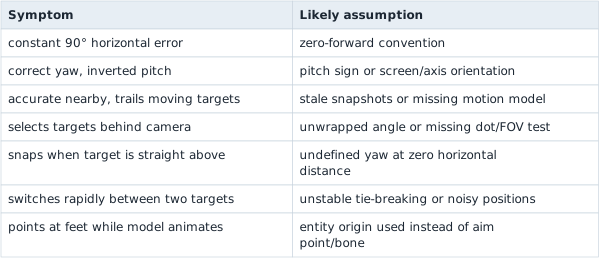
This is the complete path for the exact build: static globals to reversed player struct to target math to live yaw/pitch write.
The course D L L already runs that loop. Build and inject it into ac_client.exe, start a local bot match, and press F4 to toggle the aimbot:
Terminal window
Code example. The surrounding prose explains this example; the full lesson contains the exact code.
The full compiled implementation is assaultcube_tools.rs. It bounds the player count to 32, rejects null pointers and non-finite coordinates, skips dead entities, chooses the closest live target, and performs the real volatile yaw/pitch writes. dll.rs owns the F4 state and stops the update loop before cleanup.