Section: What recoil is inside a program.
On screen, recoil looks like the weapon pushing the camera. In code, it is usually one or more numbers added to a view model over time.
The game may keep separate values for:
the player’s intended yaw and pitch from the mouse;
an immediate weapon kick;
a recovery amount that eases back toward zero;
random spread used by projectile calculations;
camera shake used only for presentation;
the weapon model’s animation.
Those systems can produce similar movement while controlling different things. Removing a camera kick should not be assumed to remove projectile spread, and changing the weapon animation should not be assumed to change aim.
In brief: View kick, weapon animation, and projectile spread can look related while coming from different calculations.

This diagram deliberately gives rendered view and shot direction separate paths. If two systems read the same base aim but add different offsets, changing one will not necessarily change the other.
An angle describes rotation. Yaw usually turns left and right around a vertical axis. Pitch looks up and down. Games may store degrees, radians, fixed point units, or normalized values, so the number 90.0 has meaning only after measurement.
Section: Observe one axis at a time.
In an offline AssaultCube session, log view angles while:
standing still;
moving the mouse;
firing one shot;
firing a burst;
switching weapons.
Recoil may change the same yaw and pitch values as the mouse, or it may update separate kick values that are combined later.
Log time as well as values. A single before-and-after pair shows total movement; a short time series shows whether the kick happens instantly and how recovery behaves across later frames.
Give each sample a monotonic timestamp and, when available, the frame or simulation tick. Wall-clock timestamps can jump; a monotonic clock measures elapsed duration. Each sample also needs the weapon, fire mode, and whether the shot was accepted. Otherwise a reload or dry-fire sample can be mistaken for zero recoil.
Section: Break on the angle write.
Set a write breakpoint on the confirmed pitch field and fire once.
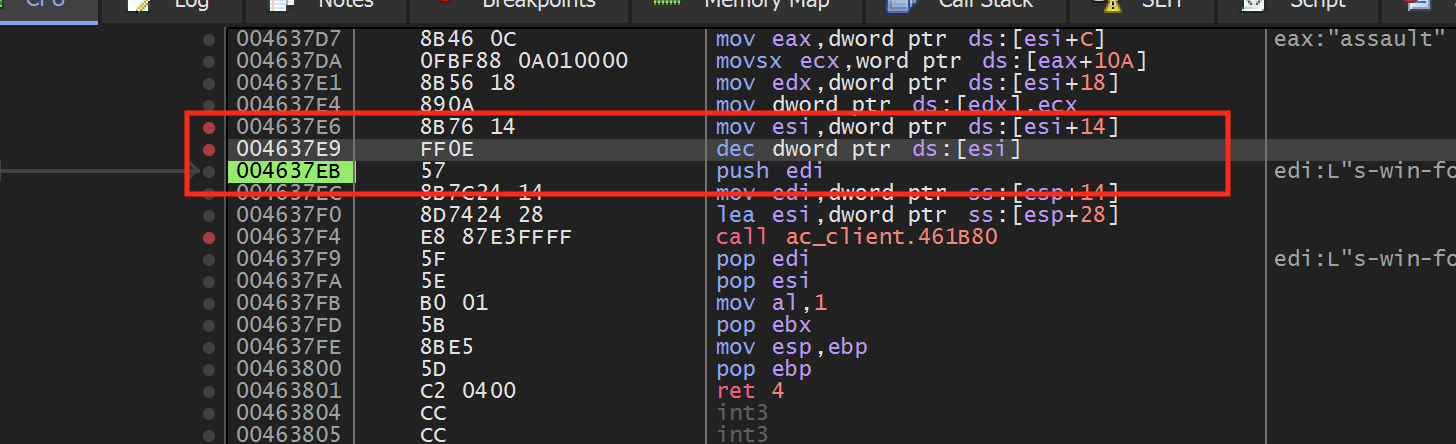
Compare the call stack with an ordinary mouse movement. A path that appears only after firing is a useful lead.
Step upward until you can explain the inputs:
Code example. The surrounding prose explains this example; the full lesson contains the exact code.
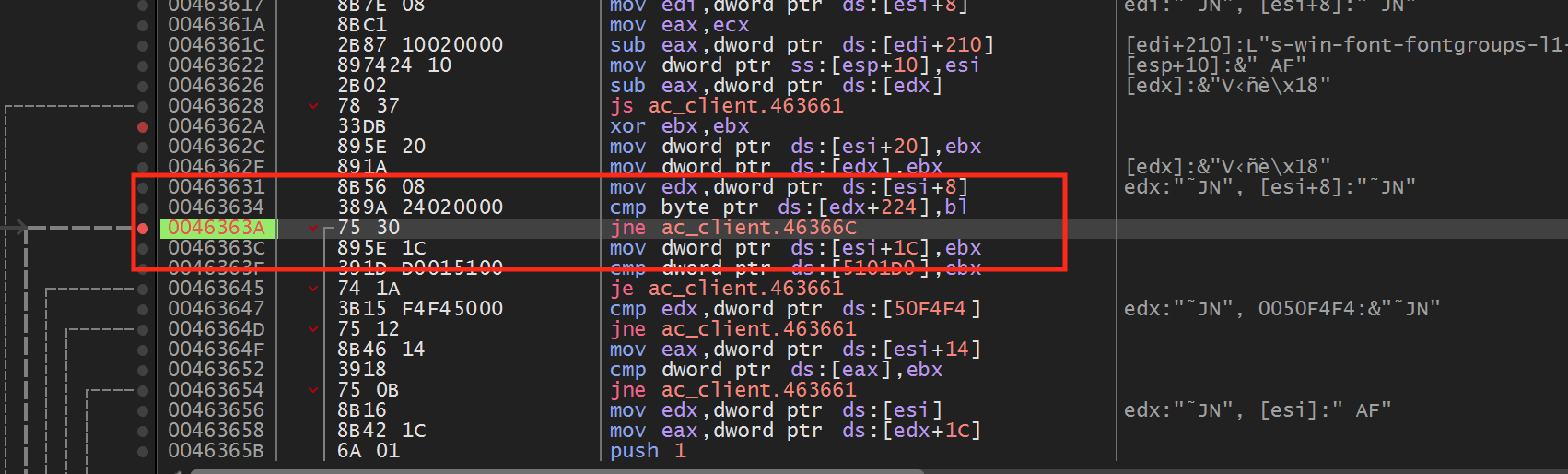
Section: Model recoil separately.
The logged view angle mixes player input with weapon effects. Give the weapon’s temporary kick its own two-axis value so it can be compared across shots without treating every camera movement as recoil. The validity check rejects non-finite readings and values outside this lab’s expected range:
Code example. The surrounding prose explains this example; the full lesson contains the exact code.
Do not assume the units are degrees. Compare known view changes and weapon differences.
is_finite rejects NaN and infinity. Those special floating-point values can spread through later math and make comparisons or drawing unreliable. The 90.0 limits are a lab sanity check, not proof of the game’s real unit system.
Name samples with units:
Code example. The surrounding prose explains this example; the full lesson contains the exact code.
Degrees per frame and degrees per second are different quantities. A per-frame recovery constant produces different behavior when frame rate changes unless the engine runs that update on a fixed simulation tick.
Section: Recoil is often an impulse plus recovery.
A simple model keeps a kick displacement x and velocity v. Firing adds an impulse; each update pulls the displacement toward zero and damps velocity:
Alternative: Picture a spring pushed by each shot: it stores motion, overshoots, and settles. Use that picture only when measured recovery supports it.
Code example. The surrounding prose explains this example; the full lesson contains the exact code.
This damped-spring model explains overshoot and smooth return. Other games use a fixed curve, exponential decay, a table of weapon-specific offsets, or direct angle changes. Fit the simplest model supported by measured samples rather than assuming every recovery is a spring.
For exponential recovery, x(t) equals x₀e^(-kt). Equal fractions disappear in equal time intervals. For linear recovery, equal absolute amounts disappear. Plotting a few samples makes the difference visible.
Section: Prefer measurement over removal.
First build an observer that logs a short sequence:
Code example. The surrounding prose explains this example; the full lesson contains the exact code.
This can reveal:
a fixed pattern;
random spread;
weapon-specific values;
accumulation and recovery over time.
Repeat the same shot many times. Compute mean kick to expose a fixed pattern and the spread around that mean to expose randomness. If shot number inside a burst matters, group by shot index instead of averaging the whole magazine together.
Code example. The surrounding prose explains this example; the full lesson contains the exact code.
Variance describes observed variation; it does not prove which random-number source or probability distribution produced it.
Section: Test one instruction with a temporary patch.
A temporary debugger patch can show whether one instruction contributes to recoil. Keep a copy of the original bytes so you can restore them, change one instruction, and compare the same controlled shot.
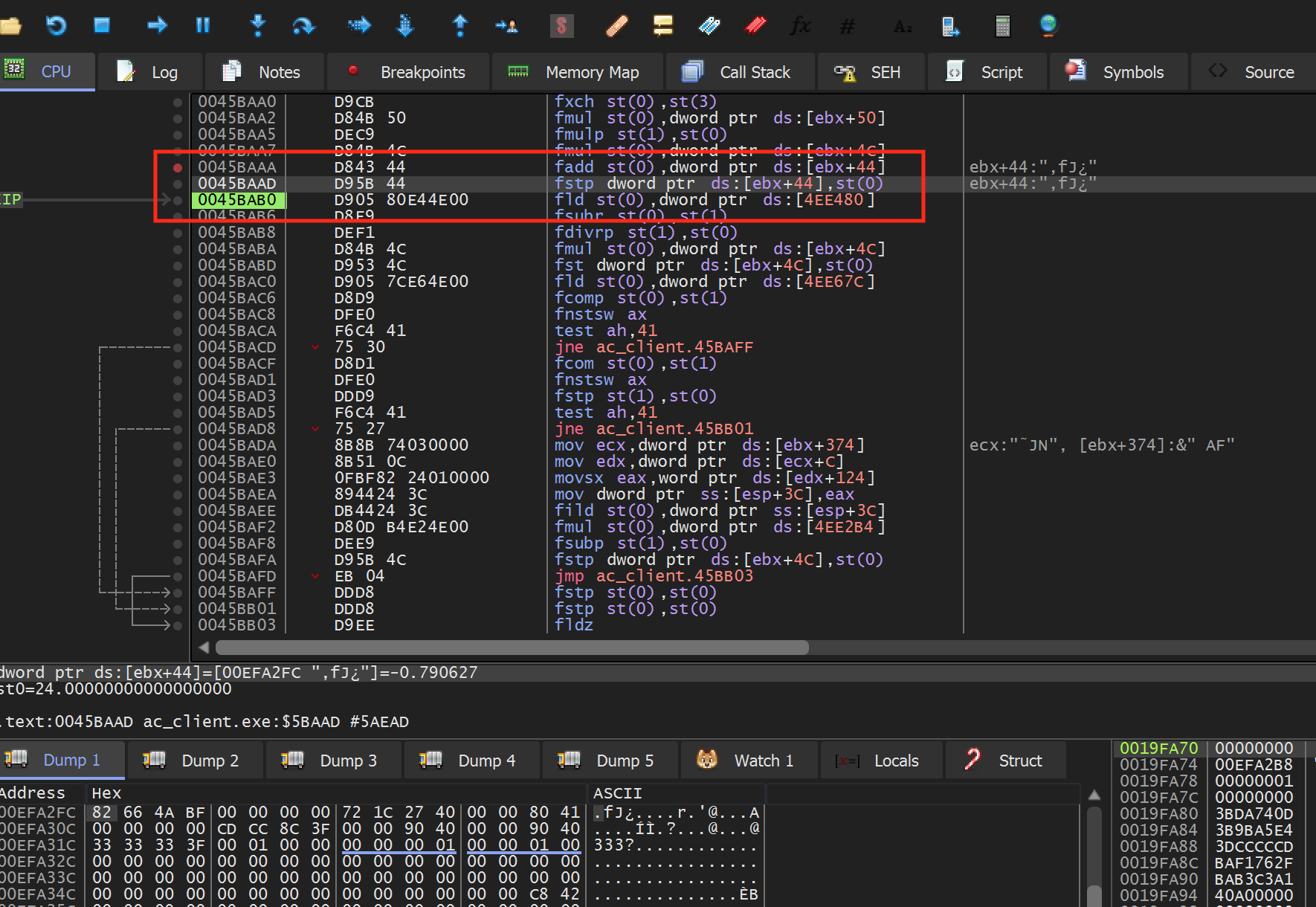
If weapon animation still moves but the camera does not, you may have isolated view kick. If accuracy changes too, the instruction controls more than presentation.
Compare at least these observables separately:
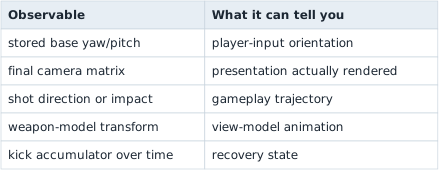
Section: Apply the AssaultCube 1.2.0.2 no-recoil patch.
The measured recoil layers above establish what the patch should change. The automated PatchPlan version below applies the verified patch lifecycle from Lesson 8.3. Its byte check, write, and restoration must all refer to the same pinned build.
The firing path begins around this value; after breaking on the live pitch field while firing, the recoil store is found at this value. Replace its complete three-byte instruction with:
Code example. The surrounding prose explains this example; the full lesson contains the exact code.
These bytes pop the pending x87 value with fstp st(0) and pad the remaining byte, so the recoil value is discarded instead of being stored to [e b x+hexadecimal 4 4], the pitch field.
The older x87 floating-point unit behaves like a small stack of number registers. The original store removes its top value after writing it. Merely NOPing the whole instruction would leave that value on the x87 stack and could break later calculations. fstp st(0) discards the value while preserving the original stack effect; nop fills the final byte so the patch length remains three.
Use a verified patch:
Code example. The surrounding prose explains this example; the full lesson contains the exact code.
Fire a single shot before and after enabling it. Ammo and firing animation should still work, but the camera should no longer kick upward. Restore the original three bytes and confirm recoil returns.
Silent video demonstration: Recoil behavior during AssaultCube firing. The original no-recoil demonstration shows firing with the camera effect altered. Watch camera motion separately from ammunition and firing animation; changing one recoil store does not establish that every weapon effect has changed.
Section: Random spread: choosing a point in a circle.
Spread adds a random offset to the direction of a shot. The offset is usually a random point inside a small circle around the aim direction, and picking that point fairly is easier to get wrong than it looks.
The obvious recipe is a random distance r equals R times u, with u chosen evenly between 0 and 1, at a random angle. It bunches the shots near the middle. Half of the values of u fall below 0.5, so half of the shots land inside the circle of radius 0.5 times R, but that circle has only (0.5)² equals 25 percent of the area. The fix is to take a square root, r equals R times square root of u, because the area inside a radius grows as the radius squared:
Narration: Choosing radius evenly makes a dense centre because small radii enclose less area. A random-looking spread is not necessarily evenly distributed across the disk.
Code example. The surrounding prose explains this example; the full lesson contains the exact code.
The two values u and v come from a pseudo-random number generator. A game that seeds it with the same number gets the same “random” sequence every time, which is how replays and networked games keep every machine in agreement. Two runs that start from the same seed repeat their spread exactly, and runs that start from different seeds do not.
The spread offset is added to the shot direction, not to the camera, which is why the diagram above gives them separate paths.
Section: Camera motion: shake, follow, orbit, and zoom.
The camera has more layers than recoil. Each calculates a position or viewing direction: shake adds an offset, follow tracks a subject, orbit rotates around a point, and zoom changes the framing.
Shake is a short random offset that fades. With an amplitude of 4 pixels that fades to 0 over 0.5 s, the largest offset at 0.1 s is 4 times (1 minus 0.1 divided by 0.5) equals 3.2 pixels, at 0.25 s it is 2.0, and at 0.5 s it is 0. Many games track a “trauma” value from 0 to 1 and shake by its square, so a light hit of 0.5 shakes at only 0.25 of the maximum. Shake is presentation: it moves the picture, not the aim.
Follow cameras trail the player. A top-down 2D camera eases toward the player with the smoothing from Lesson 4.4, and often has a dead zone, a box around the screen’s centre inside which the player can move without moving the camera.
Orbit cameras circle a target. With z up, the camera sits at the target plus distance times (cos(pitch) times cos(yaw), cos(pitch) times sin(yaw), sin(pitch)) and always looks back at the target. For a target at the origin, a distance of 10, a yaw of 90 degrees, and a pitch of 30 degrees, that is 10 times (0.866 times 0, 0.866 times 1, 0.5) equals (0, 8.66, 5).
First-person cameras sit at the character’s head and take yaw and pitch from the mouse. Pitch is clamped just short of straight up or down, so the view cannot flip over ( Lesson 7.1 ). The weapon in the player’s hand, the view model, is often drawn with its own field of view, narrower than the world’s, so it does not look stretched.
Free and pan cameras are for editors: a free camera moves along its own forward and right directions, and a 2D pan camera moves opposite to the drag.
Zoom narrows the field of view for a perspective camera, which Lesson 7.1 showed scales the picture by 1.732 when it goes from 90 degrees to 60 degrees. For an orthographic camera, zooming shrinks the box of visible world, so halving its width doubles the pixels per unit.
Section: Recoil is a sum of layers.
Many effects are layers:
Code example. The surrounding prose explains this example; the full lesson contains the exact code.
Do not label the first changing float “recoil.” Trace when it is produced and where it is combined.
Composition order matters for 3D rotations. Adding small yaw/pitch offsets is a common approximation, but full orientations may be matrices or quaternions. Large rotations do not generally commute: applying yaw then pitch can differ from pitch then yaw. Identify where the engine converts or combines its representation before assigning meaning to one component.
Section: Common false conclusions.
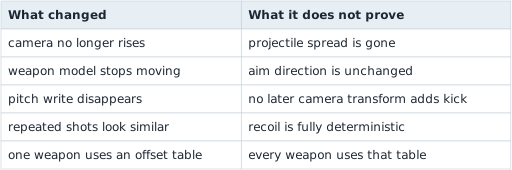
Keep this experiment offline. Its value is learning to separate a visible effect into measurable contributions.
The compiled in-process implementation is enable_assaultcube_no_recoil. After injection, F2 toggles it and restoration puts D9 5B 44 back.