Section: A draw call is still a request, not an object.
Lesson 7.3 made this point for OpenGL and it holds here: a draw call asks the G P U, graphics processing unit, to consume indices using whatever is currently bound. It does not say “draw the player.” One character can take several draws — body, weapon, shadow — and one draw can cover many unrelated objects batched together.
What changes between the two APIs is not that idea. It is how much of the surrounding state you can see from inside the call.
Section: Read the arguments precisely.
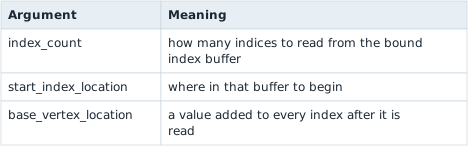
The Direct3D 11 indexed draw looks compact because buffers, shaders, and topology are already bound to the context. Its function type has the hidden COM object pointer first, followed by a count and two offsets. Those three numbers choose geometry within the bound buffers; they do not identify a game object by themselves:
Code example. The surrounding prose explains this example; the full lesson contains the exact code.
Predict first
The bound index buffer holds six indices: 0, 1, 2, 2, 1, 3. The game calls DrawIndexed(3, 3, 4), so index_count is 3, start_index_location is 3 and base_vertex_location is 4.
Which vertices does the G P U fetch?
Answer: Vertices 6, 5 and 7. Start at position 3 and read 3 indices: 2, 1, 3. Adding the base vertex 4 to each gives 2 + 4 equals 6, 1 + 4 equals 5 and 3 + 4 equals 7.

Imagine two DrawIndexed(6, 0, 0) calls in one frame. Before the first, the context has a character texture and depth testing bound. Before the second, the program binds a UI texture and a state that ignores world depth. The same three draw arguments can now produce different images. If the character’s triangles are hidden behind a wall, the first call may produce no visible pixels at all. The draw arguments tell you which indices were submitted; the bound buffers, topology, shaders, textures, and depth state explain how those indices are used. This is the state-bound idea from OpenGL again, with Direct3D’s own way of storing and querying the state.
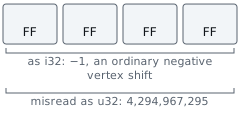
Note that base_vertex_location is signed. That is not a quirk; it exists so several meshes can share one vertex buffer, with each mesh addressed by a positive or negative shift from a common origin. If you log it as u32 a perfectly ordinary negative offset appears as a number near four billion, and you will be tempted to treat a normal draw as corrupt.
The same arithmetic from Lesson 7.3 applies to the counts:
Code example. The surrounding prose explains this example; the full lesson contains the exact code.
Submitted triangles can still be degenerate, back-face culled, clipped, or covered by something nearer. Depth testing happens long after this call returns.
The Direct3D 9 equivalent carries more:
Code example. The surrounding prose explains this example; the full lesson contains the exact code.
Two differences matter when you port a note from one to the other. primitive_count counts primitives, where Direct3D 11’s index_count counts indices — for a triangle list they differ by a factor of three, and mixing them up is the most common reason a ported filter matches nothing. primitive_type is an argument in Direct3D 9; in Direct3D 11 the topology is bound state set earlier by IASetPrimitiveTopology, so the draw call does not mention it at all.
Section: Where the state lives is the real difference.

Direct3D 9 keeps render state on the device as a large set of individually settable values. Inside a DrawIndexedPrimitive hook you can ask the device what is currently set — GetRenderState, GetTexture, GetTransform — and get an answer immediately.
Direct3D 11 replaces most of that with immutable state objects created up front and bound as a unit: a blend state, a depth-stencil state, a rasterizer state. From a DrawIndexed hook you retrieve what is bound with the context’s Get calls — OMGetBlendState, OMGetDepthStencilState, PSGetShader, IAGetVertexBuffers — and then read the description back off the object.
Alternative: Direct3D 11 state objects are saved configuration bundles: the context binds a bundle, and a draw uses whichever bundle is currently attached.
Two practical consequences follow, and they catch people out:
Those Get calls hand you a reference. COM Get* methods call AddRef on what they return, increasing the object’s reference count by one. Each successful query therefore creates one matching Release obligation. On a path that runs thousands of times per second, forgetting even one release causes a steady leak. Put the returned pointer in a Rust wrapper whose Drop calls Release; then an early return cannot skip cleanup. Lesson 6.4 later applies the same ownership idea to Windows handles.

Querying costs more than logging. Retrieving several state objects per draw, on a thread with a frame deadline, is real work. Sample rather than record everything — one draw in a hundred, or only draws whose index count falls in a range you care about.
Section: Label geometry by the state bound around it.
You cannot ask a draw call what it is drawing. You can group draws by properties that tend to correlate with what they are, then test whether the grouping holds:
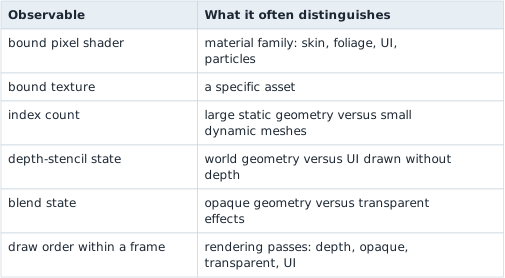
Every one of these is a proxy: an observable clue that may correlate with the category we care about, without being the category itself. A shader shared by characters and crates does not distinguish them. Lesson 15.8 later returns to the risks of treating a proxy as proof. Test a grouping by changing something you control — move, equip a different weapon, walk into another room — and check that the group changes the way the label says it should. A label that matched in one frame can be an accident of what that frame happened to draw.
In brief: Draw properties are category clues that need testing, rather than proof that a particular game object was drawn.
Section: Shader programs and the cost of a draw.
The bound pixel shader in the table above is one compiled program among many that a game can choose from, and the number of draws in a frame has a cost of its own.
Section: Variants, instancing, and shaders that do not draw.
Variants. One shader source can have switches, written as #ifdef lines, such as “has a normal map” or “has fog.” Each combination compiles to a separate program, so three switches give 2 times 2 times 2 equals 8 variants. Engines compile the ones a scene needs, which is why a game can hitch the first time something new appears.
Instancing. To draw 1,000 copies of one tree mesh, the game makes one draw call with 1,000 instances. A buffer holds each copy’s transform, a 4 times 4 matrix of 16 four-byte floats, which is 64 bytes, so 1,000 copies take 64,000 bytes. Earlier we saw that one draw can contain many objects; instancing is the deliberate version of it.
Compute shaders. A compute shader is not part of drawing. It is a general G P U program that runs once for each item in a grid of work, reading and writing buffers. Engines use it for particles, culling, mesh deformation, and post-processing.
Post-processing shaders. A fragment shader run over a full-screen rectangle, reading the finished picture as a texture, produces effects such as bloom and colour grading ( Lesson 7.2 ).
Extending the standard material. Engines let a game add its own shader code and extra vertex data, such as a per-vertex wind weight, to a standard material instead of rewriting it.
Section: Why many small draws cost frame time.
Each draw call costs the C P U, central processing unit, something even if the G P U’s share is tiny, because the driver checks the bound state and builds the commands. Suppose, as an illustration, one draw costs 5 microseconds of C P U time. Then 10,000 draws cost 10,000 times 5 equals 50,000 microseconds, which is 50 milliseconds, three frames of the 16.67 milliseconds budget from Lesson 4.1, with the G P U waiting. Instancing, merging meshes that share a material, texture atlases, and culling (Lesson 7.2) all exist to cut the number of draws.
A stress test finds the limit by multiplying one thing, such as cubes, sprites, lights, animated characters, or text, and watching the frame time. If 1,000 cubes take 4 milliseconds and 4,000 take 16 milliseconds, each costs 0.004 milliseconds and the 16.67 milliseconds budget runs out at about 16.67 divided by 0.004 equals 4,167 cubes. Halving the window’s pixel count tells you which processor is the limit: if the frame time does not change, the C P U, not the G P U, is the bottleneck.
Section: Draw a frame boundary around your samples.
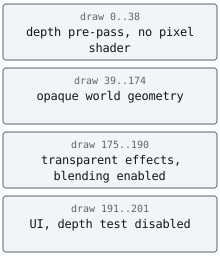
DrawIndexed fires many times per frame; Present fires once. Recording draws without frame boundaries produces a stream you cannot reason about, because you cannot tell where one frame’s ordering ends.
Number the frames in the Present hook from Lesson 7.10, and tag each draw sample with the current frame number. The draw index within a frame is then meaningful, which is what makes “the UI is the last eleven draws” a statement you can check rather than an impression.
Narration: Without frame numbers, a late UI draw from one frame can appear next to an early world draw from the next, hiding their real order.
Bound both the samples per frame and the frames retained, exactly as in Lesson 6.11. An unbounded recorder attached to a render loop will consume memory faster than you expect and will change the frame times you were trying to measure.
Section: Direct3D 12 moves the work earlier.
Direct3D 12 does not submit draws through a context. Commands are recorded into command lists ahead of time and handed to a queue with ExecuteCommandLists, often built on several threads at once.
Hooking the submission point therefore tells you that a batch of pre-recorded work was queued, not what is in it. Present still works as a frame boundary because the swap chain interface is unchanged, but per-draw observation means dealing with recorded command lists rather than intercepting individual calls. The vtable reasoning from Lesson 7.10 transfers directly; the assumption that one hook sees one draw does not.
Section: Scope.
Use your own Direct3D program or an offline single-player session on a pinned version, and keep the analysis window separate as in Lesson 7.9. The transferable skill — reading submitted G P U work and correlating it with bound state — is what graphics debuggers, frame profilers, and capture tools do, and it is the practical way to understand what a renderer is actually asking the G P U to do.
Lesson 8.8 uses these graphics observations alongside memory snapshots, feature toggles, and verified restoration and shutdown order to assemble one reliable local tool.