Section: The OpenGL method does not transfer.
Lesson 7.3 found glDrawElements by its exported name, and the Urban Terror wallhack in Lesson 8.8 detours an instruction inside it. OpenGL is a C A P I, application programming interface: opengl32.dll exports that function, so GetProcAddress can hand you its entry address. Lesson 8.4 used the import table as a different redirection point for named functions.
An export is a function a D L L, dynamic link library, makes findable by name. Ask GetProcAddress for Present in d3d11.dll, or inspect that D L L’s export list: the method is not there. Neither are DrawIndexed and Draw. The public names are mostly creators such as D3D11CreateDevice, not the method that runs once per frame. Lesson 5.3 showed where a P E, portable executable, file stores its export list; this lookup now uses that file-format detail.
This is not obfuscation. Direct3D is built on COM, the Component Object Model — Microsoft’s convention for handing out objects whose methods are reached through a table of function pointers rather than by name. COM does not expose methods as exports. It exposes objects.
Section: A COM interface stores a table of methods.
A C++ object may begin with a pointer to a table of function addresses, called a vtable. A COM interface pointer uses that arrangement as a published A B I, application binary interface, contract, rather than leaving it for us to infer from disassembly. Lesson 3.8 showed the same memory shape in a game object:
Picture a numbered control panel. Button 8 on an IDXGISwapChain is labeled Present by the interface contract, but the panel does not contain a universal street address for the code behind it. One object supplies a vtable pointer; slot 8 in that table supplies the function pointer for this implementation. The panel picture helps with the stable number. The two real memory reads below are what locate the code in this process:
Code example. The surrounding prose explains this example; the full lesson contains the exact code.
Two lookups, the same shape as the virtual call you traced in Chapter 3. The difference is that here the layout is a contract. Microsoft cannot reorder the methods of a published interface without breaking every compiled program that uses it, which is what makes a vtable index a usable, stable fact.
Each slot is one pointer wide: eight bytes in a 64-bit process, four in a 32-bit one. Get that wrong and every index lands halfway between two entries.

Section: Derive the index; do not memorize it.
You will find lists of “magic” Direct3D vtable indices online. Take the number as a hint and derive it yourself, because the derivation takes a minute and tells you immediately when a list is talking about a different interface.
The method order follows the inherited interface layout: a vtable begins with the methods of the interfaces it inherits, in inheritance order, each in declaration order. IDXGISwapChain inherits like this:
Alternative: Derive a vtable like a numbered family list: inherited entries come first, then the new interface’s own methods in declaration order.

3 + 4 + 1 equals 8. Present is index 8, and now you know why, which means you can work out ResizeBuffers the same way instead of searching for it.
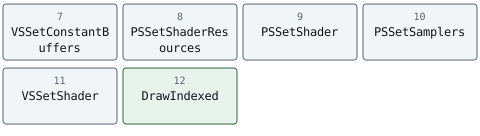
The same count applied to ID3D11DeviceContext gives IUnknown (3) plus ID3D11DeviceChild (4) equals 7, then the context’s own methods in declaration order: VSSetConstantBuffers, PSSetShaderResources, PSSetShader, PSSetSamplers, VSSetShader, and then DrawIndexed at index 12.
Written out as slots:
For the older A P I, IDirect3DDevice9 inherits only IUnknown, so its own methods begin at index 3 and are simply counted down the header: Present at 17, Reset at 16, EndScene at 42, DrawIndexedPrimitive at 82.
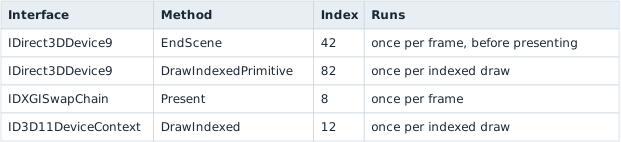
Confirm any of these against the SDK header for the version you are targeting before relying on it. A number copied from a forum post may have been counted for a different interface or SDK version, and a hook installed at the wrong index replaces whichever method actually lives in that slot.
Section: Find a vtable inside the process you control.
Here is a useful lab technique. To learn where Present lives in your own running program, create a small temporary swap chain inside that same process and inspect its vtable. You need not first find the main window’s swap chain.
Objects of one interface implementation commonly share a vtable. A temporary object therefore gives a candidate function address for that implementation. Confirm that the real swap chain in this process uses the same method entry before relying on it; another implementation may use a different table.

There are now three distinct ways to find code: a named export asks a D L L for a public function, a byte pattern searches for an instruction sequence, and this temporary COM object supplies the address of its own method. Only the last one tells us where this object’s Present implementation lives. It still requires a compatibility check against the actual object and runtime. Lesson 5.7 expands the byte-pattern case.
Do not copy that absolute pointer from a separate helper process into a game. Each process has its own virtual address space, and a graphics runtime or driver can expose a different implementation. To study a separate offline target, inspect its own swap chain or create the probe inside its process using the D L L lifecycle from Chapter 6. A module-relative address may be translated only after confirming the same module build and method body in both processes. Microsoft’s virtual-address documentation explains why identical numbers alone do not identify the same object.
Section: Do this to a program you wrote.
The target here is your own program. Write a minimal Direct3D 11 program — a window, a device, a swap chain, a clear-and-present loop — and hook that. Every mistake is then yours to observe, and nothing depends on a specific game build.
The vtable commonly lives on a protected page: the program can read the slot, but a normal write fails. VirtualProtect temporarily makes the pointer-sized slot writable. Save both the original pointer and the previous protection, write the replacement, then restore the protection immediately. A shared vtable slot can affect every object using that table in this process, so the experiment must also restore the pointer when it ends:
Narration: Several objects can use the same vtable. Changing one shared slot may therefore redirect more than the temporary object used to locate it.
Code example. The code’s comments explain: 🛡️ SAFETY: `slot` points into the vtable read from a live swap chain, the index was derived from the interface declaration, and the original pointer is stored so `Drop` can put it back.
Restore the previous protection rather than leaving the page writable. A page you widened stays widened for the life of the process. This short code shows the two protection changes and the pointer swap; a complete hook guard must also roll back if the second protection change fails. Lesson 8.3 applies the same verification and rollback reasoning to patched instruction bytes.
Section: The replacement must match the A B I exactly.
A COM method has a hidden first parameter — the interface pointer, the same this you met in Lesson 3.8 — and uses the system convention:
In brief: A COM method receives its interface pointer before the visible arguments; the replacement must include that hidden receiver.
Code example. The surrounding prose explains this example; the full lesson contains the exact code.
Forget the first parameter and every argument shifts by one position. The call still runs, sync_interval reads whatever was in the this register, and the failure looks like a rendering glitch rather than a signature mistake.
Return the HRESULT you received from the original. Callers check it, and Present genuinely can fail — a lost device returns an error the game is expecting to handle.
Section: The lifecycle is where hooks actually break.

Install, forward, restore. Each step has a failure that a single successful test run will not reveal, so vtable_hook_lab.rs models the bookkeeping as plain safe Rust with no graphics A P I involved:
Terminal window
Code example. The surrounding prose explains this example; the full lesson contains the exact code.
Installing twice saves your own replacement as “the original.” The replacement then forwards to itself, and the stack overflows on the next frame — far from the second install, which is what makes it confusing. Refuse the second install by checking whether the slot already holds your function.
Restoring blindly discards whoever installed after you. If another tool hooked the same slot later, writing your saved pointer back removes their replacement and leaves them forwarding to a function no longer in the table. Restore only when the slot still holds your own function.
Holding a lock across the forwarded call deadlocks — that is, two paths end up each waiting for something the other holds, and neither ever continues. The original is free to re-enter the hooked path. Copy the original pointer out, release the lock, then call — the lab does exactly this and says why in a comment.
The device can be recreated underneath you. A resolution change or an alt-tab causes ResizeBuffers, and in Direct3D 9 a lost device causes Reset. Cached textures, render targets, and fonts created against the old device are invalid afterwards. Treat those calls as the signal to drop and rebuild anything you allocated.
Present is not guaranteed to be your thread. Whatever the replacement touches is shared with the render thread, so it needs the discipline from Lesson 6.11: copy a small fixed-size sample, return, and analyze elsewhere. A lock, an allocation, or a file write on this path is a frame-time cost paid thousands of times per second.
Section: What this technique does and does not tell you.
Hooking Present tells you that a frame was submitted. It is the natural place to draw an overlay, count frames, or take a screenshot, and it is the mechanism behind capture software, frame-rate counters, debug HUDs, and graphics debuggers such as RenderDoc and PIX.
It tells you nothing about which objects are in that frame. For that you need the draw calls and the state bound around them, which is the next lesson. And as in Lesson 7.3, submission is not completion: Present returning does not mean the G P U, graphics processing unit, has finished, and forcing it to catch up so you can measure something will change the thing you are measuring.
Section: Scope.
Keep this to a program you wrote or an offline single-player session on a version you have pinned. The transferable skill is COM interface dispatch and reversible hook lifecycle management, which is the same machinery used by capture tools, profilers, accessibility overlays, and the graphics debuggers above.