Section: Processes normally have separate address spaces.
The proxy copied messages between sockets. A supported game add-on and a separate visualizer could instead agree on a local shared byte region. The message still needs a layout and a lifetime; only the transport changes.
Two running programs can both use the address shown here, yet those numbers can refer to completely different physical storage. Each process has its own virtual address space.
That separation is a safety feature. A map helper should not need to patch a game process merely to receive a supported event from a mod. Windows provides interprocess communication, or IPC, for programs that intentionally cooperate.
Named shared memory is one IPC option:

The two views do not need the same virtual address. Windows connects both views to the same file-mapping object.
The programs share bytes through one kernel-managed object, not pointers to each other’s private address spaces:

The views may have different addresses, but they expose the same mapped bytes. The small protocol is what turns those bytes back into a trustworthy value.
Section: A mapping object is not the view.
These terms describe different resources:
A file-mapping object tells Windows what storage is shared, how large it is, and which protections are allowed.
A view maps some or all of that object into one process’s virtual address space.
A handle names the mapping object.
A pointer from MapViewOfFile names the beginning of one process’s view.
Closing the handle and unmapping the view are separate cleanup operations. The lab uses OwnedHandle for the first and a small MappedView type with Drop for the second.
In brief: The handle names the shared mapping; the view is the address where this process can access its bytes.
Section: Paging-file-backed means no ordinary file is required.
CreateFileMappingW normally accepts a file handle. Passing INVALID_HANDLE_VALUE asks Windows for storage backed by the system paging file instead. We must provide a nonzero maximum size—in this lab, 4096 bytes.
The name starts with Local\, so it lives in the current logon session’s local namespace. We do not use Global\, which can require extra privilege and makes the scope wider than this lab needs.
Section: Bytes need a tiny protocol.
Memory has no built-in String type. Both programs must agree on a layout:
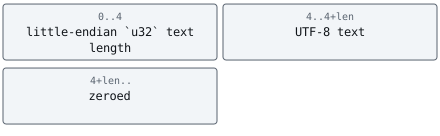
The four-byte length makes embedded zero bytes unambiguous and lets the reader reject impossible sizes before creating a string slice.
Alternative: Sharing storage is like sharing a notebook: agree on the page layout and on when a complete entry may be read.
This is the beginning of serialization: turning structured information into an agreed byte representation.
The original reader treats the first zero byte as the end of UTF-8 text. A legitimate embedded zero therefore shortens the message. The improved format uses the four-byte length header shown above; the writer must use that same format too.
Before: stop text at the first zero byte
Code example. The surrounding prose explains this example; the full lesson contains the exact code.
Validate that a complete header exists before slicing, then check its declared length against the remaining mapping. The length describes payload bytes, not the mapping’s zero padding.
Improved code
Code example. The surrounding prose explains this example; the full lesson contains the exact code.
Show the diff
Code example. The surrounding prose explains this example; the full lesson contains the exact code.
Takeaway: agree on an explicit length format at both ends, and validate the header before trusting it.
One hazard is worth naming here, even though this one-shot lab sidesteps it by writing only once. Shared memory gives two processes access to the same bytes. It gives them no agreement about when. Nothing prevents a reader from arriving in the middle of a write:

The reader’s length check passes, the UTF-8 decode very likely succeeds, and the text returned is simply wrong — or is half of the previous message. Writing the payload before the length narrows that window without closing it, since the C P U, central processing unit, and the compiler may reorder the two stores anyway. Closing it takes a sequence number the reader checks before and after copying, or a real synchronization object.
The figure shows the smallest case: old payload READY (five bytes), new payload RUNNING (seven bytes), and a reader that copies in the gap between publishing the length and finishing the text. Both checks in read_text succeed, yet the message is not one the writer ever meant to publish. Seeing the same bytes does not give either program an agreed moment to read them.
Section: Build the writer and reader.
Additional detail: Complete lab source: shared_memory_lab.rs.
Code example. The code’s comments explain: 🛡️ SAFETY: handle refers to a file-mapping object. A null address is checked before any slice is created, and the view is unmapped in Drop. ✅ SAFETY: MapViewOfFile returned a non-null view of length MAPPING_BYTES, and self keeps the view mapped for the slice's entire lifetime. 🔒 SAFETY: the writer requested FILE_MAP_WRITE, owns this mutable borrow, and the mapped range remains valid until Drop. 🧹 SAFETY: this object owns one live mapped view and unmaps it once. 🛡️ SAFETY: INVALID_HANDLE_VALUE requests paging-file-backed memory. The mapping name is static and the size is nonzero. 📦 Zeroing removes bytes left by an older, longer message. The first four bytes are the only trusted boundary for the current payload. 🧹 Keep both the mapping handle and its view alive until the reader has opened the named object; dropping the last handle destroys its name. 🔍 SAFETY: the name is static, inheritance is disabled, and the reader requests read-only access. 📏 The writer stores a little-endian byte length, not a character count. 🛡️ Validate the length before slicing, then validate UTF-8 before treating arbitrary shared bytes as text.
Section: Why is this unsafe code contained?.
MapViewOfFile returns a raw pointer. The compiler cannot prove how many bytes it covers, whether the view is writable, or when Windows unmaps it. MappedView establishes those facts once, then ordinary methods return bounded slices.
The writer receives &mut [u8]; the reader receives &[u8]. That is semantic highlighting at the type-system level: mutability shows which side is allowed to change data.
Section: Run two copies.
In PowerShell window one:
Terminal window
Code example. The surrounding prose explains this example; the full lesson contains the exact code.
Leave it waiting. In window two:
Terminal window
Code example. The surrounding prose explains this example; the full lesson contains the exact code.
Return to window one and press Enter. The mapping object disappears after the last handle closes, so another reader should then receive a clear “open the writer first” error.
Narration: Both the reader and writer must take the same mutex; signalling an event does not exclude a partial read.
Section: Where shared memory fits.
A Wesnoth add-on or game build could publish a tiny turn/event record. A separate visualizer could read it. The producer defines the shared-memory contract, so both sides agree on its layout and lifetime.
The one-shot lab avoids concurrent writes. A concurrent design could hold the same named mutex while the writer updates a record and while the reader copies it; the reader would then avoid mixing old and new fields. Both sides also need a shared format version and an agreed sequence-number meaning. A notification event alone announces readiness; it does not by itself protect the copy. Never put passwords or secret tokens in a mapping protected only by a convenient name.
The buildable source is shared_memory_lab.rs.
References: sharing files and memory, creating named shared memory, CreateFileMappingW, and MapViewOfFile.
Lesson 9.9 uses a named pipe when the producer and consumer would rather exchange one request and one reply than coordinate reads of a shared region.