Section: A named pipe is a local client/server channel.
Shared memory in Lesson 9.8 gave two programs views of the same bytes, but a concurrent writer needed an additional timing agreement. For one request followed by one reply, a named pipe gives us a connection with an explicit read/write order.
A named pipe server creates a known pipe name and waits. A client opens that name. After they connect, both sides can exchange bytes through ordinary Windows read and write calls.
This resembles a tiny network service, but the lab keeps both programs on the same Windows machine:
Code example. The surrounding prose explains this example; the full lesson contains the exact code.
Named pipes are useful when a supported game plug-in, launcher, capture helper, or your own engine build needs to talk to a separate tool without sharing raw pointers.
One bounded exchange has a clear beginning, two validated messages, and a clear end:

The pipe transports bytes. Both programs still need to agree on the length field, message kinds, payload encoding, and which requests to reject.
🔌 IPC idea: define a small message format instead of sharing addresses. Each process keeps ownership of its own memory and exchanges bounded copies.
Section: Message mode preserves write boundaries.
Windows pipes can operate in byte mode or message mode.
In brief: Message mode remembers write boundaries, but a small read buffer can still return only part of one message.
Byte mode is a stream. One read can receive part of a write or data from several writes.
Message mode preserves message boundaries. A read receives one message, provided the buffer is large enough.
The lab selects PIPE_TYPE_MESSAGE when creating the server and PIPE_READMODE_MESSAGE for both ends.
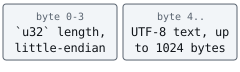
It still adds a four-byte length header. Why use both? Message mode keeps transport boundaries, while the length header validates the application protocol. The receiver can reject a damaged or unexpected frame instead of trusting every byte Windows delivered.
Section: Treat IPC data like untrusted input.
“Local” does not mean “automatically trustworthy.” Another program in the same account or session might know or guess the pipe name.
Alternative: A local sender is another program. Validate its lengths and contents just as you would a network sender.
The receiver checks all of these facts before making a String:
At least four header bytes arrived.
The declared text length is no more than 1024 bytes.
The received frame size equals 4 + declared length.
The text bytes are valid UTF-8.
The first check that fails rejects the frame, and the later ones never run. Try the edge of the limit: 1,028 bytes whose header says 1,024 pass, because the limit is on the text length.

The server accepts one client, handles one request, sends one fixed reply, and exits. Small limits make the behavior easy to reason about.
This byte-stream counterexample shows why a single successful read need not contain a complete payload. The Windows lab below chooses message mode and still checks lengths.
Section: Keep the pipe local and never impersonate.
Named pipes can support remote clients. This lab includes PIPE_REJECT_REMOTE_CLIENTS, so Windows rejects them automatically.
This original creation helper chooses message mode and duplex access, but does not explicitly reject remote clients. This helper extracts the creation step from the complete lab below, using its pipe name and FRAME_BYTES buffer limit; OwnedHandle closes the created pipe. Accepting and parsing the request happens later.
Before: create a pipe without rejecting remote clients
Code example. The code’s comments explain: SAFETY: The pipe name is static and terminated; no security pointer is supplied.
Add the local-only capability boundary to the creation mode. It rejects remote clients at the Windows pipe boundary; it does not replace the normal access check for local clients.
Improved code
Code example. The code’s comments explain: SAFETY: The pipe name is static and terminated; no security pointer is supplied.
Show the diff
Code example. The code’s comments explain: SAFETY: The pipe name is static and terminated; no security pointer is supplied.
Takeaway: restrict who can reach a channel when creating it, then validate each received message.
The program does not call ImpersonateNamedPipeClient, duplicate tokens, start a process as another identity, or change privileges. Those operations solve different identity and access-control problems; they are not part of this message channel.
Section: Build both modes in one program.
Additional detail: Complete lab source: named_pipe_lab.rs.
Code example. The code’s comments explain: 📏 `str::len` is UTF-8 bytes, exactly what the wire header measures; visible character count would be wrong for emoji or accented text. 📦 Prefixing the length makes the receiver reject truncated or joined data instead of guessing where the message ends. 🛡️ SAFETY: buffer is writable, bytes_read is a valid output pointer, and this synchronous lab does not supply an OVERLAPPED structure. 🛡️ Validate in dependency order: header exists, declared payload fits, and the one message-mode read agrees exactly with that declaration. ✅ Only the declared, completely received payload is decoded as UTF-8. 📦 SAFETY: bytes remains readable during the synchronous call and bytes_written is a valid output pointer. ⚠️ A successful synchronous call still reports how much it wrote; accepting a short write would send a frame whose header lies. 🔒 SAFETY: the pipe name is static. The server allows one synchronous, message-mode connection and supplies no custom security pointer. ⚠️ A client can connect between CreateNamedPipeW and ConnectNamedPipe. In that harmless race, Windows reports ERROR_PIPE_CONNECTED. 🛡️ SAFETY: pipe owns a valid server-pipe handle and this synchronous call deliberately supplies no OVERLAPPED structure. 🧭 SAFETY: the path is static. This opens only the local course pipe, requests read/write data access, and does not inherit the handle. ✅ SAFETY: pipe is a connected named-pipe handle and read_mode remains valid for the duration of the call.
Section: Understand the connection race.
A client can open the pipe after CreateNamedPipeW creates it but just before the server calls ConnectNamedPipe. Windows then returns ERROR_PIPE_CONNECTED. That does not mean the connection failed—it means the client already won the race.
Narration: A client can connect before the server starts waiting; that successful connection must not be mistaken for a failed session.
The match arm accepts only that documented condition and returns every other error:

The client may connect in the narrow interval before the server calls ConnectNamedPipe. In that case Windows reports ERROR_PIPE_CONNECTED, which means the connection already exists rather than that it failed. The match below accepts both successful outcomes and propagates other errors:
Code example. The surrounding prose explains this example; the full lesson contains the exact code.
Section: Run the request and reply.
In window one:
Terminal window
Code example. The surrounding prose explains this example; the full lesson contains the exact code.
In window two:
Terminal window
Code example. The surrounding prose explains this example; the full lesson contains the exact code.
The client prints the acknowledgement and both programs exit. Start the server again for another message.
Section: How to grow this design safely.
A larger tool could add a version number and an enum of allowed messages such as TurnStarted, MapLoaded, or PlayerPositionFromSupportedMod. It should authenticate sensitive clients, set an explicit security descriptor, rate-limit messages, keep bounded queues, and separate parsing from actions.
Do not accept a command string and pass it to PowerShell or cmd.exe. Define a small message enum and reject unknown variants. Data should select one defined action, not become code.
The buildable source is named_pipe_lab.rs.
References: named-pipe operations, CreateNamedPipeW, ConnectNamedPipe, and SetNamedPipeHandleState.