The tool-architecture lesson gave snapshots, commands, features, and cleanup separate owners. Rendering adds a timing constraint: positions and the camera that projects them must describe the same captured update. A well-organized tool can still draw incorrect markers if those values come from different moments.
This lesson applies that architecture to radar, overlays, aim analysis, and render hooks. The snippets describe interfaces inside a combined tool; the complete dispatcher and patch owners are linked below.
Section: One frame, one snapshot.

Read and validate target data once per update. Features consume the same owned snapshot. In this excerpt, PlayerSnapshot is a local record of the player’s identity, position, and other validated fields; Mat4 holds the camera transform. Neither type borrows a pointer into the game:
Code example. The surrounding prose explains this example; the full lesson contains the exact code.
Every feature receives the same owned set of fields from one bounded observation pass. If the radar reads the player list on one pass while the overlay independently reads the camera matrix a few milliseconds later, the features describe different updates, and markers can land where enemies used to be. Bundling the fields means both features use the same captured values. It does not make the reads atomic: the game can update an entity between two reads within that pass. Validate the resulting snapshot and, if the game exposes a tick or generation counter, check it before and after the copy or retry when it changes.
In brief: Sharing one captured set prevents features from using different copies; it does not prove the game stayed unchanged during capture.
The camera matrix and viewport travel with the players for that exact reason. Projecting this frame’s positions through last frame’s camera is wrong in a way that looks almost right — everything is drawn slightly behind where it belongs, worst when you turn quickly, which makes it easy to blame the projection maths instead of the timing.
Vec<PlayerSnapshot> is owned rather than borrowed, so nothing here points back into the game. A feature holding a reference into an entity the game then frees is the stale-pointer failure from Lesson 1.8, arriving through the back door. Copy once, then let every feature read from the copy.

Section: Give render features a lifecycle.
A radar overlay needs a different per-frame action from a recoil patch, but both must answer the same lifecycle questions: when is it enabled, what does it do with this frame’s snapshot, and how does it undo its own changes? The interface below makes those moments explicit for every feature:
Code example. The surrounding prose explains this example; the full lesson contains the exact code.
Only patching or hooking features need setup or restoration in enable and disable. A pure observer still implements those required methods, but they can return Ok(()); its useful work lives in update. The owner checks the result before reporting that a toggle succeeded.
Section: Model configuration with enums.
Three booleans named show_teammates, show_opponents, and show_everyone could all become true after a sequence of clicks. Yet the overlay can display only one of those modes at a time. Store that choice as one enum value, alongside the independent radar and debug switches:
Alternative: Use one selector for mutually exclusive overlay modes, and separate switches for independent features that can operate together.
Code example. The surrounding prose explains this example; the full lesson contains the exact code.
An enum prevents impossible combinations such as three different overlay booleans being true at the same time.
Section: Route input as commands.
A key press should request a change, not let the input thread reach into a feature while the update loop is using it. The input side can send a small command; the update loop then applies it to its own Settings. For example, CycleOverlay takes Off to Teammates and eventually back to Off:
Code example. The code’s comments explain: The update loop uses true to leave the loop and enter cleanup.
The input thread sends commands through a channel. The update loop owns and changes the settings, avoiding shared mutable globals. A true return means it should stop taking frames and enter cleanup. The menu receives an acknowledgement after an enabled feature has actually changed state.
Section: Contain a render feature’s failure.
If a frame lacks a valid projection matrix, the overlay may fail while the radar and debug reader can continue. Each feature’s update returns a result. The owner records the error, marks that feature disabled, and calls its restoration path. Subsequent updates skip it; an error message alone would leave it running again on the next frame.
That local decision is valid only when the rest of the snapshot remains sound. A closed process or an invalid entity list stops every consumer. A missing camera may disable only screen projection. If a failing feature cannot restore its hook or patch, keep that failure visible and enter the shared shutdown path rather than treating a disabled checkbox as successful cleanup.
Section: Shut down in reverse order.

Do not unload code while another thread may still execute it. Restoration must also happen on the thread or render boundary that owns the changed state. Stop the worker, wait for it to finish, and remove only the hooks this tool installed. A render callback may still be executing after the menu closes.
Narration: Closing the controls can leave a render callback in flight. Removing its code before that call finishes turns cleanup into a crash.
Section: Keep verified graphics facts with their target build.
An offset is a fact about one supported executable, not a universal property of an overlay. A profile joins build identity, module-relative locations, object layouts, and expected instruction bytes. Each feature receives verified facts from that profile rather than embedding another copy of an address.
A profile should make the supported game and version obvious. These constants join the concrete labs used by this combined tool; the complete project uses Option<usize> for facts a game does not need.
Code example. The surrounding prose explains this example; the full lesson contains the exact code.
At startup, verify an original instruction signature at every address you plan to use. The finished D L L, dynamic link library, dispatches by the current executable and exposes only hotkeys that belong to that exact game:
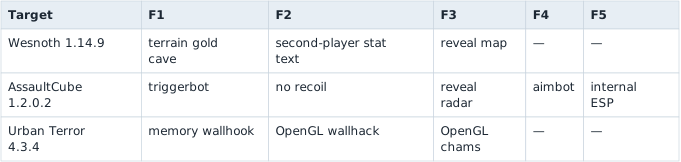
End stops the worker and restores every active patch. Flare and Wyrmsun, the offline automation targets from Chapter 4, use their dedicated in-game loops instead of this function-key table.
Load one supported profile after fingerprinting the target. Features receive verified addresses and layouts instead of hardcoding them. If a profile has no address for a capability, that control must remain unavailable; None is not an invitation to reuse an address from another game.
The complete dispatcher and lifecycles are in dll.rs. The patch-owning primitives are in local_patch.rs; dropping each LocalPatch restores the bytes it captured only after an exact pre-patch verification.
Section: Build the Urban Terror 4.3.4 memory wallhack.
The flag trace and frame-local state model in Lesson 7.2 can be understood with the debugger alone. This pinned in-process implementation applies the verified detour and D L L lifecycle from Lesson 8.3 to the rendering boundary. Keep those ownership and restoration steps intact while following the exact build-specific addresses below.
Additional detail: Exact-build reference: the Urban Terror 4.3.4 memory wallhack.
The r_drawentities trace in this exact build leads through the call at this value. Inside the entity loop, e b x holds the current render entity at this value. The field at [e b x+4] cycles through values such as hexadecimal 0 D, hexadecimal 4 0, hexadecimal 8 2, and hexadecimal 8 3.
Hook this exact point:
Code example. The surrounding prose explains this example; the full lesson contains the exact code.
A 32-bit detour cave has the same shape as the Wesnoth cave:
Code example. The surrounding prose explains this example; the full lesson contains the exact code.
Install a six-byte verified detour at this value, enter a local game, enable cg_thirdperson, and add bots. The local player and bots should render through walls, as in Lesson 7.2’s depth-test experiment. Values hexadecimal 8 3 and hexadecimal 4 0 should not create the same effect; that comparison is how you prove hexadecimal 0 D is the relevant render state.
Restore the original six hook bytes when the feature is disabled. This memory-based wallhack is intentionally kept as a full target-specific lab before the more general OpenGL approach below.
The D L L already contains the complete verified implementation. Build and inject it into Quake3-UrT.exe, enter a local bot match, and press F1 to toggle this memory wallhook. Press End to stop and restore all six bytes. See install_urban_terror_memory_wallhook and the Urban Terror hotkey worker in dll.rs.
Section: What the experiment proves.
The comparison isolates how one C P U, central processing unit,-side flag changes G P U, graphics processing unit, behavior. It does not prove that every build uses the same flag, address, or rendering path, so keep the executable fingerprint and original bytes beside the result.
Section: Turn the wrapper into the actual Urban Terror wallhack.
The A P I, application programming interface, signature, draw-count interpretation, and sampling design in Lesson 7.3 stand on their own. The exact-build detour below applies the D L L and patch lifecycle from Lesson 8.3 to one verified OpenGL instruction. Recheck the displaced instruction span and restoration path before running it.
Additional detail: Exact-build reference: the Urban Terror 4.3.4 OpenGL wallhack.
In Urban Terror 4.3.4, resolve glDrawElements from opengl32.dll. The historical build hooks the instruction at glDrawElements + hexadecimal 1 6 and resumes six bytes later. This is not a function-entry wrapper: it is a real code cave in the middle of the OpenGL function. At this point in this 32-bit build, e b x holds count.
Resolve these two OpenGL functions with GetProcAddress:
Code example. The surrounding prose explains this example; the full lesson contains the exact code.
Lesson 7.3 explains why this pair matters: glDepthRange(0.0, 0.0) flattens every highlighted fragment to the nearest depth, and GL_ALWAYS stops the depth test from rejecting it.
The six bytes we replace are one whole x86 instruction:
Code example. The surrounding prose explains this example; the full lesson contains the exact code.
Before and after the patch, the six bytes at glDrawElements + hexadecimal 1 6 look like this:
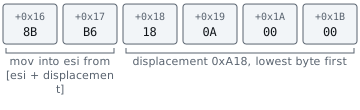
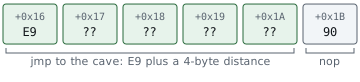
The installer refuses to patch if those bytes do not match. It writes a five-byte near jump plus one NOP, and LocalPatch owns the saved bytes so dropping the patch restores them:
Code example. The surrounding prose explains this example; the full lesson contains the exact code.
The cave saves the C P U flags and all general-purpose registers, passes the live e b x value to an ordinary helper, replays the displaced instruction, and returns to the byte immediately after it:
Code example. The surrounding prose explains this example; the full lesson contains the exact code.
Why save everything? The original OpenGL function expects its registers and flags to have particular values when it resumes. The compiler is free to use registers while apply_urban_terror_gl_state runs. Saving and restoring them makes the helper almost invisible to the interrupted function.
The helper changes the live OpenGL state. A later non-highlighted draw restores normal depth state:
Code example. The code’s comments explain: 🛡️ SAFETY: these pointers were resolved from this process's opengl32.dll, and the game reached the cave on its OpenGL render thread.
Build the D L L for 32-bit Windows, inject it into Quake3-UrT.exe, enter a local match, and press F2. Geometry with count greater than 500 is forced to the near plane and uses GL_ALWAYS, producing the player/weapon-through-wall result shown below. Press F2 again or End to restore normal state and the original six code bytes.
Terminal window
Code example. The surrounding prose explains this example; the full lesson contains the exact code.
The complete compiled implementation—including export lookup, the naked cave, exact-byte verification, both graphics modes, and restoration—is in opengl_hooks.rs. The hotkey worker is in dll.rs.
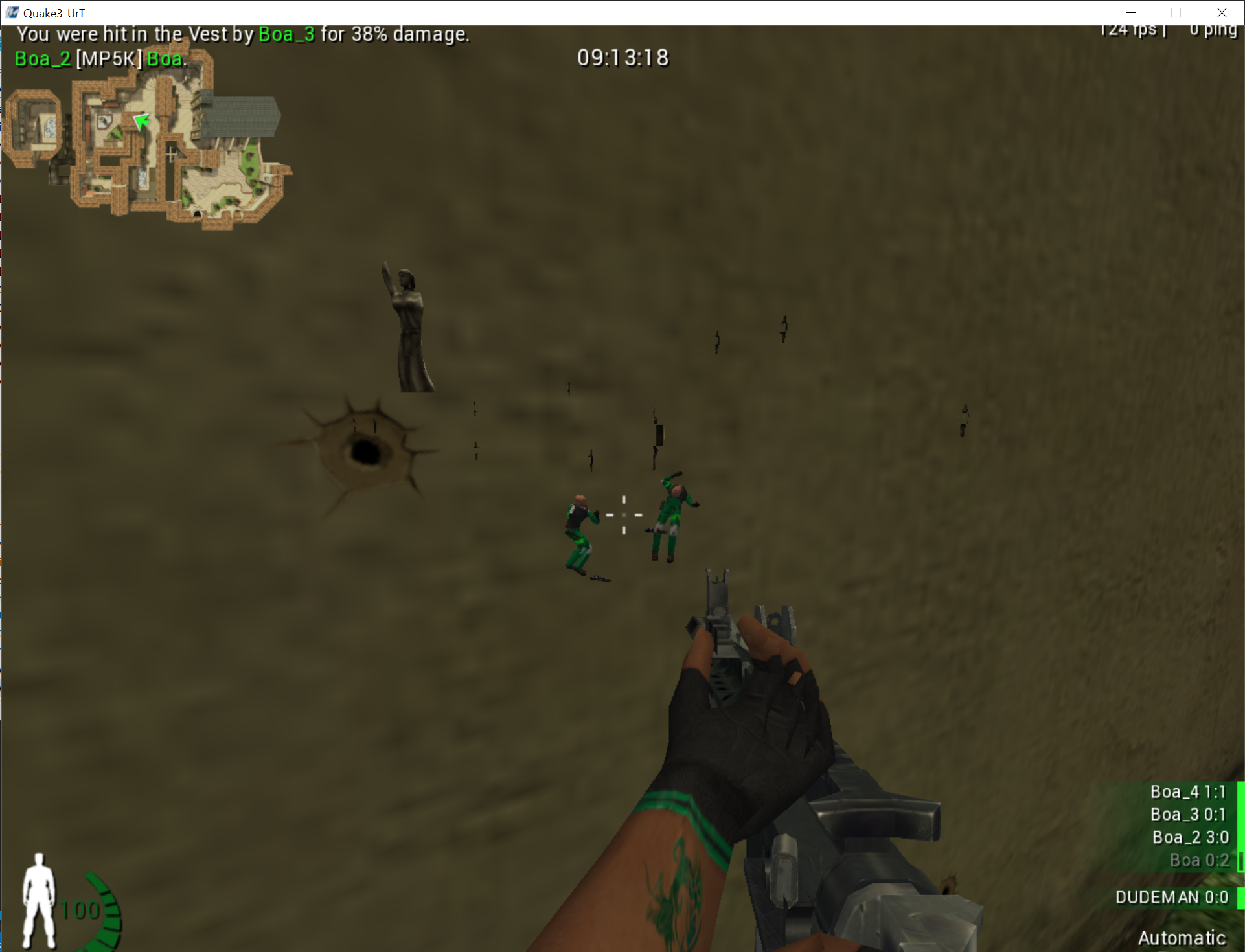
The threshold is a confirmed property of this lesson build, not a universal player detector. Log counts while toggling third-person and adding/removing bots so you can see exactly which models it includes.
OpenGL state stays set until another call changes it. This middle-of-function cave cannot surround one typed glDrawElements call, so it restores the normal state when the next non-highlighted draw arrives and when the feature is disabled. Pressing End also disables the mode before removing the code patch. That ordering prevents the game from being left with GL_ALWAYS active.
Section: Check the combined render path.
The complete dispatcher and feature lifecycles bring the separate effects into one D L L, called the multihack in the original course. Test the connections as well as each effect:
radar and overlay consumers use the same captured player values;
camera and viewport changes cannot silently mix with an older frame;
a disabled feature is skipped until the user deliberately enables it again;
each render callback restores the graphics state it changed;
each hook restores only its own verified original bytes;
an unsupported game or build exposes no active feature controls;
shutdown waits for workers and callbacks before unloading code.
Keep a log of target, build, feature, address, expected bytes, found bytes, action, and restoration result, separate from the visible menu. Those records let a failed cleanup remain inspectable even after its UI closes.
The next lesson draws the menu inside the game’s frame. Each feature still needs one owner, commands that report their outcome, and verified restoration of any changed bytes.