Section: A third option between a window and an overlay.
Lesson 8.6 put the menu in its own window, which is the right default: it cannot corrupt the game’s graphics state, and you can close the game without losing it.
But you have already met a function that draws text inside the game. In Lesson 3.11 you traced Wesnoth’s print function; Lesson 8.3 then used its call site for a verified, reversible text hook. In Lesson 7.9 you called AssaultCube’s print function at this value to label players. That function already knows the font, the scale, the screen size, and the right moment in the frame to draw. Calling it is the cheapest way to put a menu on screen, because the hard graphics work is done and you are only supplying strings.
The trade is that you are now running inside the game’s render path, so the hook must finish quickly. A file read, sleep, or blocking channel receive there delays the game’s next frame; Lesson 6.11 measures the same cost in a per-frame recorder.
Section: What a game’s interface is made of.
Before borrowing the game’s text function, it helps to know what it sits on top of. A game’s interface is drawn by the same pipeline as its world (Lesson 7.2), in a last pass that ignores the 3D camera: flat rectangles and text, placed in screen units.
Text. A font is turned into a glyph atlas, a texture holding every character as a small image (the atlas idea from Lesson 7.2). To draw “Gold”, the engine draws one quad per letter, each showing that letter’s rectangle in the atlas, and moves along by each letter’s advance width. If the advances of G, o, and l are 12, 9, and 4 pixels, the letter d starts 12 + 9 + 4 equals 25 pixels to the right of where the G started.
Layout. Elements sit in boxes. Anchoring pins a box to part of the screen: a 200 times 50 box anchored to the bottom-right corner of a 1280 times 720 screen with a 20-pixel margin is at x equals 1280 minus 20 minus 200 equals 1060 and y equals 720 minus 20 minus 50 equals 650. In a flex layout, boxes in a row share the space by weight: in a 600-pixel row, three boxes with weights 1, 2, and 1 get 150, 300, and 150 pixels. A grid layout assigns boxes to rows and columns, and size limits keep a box between a smallest and a largest size.
Scaling. Interfaces are usually designed for a reference size, such as 1920 times 1080, and scaled by the smaller of width divided by 1920 and height divided by 1080. On a 1280 times 720 screen both are 0.6667, so a 300-pixel button is drawn 200 pixels wide. The window’s scale factor from Lesson 6.9 multiplies the result again.
Stretchable art. A button picture with decorated corners cannot simply be stretched. Nine-slice drawing cuts it into a 3 times 3 grid: the four corners keep their size, the four edges stretch in one direction, and the centre stretches in both. Drawing a picture with 16-pixel corners as a 200 times 60 button gives four 16 times 16 corners, top and bottom edges 200 minus 32 equals 168 wide, side edges 60 minus 32 equals 28 tall, and a 168 times 28 centre.
Order and clipping. Elements are drawn back to front by a layer number. Clipping hides whatever falls outside a box, which is how a scrolling list works: the items are moved up by the scroll amount, and only the part inside the list’s box is drawn.
Input and focus. A click is tested against each box’s rectangle, the 2D picking of Lesson 7.5, and the topmost box under the cursor gets it. For a keyboard or gamepad, the game keeps a focus, the element that will respond, and moves it to the nearest element in the direction pressed. A text box keeps a string and a cursor position and receives typed characters. Sliders, checkboxes, and buttons are each a small state machine: a value, and whether they are hovered, pressed, or focused.
Popups. A context menu is a box created at the cursor when the right button is pressed and sized to fit its items. If it would run off the screen it is moved back: a 150 pixel wide menu opened at x equals 1200 on a 1280 pixel screen is placed at min(1200, 1280 minus 150) equals 1130.
Where it is drawn. Most interface is drawn over the finished 3D picture. It can also be drawn into a texture and placed on a surface in the world, such as a screen on a wall, and a label that follows an object uses the projection from Lesson 7.9.
Lesson 8.6 contrasts the two ways such code is written: an immediate-mode interface redraws every element on every frame from the current state, and a retained-mode interface keeps a tree of elements in memory and changes them when something happens.
Alternative: Drawing location and interface storage are separate choices: the same saved menu settings can drive either a separate window or an in-game text pass.
Section: Hook a per-frame site, then call the text function.
The obvious idea is to hook the text function itself. That is the one thing that cannot work:

The hook calls the text function, and the text function runs the hook again: recursion with no base case, the same failure as a wrapper that forwards to itself in Lesson 7.3. Every nested call adds a stack frame, so the stack overflows while the hook is still trying to draw its first menu line.
Narration: Calling the hooked text function from its own replacement never reaches a finished menu line; each attempt creates another unfinished call on the stack.
Hook a site that runs once per frame instead, and call the text function from there as an ordinary function.
Lesson 7.9 already identified such a site in AssaultCube: the final print hook at this value, resuming at this value. Drawing there puts your lines in the same pass as the game’s own HUD, so they inherit its ordering and never appear underneath the world:

Section: Reconstruct the contract before you call it.
Calling a function you found is Lesson 6.7’s problem, not a new one. Before the first call, answer its four parts:
which arguments it takes, and in what order — typically a screen position and a string;
where those arguments go, which for a 32-bit game usually means cdecl on the stack, or thiscall with the renderer object in e c x;
what it returns, if anything;
whether it copies the string or merely stores the pointer.
That last question is the one that bites. If the function keeps the pointer and draws later in the frame, a string you built on the stack is gone by then:
Code example. The code’s comments explain: ❌ The buffer dies at the end of this function. If the game reads the pointer later in the frame, it reads freed stack space.
Keep an owned buffer alive for at least as long as the frame, and give the function a pointer into that:
Code example. The code’s comments explain: ✅ `lines` outlives the call, and the trailing zero is explicit because a C-style text function reads until it finds one.
CString is the same tool Lesson 3.11 used at the C boundary, and for the same reason: it guarantees the terminating zero and rejects interior zero bytes instead of silently truncating your text.
Section: Colour is usually a marker inside the string.
Many engines let a string carry its own formatting. The mechanism is nearly always the same: a marker byte the renderer watches for, followed by an index that selects a palette entry. AssaultCube uses the form feed character, hexadecimal 0 C, followed by a digit.
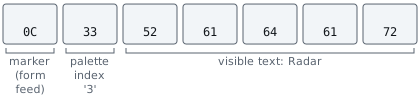
Two consequences follow, and both matter.
The marker and index are consumed, not drawn, so the string’s byte length is larger than the number of visible characters. That is the same distinction Lesson 3.11 drew between bytes, code units, scalars, and what a reader sees; a menu that lines up columns by counting bytes will be crooked.
And the exact marker is a fact about one build. Confirm it by drawing a string containing a candidate byte and watching what happens, rather than trusting the number above.
Section: The menu itself is a small state machine.
Everything above is about getting characters on screen. The part that actually misbehaves is the bookkeeping, so text_menu_lab.rs models it in portable safe Rust with no graphics A P I, application programming interface, involved:
Terminal window
Code example. The surrounding prose explains this example; the full lesson contains the exact code.
Section: A wrapping cursor underflows if you write the obvious thing.
Moving the cursor up from the first row should land on the last. The natural expression is wrong:
Code example. The surrounding prose explains this example; the full lesson contains the exact code.
When cursor is 0, 0 - 1 on an unsigned integer panics in a debug build. A release build wraps it to usize::MAX, and % len then keeps the result inside the list, but usually on the wrong row:
Predict first
A release build wraps 0 - 1 on usize to usize::MAX equals the large number shown. The menu has 3 rows and the cursor is on row 0.
Pressing up runs (cursor - 1) % len. Which row is selected?
Answer: Row 0. The digits of the large number shown add up to 87 equals 3 times 29, so the number is a multiple of 3 and the remainder is 0. The cursor does not move at all.

Handle the boundary explicitly and the intent is visible:
Code example. The surrounding prose explains this example; the full lesson contains the exact code.
Section: GetAsyncKeyState reports a level, not a press.
GetAsyncKeyState answers “is this key down right now?”, which is true on every frame of one press, so a menu that acts on it scrolls the whole list in a fraction of a second. Act on the edge instead, the frame where the key changed from up to down, as Lesson 8.6’s menu hotkey does:
In brief: A menu advances on a press transition, rather than on every frame in which the key remains down.
Code example. The surrounding prose explains this example; the full lesson contains the exact code.
The lab test holds the key for ten frames and asserts the cursor moved exactly one row.
Section: Build the strings without allocating every frame.
The render path runs thousands of times per second. Clear and reuse one buffer rather than allocating a fresh Vec per frame; the lab asserts the buffer’s capacity is unchanged after a second render.
The menu should also own only its own state. Keep Lesson 8.6’s split: the menu produces settings and commands, and the worker reads them. A menu that writes game memory while the render thread draws puts a second writer on the same data.
Section: Restore the site, not just the feature.
Closing the menu is a display change. Unloading the tool is a lifetime change with a fixed order: stop the worker, wait for it to leave the hooked path, restore the displaced bytes, then release the D L L, dynamic link library. While an in-flight frame is still executing the detour, the hook is draining: no new calls should enter, but the current call must finish before its code is removed. Lesson 8.10 applies the same rule to a general hook manager.
Silent video demonstration: Combined tools running in AssaultCube. The original multihack recording combines features from the preceding AssaultCube lessons. Compare their visible effects with the independent settings a menu exposes: changing a setting and drawing that setting are separate responsibilities.
Section: Scope.
This is the same offline, version-pinned lab used since Chapter 7, and the same menu model as Lesson 8.6 rendered somewhere else. The transferable skill — calling a function you recovered, with a contract you proved, from a hook that runs at a known point in a frame — is what a debug HUD, a benchmarking overlay, and an accessibility tool all do.