Section: Locate the save by behavior.
Lesson 10.1 followed one Flare character’s Physical value from running state into avatar.txt. Now we will prove the exact path, change that file once, and ask Flare to load it. Use Flare 1.12 with a disposable character. Start Process Monitor and filter to the game process.
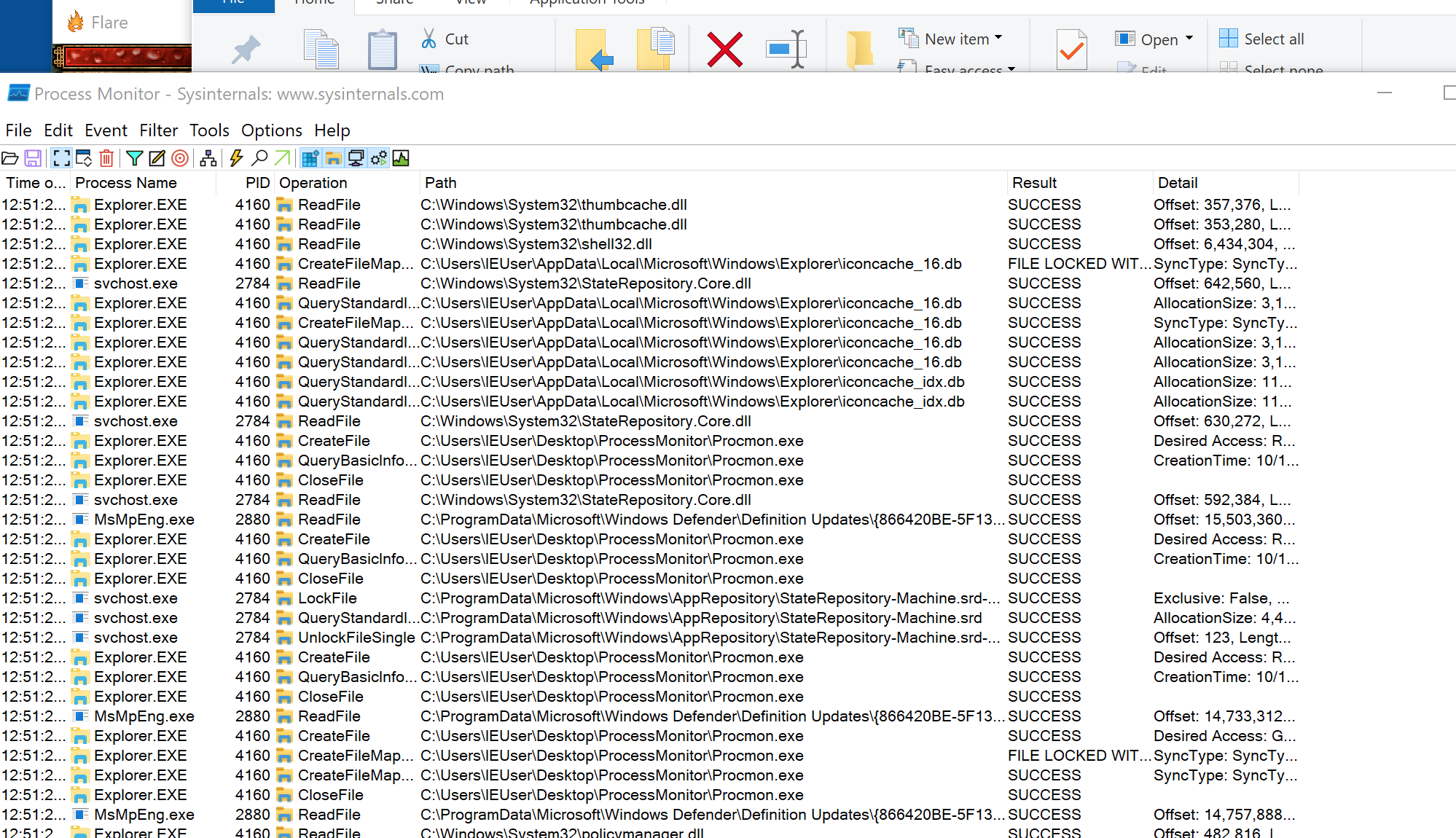
Save the game once, then look for file writes near that timestamp.
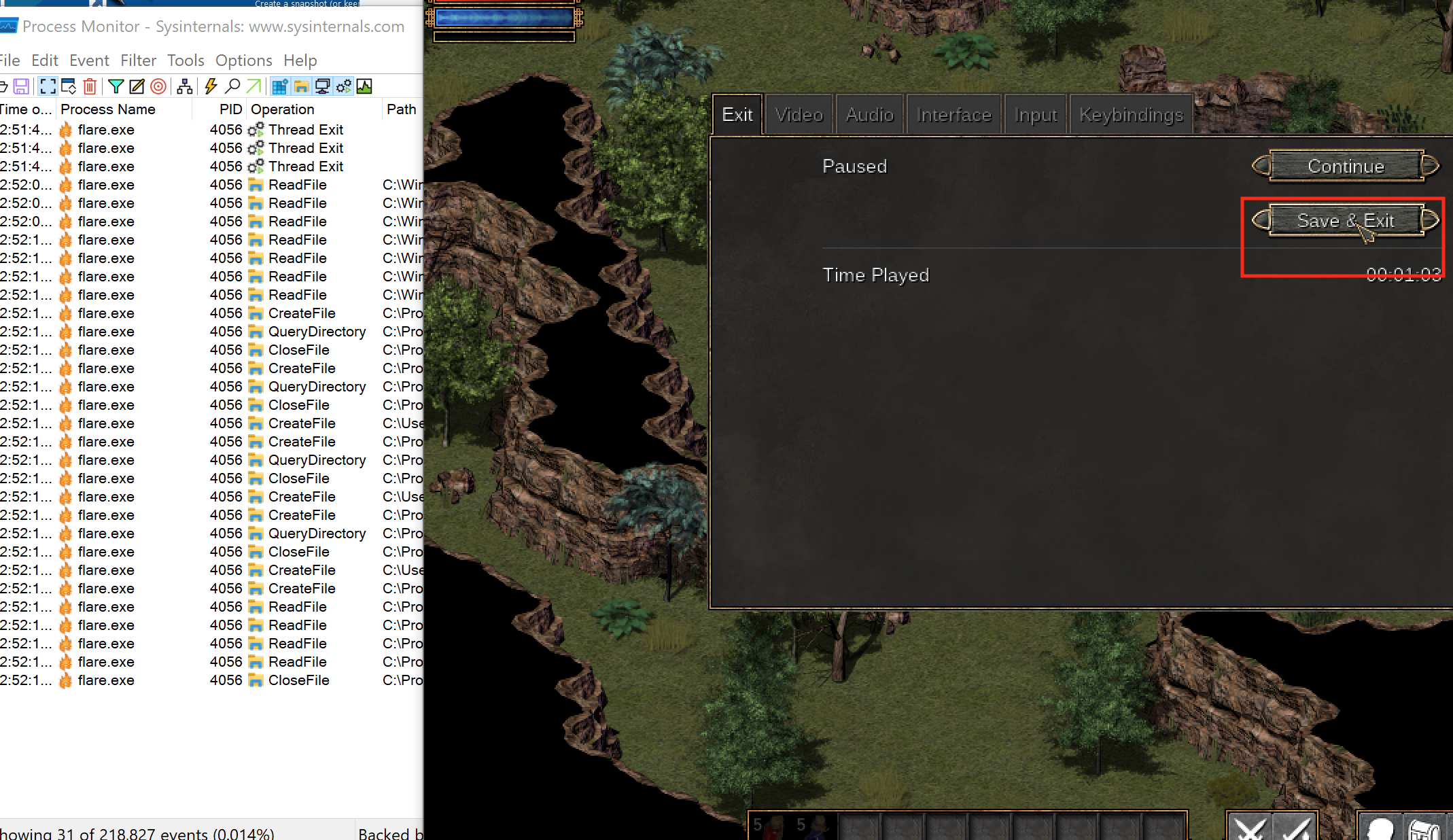
Close the game before editing. Many games keep state in memory and overwrite the save during shutdown.
For the actual Flare 1.12 lab, filter Process Name is flare.exe, create a character in the Empyrean campaign, then choose Save & Exit. The important writes are:
Code example. The surrounding prose explains this example; the full lesson contains the exact code.
Open avatar.txt first. It contains the character XP and build values; stash_HC.txt is the shared hardcore stash. Copy both files before changing either one.
Section: Make two controlled saves.
Compare two disposable saves from the same character. Make one intended change through the game, such as spending one available point on Physical, and record the visible result. For example:
Alternative: Two controlled saves are a before-and-after experiment: change one visible value so the file difference has a question to answer.
save A has build=5,1,1,2;
save B has build=6,1,1,2 after Physical rises from 5 to 6;
no other intentional action occurs between saves.
Compare them:
Code example. The surrounding prose explains this example; the full lesson contains the exact code.
If the files differ almost everywhere, compression, encryption, timestamps, or a checksum may be involved.
This helper compares only the shared prefix because zip ends with the shorter file. Check the two total lengths separately; an inserted field or newline also counts as a difference.
The two-save comparison is a controlled experiment, not proof that every changed byte belongs to gold. Games may update play time, random state, timestamps, object order, or integrity data during the same save. Repeat the comparison with several values and one intentional change at a time. A real field should follow the chosen change consistently; unrelated changing bytes are background state.
Section: Prefer a typed text format.
If the save is readable key/value text, parse lines instead of replacing every matching number:
Code example. The surrounding prose explains this example; the full lesson contains the exact code.
This small example makes the field names visible, but collecting directly into a map would keep only one of two repeated build= lines. The complete editor below checks that the target line occurs exactly once and preserves the other lines and their newline style.
Narration: A map can silently collapse repeated keys. A successful parse may therefore discard a second save line before the editor notices it existed.
Then require the exact field and change its complete value:
Code example. The surrounding prose explains this example; the full lesson contains the exact code.
In the exact Flare 1.12 capture, the new character has:
Code example. The surrounding prose explains this example; the full lesson contains the exact code.
The four build numbers are Physical, Mental, Offense, and Defense. The original visible hack changes them to:
Code example. The surrounding prose explains this example; the full lesson contains the exact code.
Reloading the disposable character shows all four values as 30.
Section: The magic number and the version say what the file is.
The book’s invented binary GSAV save records Nia at level 3 with 250 gold. Its first four bytes are 47 53 41 56. As A S C I I codes they are:
hexadecimal 4 7 equals 4 times 16 + 7 equals 71: G;
hexadecimal 5 3 equals 5 times 16 + 3 equals 83: S;
hexadecimal 4 1 equals 4 times 16 + 1 equals 65: A;
hexadecimal 5 6 equals 5 times 16 + 6 equals 86: V.
That fixed starting pattern is a magic number. The loader checks it before treating bytes as fields. A PNG likewise has a fixed signature; renaming either file changes neither its bytes nor its format.
The next two bytes, 01 00, are the little-endian layout version 1. A loader uses the version to select a known layout; an editor must refuse an unknown version because fields may have moved. The GSAV lab returns UnsupportedVersion for anything other than 1.
Section: A length-prefixed string.
GSAV puts the name’s byte length at offset 11 (hexadecimal 0 B), then the text at offset 12. For Nia, 03 announces three bytes:
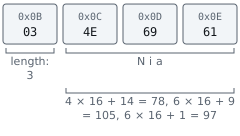
The checksum follows the text, so it starts at 12 + 3 equals 15. Changing the name to the five-byte Grace moves it to 12 + 5 equals 17 and grows the whole save to 17 + 4 equals 21 bytes. A tool assuming offset 15 would now read the wrong field.
Check the prefix against the actual file size before trusting it. A damaged byte C8 means 12 times 16 + 8 equals 200; its claimed name ends at 12 + 200 equals 212, beyond a 19-byte file. The lab requires 12 + length + 4 to equal the real size and returns an error otherwise.
Other formats end the text with a terminator, often C’s 00 byte. A prefix counts bytes; a terminator marks the end. A nearby number matching the text’s byte count is a clue, then test it with names of different lengths. Neither convention measures the number of displayed characters.
Alternative: A length prefix measures the string from its beginning; a terminator marks its ending. Both separate text from the bytes that follow.
Section: Write atomically.
Do not overwrite the original in place. Write a temporary sibling, flush it, then rename:
Code example. The surrounding prose explains this example; the full lesson contains the exact code.
The important change is that the original path is not used as scratch space:
The original helper writes directly to the closed game’s disposable save file. Opening it for replacement truncates the old contents before the new data is completely written, so a failure can leave a partial save.
Before: overwrite the original save in place
Code example. The surrounding prose explains this example; the full lesson contains the exact code.
Use prepare then replace: exclusively create a sibling temporary file, write and flush it, close its handle, then request replacement. With create_new(true), a leftover temporary file causes an error instead of being overwritten; inspect or remove it before retrying.
Improved code
Code example. The surrounding prose explains this example; the full lesson contains the exact code.
Show the diff
Code example. The surrounding prose explains this example; the full lesson contains the exact code.
Takeaway: construct the complete replacement away from the original, and keep a backup until the game accepts it.
Writing directly truncates the original before the new bytes are safely stored. A crash or full disk can leave half a save. The sibling temporary file keeps the original untouched during construction, sync_all asks the operating system to flush it, and closing the handle before replacement avoids Windows sharing conflicts. The complete Windows lab uses ReplaceFileW so replacement and backup creation are one filesystem action.
On Windows, replacing an existing file may require a platform-specific replace operation. Keep the backup until the game successfully loads the new save.
Section: Prepare, validate, commit, and recover.
Use four explicit stages: prepare, validate, commit, recover:
Prepare: read the original and build new bytes somewhere else.
Validate: confirm the target field, format, ranges, and complete output.
Commit: replace the directory entry in one filesystem operation.
Recover: keep enough information to return to the last known-good save.
Atomic replacement and durability solve different problems. Atomic means an observer should see the old file or the new file, not a half-written mixture. Durable means completed data survives the failures the system promises to handle. Flushing the temporary file improves durability, but no single call can make the edit, the game’s other save files, cloud synchronization, and a power failure one universal transaction.
In brief: Atomic replacement avoids a half-written file; durability asks whether completed data survives the failures being considered.
The property we are designing is crash consistency: after interruption, the files should describe an old valid state, a new valid state, or an unambiguous recoverable state. “The normal path completed once” is weaker; crash consistency also accounts for every point where execution could stop.
Design the on-disk states so each one has an obvious response:
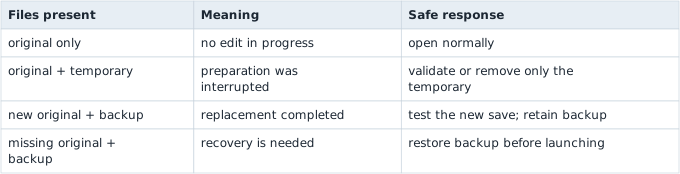
Do not choose by modification time alone. Validate the expected filename, format, and contents, then ask the user before replacing the only known-good copy.
Section: Run the complete save editor.

Close Flare, build the Windows lab workspace, and pass the exact save path and new build value:
Terminal window
Code example. The surrounding prose explains this example; the full lesson contains the exact code.
The tool requires exactly one build= line, preserves CRLF versus LF, writes and flushes a sibling temporary file, and uses the windows crate’s ReplaceFileW with write-through. Windows installs the new file atomically and places the original at avatar.txt.gha-backup. It refuses to overwrite an existing backup.
The backup is part of the tool’s data model, not clutter to delete immediately. The edit is not considered successful until Flare parses the new file, loads the character, and later saves it normally. That final save matters because the game wrote it: if the edited value is still there, the change survived the game’s own loader and serializer.
The complete program is flare_save_editor.rs; the reusable Windows replacement boundary is file_replace.rs.
Additional detail: Complete lab source: flare_save_editor.rs.
Code example. The code’s comments explain: 🛡️ A newline would create a second field and turn a value edit into a structural save-file injection. 📦 Preserve the file's existing Windows/Unix line convention and whether it ended with a newline; unrelated formatting should not become a diff. 🎯 Zero means the requested field is absent; several means the edit is ambiguous. In both cases the original must remain untouched. 🧹 Flush and close the complete sibling file before asking Windows to atomically swap names. The original is never used as scratch space. 🔁 Replacement failed, so remove only our disposable temporary file; `path` still names the untouched original.
Read it in five chunks: validate the three arguments, locate exactly one field, preserve the file’s newline style, flush a temporary file, then ask Windows to install it while keeping a backup. If any earlier chunk fails, the original save is untouched.
Section: Checksums and integrity fields.
If one small value change also changes a separate fixed-size region, the file may contain a checksum. Lesson 10.8 works through the GSAV sum; Lesson 10.3 keeps the exact two-save hex comparison.
Do not patch until you understand:
which bytes are covered;
which algorithm is used;
where the expected checksum is stored;
byte order;
whether a secret key is involved.
If the format is cryptographically signed, use supported modding tools instead of attempting to defeat the signature.
Section: Debug the loader only if needed.
Process Monitor can show the file read, and a debugger breakpoint on file APIs can show the buffer passed into parsing.
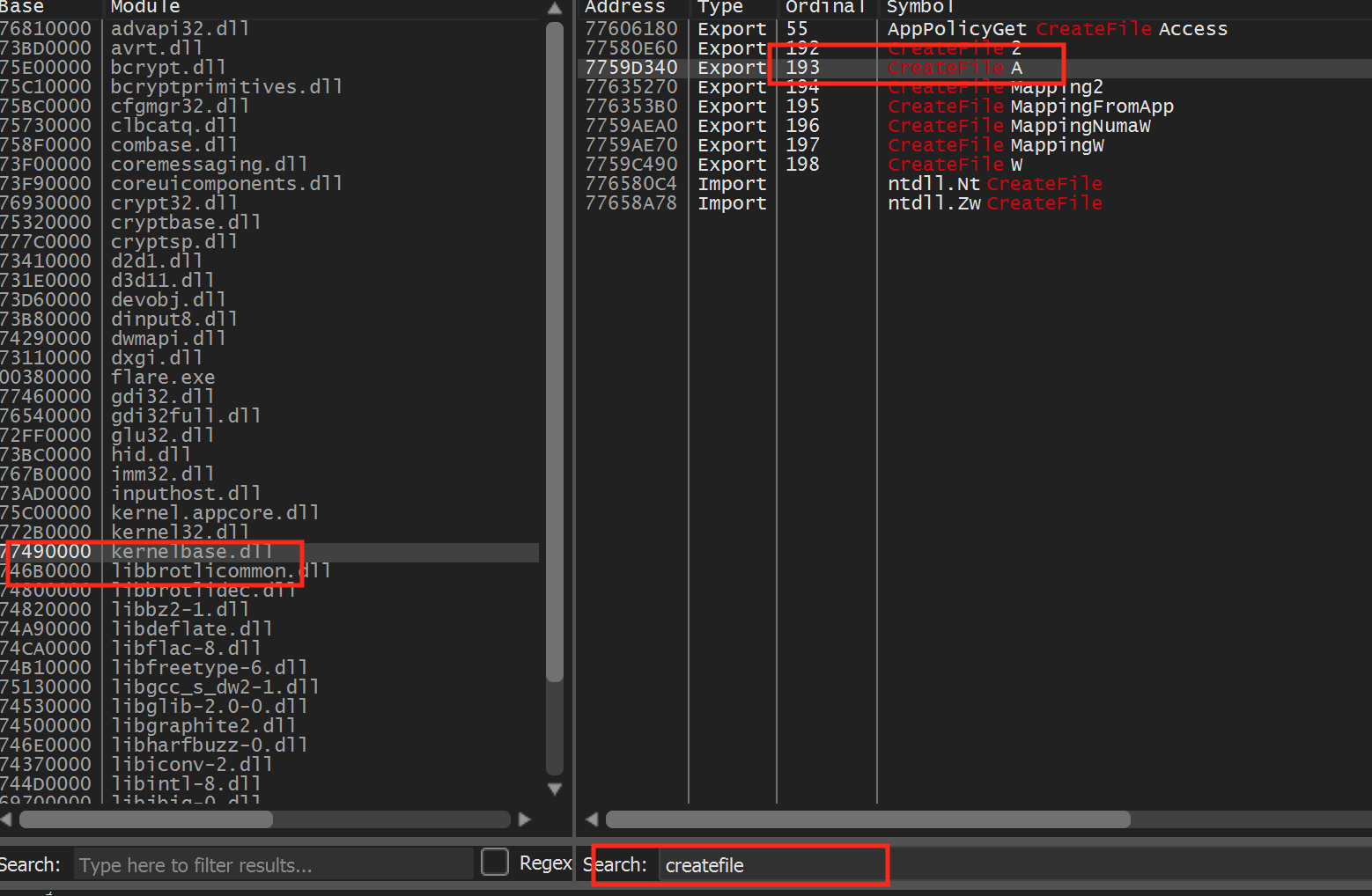
In 32-bit Flare on Windows, open x64dbg’s Symbols tab, choose kernelbase.dll, find CreateFileA, and break at its first instruction. Saving the game puts the same avatar.txt path on the stack, independently confirming the location found with Process Monitor.
The aim is to learn the format, not to disable validation.
Section: Validate the result.
keep the original backup;
load the disposable character;
confirm only the intended field changed;
save again normally;
confirm the game can reload that new save.
If loading fails, restore the backup and compare the serializer’s whitespace, encoding, terminators, ordering, and integrity field.
Flare made its fields readable as text. A different game may store the same kind of character state as raw bytes. The next lesson keeps the same copy–compare–edit–reload discipline but shows how to read that binary layout with a hex editor.