Section: A binary save is not text.
Lesson 10.2 edited Flare’s text avatar.txt save. Its build=5,1,1,2 line records a character whose Physical attribute is 5 and is readable in any text editor. Many saves are not. They store numbers as raw bytes, the same way a u32 sits in memory, because that is smaller and faster to load. Open one in a text editor and most bytes turn into boxes, blanks, or stray symbols. Worse, saving it from a text editor can quietly change bytes, for example by converting line endings, which corrupts the file.
A hex editor shows a file as what it is: a numbered sequence of bytes, each written as two hexadecimal digits. In byte-overwrite mode, it can save the exact replacement bytes without decoding the whole file as text. HxD and ImHex are common examples; they show the same three columns, so nothing in this lesson depends on which one you use.
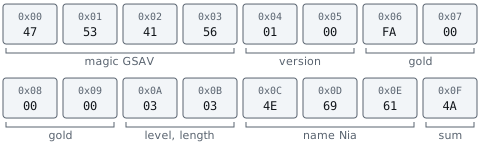
This lesson uses a toy save format made for the book, GSAV, and a Rust lab that reads and writes it. Here is the complete save for a character called Nia, at level 3, with 250 gold. It is 19 bytes long:
Code example. The surrounding prose explains this example; the full lesson contains the exact code.
Everything here applies to offline, single-player saves. A value kept on a game’s server is not in any file on your disk.
Section: The three columns of a hex editor.
Opened in a hex editor, those 19 bytes look like this:
Code example. The surrounding prose explains this example; the full lesson contains the exact code.
The offset column on the left gives the position of the first byte on each row, counted in hex from the start of the file. A row holds 16 bytes, numbered 00 to 0F along the top, so the second row starts at byte 16, which is hexadecimal 1 0 (1 times 16 + 0).
The byte column in the middle shows each byte as two hex digits. To find the offset of any byte, add its row offset and its column number: the last byte sits on row the bit pattern shown in column 02, so its offset is hexadecimal 1 0 + hexadecimal 0 2 equals hexadecimal 1 2, which is 16 + 2 equals 18.
The character column on the right shows each byte as a character. A S C I I is the standard table that gives every English letter, digit, and common symbol a number from 0 to 127. Bytes from hexadecimal 2 0 (a space) to hexadecimal 7 E ( ~ ) are printable A S C I I and appear as themselves; every other byte appears as a dot.
The character column is where text stands out: GSAV at the start and Nia in the middle. It also shows things that are not text. The byte at hexadecimal 0 F is 4A, which is 4 times 16 + 10 equals 74, the A S C I I code for the letter J, so the column shows a J even though that byte is part of a number. Nothing in the file marks which bytes are meant as text, so the editor shows every byte both ways.
Narration: The character column displays every byte as a possible character. An apparent letter can be part of a number, so use the format to decide its meaning.
Each byte belongs to one field of the format. A strip of 16 boxes is one row:
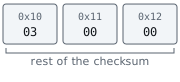
The full layout, with offsets in hex and in decimal:
The save format, field by field
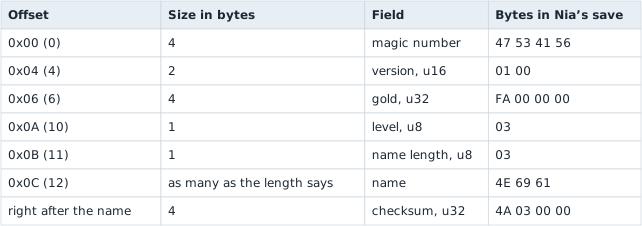
The sections below read each field in turn.
Section: A file offset is not a memory address.
An offset in a file is a distance in bytes from the file’s first byte: offset hexadecimal 0 6 means “skip six bytes, then read.” It is not a memory address. When the game loads this save, it reads the bytes and copies each field into its own structures somewhere in its memory, so the gold that sat at file offset 6 ends up at an address that has nothing to do with 6 and usually changes from one run to the next. Two things follow:
In brief: A file offset identifies a position inside stored bytes; it does not identify where a loaded field lives in process memory.
Changing byte 6 on disk does not change a running game. The game sees the new value only when it loads the file again, and a game that is still running can overwrite the edit when it saves on exit, so close it first.
An address found with a memory scanner cannot be typed into a hex editor’s “go to offset” box, or the other way round. Lesson 5.1 met the same split for executables, where the section table translates between file offsets and addresses.
Section: The magic number and the version say what the file is.
47 53 41 56 spells GSAV in A S C I I. This fixed starting pattern is a magic number: the loader refuses other formats before decoding fields. The next two bytes, 01 00, give layout version 1. An unknown version must be refused because its fields may have moved. The lab returns UnsupportedVersion in that case.
Lesson 10.2 explains the format and version checks.
Section: Multi-byte numbers are stored lowest byte first.
Games for x86 PCs usually write numbers to disk exactly as they sit in memory, which is little endian: the byte worth the least comes first. Lesson 1.8 explains why each box is worth 256 times the one before it. Gold occupies offsets 6 to 9, which hold FA 00 00 00. hexadecimal F A is 15 times 16 + 10 equals 250 and the other three bytes are 0, so the gold is 250. Try other values: changing gold only overwrites these four bytes, and no later field moves.

The version works the same way with two bytes: 01 00 is 1 times 1 + 0 times 256 equals 1. The level at offset 10 is a single byte, 03, so there is no order to get wrong: it is 3.
Reading in the wrong order gives a number that is obviously off, which makes a useful check: read biggest byte first, FA 00 00 00 is this value, which is 250 times the large number shown equals the large number shown gold. When one byte order gives a plausible value and the other gives billions, the plausible one is almost always the right one.
Section: A length-prefixed string.
A length-prefixed string stores its byte count before its text. Here offset 11 contains 03, so the next three bytes, 4E 69 61, spell Nia. The checksum begins at offset 12 + 3 equals 15. A five-byte name moves it to offset 17 and grows the whole file to 21 bytes.
The loader checks that 12 + length + 4 equals the file’s real size before reading the name or checksum. A damaged length of 200 cannot describe this 19-byte file. Lesson 10.2 works through those bounds and the terminator alternative.
Section: Find a field by comparing two saves.
The layout above was handed to you. A real game’s layout usually is not, so its fields are found by comparison, the byte-level version of Lesson 10.2’s two-save diff: save once, change exactly one value in the game, save again, and compare the two files. Most hex editors have a compare view that highlights the bytes that differ.
Suppose Nia earns 1,000 gold, taking her from 250 to 1,250, and nothing else changes. Offsets hexadecimal 0 0 to hexadecimal 0 5 are identical in both saves, so the strips start at hexadecimal 0 6:
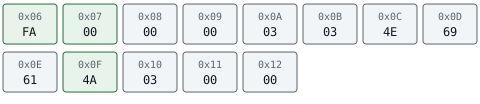
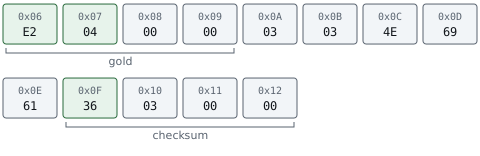
Offsets 6 and 7 changed from FA 00 to E2 04. hexadecimal E 2 is 14 times 16 + 2 equals 226, so reading lowest byte first gives 226 + 4 times 256 equals 226 + 1,024 equals 1,250: the new gold. Gold therefore starts at offset 6. Offsets 8 and 9 hold 00 in both saves, so they could be the upper half of a 4-byte gold field or something unrelated that happens to be zero. Two bytes can hold at most 256 times 256 minus 1 equals 65,535, so a third save with more gold than that settles it: if byte 8 changes, the field is wider than two bytes.
Offset hexadecimal 0 F changed as well, from 4A to 36, although nothing else in the game changed. A byte that changes whenever any other value changes is the mark of a checksum, the subject of the next section.
In a real game the diff also catches bytes that change on their own, such as play time, a timestamp, or a random seed. Lesson 10.2 separates those by repeating the comparison with several values; the real field follows the in-game number every time.
Section: Why one edited byte breaks the save.
The final four bytes store a checksum, computed from the bytes before them. This toy format adds those bytes and stores the sum as a little-endian u32. The original save’s sum is 842:
Code example. The surrounding prose explains this example; the full lesson contains the exact code.
The stored bytes 4A 03 00 00 also mean 74 + 3 times 256 equals 842. Editing gold changes its contribution to that sum. For 1,250 gold, E2 04 00 00 contributes 226 + 4 equals 230 in place of 250, so the new sum is 842 minus 250 + 230 equals 822. Its checksum is 36 03 00 00. The complete consistent file is:
Code example. The surrounding prose explains this example; the full lesson contains the exact code.
Changing gold to 9,999 without updating the checksum instead gives a computed sum of 646 while the stored value stays 842, so the loader refuses the file. The lab validates the original before editing and recomputes the checksum afterward; giving existing damage a fresh checksum would conceal it.
A plain sum detects some damage but cannot establish who approved the bytes. Lesson 10.8 keeps the full calculation, loader trace and scene, and the distinction from a hash or signature.
Section: Edit without losing the original.
A hex editor writes straight back to the file it opened, so a few mechanical details decide whether an edit can be undone:
Keep an untouched copy of the save before the first edit, and keep it until the game has loaded the edited save and saved it again. A wrong byte is only undone by that copy.
Type over bytes; do not insert them. Hex editors have an overwrite mode, which replaces bytes in place, and an insert mode, which adds bytes and pushes everything after them along. In a fixed layout, one inserted byte moves every later field: the loader then reads the checksum from the wrong place and finds the file one byte too long. Changing gold overwrites exactly four bytes.
A longer name is the one edit that must insert bytes. Renaming Nia to Grace means inserting two bytes, changing the length byte from 03 to 05, and recomputing the checksum at its new offset, 17. Getting any one of the three wrong makes the loader refuse the file.
A program that edits saves should write the result to a temporary file and then replace the original in one step, as in Lesson 10.2, so a crash mid-write cannot leave half a save.
Section: When a hex editor cannot help.
Everything above depends on each field being stored as plain bytes at a known place. Two common designs break that assumption:
A compressed save stores an encoded form of the data. gzip, a common compression format, starts its files with 1F 8B, the same bytes Lesson 9.3 found at the start of Wesnoth’s network payloads. The gold field is not anywhere in the file as plain bytes, and changing one compressed byte changes how everything after it decompresses; gzip’s own CRC-32 at the end of the stream then fails. The file has to be decompressed, edited, and compressed again with a tool that understands the format.
An encrypted save looks like random bytes: no readable text in the character column, and every value from 00 to FF appearing about equally often. Changing the encrypted bytes, the ciphertext, changes what they decrypt to in ways nobody can choose, and authenticated encryption, covered in Lesson 10.10, refuses the altered file outright. Without the key there is nothing to edit.
The two-save comparison tells these cases apart quickly. A plain format changes a handful of bytes, as it did above; a compressed file, or one encrypted afresh on every save, changes almost everything from the first difference onward. If the save turns out to be text after all, Lesson 10.2’s key/value editing is simpler than any hex edit.
Section: The lab.
hex_save_lab.rs implements the GSAV format in portable safe Rust:
every offset is a named constant, such as GOLD_OFFSET (6) and NAME_LENGTH_OFFSET (11), so no bare numbers are scattered through the code;
parse checks, in the loader’s order, that the file is long enough, the magic is GSAV, the version is 1, the length byte agrees with the file size, and the stored checksum equals the recomputed sum, and it returns a distinct SaveError for each failure, such as BadMagic, TooShort, or ChecksumMismatch, instead of panicking;
patch_gold overwrites the four gold bytes in a copy and then recomputes the checksum, while patch_gold_without_checksum makes the broken edit so its rejection can be seen;
patch_gold runs parse on the original first, because recomputing the checksum of an already damaged save would give the damage a valid checksum;
hex_dump prints bytes in the three-column layout above, and differing_offsets is the compare view.
Its tests pin every number in this lesson: the sum 842, the recomputed 822, the rejected 646, the differing offsets 6, 7, and 15, and the checksum’s move to offset 17 for a five-letter name. Build and run it with:
Code example. The surrounding prose explains this example; the full lesson contains the exact code.
The save has shown why a file offset and a live memory address answer different questions. The same byte-reading habit helps with other game resources: next we connect a visible surface to a texture file, then follow the files that define units and bundle mods.