Section: Identify one surface.
Lesson 10.2 changed the build= character-stat line in Flare’s avatar.txt save and reloaded the character. Another stored resource controls what a game draws: an image file. We can use the same identify to copy to change one thing to reload to verify method, this time looking for a visible mark on a texture.
In the offline Urban Terror target, choose a distinctive wall, sign, or object. Walk close enough to see its texture clearly.
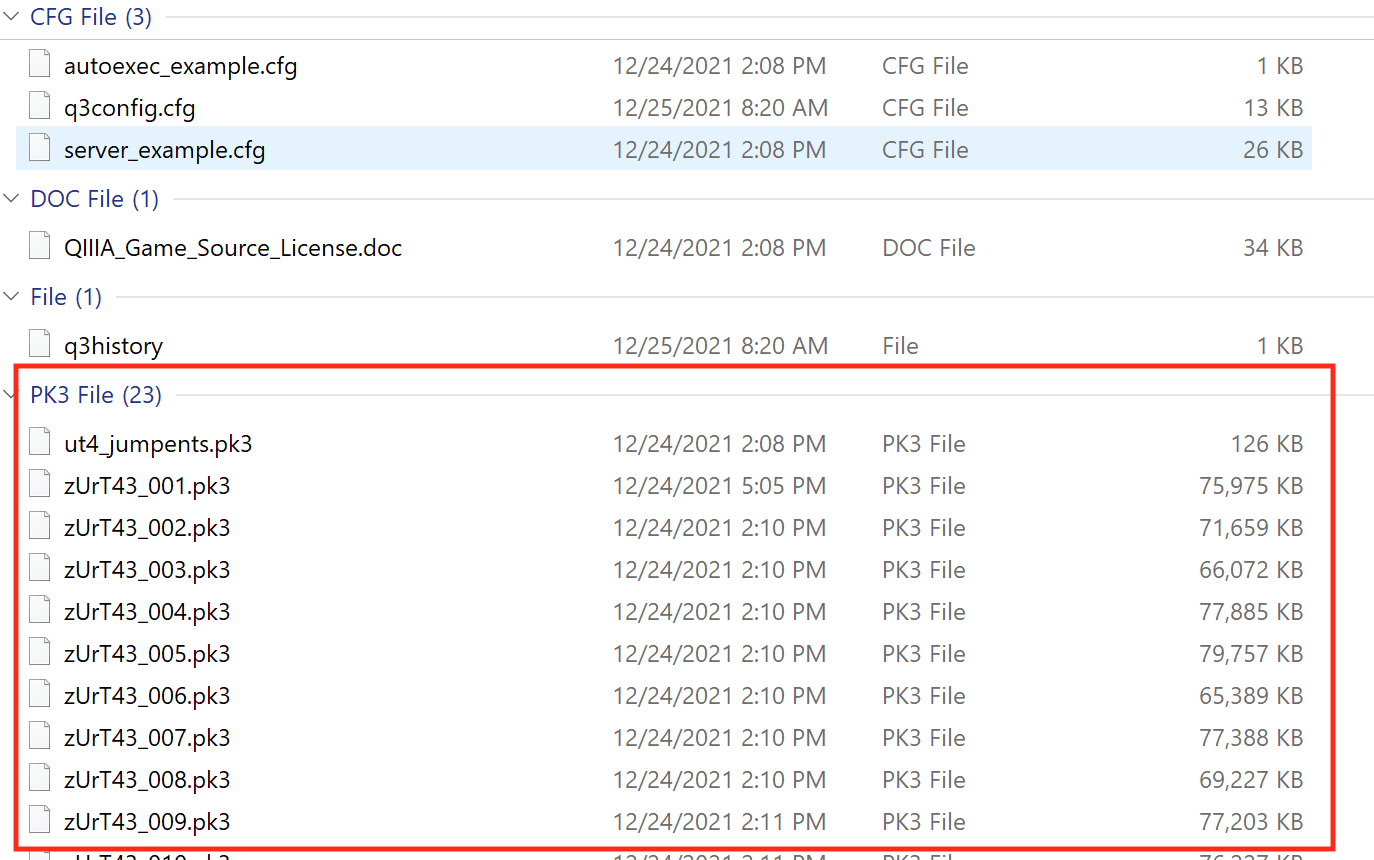
Search the game’s resource folders or archives for likely image names. Thumbnail tools and image dimensions can narrow the list.
Urban Terror’s q3ut4 folder contains .pk3 files. A PK3 is a ZIP archive with a game-specific extension; its first two bytes are the ZIP magic PK. For this exact lab, open:
Code example. The surrounding prose explains this example; the full lesson contains the exact code.
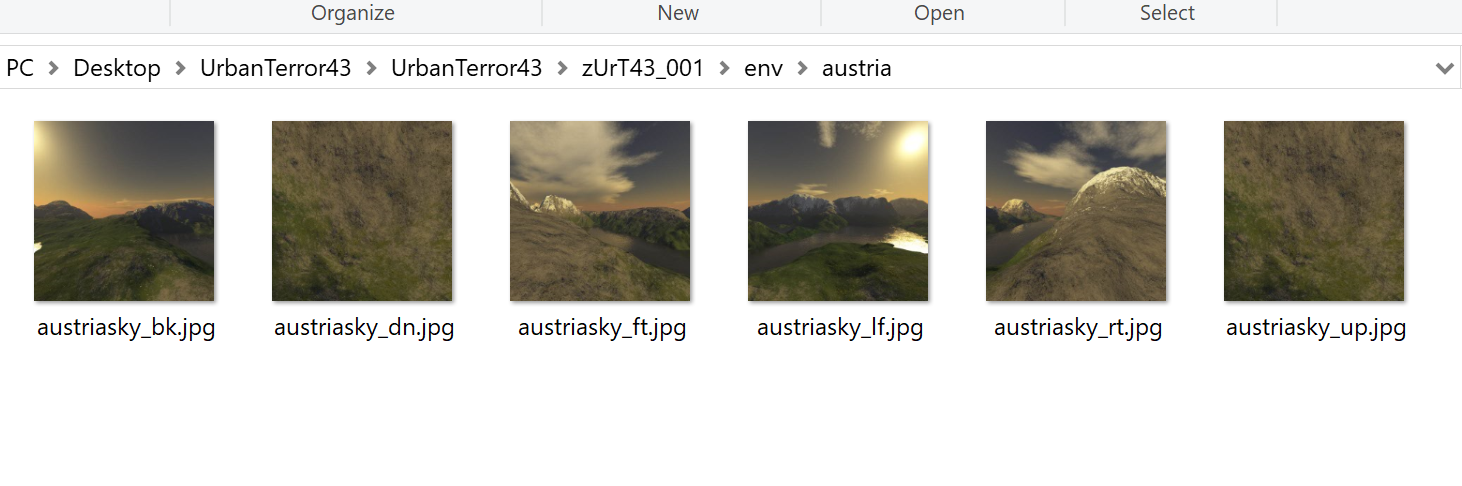
Inside it, browse to env\austria. These six images form the Austria map’s skybox.
Section: Prove the file.
Make a reversible test change—such as a bright corner mark—while preserving:
width and height;
color channels;
alpha behavior;
compression format;
mipmap expectations;
file name and path.

Restart or reload the level. If the mark appears on the chosen surface, the mapping is confirmed.
In brief: A small visible marker proves which image the game loaded before you spend time redesigning that texture.
Section: Perform the Austria skybox hack.
Extract zUrT43_001.pk3 to a work folder. Keep the original PK3 as a backup. The extracted tree has the sky images three folders down:
DirectoryzUrT43_001/ the work folder you extracted into Directorybotfiles/…Directoryenv/ Directoryaustria/ austriasky_dw.jpg the downward-facing image to copyaustriasky_up.jpg the file to replaceDirectoryfonts/……
Additional detail: DirectoryzUrT43_001/ the work folder you extracted into.
Directorybotfiles/…
Additional detail: Directorybotfiles/.
…
Directoryenv/ Directoryaustria/ austriasky_dw.jpg the downward-facing image to copyaustriasky_up.jpg the file to replace
Additional detail: Directoryenv/.
Directoryaustria/ austriasky_dw.jpg the downward-facing image to copyaustriasky_up.jpg the file to replace
Additional detail: Directoryaustria/.
austriasky_dw.jpg the downward-facing image to copy
austriasky_up.jpg the file to replace
Directoryfonts/…
Additional detail: Directoryfonts/.
…
…
In that tree:
delete env\austria\austriasky_up.jpg;
copy env\austria\austriasky_dw.jpg;
rename the copy to austriasky_up.jpg;
ZIP the archive’s contents ( botfiles, env, fonts, and the other root folders), not the outer work folder;
name the new archive zUrT43_001.pk3 and place it in q3ut4.
Start a local match on ut4_austria and look upward. The top of the sky now uses the downward-facing image. That unmistakable result proves you found, modified, and repacked the real game resource correctly.
Section: Run the complete PK3 replacer.
Close Urban Terror and give the tool the real archive path:
Terminal window
Code example. The surrounding prose explains this example; the full lesson contains the exact code.
The program opens the PK3 as ZIP, reads env/austria/austriasky_dw.jpg, rebuilds every archive entry, substitutes those bytes only for env/austria/austriasky_up.jpg, flushes the new archive, and atomically installs it with ReplaceFileW. The untouched original becomes zUrT43_001.pk3.gha-backup, and the tool refuses to replace any other PK3 name or overwrite that backup.
The full implementation is urbanterror_pk3.rs. It uses the current zip crate A P I, application programming interface, documented through Context7 and the shared Windows replacement helper in file_replace.rs.
Additional detail: Complete lab source: urbanterror_pk3.rs.
Code example. The surrounding prose explains this example; the full lesson contains the exact code.
The loop rebuilds every entry instead of modifying ZIP bytes in place. Only the exact UP path receives replacement bytes, and replaced equals 1 catches both “wrong archive” and “duplicate path” mistakes before Windows installs anything.
Section: Inspect image metadata.
The image crate can load common formats:
Code example. The surrounding prose explains this example; the full lesson contains the exact code.
With those dependencies in Cargo.toml, this function opens one image and prints its dimensions and color format. The result tells you whether the file still has the properties the game expects before you replace an asset.
Code example. The surrounding prose explains this example; the full lesson contains the exact code.
Some game-specific formats need dedicated tools. Do not rename a PNG to another extension and assume the bytes changed format.
Section: Create a marked copy.
A tiny marker in one corner is enough to prove which image the game loaded, without redesigning the whole texture. This function takes an RGBA image, limits the marked square to 16 pixels on either side, and returns the changed copy for the reversible archive replacement:
Code example. The surrounding prose explains this example; the full lesson contains the exact code.
The marker is orange-red, rgb(255, 64, 32): red 255, green 64, blue 32, with alpha 255 (fully opaque). Write to a new path first and compare dimensions and color type.
Urban Terror reads this image from inside its archive. Whether another engine prefers a loose file at the same path is part of its load order, which Lesson 10.5 works through for mods.
Section: Texture coordinates explain repetition.
A model’s texture coordinates map its surface to the image, so one texture can repeat, rotate, or cover many surfaces. Changing the image may affect more places than the one you first noticed. If the replacement appears upside down, the file and the engine disagree about which edge v equals 0 names (Lesson 7.1).
Narration: One replacement image may alter several walls because the model reuses it. Check other surfaces before assuming the edit affects only your test corner.
A coordinate outside 0 to 1 is handled by the texture’s addressing mode. With repeat, u equals 2.5 is treated as 0.5, so the image tiles. With clamp, it is treated as 1.0, so the edge pixels smear outward.
Alternative: Repeat wraps a texture coordinate around the image; clamp holds it at the edge. The same image can therefore tile or smear without changing its bytes.
Section: Models: reading a glTF file.
A texture is one image. A 3D model contains arrays of vertex positions and other attributes, plus indices and references that connect them into surfaces and scenes. glTF is an open format for 3D models and scenes from the Khronos Group, the same group that maintains OpenGL, and it is a good example because it is plain about its own structure. A glTF model is a J S O N description of what is in the model, in .gltf text with its binary data alongside, or all packed in one .glb file. Reading it is the two-stage parse from Lesson 10.1: first check that the bytes are valid J S O N of the right shape, then check that what the J S O N says makes sense.
The J S O N is a set of lists that point at each other by position. The smallest useful model is one triangle:
Code example. The surrounding prose explains this example; the full lesson contains the exact code.
Follow the chain from the top. The scene lists node 0. Node 0 holds mesh 0, and moves it 2 units up with a translation (a node can also have a rotation, stored as a quaternion from Lesson 7.1, a scale, and children, which is the parent and child arrangement of Lesson 7.1). The mesh’s one primitive says its vertex positions are in accessor 1 and its indices are in accessor 0. An accessor says how to read a stretch of bytes: accessor 1 is VEC3 (three numbers per item) of componentType 5126 (a 4-byte float), count 3, so each vertex is 3 times 4 equals 12 bytes and the three vertices take 3 times 12 equals 36 bytes. Accessor 0 is SCALAR of 5123 (a 2-byte unsigned integer), count 3, which is 3 times 2 equals 6 bytes, the three indices. A buffer view is a slice of the buffer: view 0 is bytes 0 to 6 and view 1 is bytes 8 to 44, because the indices are padded with 2 bytes so that the floats start on a 4-byte boundary. The buffer is 8 + 36 equals 44 bytes in all.
Because a model file is untrusted input, a loader checks every one of those links. Does the accessor name a buffer view that exists? Does its offset plus count times item size fit inside that view? Accessor 1 needs 0 + 36 equals 36 bytes and its view is 36 long, so it fits. A file that claims count the large number shown for the same view needs the large number shown times 12 equals the large number shown bytes, and must be rejected before anything is allocated or read.
The rest of a model hangs off the same pattern: materials (colours, textures, and whether the surface is opaque, cut out, or blended, as Lesson 7.2 explained), skins (the skeleton, with the bone indices and weights of Lesson 7.6), animations (lists of times and values for a node’s translation, rotation, or scale, played with the interpolation of Lesson 4.4), and free-form extras where a game can store its own data. A scene viewer is a tool that does nothing but load such a file and show it, which is the quickest way to see what a model contains.
Section: Sounds: samples, mixing, and position.
A sound is stored as a list of samples, measurements of the sound wave taken many times a second. CD-quality audio takes 44,100 samples a second for each of 2 channels (left and right), each sample 2 bytes. That is 44,100 times 2 times 2 equals 176,400 bytes a second, or the large number shown bytes, about 10 MiB, a minute. A three-minute song would take about 30 MiB, so music is stored compressed (Ogg Vorbis and MP3 are common) and streamed, decoded a chunk at a time, while a short sound effect is decoded once and kept in memory.
Several sounds play at once, but the sound card takes one stream, so the engine mixes them: for every sample it adds the playing sounds’ samples, each scaled by its own volume. With samples running from minus 1 to 1, two sounds at 0.7 and 0.6 add to 1.3, which is past the limit, so it is cut to 1.0 and the sound distorts. Engines lower volumes or add a limiter to avoid that.
The sound card asks for audio in small buffers. A buffer of 1,024 samples at 44,100 samples a second lasts 1,024 divided by 44,100 equals 0.0232 seconds, about 23 milliseconds. If the engine has not filled the next one by then, the listener hears a click. So audio runs on its own thread with its own deadline, apart from the frame loop, as Lesson 6.6 describes.
Some properties are simple to compute:
Pitch. Playing samples faster raises the pitch: a rate of 2.0 is an octave higher, since every frequency doubles. A pure test tone of 440 hertz is generated as sin(2 pi times 440 times t), and at 44,100 samples a second one cycle is 44,100 divided by 440 approximately 100 samples long.
Position. A sound that comes from a place gets quieter with distance, say by 1 divided by distance, and is placed left or right by the dot product (Lesson 4.4) of the direction to it with the listener’s right-hand direction. With the listener facing +y, so that right is +x, a sound at (3, 4, 0) is 5 away, in the direction (0.6, 0.8, 0), so its pan is 0.6, to the right, and its loudness is 1 divided by 5 equals 0.2. Splitting that between the ears by (1 minus pan) divided by 2 and (1 + pan) divided by 2 gives a left volume of 0.2 times 0.2 equals 0.04 and a right volume of 0.2 times 0.8 equals 0.16.
Triggers. A sound effect usually plays in response to an event, such as “coin 42 was collected” ( Lesson 1.3 ). The music follows the game’s state, and changing tracks is a cross-fade like the animation blend of Lesson 7.6: halfway through a 2-second fade, the old track is at volume 0.5 and the new one at 0.5.
Section: Two ears and falloff.
The pan above gives a single number for left and right. A spatial audio mode instead puts two ears on the listener, a fixed gap apart along its right-hand direction, and works out the volume at each ear from that ear’s own distance. Take a gap of 2, so the ears are at ( minus 1, 0, 0) and (1, 0, 0), and the same sound at (3, 4, 0). The left ear is square root of ((3 minus ( minus 1))² + 4 to the power of 2) equals square root of 32 equals 5.66 away and the right ear is square root of ((3 minus 1)² + 4 to the power of 2) equals square root of 20 equals 4.47 away. Using the 1 divided by distance attenuation formula, the left ear hears 1 divided by 5.66 equals 0.177 and the right ear 1 divided by 4.47 equals 0.224. The right ear is louder by a factor of 0.224 divided by 0.177 equals 1.26, much less than the factor of 4 (0.16 divided by 0.04) that the simple pan gave, because two ears this close together differ little in distance.
How quickly a sound fades with distance is its falloff. Two common choices, for a sound that plays at full volume out to 1 unit and, for the linear one, reaches silence at 50 units:
Two falloff curves
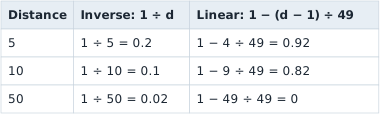
Inverse falloff halves the volume each time the distance doubles, and it never reaches silence, so a game also sets a distance beyond which the sound is not mixed at all, which saves the work. Linear falloff stays loud nearby and reaches 0 exactly at its limit.
Like a texture, a replacement sound has to match what the game expects: the same path and format, and usually the same sample rate and channel count.
Section: Package as a mod.
Package the marked texture as a mod folder that contains only the changed file and a short manifest; Lesson 10.5 shows what that manifest records for a replaced asset.