Section: A debugger is an event loop.
The scanner in Lesson 5.8 found where a value was stored; the disassembler in Lesson 5.9 named instructions near an address. To learn which instruction actually changes Wesnoth’s gold during one turn, we need to pause when that instruction runs and inspect the live registers. A debugger provides that pause.
Windows reports events such as process creation, D L L, dynamic link library, loading, exceptions, and process exit. A breakpoint is one such event that this tool deliberately causes and then handles.

If the debugger forgets to continue an event, the target remains frozen.
Section: Model events immediately.
Convert Windows structs into owned typed data at the F F I, foreign function interface, boundary:
Code example. The surrounding prose explains this example; the full lesson contains the exact code.
Close or transfer ownership of any handles contained in the raw Windows event. Do not leak them during a long session.
Section: Own breakpoint state.
A software breakpoint replaces one instruction byte with hexadecimal C C. To let the original instruction run later, the debugger must remember both its address and that displaced byte. Keying records by address also lets several breakpoints coexist without a single global “current breakpoint” slot:
In brief: A breakpoint owns a temporary code change; its record must also make restoring that exact byte possible.
Code example. The surrounding prose explains this example; the full lesson contains the exact code.
Setting a breakpoint:
read the original byte;
store it;
write hexadecimal C C;
flush the instruction cache;
mark it armed.

Section: Handle the int3 pause.
When a software breakpoint installed by this debugger fires:
suspend the relevant flow through the debug event;
restore the original byte;
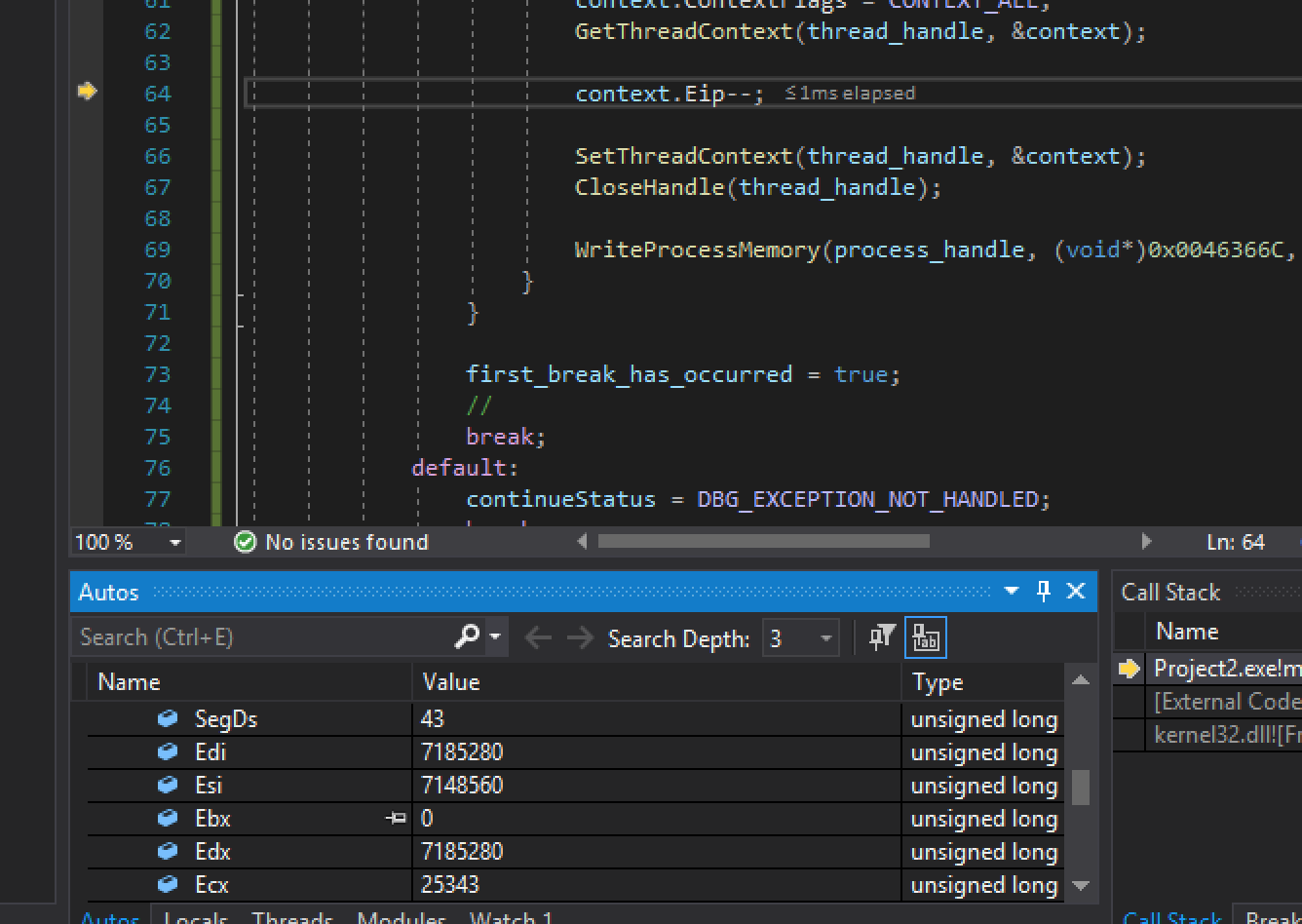
move the instruction pointer back by one byte;
enable the C P U, central processing unit, trap flag for one instruction;
continue.
The next single-step exception lets the debugger reinsert hexadecimal C C and clear the trap flag.
This two-step cycle is why a breakpoint has state; it is not just one changed byte.
Code example. The code’s comments explain: 🔴 The target currently contains hexadecimal C C at the owned address. 👣 The original byte is temporarily restored for exactly this thread. ⚪ No debugger-owned byte is installed at this address.
Section: Distinguish your exceptions.
Not every breakpoint exception belongs to your debugger. Windows and the target may use breakpoints internally.
Check:
exception code;
address;
whether the address is in your breakpoint map;
first-chance status;
current phase and thread.
Pass unhandled exceptions onward with the correct continue status.
Section: Debugging changes what you observe.
A debugger is a measuring instrument, and every instrument affects its subject somehow. A software breakpoint temporarily replaces one instruction byte. Pausing one thread can delay rendering, audio, input, or network work. Single stepping makes a short path take far longer than normal, and Windows can expose whether a process is being debugged.
Alternative: Compare debugger runs with ordinary runs, like comparing a slowed replay with real-time play: timing differences may come from the observer.
That creates an important distinction:
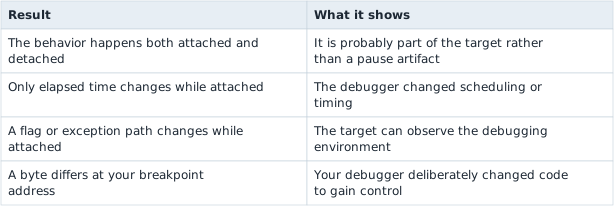
On the course target, run the same input once without a debugger and once attached, logging inputs, chosen branches, elapsed time, and output both times. A difference that appears only while attached comes from the measurement, not from the game’s normal logic. That effect is called instrumentation bias: the tool used to measure a program changes what the program does.
Debugger-aware behavior usually comes from a small set of sources: flags, handles, exceptions, timing, instructions, memory, and interaction with the desktop. A change that appears only while attached traces back to one of them. This lesson intentionally does not turn those sources into concealment or bypass instructions.
Section: Keep F F I wrappers narrow.
Windows calls include:
DebugActiveProcess or process creation with debug flags;
WaitForDebugEvent;
ContinueDebugEvent;
thread context get/set;
process memory read/write;
FlushInstructionCache;
handle cleanup.
Each wrapper should document handle ownership, pointer validity, buffer size, and structure initialization.
Section: Guarantee continuation.
Use a guard so an early parsing error does not accidentally leave an event uncontinued:
Code example. The code’s comments explain: 🛡️ SAFETY: these IDs came from the one pending DEBUG_EVENT, and this guard owns the responsibility to continue it exactly once. ✅ Clear responsibility only after Windows accepted the continue. If the call errors, Drop still attempts to release the pending event. 🧹 SAFETY: best-effort release of the still-pending event. Using NOT_HANDLED avoids swallowing a target exception we did not own.
Its Drop implementation can make a best-effort continue and log failures.
Section: First milestone.
Do not start with stepping, symbols, and a GUI. First:
launch a tiny practice target under the debugger;
print process and thread events;
continue every event;
exit cleanly when the target exits.
Then add one breakpoint at a known function in the course target.
Section: Attach it to Wesnoth.
Once the breakpoint cycle works in the tiny target, point the debugger at the 32-bit wesnoth.exe 1.14.9 process. Add one software breakpoint at the income instruction from lesson 2.10:
Code example. The surrounding prose explains this example; the full lesson contains the exact code.
Start a local match with income and end the turn. When the event fires, copy the thread context and log:
Code example. The surrounding prose explains this example; the full lesson contains the exact code.
Then perform the restore/single-step/re-arm sequence and continue Wesnoth. The turn must finish normally, and the breakpoint should fire again next turn. This turns the debugger project into a real game-hacking tool rather than leaving it attached only to a sample program.
Section: Cleanup.
On detach or exit:
restore every armed breakpoint;
flush the instruction cache;
continue any pending event;
detach if the target is still running;
close every process and thread handle.
A debugger that pauses correctly but cannot cleanly detach is not finished.
Narration: A forgotten breakpoint can remain after the tool closes, so a clean detach matters even when the experiment already produced its answer.
Section: Run the completed debugger.
Build the workspace for 32-bit Windows, start Wesnoth 1.14.9 in a local match, and run:
Terminal window
Code example. The surrounding prose explains this example; the full lesson contains the exact code.
End a turn to hit the real income instruction. The tool prints e a x, signed and hexadecimal e d x, the calculated e a x + 4 address, and gold before the add. Press End between events to restore hexadecimal 0 1, detach, and close all handles.
The complete state machine is wesnoth_debugger.rs. It implements attach, exact opcode verification, WaitForDebugEvent, event-handle cleanup, x86 thread contexts, e i p rewind, trap-flag stepping, re-arming, error-path continuation, byte restoration, and detach using the windows crate.